user 88 91
-
Posts
4 -
Joined
-
Last visited
user 88 91's Achievements

Wolf Bait (1/9)
2
Reputation
-
@TeaxThat's a great suggestion, I actually am using Borderless Gaming - I set it up 2019 for vintage story so had completely forgot about that! I suggest using the legacy version: https://github.com/Codeusa/Borderless-Gaming/releases The newer versions aren't free and also seems to be having some issues according to reviews: https://store.steampowered.com/app/388080/Borderless_Gaming/#app_reviews_hash
-
Try change the discord streaming setting: If the streaming setting was already turned on in discord, you could try to disable it and see if that solves the issue, the feature is experimental and might not work with all applications, this could be why it wasn't working. OBS + Voicemeeter workaround: I've streamed audio though discord using software such as Voicemeeter previously, you could try to combine this with OBS streaming to stream both audio and video. The goal with software such as voicemeeter is to combine both specific sounds sources (such as vintage story) with your microphone into one audio channel that you can use as audio input to discord. Here's how I setup this, you enable/disable A/B channels to forward it to the desired output: You can find App volume and device preferences by putting this in run (WIN+R) -> explorer.exe ms-settings:apps-volume
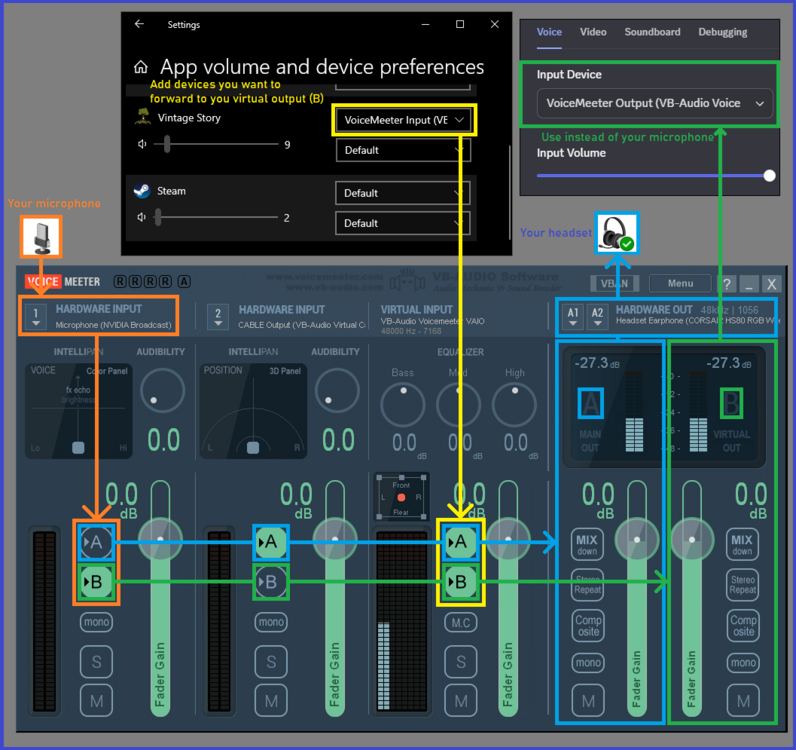
-
This usually requires changes either to Vintage Story or Discord. Discord setting streaming settings: There is a settings in discord, user settings -> Voice & Video -> Streaming -> "Use our advanced technology to capture your screen" - try toggle this Workarounds: Use OBS as a middle man for discord streaming -> Setup OBS to capture vintage story -> right-click the preview and then choose "project preview" -> stream OBS preview to discord
-
 Did you at any point start the world with any world gen mod disabled? I got a similar issue when I disabled Terra Prety by accident and started up the world. I later reproduced the issue: 1) I generated a new world with the exact world settings 2) Flew around with creative mode for almost an hour where everywhere generated just fine 3) Disabled Terra Prety and loaded up the world again 4) Enabled the Terra Prety, flew around to generate new chunks and then found bands of missing chunks that wouldn't generate