


SomeGuy
-
Posts
5 -
Joined
-
Last visited
Content Type
Profiles
Forums
Blogs
News
Store
Posts posted by SomeGuy
-
-
Heya, I'm on an RTX 5070 TI, Ryzen 7 9800X3D and 32GB of 6000 MHz DDR5 RAM and I have the exact same issue regardless of settings or tweaks. I also get these big drops that are quite visible on the frametime graph, which make the game feel jittery/stuttery even with a high framerate. Vanilla or modded, the issue persists. I really hope the developers address this soon.
-
5 hours ago, Thorfinn said:
Pretty sure what you are seeing is being "phased" partially into the ladder. Usually happens when you are too close to the ladder you are adding when extending it. Really easy to duplicate with regular ladders. That can also happen when nearby partial blocks nudge you one way or another, too.
Move until you are against the wall opposite the ladder and the pain should stop.
Thank you! Had no idea this kind of issue existed. I appreciate the insight!
-
I am playing on singleplayer, so latency can't be it. My PC is a mid-end gaming PC and my processor is an AMD Ryzen 7 3700X 8-core, though I'm not sure if CPU load is the cause. I've encountered this phantom damage issue 3 times in 100 hours and it has exclusively happened when going up or down shafts, at least in my experience. This was the first time I checked the damage log for what happened though (note: the first two times had the same conditions, aka nominal hunger, temporal stability and no enemies nearby), as I hadn't thought of doing that the first two times. Got the idea from this thread after I went searching for if others had encountered this issue as well.
It is a rather strange issue, as fall damage should only be happening when falling from a sufficient height, yet sometimes the game seems to issue fall damage when climbing ladders in shafts.
The first time I encountered this issue was quite a few weeks back, but I do recall it rather well. I was prospecting for tin and found a chunk with a good reading for it, I then started digging my 1x1 shaft and used rope ladders to go down. I dig 3 to 4 blocks, put down ladders, go down and repeat. But when I was around 15 to 25 blocks deep, mining down as usual and then I get damaged 3 times in rapid succession (around 0.25 - 0.50 seconds in between). My hunger was fine, temporal stability was high and there were no enemies in the shaft (I block the top with a fence and I hadn't dug into a cave). As I was still new (and terrified of the underground haha), I panick and immediately leave the shaft and find a new place to dig. At the time, I thought I accidentally broke 1 block into a cave and a locust got in, but there was no locust light and I hadn't actually opened a cave either. Was quite the experience though, gave me a good scare lol.
The second time I don't remember very well, as I only got damaged once and I just kept mining as usual. But the third happened yesterday, so I recall it well. I was prospecting for iron and found a chunk with a good reading, so I proceeded to dig my shaft and go down until I found the deposit. I was around 50 to 60 blocks deep, enough for my temporal stability to slowly start depleting, but things were going well. I had dug into some quartz and found gold, but kept going down as the iron was my goal. I eventually got a high reading for magnetite and kept digging down and using the propick every 5 blocks down or so to see if the reading got better - it did! I got a very large reading and directly hit the disk shaped deposit. I was now at the bottom of my shaft (rope ladders going the whole way down of course) and was just about to dig the iron on the wall, until I get damaged out of nowhere. I quickly climb up my ladder, panicked, thinking a drifter spawned in the dark or something (even though I had a lantern on my offhand keeping things lit and the walls were covered by ladders and there were no openings on the shaft walls, meaning drifters could not spawn) but then I get damaged again while going up the ladder. I quickly continue my way up and block the ladder - after which, I get my bearings and open the shaft. I go down, yet find no creature or opening, I get damaged once more while going down my ladder. I check my hunger and temporal stability, but both are nominal. Then I realize it is another instance of phantom damage, just like the last 2 instances. I then go searching for answers and stumbled into this thread - which lead to me opening my damage log and seeing that it was gravity damaging me. Naturally, I was a bit perplexed by this, as I had not fallen at all, since I was on a ladder the whole time.
Strange times aye.
-
Hi! Very late reply, but I encounter this same issue sometimes when mining deep underground in 1x1 shafts with rope ladders. Sometimes going down/up with them you will at random get damaged even though hunger and temporal stability are nominal and no enemies are nearby. I opened my damage log and the game said I was damaged by gravity, even though I had not fallen at all and was climbing down a ladder slowly.
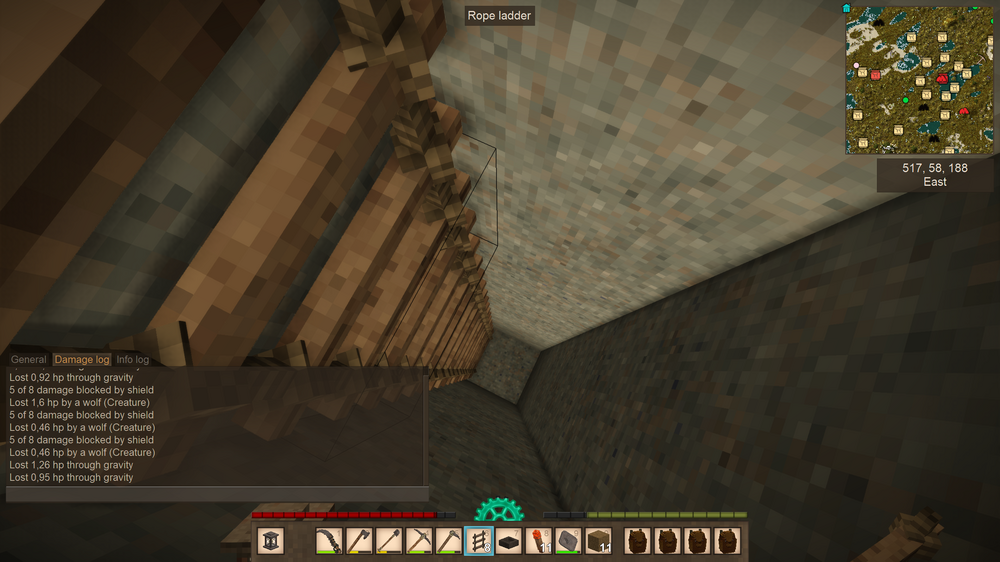
Turns out there is no scary mystery creature, just a gravity bug


Constant fps drops/stuttering, game unplayable.
in Discussion
Posted · Edited by SomeGuy
Heya, guys. Update on my situation with performance in this game; I am on the latest update and have found a few tweaks which have improved the stuttering issue to a noticeable degree, but not outright solved.
(Specs: RTX 5070 TI, Ryzen 7 9800X3D, 32GB 6000 MHz DDR5, SSD)
These are the tweaks that helped me:
1. NVIDIA Control panel - turn VSYNC (Vertical Sync) to Fast and Threaded Optimization to Off for Vintage Story (I'm not 100% sure on the effectiveness of turning off Threaded Optimization but from my testing, it seemed to be a little smoother on my PC).
2. Turn VSYNC off inside of Vintage Story's own settings.
3. I went down to 60 fps from 90 fps using the in-game FPS limiter.
4. I'm on 800 view distance and medium settings for SSAO & Shadows, then 10 for Dynamic Lights. I also put Far LOD to 50% but I didn't test that one much so it might be placebo.
5. Updating to the latest version of Vintage Story, version 1.21.6 (Stable version; this seemed to help noticeably in my case).
There will still be stuttering when loading in new terrain, but besides that it seems to be gone. However as I emphasized earlier - the issue is not fully gone and definitely needs some more optimization from the devs still. I have 16 threads on my Ryzen 7 9800X3D and it appears that the game offloads the entirety of terrain loading to threads 8,9,10 & 11 (Thank you, Ryilo). Thread 0 also sees a lot of use, which is normal. I got a feeling that VSYNC plays a large part in the stuttering, and it may very well be tied to GSYNC / FREESYNC on your monitor also - but my 144hz monitor has neither technology, so I cannot confirm whether that is true or not. Lastly due to what WAY2HELL said above - I checked my mouse's polling rate and it has been always been at 1000 Hz, so I'm unsure whether that affected my experience.
As for RAM settings, I just had it on Optimize Somewhat and seemed to have the best results with that one.
I also use a program called ProcessLasso to put Vintage Story's CPU Priority to always be High (right click Vintage Story.exe in ProcessLasso -> CPU Priority -> Always -> High), and to make some background apps like Discord, Spotify, Firefox and such not use threads 0,8,9,10 & 11 by adjusting their CPU Affinity on the Always option (right click the app in Process Lasso -> CPU Affinity -> Always -> select which threads you don't want it to use). I also generally put apps I use in the background to Normal or Below Normal CPU Priority, which is what I did with Discord and Firefox. Keep in mind it is a paid program though and I did not test the game without it. I'm not sure how much it helps (or if it does at all; since I always use ProcessLasso), but wanted to give the information since it is a tweak I made use of.
I hope this can help some other users frustrated with this problem. I personally am having a much smoother experience compared to last year!