
kcils
-
Posts
3 -
Joined
-
Last visited
Content Type
Profiles
Forums
Blogs
News
Store
Everything posted by kcils
-
Good work getting that out so quickly! Glad I was able to help out. I tried to make the info as transparent as possible. A shame that it's limited until the world is loaded, however. I could try making a patcher, that will patch your .dll and back up the original/have relevant options for it. Let me know if that's something you would want - that way, anyone could do like I did and have even the main menu be fixed, but a bit easier.
-
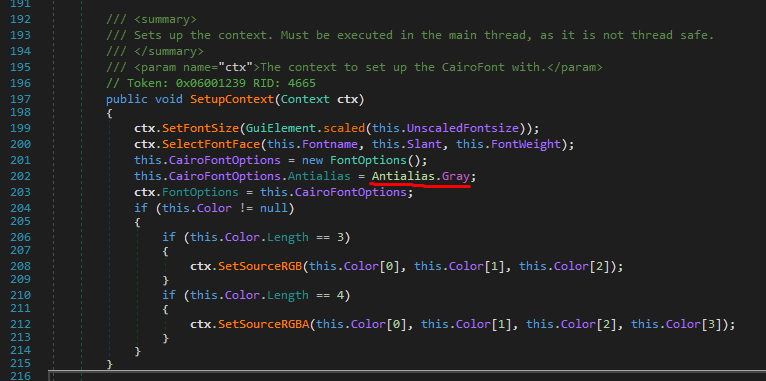
I ended up figuring it out, by editing CairoFont within Vintagestory.API.Client inside VintagestoryAPI.dll, using dnSpy, changing "Antialias.Subpixel" to "Antialias.Gray" on line 202, then compiling and saving the new .dll and replacing the old one. I have these loaded into dnSpy: cairo-sharp.dll Vintagestory.exe VintagestoryAPI.dll VintagestoryLib.dll VintagestoryServer.exe VSCreativeMod.dll VSEssentials.dll VSSurvivalMod.dll ModMaker.dll not sure if it makes a difference to have all of them loaded for this one edit.. but just for posterity's sake, this is everything I have loaded into dnSpy. as you can see, the text looks about a thousand times better! I'm sure someone can make this a mod, that way you don't have to edit the .dll manually.. but, I am not experienced enough to do it. This is about all I can do. Merry Christmas guys!

-
Hey guys, curious if anyone knows anything about this. Sorry if this is in the wrong section. I often play at lower resolutions, windowed and borderless windowed, sometimes below 768p. Even at 1080p, I get this type of color fringing on text (I am always at 100% windows scaling, no scaling ingame), but it is really horrendous below that. The attached picture is a screenshot of the game at 768p, zoomed in 4x. You can see the text is just crazy. It looks very bad 1:1 in-game. Does anyone know how to fix this, make the text render without this artifact? Perhaps there is some ClearType, or subpixel stuff going on? There was another thread a couple years ago about this, but it really didn't go anywhere for Windows machines. Any help is much appreciated Edit: looks like another person has brought this issue up very recently, via github: https://github.com/anegostudios/VintageStory-Issues/issues/7696 Not sure how to replicate this fix they did on Windows, though