
Duranu
-
Posts
1 -
Joined
-
Last visited
Content Type
Profiles
Forums
Blogs
News
Store
Everything posted by Duranu
-

Add Ability for the Player to See Who is Online
Duranu replied to ADisorderlyFashion's topic in Suggestions
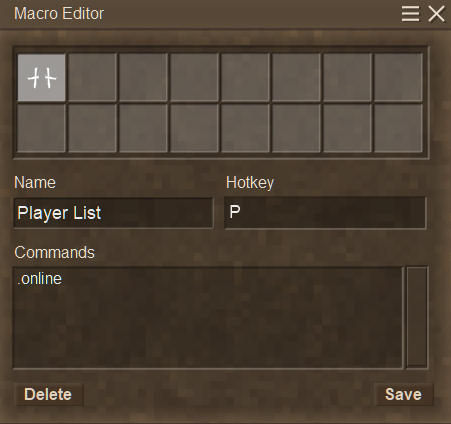
I'm sure you have figured it out, but if not, and in case anyone finds this post on google like I did trying to find a player list, it's actually pretty easy to make a macro Open the Macro Menu with Ctrl+M Choose a Macro Slot on the top half of the window (by default Slot 1 is automatically picked when you open the window) Name the Macro whatever you want it named, in this case I named it: Player List Set the hotkey for whatever button you want to press to activate it, I chose P as I didn't see it as being used already in the controls list in the commands section enter: .online Press the Save button in the bottom left then close the window Now anytime you press whatever button you assigned the macro to (in this example: P) it will add the player list to your chat window Hit Tab to close chat like normal