Slye_Fox
-
Posts
14 -
Joined
-
Last visited
Slye_Fox's Achievements

Berry Picker (2/9)
1
Reputation
-
Patches not working in multiplayer
Slye_Fox replied to Slye_Fox's topic in [Legacy] Mods & Mod Development
Welp, there goes that idea. -
Patches not working in multiplayer
Slye_Fox replied to Slye_Fox's topic in [Legacy] Mods & Mod Development
So, if I'm understanding right; While I can change the shape file, it would affect all the blocks that use it, not just the ones I want to change. -
Patches not working in multiplayer
Slye_Fox replied to Slye_Fox's topic in [Legacy] Mods & Mod Development
Okay, then is it possible to make these blocks use a custom shape file instead of the default one, or are the blocks hardcoded to use those shapes? The reason I'm trying to get this to work is that I'm not just replacing textures, but also fixing some errors. For example: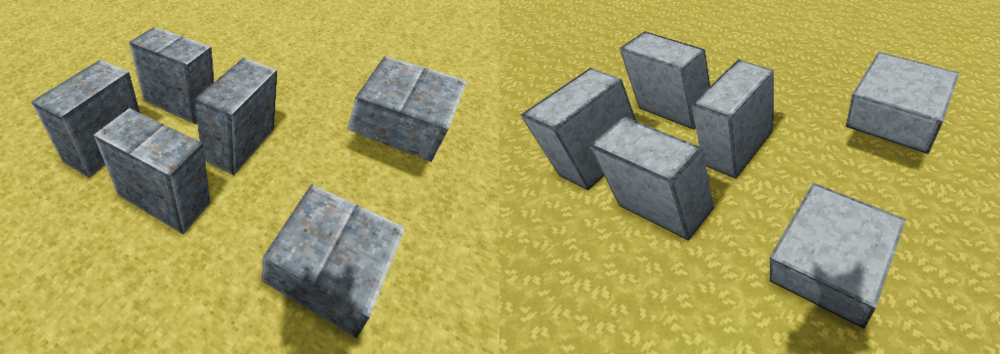
-
Patches not working in multiplayer
Slye_Fox replied to Slye_Fox's topic in [Legacy] Mods & Mod Development
Wait, I just realised something. You say that this mod only works as a 'both' type mod. But there are already client side only mods that do work in multiplayer, eg; Reforged Tools. -
Patches not working in multiplayer
Slye_Fox replied to Slye_Fox's topic in [Legacy] Mods & Mod Development
It doesn’t just replace the textures, it changes it to use a different set of textures on certain sides. This is also not the only patch In the mod, just the first I grabbed. Another patch example is for the Polished Slabs; [ { "file": "game:blocktypes/stone/polished/polishedrockslab.json", "op": "replace", "path": "/texturesByType", "value": { "*-up-free": { horizontals: { base: "block/stone/polishedrockslab/{rock}" }, verticals: { base: "block/stone/polishedrock/{rock}" } }, "*-down-free": { horizontals: { base: "block/stone/polishedrockslab/{rock}" }, verticals: { base: "block/stone/polishedrock/{rock}" } }, "*-north-free": { "verticals": { base: "block/stone/polishedrockslab/{rock}" }, "east": { base: "block/stone/polishedrockslab/{rock}", rotation: 90 }, "west": { base: "block/stone/polishedrockslab/{rock}", rotation: 90 }, "north": { base: "block/stone/polishedrock/{rock}" }, "south": { base: "block/stone/polishedrock/{rock}" } }, "*-south-free": { "verticals": { base: "block/stone/polishedrockslab/{rock}" }, "east": { base: "block/stone/polishedrockslab/{rock}", rotation: 90 }, "west": { base: "block/stone/polishedrockslab/{rock}", rotation: 90 }, "north": { base: "block/stone/polishedrock/{rock}" }, "south": { base: "block/stone/polishedrock/{rock}" } }, "*-east-free": { "verticals": { base: "block/stone/polishedrockslab/{rock}", rotation: 90 }, "east": { base: "block/stone/polishedrock/{rock}" }, "west": { base: "block/stone/polishedrock/{rock}" }, "north": { base: "block/stone/polishedrockslab/{rock}", rotation: 90 }, "south": { base: "block/stone/polishedrockslab/{rock}", rotation: 90 } }, "*-west-free": { "verticals": { base: "block/stone/polishedrockslab/{rock}", rotation: 90 }, "east": { base: "block/stone/polishedrock/{rock}" }, "west": { base: "block/stone/polishedrock/{rock}" }, "north": { base: "block/stone/polishedrockslab/{rock}", rotation: 90 }, "south": { base: "block/stone/polishedrockslab/{rock}", rotation: 90 } } } } ] -
Patches not working in multiplayer
Slye_Fox replied to Slye_Fox's topic in [Legacy] Mods & Mod Development
Does that mean that there's no way to have it so only the client needs the mod? -
Patches not working in multiplayer
Slye_Fox replied to Slye_Fox's topic in [Legacy] Mods & Mod Development
I've tried putting the patch and the textures it uses into it's own subfolder, but it's the same result. Works in single-player, but not multi-player. -
Patches not working in multiplayer
Slye_Fox replied to Slye_Fox's topic in [Legacy] Mods & Mod Development
It didn't work with either case. -
Patches not working in multiplayer
Slye_Fox replied to Slye_Fox's topic in [Legacy] Mods & Mod Development
Oddly, adding the "side" line to the patch actually stops it working in single-player too. -
Patches not working in multiplayer
Slye_Fox replied to Slye_Fox's topic in [Legacy] Mods & Mod Development
Yes to both. It's in my "AppData\Roaming\VintagestoryData\Mods" folder, and works fine in single-player. I'll also state, that's it's only the patches of this texture mod that's not working in multi-player, every thing non-patch related loads fine. -
Patches not working in multiplayer
Slye_Fox replied to Slye_Fox's topic in [Legacy] Mods & Mod Development
The modinfo does have it set to client, dunno how I'd set that in the patch (not seen it on the wiki), and server doesn’t have that mod (it's my server). -
Is there anything special that needs to be done to get a client-side patch to work in multiplayer? My patch: [ { "file": "game:blocktypes/stone/cobble/cobbleslab.json", "op": "replace", "path": "/textures", "value": { horizontals: { base: "block/stone/cobblestoneslab/{rock}" }, up: { base: "block/stone/cobblestoneslabtop/{rock}*" }, down: { base: "block/stone/cobblestone/{rock}*" } } } ]
-
No, the Grass overlay not the Tall Grass. The ones in "\assets\survival\textures\block\plant\grasscoverage"
-
Is it possible to make it so the grass overlay uses variant textures?