快乐守护者
-
Posts
16 -
Joined
-
Last visited
Content Type
Profiles
Forums
Blogs
News
Store
Everything posted by 快乐守护者
-
English: thank you. What I'm doing now is to copy the action of the automatic loop playback, change it to a one-time playback, and then rename it as a player-specific action. 原文: 谢谢。我现在的做法是,把自动循环播放的动作复制一份改成一次性播放然后重命名为玩家专用动作。
-
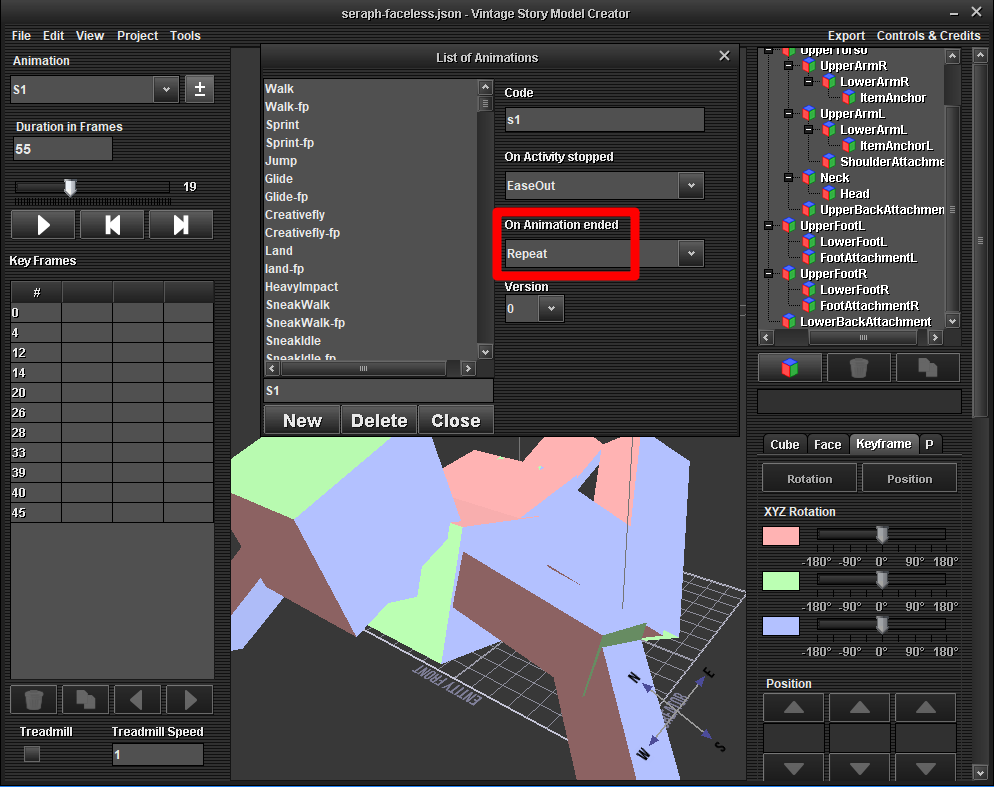
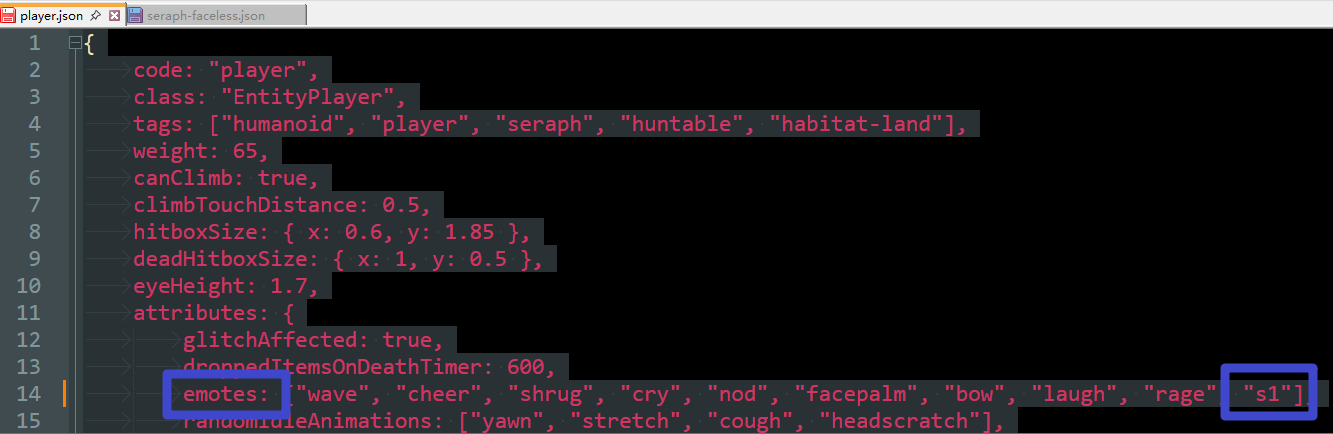
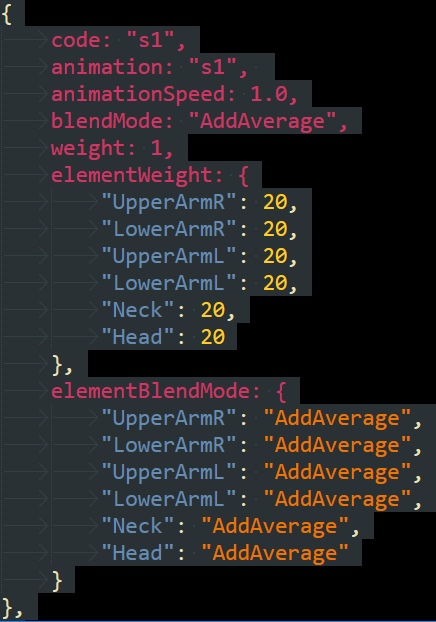
English: Excuse me, after a player uses the "/emote s1" command to perform the s1 action, how can they stop it? I edited a custom action named s1 and added it to Player.json. After entering the game, when the player uses the "/emote s1" command to perform the action, they continuously loop the s1 action and cannot stop it. Whether the player walks, attacks, or swims, the s1 action is always blended with these movements. Using the "/npc exec playanim s1 1" command to make an NPC perform the s1 action causes the NPC to continuously loop the action. Using the "/npc stop" command can make the NPC stop the s1 action. Using the "/npc exec goto p s1 0.01 1" command to make an NPC move to the player's location using the s1 action causes the NPC to continuously loop the s1 action until it reaches the player's location, at which point the action stops. 原文: 请问,玩家用 "/emote s1" 指令做出s1动作后如何停止s1动作? 我编辑了一个自定义动作,名字叫s1。我在Player.json里添加了这个动作。进入游戏后,让玩家用 "/emote s1" 指令做出动作后玩家就一直循环做这个动作无法停止,不管玩家走路还是攻击还是游泳都会混合s1动作一起做。 用“/npc exec playanim s1 1”指令让NPC做出s1动作后NPC会一直循环这个动作,用“/npc stop”可以让NPC停止s1动作。 用“/npc exec goto p s1 0.01 1”指令让NPC用s1动作移动到玩家所在位置,NPC会循环使用s1动作直至移动到玩家所在位置然后停止动作。
-
Thank you! Making this change here does indeed allow players to perform custom actions. 谢谢!在这里改一下,确实能让玩家做出自定义动作了。
-
我找到生成机器人的方法了。新版把这个指令改了。改成了“/entity spawn animalbot-wolf-eurasian-adult-male 1”
-
English: Could you please tell me why the command "/entity spawn animalbot-wolf-male 1" doesn't work? I found this command on Wikipedia and I remember it worked in the old version of the game. Has the command for generating robots been changed in the new version? 原文 请问为什么“/entity spawn animalbot-wolf-male 1”这个指令不起作用? 这个指令是从维基百科上查到的,我记得旧版游戏能用这个指令。新版游戏是不是把生成机器人的指令换成别的了?
-
English: "How can I make players perform custom animations? I added a new animation called 's1' to the file at 'D:\Vintagestory\assets\game\shapes\entity\seraph-faceless.json'. I can make NPCs perform the 's1' animation using the command '/npc exec playanim s1 1', but I cannot make players perform the 's1' animation using '/emote s1'. How can I make players perform the 's1' animation? I asked ChatGPT about this and received a mod code, but ChatGPT modified it more than 10 times without successfully getting it to run. Below is the mod code." 原文: 请问如何让玩家做出自定义动作? 我在“D:\Vintagestory\assets\game\shapes\entity\seraph-faceless.json”这个文件中添加了新动作“s1”,我可以用“/npc exec playanim s1 1”指令让NPC做出“s1”动作。但是不能用“/emote s1”让玩家做出“s1”动作。请问,如何让玩家做出“s1”动作?我想ChatGPT询问,得到了一个mod代码,这个代码ChatGPT修改了10多次也没有成功运行。下面是mod代码。 —————————————————————————————————————————————————————— using System; using Vintagestory.API.Common; using Vintagestory.API.Server; using Vintagestory.API.Client; using Vintagestory.API.MathTools; using Vintagestory.GameContent; public class ZengruiModSystem : ModSystem { // 服务端 API(可空) private ICoreServerAPI? sapi; // 网络消息频道标识 private const string EmoteChannel = "Zengrui.Emote"; public override void StartServerSide(ICoreServerAPI api) { base.StartServerSide(api); sapi = api; // ================================================== // 注册网络频道(字符串类型消息) var channel = api.Network.RegisterChannel(EmoteChannel) .RegisterMessageType<string>(); // ================================================== // /emotes1 指令 api.ChatCommands .Create("emotes1") .WithDescription("播放自定义动作 s1") .HandleWith(args => { if (args.Caller.Player is IServerPlayer sPlayer) { // 向客户端发送动画名 channel.SendPacket(sPlayer, "s1"); return TextCommandResult.Success("请求播放动作 s1"); } return TextCommandResult.Error("未找到服务器端玩家"); }); } public override void StartClientSide(ICoreClientAPI capi) { base.StartClientSide(capi); // ================================================== // 注册客户端网络消息处理 var channel = capi.Network.GetChannel(EmoteChannel); channel.SetMessageHandler<string>((animCode) => { var entity = capi.World.Player.Entity; if (entity?.AnimManager != null) { entity.AnimManager.StartAnimation(animCode); } }); } }
-
English: Is there a way to switch directly from first-person view to third-person view? The game’s default camera is first-person view. Pressing F5 switches to second-person view, and pressing F5 again switches to third-person view. Is there any way to switch directly from first-person view to third-person view? Does the game have any in-game commands for switching camera perspectives? For example, the commands “.clientConfig musicLevel 0” and “.clientConfig musicLevel 100” can be used to disable or enable background music. If there is a command that can directly switch to third-person view, it could be bound as a hotkey using the in-game macro editor opened with “Ctrl+M”, allowing one-key switching to third-person view. 原文: 请问如何从第一人称视角直接切换到第三人称视角? 游戏默认视角是第一人称视角,按F5可以切换到第二人称视角,再按F5可以切换到第三人称视角。有没有办法直接从第一人称视角切换到第三人称视角? 游戏内有没有切换视角的指令?比如“.clientConfig musicLevel 0"和”.clientConfig musicLevel 100“指令可以开启或关闭BGM,如果有能直接切换到第三人称视角的指令,就可以通过游戏内“Ctrl+M”调出来的宏编辑器制作成快捷键,就可以一键切换到第三人称视角了。
-
English: Thank you very much! These two methods have perfectly solved my problem. Now I can generate a pot of food at the specified coordinates "512081, 112, 512051" by using the "/zuofan" command. Here is my code. 原文: 非常感谢!这两个方法完美的解决了我的问题。我现在能通过“/zuofan”指令在指定的坐标“512081, 112, 512051”上生成一锅食物了。下面是我的代码。 ———————————————————————————————————————————————————————————————— using System; using Vintagestory.API.Common; using Vintagestory.API.MathTools; using Vintagestory.API.Server; using Vintagestory.GameContent; public class ZengruiModSystem : ModSystem { private ICoreServerAPI sapi; public override void StartServerSide(ICoreServerAPI api) { sapi = api; // 指令:获取玩家脚下坐标 api.ChatCommands .Create("huodezuobiao") .WithDescription("显示玩家脚下方块的绝对坐标") .RequiresPrivilege(Privilege.chat) .HandleWith(OnGetPosition); // 指令:在固定坐标放置一锅红肉炖胡萝卜 api.ChatCommands .Create("zuofan") .WithDescription("在固定坐标放置一锅红肉炖胡萝卜(陶锅)") .RequiresPrivilege(Privilege.chat) .HandleWith(OnPlaceCookedCrock); } // -------------------------------------------------- // /huodezuobiao private TextCommandResult OnGetPosition(TextCommandCallingArgs args) { var player = args.Caller.Player; if (player == null) { return TextCommandResult.Error("未找到玩家"); } BlockPos pos = player.Entity.Pos.AsBlockPos; return TextCommandResult.Success( $"你脚下的绝对坐标为: X={pos.X}, Y={pos.Y}, Z={pos.Z}" ); } // -------------------------------------------------- // /zuofan private TextCommandResult OnPlaceCookedCrock(TextCommandCallingArgs args) { // ★ 固定坐标(你指定的) BlockPos pos = new BlockPos(512081, 112, 512051); // 确保区块已加载 sapi.World.BlockAccessor.GetChunkAtBlockPos(pos); // -------------------------------------------------- // 1. 获取“陶锅物品对应的方块” // 注意:这是陶锅“物品”,不是直接放在世界里的方块 Block crockBlock = sapi.World.GetBlock(new AssetLocation("game", "claypot-blue-cooked")); if (crockBlock == null) { return TextCommandResult.Error("未找到陶锅方块(claypot-blue-cooked)"); } // 创建一个陶锅 ItemStack ItemStack crockStack = new ItemStack(crockBlock, 1); // -------------------------------------------------- // 2. 通过 IBlockMealContainer 给陶锅“生成一锅食物” IBlockMealContainer mealContainer = crockBlock as IBlockMealContainer; if (mealContainer == null) { return TextCommandResult.Error("该方块不是食物容器(IBlockMealContainer)"); } // 获取食材物品 Item meatItem = sapi.World.GetItem(new AssetLocation("game", "redmeat-raw")); Item carrotItem = sapi.World.GetItem(new AssetLocation("game", "vegetable-carrot")); if (meatItem == null || carrotItem == null) { return TextCommandResult.Error("未能找到红肉或胡萝卜物品"); } // 创建食材 ItemStack ItemStack meatStack = new ItemStack(meatItem, 1); ItemStack carrotStack = new ItemStack(carrotItem, 1); // ★ 核心:生成一锅“红肉炖胡萝卜” // "meatystew" 是食谱代码 mealContainer.SetContents( "meatystew", crockStack, new ItemStack[] { meatStack.Clone(), meatStack.Clone(), carrotStack.Clone(), carrotStack.Clone() } ); // -------------------------------------------------- // 3. 把“装好食物的陶锅”作为物品,放进地面存放(Ground Storage) PlaceOneItemStackAsGroundStorage(crockStack, pos); return TextCommandResult.Success( $"已在 {pos.X}, {pos.Y}, {pos.Z} 放置一锅红肉炖胡萝卜" ); } // -------------------------------------------------- // 在指定坐标创建 GroundStorage,并放入一个物品 private void PlaceOneItemStackAsGroundStorage(ItemStack itemStack, BlockPos pos) { // 获取地面存放方块 Block groundStorageBlock = sapi.World.GetBlock(new AssetLocation("game", "groundstorage")); sapi.World.BlockAccessor.SetBlock(groundStorageBlock.BlockId, pos); // 获取地面存放的 BlockEntity BlockEntityGroundStorage begs = sapi.World.BlockAccessor.GetBlockEntity(pos) as BlockEntityGroundStorage; if (begs == null) return; // 使用 DummySlot 让系统判断存放属性 ItemSlot dummySlot = new DummySlot(itemStack); begs.DetermineStorageProperties(dummySlot); // 强制应用 GroundStorage 的存放属性 CollectibleBehaviorGroundStorable behavior = itemStack.Collectible.GetBehavior<CollectibleBehaviorGroundStorable>(); if (behavior != null) { begs.ForceStorageProps(behavior.StorageProps); } // 放入物品 begs.Inventory[0].Itemstack = itemStack.Clone(); begs.Inventory[0].MarkDirty(); // 通知世界刷新 begs.MarkDirty(true); } }
-
Thank you very much! ".clientConfig musicLevel 0" and ".clientConfig musicLevel 30" are two commands that I had been searching for for a long time but couldn't find. 原文: 非常感谢! “.clientConfig musicLevel 0”和“.clientConfig musicLevel 30”这两个指令正式我苦苦寻找了很久都没有找到的指令。
-
English: Is there any way to add commands for controlling BGM through mods? For example, inputting "/nobgm" to turn off BGM or set its volume to 0%, and inputting "/bgm" to turn on BGM or set its volume to 30%. 原文: 请问有没有办法通过模组来添加控制BGM的指令?比如输入“/nobgm"来关闭BGM或者把BGM的音量调成0%,输入”/bgm“来打开BGM或者把BGM的音量调成30%。
-
[Community Poll] Video Tutorials for Modding Tutorials
快乐守护者 replied to Nat_VS's topic in Official Modding API/Doc Updates
English: I think videos are necessary. As a complete novice with no prior knowledge, I tried to create my first mod using "https://wiki.vintagestory.at/Modding:Code_Tutorial_Simple_Block", but even following the step-by-step instructions, I couldn't complete it because I didn't know the meanings of many specialized terms. Finally, it was with the help of ChatGPT that this module was completed. 原文: 我认为视频是必要的。我这种一点也没学过的小白,通过“https://wiki.vintagestory.at/Modding:Code_Tutorial_Simple_Block”学习制作第一个模组,跟着一步步做都做不出来,因为很多专有名词我不知道是什么意思。最后借助ChatGPT才把这个模组做出来。 -
English: Could you please tell me how to use the mod to generate a "Hefty Red meat-Carrot stew" at the coordinate position "512081, 112, 512051" with the "/zuofan" command? I have successfully generated items at the coordinate position "512081, 112, 512051" using the "/zuofan" command through "wiki.vintagestory.at and ChatGPT", but I can only generate blocks or empty "clay pots", and I can't generate a "Dark brown ceramic pot of meat stew" like a "clay pot with Hefty Red meat-Carrot stew". Here is my code. ————————————————————————————————————————————————————————————————————————————————————————————————— 中文: 请问,如何通过模组实现用“/zuofan”指令在“512081, 112, 512051”这个坐标位置生成一份"豪华红肉-胡萝卜炖"。 我通过“wiki.vintagestory.at和ChatGPT”成功实现了用“/zuofan”指令在“512081, 112, 512051”这个坐标位置生成物品,但是只能生成方块或者空的"陶锅",无法生成"装着炖肉的深棕陶锅"这种有食物的陶锅比如装着"豪华红肉-胡萝卜炖"的陶锅。下面是我的代码。 ————————————————————————————————————————————————————————————————————————————————————————————————— using System; using Vintagestory.API.Common; using Vintagestory.API.MathTools; using Vintagestory.API.Server; using Vintagestory.GameContent; public class ZengruiModSystem : ModSystem { ICoreServerAPI sapi; public override void StartServerSide(ICoreServerAPI api) { sapi = api; // 指令 1:获取玩家脚下坐标 api.ChatCommands .Create("huodezuobiao") .WithDescription("显示玩家脚下方块的绝对坐标") .RequiresPrivilege(Privilege.chat) .HandleWith(OnGetPosition); // 指令 2:在固定坐标放置陶锅,并填充食物 api.ChatCommands .Create("zuofan") .WithDescription("在固定坐标放置红肉炖胡萝卜或陶锅") .RequiresPrivilege(Privilege.chat) .HandleWith(OnPlaceFixedBlock); } // ----------------------------- // /huodezuobiao 的回调 private TextCommandResult OnGetPosition(TextCommandCallingArgs args) { var player = args.Caller.Player; if (player == null) return TextCommandResult.Error("未找到玩家。"); // 直接获取玩家所在块坐标 BlockPos pos = player.Entity.Pos.AsBlockPos; return TextCommandResult.Success($"你脚下的绝对坐标为: X={pos.X}, Y={pos.Y}, Z={pos.Z}"); } // ----------------------------- // /zengruizuorouduncai 的回调 private TextCommandResult OnPlaceFixedBlock(TextCommandCallingArgs args) { // 固定坐标 BlockPos pos = new BlockPos(512081, 112, 512051); // 强制加载区块 sapi.World.BlockAccessor.GetChunkAtBlockPos(pos); // 使用陶锅的 ID (1093) 来获取陶锅方块 Block crockBlock = sapi.World.GetBlock(1093); // 请确保陶锅的ID正确 if (crockBlock == null) { return TextCommandResult.Error("未找到陶锅方块,请检查 block id"); } // 放置陶锅(只放在目标方块上) sapi.World.BlockAccessor.SetBlock(crockBlock.BlockId, pos); // 获取该位置的 BlockEntity var be = sapi.World.BlockAccessor.GetBlockEntity(pos) as BlockEntityCrock; if (be != null) { // 访问陶锅的 Inventory var inv = be.Inventory; if (inv != null) { // 获取 "生红肉" 和 "胡萝卜" 的物品实例 Item meatItem = sapi.World.GetItem(new AssetLocation("game", "redmeat-raw")); Item carrotItem = sapi.World.GetItem(new AssetLocation("game", "vegetable-carrot")); if (meatItem == null || carrotItem == null) { return TextCommandResult.Error("未能找到生红肉或胡萝卜的物品,请检查物品代码"); } // 创建物品堆栈,假设数量为 1(你可以根据需要调整) ItemStack meatStack = new ItemStack(meatItem, 1); ItemStack carrotStack = new ItemStack(carrotItem, 1); // 直接设置陶锅的槽位内容 inv[0].Itemstack = meatStack; // 放入红肉 inv[1].Itemstack = carrotStack; // 放入胡萝卜 // 确保 BlockEntity 更新 be.MarkDirty(true); } } return TextCommandResult.Success($"已在 {pos.X} {pos.Y} {pos.Z} 放置陶锅,并添加了红肉和胡萝卜"); } } ————————————————————————————————————————————————————————————————————————————————————————————————— English: ChatGPT said that this piece of code of mine can generate a pottery pot filled with food, but the actual result in the world is that it generates an empty pottery pot. ————————————————————————————————————————————————————————————————————————————————————————————————— 中文: ChatGPT说我这段代码可以生成装有食物的陶锅,但是实际效果是生成一个空的陶锅。