
Velynicus
-
Posts
32 -
Joined
-
Last visited
Velynicus's Achievements

-
Does anyone know if there is a tiredness measure that VS can or does expose? for modders? Are there any server commands that will print your tiredness - or when you can sleep next? Actually it looks like the reis a player watched attribute called tiredness....how much tiredness do you require for sleep? Does anyone know that?
-
Actually @BlockBerryJam it was my mod Good Night Sleep. and the issue was resolved. Sorry i cant be more help.
-
 Hi - I know its an old post - but i want to gen a chuck outside the player's view. Your post indicates it's possible. Is that correct? I'm being told that it's not. Just looking to confirm
 -
Thank you AI! You are receiving the error "This version (1.0.0) of the mod has already been released" because the Mod DB requires each version number to be unique. The issue is not the filename, but the modversion property within the modinfo.json file inside your .zip archive. The website reads the version from that specific JSON file. If you are trying to upload a new file using the "Add Release" button, you must have incremented the version number in your modinfo.json file before zipping and uploading it. Solution Steps Update modinfo.json: Open the modinfo.json file in your mod's source folder. Increment the version: Change the "modversion" value to a new, higher number (e.g., from "1.0.0" to "1.0.1" or "1.1.0"). Re-zip the mod: Create a new .zip file with the updated modinfo.json inside. Ensure the zip structure is correct (the modinfo.json and other mod contents should be at the root of the .zip file, not inside an extra folder). Drag and drop the new file: Go back to the "Add release" section on the Vintage Story Mod DB and drag the newly created .zip file into the upload area. The system should now read the new version number and allow you to save the release. Regarding the "Draft" Status You do not need to move the mod to "Draft" status to add a new release. "Draft" status is typically for initially creating a mod entry before making it publicly visible. New releases can be added directly to an existing, published mod page. The key to resolving your error is ensuring the version number in your internal mod information file is unique for every release you upload to the database.
-
I'm trying to update my mod and having some trouble with the interface. No matter what I do I get this message: This version (1.0.0) of the mod has already been released (link). Is there some trick? The file is called: goodnightsleep_2.0.1.zip.
-
Thank you @Straille ! Yes - a link would have been helpful! It works in multiplayer - and it introduces Reverence which really supplants sleep as a means of rest. I like SleepNeed myself. In Good Night Sleep. sleep becomes sort of a last resort. Reverence opens up a whole world of Burdens (blocks that spawn in the world, induce more severe fatigue on the player when he/she is in range, and reward the player dfor finding and breaking them. Soon there will be a questline to enable the build of more powerful Altars that relieve Fatigue's accumulation forever!
-
Good Night Sleep "The world is a place of burden and mischief." With every passing moment your body is fatigued. Whether piling earth, moving stone, leaping chasms or fleeing enemies - your body wearies. And rest it must. Have no fear, traveler. A good night’s sleep will sharpen your wits and focus your senses for what lies in store. Have a seat to recover strength or rest your bones by the fire’s light. Pray to whatever gods will listen. But beware. Fatigue is a puckish goblin. It connives to confound you. Hills steepen as the plains unfold. The fathoms darken into murk as curses burden the land. Even the work of your very hands exposes jeopardy. So rest and be mindful. May goodness pass to you without grudge. I'm not sure if it's "good form" to post about my own mod. But what started as a small effort to "enforce sleep" opened up a whole new world of challenges. I hope some people give the mod a try and give their advice on how it interacts (or should interact) with the games they like to play. I hope you'll share with me your thoughts and discuss with me future directions. Have fun!
-
That has certainly bitten bit me. Curious if anyone knows how the vanilla game "prevents sleep". I've seen several mod approaches that "remove" the block class from beds so that they become inert decorative blocks. But that's not how it is accomplished in temporal storms....or is it?
-
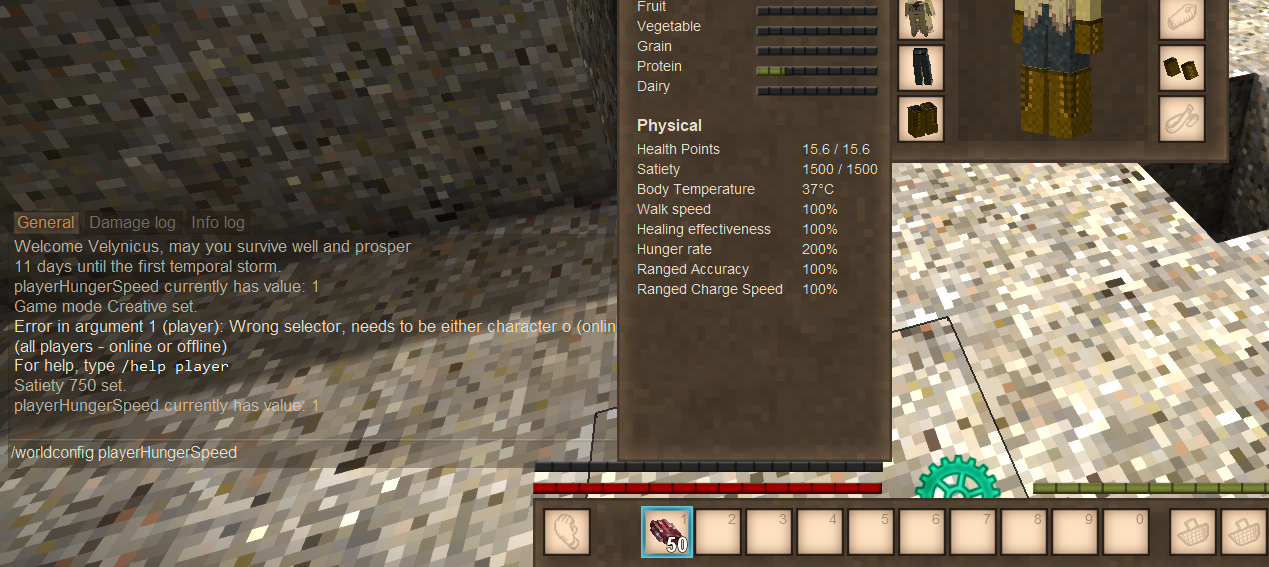
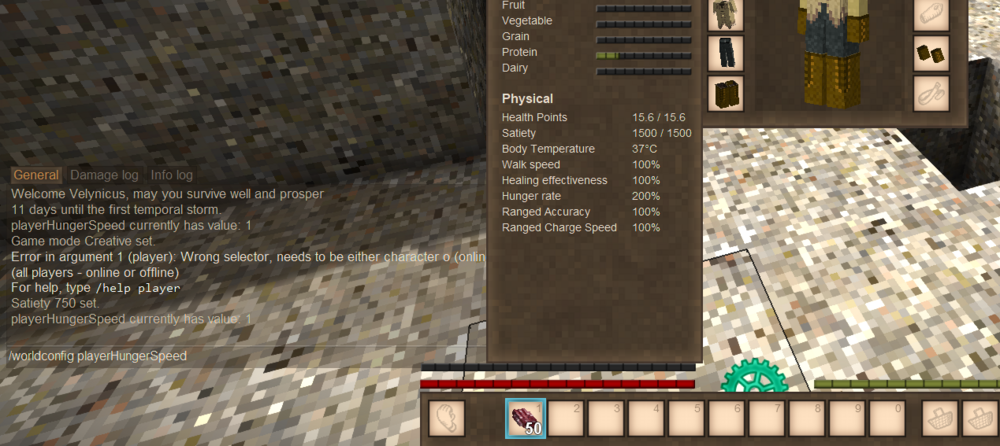
Maybe someone can help me understand something. At world set up by default the hunger rate is set to 100%. The response to the server command: /worldconfig playerHungerSpeed is "playerHungerSpeed currently has value: 1. Nothing in my off-hand at all. The character screen reports that the hunger is 200%. Any thoughts? Here is the list of mods. None that I know of affect the hunger rate. like this: Alchemy, animalcages, auto map markers, bear armor, better ruins, buzz words, carry on, clicktopick, hangingoillamps, immersivewoodchopping, jacks dryable firewood, particle plus, place every time, player corpse, pom notes, primitive survival, sortable storage, step up continued, vigor, zoom button reborn.
-
Velynicus changed their profile photo
-
Paying for help with new item models and .json for my mod.
Velynicus replied to Velynicus's topic in Discussion
I think you are right....I am slowly but surely working through with APE's gracious help! I thank you both! Still have an error after that update.... BUT , this fixed it: In the shape file from BlockBench, it comes out like this: "textures": { "copper.png": "", "redwood.png": "", "silver.png": "", "basalt.png": "" }, But his is the soloossh! "textures": { "copper.png": "game:item/tool/material/copper", "redwood.png": "game:item/tool/material/redwood", "silver.png": "game:item/tool/material/silver", "basalt.png": "game:item/tool/material/basalt" }, -
Paying for help with new item models and .json for my mod.
Velynicus replied to Velynicus's topic in Discussion
Posting this here, in case Echo Weaver or Ape, you have a thought. I used BlockBench with the plugin! My basic shape rendered correctly in the game as intended, but the client cannot find the vanilla textures. They are located here: "C:\Users\David\AppData\Roaming\Vintagestory\assets\survival\textures\item\tool\material\copper.png". In my mod's assets/modname/itemtypes/bladeofatonment.json, I have this: "shape": { "base": "goodnightsleep:item/bladeofatonement" }, "textures": { "handle": { "base": "survival:item/tool/material/redwood" }, "handle2": { "base": "survival:item/tool/material/basalt" }, "hilt": { "base": "survival:item/tool/material/copper" }, "blade1": { "base": "survival:item/tool/material/copper" }, "blade2": { "base": "survival:item/tool/material/silver" }, "blade3": { "base": "survival:item/tool/material/silver" } }, I cannot figure out why the textures are not found. Any thoughts? -
Paying for help with new item models and .json for my mod.
Velynicus replied to Velynicus's topic in Discussion
I'm such a novice to this stuff, I'm just intimidated. I will certainly give it a look - and I thank you for the suggestion. If you happen to know or run into anyone who might be interested in build a few models - please direct them this way! -
Paying for help with new item models and .json for my mod.
Velynicus replied to Velynicus's topic in Discussion
This is helpful I think. I'm only looking for simple items (and item components and blocks). One day maybe a multi-block block. No animations. This app seems like overkill. The model creator app just crashes on me.... -
I'm really stuck making new models for my mod. I'm hoping someone has the expertise (and patience) to use the model creator software and provide to me a few itemtype and blocktype .json files, along with .pngs. I have a full understanding of the directory structures - but me and chatgpt...we're coming up short making decent blocks, items and item components. If anyone is interested, respond in the forum and we'll work out how to connect. I hope I'm not violating forum rules. I'm at my wits end!