AmethystZhou
-
Posts
11 -
Joined
AmethystZhou's Achievements

-
[Tested] What happens when two mods patch the same file?
AmethystZhou replied to AmethystZhou's topic in Guides
I don't think I can move the post, maybe a moderator can do that? Or I can re-post it to the other forum. -
Let's say we have mod A (moda) and mod B (modb). Due to the game loading mods alphabetically, mod A will be loaded first, then mod B. If they patch different things, then both will co-exist and function indepently. However, what happens if they patch the same file? I ran into this question and got quite confused, so I did some testing. Here's what I found, hopefully this will help someone else Googling in the future! - If a file is only patched by one mod, then this will function no matter what. - If a file is patched by both mod A and mod B, but mod A patches values X and Y in the file, and mod B only patches Y: - X will always be patched no matter what. - In the default load order (based on mod IDs "moda" and "modb"), the Y value from mod B takes over since it loads last. - Adding mod B as a dependency in the modinfo.json of mod A forces A to load after B, and reverts the above, making the Y value from mod A take over. - Adding "dependsOn": [{ "modid": "modb"}] in the JSON patch itself within mod A has no effect. The Y value is still from mod B. So, how to force mod A to overwrite mod B's patches, without resorting to naming your mod ID "zzzzzzzmoda"? You can add .dll code to force a custom load order of your mod, as documented in the Wiki, or simply use the CompatibilityLib feature of the game. Using the case above as an example, instead of having \assets\moda\patches\patchY.json which may or may not get overwritten depending on whether mod B is also installed, you can add a separate folder \assets\moda\compatibility\modb\patches\patchY.json. This way, the patchY.json file will only be loaded if mod B is also installed, and will overwrite the same patch from mod B. The Wiki also explains some more advanced use case with mod-dependent JSON patch loading.
- 2 replies
-
- 1
-

-
- json patch
- load order
- (and 1 more)
-
How do I fix this texture glitch on a chiseled block?
AmethystZhou replied to AmethystZhou's topic in Questions
UPDATE: I have found a solution. Placing another solid block (dirt) against the glitched surface of the chieseled block fixed the texture issue! -
I've had similar issues (not on Vintage Story) with Apple AirPods on Windows. Basically my PC recognized the AirPods as two separate devices, the regular "AirPods" and an additional "AirPods hands-free audio" or something like that. The second one had horrible audio quality because it uses the telephone bandwith standard. I had to manually disable that one to force Windows to use the regular bluetooth connection. Check the bluetooth device settings, see if the name of the device say something like "hands-free audio" and possibly remove the device and adding it again.
-
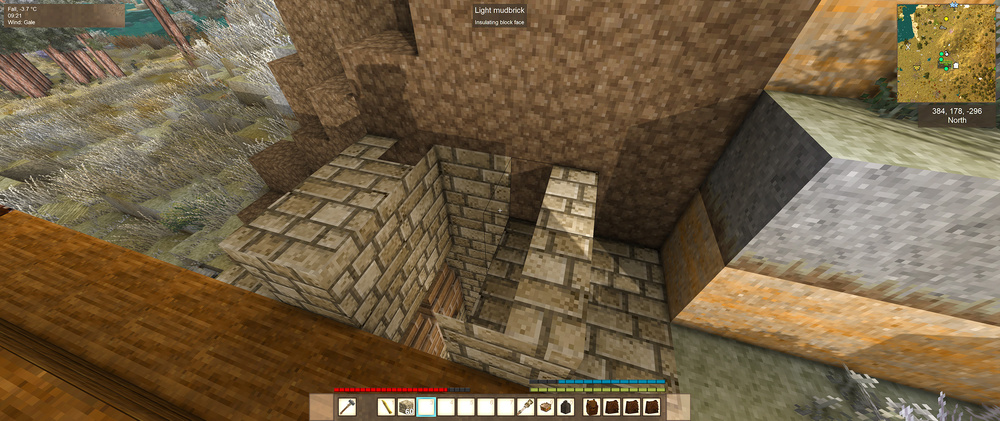
I have some chiseled mud bricks in a build. But due to a bug in a mod, these chiseled blocks got overwritten by other blocks (the bug generated new blocks in their place). I went into creative to try and fix up the terrain and my build, but the textures on these chiseled blocks are glitched. When I place down a full block (mud brick) in their place, they look normal, but once I right click with a chisel to turn them into a chieseled block, even before I did any actual chiselling, the texure become glitched. I tried re-installing my game and clearing the cache, but they did not fix the issue. Is there a way to somehow force the game to re-render everything, or something like that? Thank you! EDIT: I tried putting other blocks (like dirt) in their place and got the exact same result - normal before chiselling, once turned into a chiseled block, the textures become glitched in the exact same way. Somehow these particular coordinates got glitched...
-
@The Insanity God I'll look into that, thank you for the reply!
-
The Quiver and Sheaths mod adds many variants of the same item, and the variance is stored as different attributes of the same item. For example, the belt item can be made with different colored leather and different metal buckles. The in-game item code displays as: belt-waist-plain-general{ "types": { "belt": "thick", "leather": "blue", "metal": "gold" } } But all of these variants are all called the same name, which could be a bit confusing. I'm trying to make a patch to make the names of all the variants distinct, but how can I do this in the lang\en.json file? Thank you!
-
Help with Harmony patching
AmethystZhou replied to AmethystZhou's topic in [Legacy] Mods & Mod Development
That makes a lot of sense. I don't know how to use the CodeMatcher to replace the entire function though. Apparently the reason my code didn't work is because I'm searching for the two variables in the wrong order, since the 1.11 appears before 9, the second search can't find anything.. -
Hi! I am very new to coding and learning as I try to make a small mod to change the world generation behavior for surface ore bits. This is the relevant part of code in VSSurvivalMod.dll: if (shouldGenSurfaceDeposit) { int surfaceY = (int)heremapchunk.RainHeightMap[lz * 32 + lx]; int depth = surfaceY - posy; float chance = this.SurfaceBlockChance * Math.Max(0f, 1.11f - (float)depth / 9f); ... It calculates a chance for surface ore bits to generate, which decreases by 11.1% per block and reaches 0% by the 10th block. This means that if the ore deposit generates deeper than 10 blocks, no surface ore bits would be generated. I tried creating a simple .dll mod using Visual Studio and Harmony patching. At first I tested it with only changing the "9" in the calculation to a very large number, which works in a test world. But when I modified the code so that both variables are modified (1.11 and 9), the game gets stuck on loading. What am I doing wrong in this code? using Vintagestory.API.Client; using Vintagestory.API.Server; using Vintagestory.API.Config; using Vintagestory.API.Common; using HarmonyLib; using System.Collections.Generic; using System.Reflection.Emit; using Vintagestory.ServerMods; namespace SurfaceBits; [HarmonyPatch] public class MyModSystem : ModSystem { public static ICoreAPI api; public Harmony harmony; public override void Start(ICoreAPI api) { MyModSystem.api = api; // The mod is started once for the server and once for the client. // Prevent the patches from being applied by both in the same process. if (!Harmony.HasAnyPatches(Mod.Info.ModID)) { harmony = new Harmony(Mod.Info.ModID); harmony.PatchAll(); // Applies all harmony patches } } [HarmonyPatch(typeof(DiscDepositGenerator), nameof(DiscDepositGenerator.GenDeposit))] public static class SurfaceOrePatch { static IEnumerable<CodeInstruction> Transpiler(IEnumerable<CodeInstruction> instructions) { var matcher = new CodeMatcher(instructions) .MatchStartForward(new CodeMatch(OpCodes.Ldc_R4, 9.0f)) .ThrowIfInvalid("Could not match 9.0") .SetOperandAndAdvance(10000.0f) .MatchStartForward(new CodeMatch(OpCodes.Ldc_R4, 1.11f)) .ThrowIfInvalid("Could not match 1.11") .SetOperandAndAdvance(0.0f); return matcher.Instructions(); } } public override void Dispose() { harmony?.UnpatchAll(Mod.Info.ModID); } } Thank you very much!
-
I found the relevant part of the code, thank you so much!
-
Is there a way to change this 11% reduction in the chance? I'm very new to modding but would like to tweak this so that surface bits become available for more ore deposits, especially those that generate deeper underground. Thank you!