bababuoy
-
Posts
2 -
Joined
-
Last visited
bababuoy's Achievements

Wolf Bait (1/9)
1
Reputation
-
Custom Handbook Widgets
bababuoy replied to bababuoy's topic in Mod Development Questions/Troubleshooting
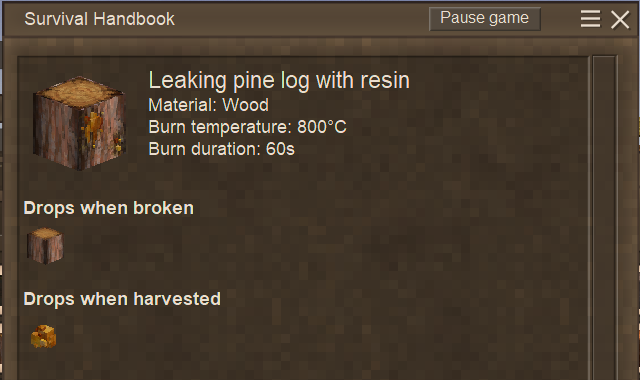
Great thank you very much, I did find that I was able to use the CollectibleBehaviorHandbookTextAndExtraInfo.cs class/OnHandbookPageComposed to add that custom behavior! Looks great! public void OnHandbookPageComposed( List<RichTextComponentBase> components, ItemSlot inSlot, ICoreClientAPI capi, ItemStack[] allStacks, ActionConsumable<string> openDetailPageFor ) { // Drops when harvested (icon row) if (codes != null && codes.Length > 0) { List<ItemStack> dropStacks = ResolveStacks(capi, codes); AddIconRow( components, capi, heading ?? "Drops when harvested", dropStacks, openDetailPageFor, 40f ); } // Can be placed into (icon row) if (canPlaceCodes != null && canPlaceCodes.Length > 0) { List<ItemStack> placeStacks = ResolveStacks(capi, canPlaceCodes); AddIconRow( components, capi, canPlaceHeading ?? "Can be placed into", placeStacks, openDetailPageFor, 40f ); } // Used for / description section if (!string.IsNullOrWhiteSpace(description)) { if (components.Count > 0) { components.Add(new ClearFloatTextComponent(capi, 14f)); } components.AddRange(VtmlUtil.Richtextify( capi, "<font weight=\"bold\">" + Lang.Get("Used for") + "</font>\n", CairoFont.WhiteSmallText() )); components.Add(new ClearFloatTextComponent(capi, 2f)); components.AddRange(VtmlUtil.Richtextify( capi, Lang.Get(description) + "\n", CairoFont.WhiteSmallText() )); components.Add(new ClearFloatTextComponent(capi, 6f)); } } } Here's part of the relevant code, I did end up making it all custom (maybe I shouldn't have but it works). -
I'm adding in some custom blocks in my 1.21.6 mod and I need them to have some behavior where if you crouch + hold right click, it'll harvest the block (similar to harvesting animal corpses). I was able to get it to work, but I was trying to figure out a way to add in a little widget into the handbook that showed what happens when it's harvested, like what pine resin logs or berry bushes have in their handbook entries. I tried experimenting with the BlockBehavior "Harvestable" in the behaviors of the modded block's JSON, as well as implementing my own BlockBehaviorHarvestable-derived class, but it didn't seem to work at all. I guess I'm just curious to know if it's only tied to vanilla blocks. Even if I had to add a custom section, I'd just like it to say "Drops when harvested" in bold text with an item icon. I attached a picture of the harvesting widget in case there's any confusion. Thanks for any help!!