


InfoDeprived
-
Posts
7 -
Joined
-
Last visited
Content Type
Profiles
Forums
Blogs
News
Store
Everything posted by InfoDeprived
-
I mean I recognize that it running hot will infact make it run slower, the slow running is expected, my point of unawareness is the freezing specifically aswell as how to conteract it. I have a passing familiarity with the shell and even my better half who knows nothing about computers had no trouble operating it when directed properly. While im sure these seem as facts from your point of view and reasonably so given I have only really elaborated on technical details rather than my own personal experience or understanding, I would argue the truth is as with all things more complex. Additionally they did specifically give detailed instruction as to how to carry out the suggestion they gave. At the end of the day all of these are valid suggestions to help solve the issue which I appreciate greatly. To answer your question, Yes it is an SSD Freezing issues remain persistent in singleplayer vanilla. we are pretty sure at this point its a hardware issue but like I said I want to check everything else before commiting to that.
-
i believe everyone has varying levels of hardware quality but i dont think hers is the worst on there. I considered that as a very real possibility when i saw the heat and realistically I think this is likely the cause, however quite honestly I dont have the expertise or confidence to dink around in there, especially in a laptop, if it comes down to it we would probably have to pay someone to do it but at that point i would want to confirm nothing else could be causing it. Would any part of the system data tell if it runs an HDD or SSD instead of physically looking? ex. system settings, task manager, ect. Should be able to get those singleplayer/vanilla tests this evening, thank you for all the help so far!
-
apologies for the lack of clarity, she is the only one experiencing issues which is how i can tell the server is fine, no one other than her has had any issues of any variety on the server. Additionally as far as im aware when she has freezes there is no noticeable changes in the server's function (i have access to the terminal) albeit I will be double checking to verify that. it may be worth noting we are hosting through Something Unique Hosting. I will check if her issues persist in vanilla at earliest opportunity and update. as for the mods, here is the full modlist from the folders: For the record the server is on version 1.21.6



-
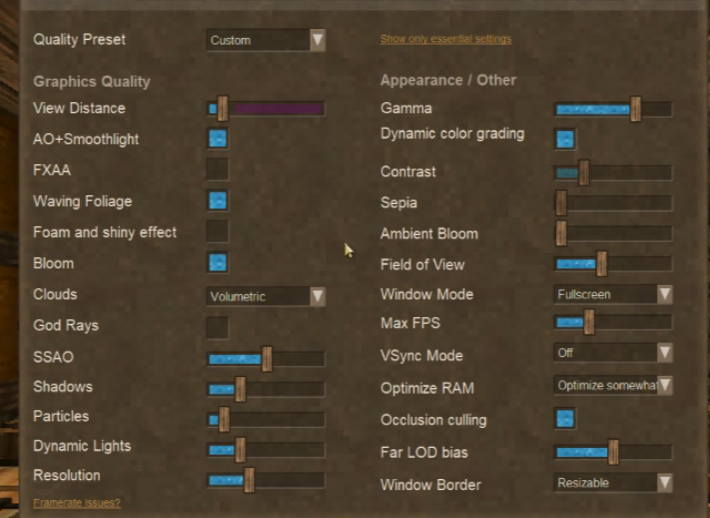
Me and my better half have been playing on a server run by a friend of ours and they've been plagued by really aggressive freezes periodically while playing, several seconds at a time and as often as every minute or so but all very differing in terms of timescale. She is not even slightly technically inclined and I have a slight understanding of this stuff, shes running an Acer Nitro 5 an517-55 and Im running a pc of my own design. The server we are on has had no issues and nor have I. Her settings are incredibly low if not at minimum, and there are mods on the server. we are noticing whenever she freezes her disc usage spikes to up to 100%, additionally her memory usage is pretty consistently high any time the game is open at all (80%-94%~). while running the game she has nothing else open other than maybe discord. We also noticed whenever the game is open her CPU specifically heats to upwards of 197* F, once the game is closed it returns to standard temperature ranging from 140-175~. Any ideas on what may be causing it or how to fix it? Graphics settings in use^
-
How do I change my VintagestoryData folder location?
InfoDeprived replied to Euri's topic in Questions
Gave --addModPath a go and it worked a charm, cheers! -
How do I change my VintagestoryData folder location?
InfoDeprived replied to Euri's topic in Questions
Mine is also being exceptionally weird, followed all steps, had the same issue as ericisawsum, went into my Json and manually fixed modPaths and it populated correctly. But when I opened my world all modded items ceased to be for whatever reason. Interestingly it seems like mods that just changed values of vanilla stuff (ex. a boost to greenhouse temperature) worked fine but items added just dont exist (ex. Iron Spear, it has been replaced with a black rectangle). What can I do to fix this?


