
jayu
-
Posts
6 -
Joined
-
Last visited
jayu's Achievements

Wolf Bait (1/9)
1
Reputation
-
Honestly I heavily suggest a fresh install (be sure to download 1.19 and not 1.20 since some mods aren’t updated yet, or be aware of this fact if you get 1.20, it’s still in a release candidate phase) then you can move over your saves and settings if things seem to work. You don’t even have to delete anything, you can easily keep two different installations (I do so for modding) so it doesn’t hurt to try it out, just download, install some mods and give it a go. (VintagestoryData folder is the same for all installations, but the game files will be different, this might not fix all problems, if so back up your VintagestoryData and let it generate a fresh one)
-
 jayu changed their profile photo
 -
My take on thirst, released now in beta version. Thirst will decrease your hunger rate by a max of 30% if you keep the bar above half, and will increase the hunger rate by a max of 30% if your bar is too low. Keeping well hydrated will also give you a euhydration health boost. Water has to be boiled to avoid risk of vomiting, and using a dowsing rod will lead the player to pure water reservoirs which can be used to make a well, a renewable source of pure water. This mod isn’t about making things overly challenging but about introducing a thirst mechanic that's enjoyable. Similar to how Vintage Story makes even the mundane tasks engaging and rewarding, I want players to relish the process of finding their own water sources, building wells, and crafting waterskins to carry water. It should be gratifying to look back and see the progress from simply drinking out of a leaky wooden bowl. The mod, as the name says, aspires to be balanced but it certainly won't be at the start. I encourage you to contribute to the balancing by providing feedback and suggestions. Download Here: BalancedThirst If you want more hardcore thirst, check out: Hydrate or Diedrate! Feature List Thirst Thirst is the main mechanic of the mod. Together with a hunger bar, you now have a thirst bar. Keep an eye on it! Its value will affect your hunger rate. If you're well hydrated, you will get hungry more slowly but the inverse is also true, when below 50%, you will get hungry faster. You can drink either from containers, or directly from the source. Vomiting and water purity Not all water is born equal. Normal water will have a small chance of being contaminated and making you vomit! You don't want to do so, as it will drastically lower your hydration and saturation. Boil water or look for pure springs to avoid that. Pure water is the only water with 0 chance of vomiting. Water boiling You can boil water in a firepit using a bowl or a kettle (not a pot). You can also boil salwater to get wet salt crystals. Throw them on the ground with sprint-right-click and dry them to get salt. Water expires Water will get contaminated by being held in containers that aren't properly sealed. Use waterskins or other (configurable) containers to keep it clean and pure for longer. LiquidContainers is highly suggested to carry water with you Dowsing Look for pure spring water with a dowsing rod. Euhydration Euhydration is a health boost acquired thorough regular hydration. Drinking salt water and urine will lower it! Bladder Choose if you sit or stand in the client config, then either sit and right-click or stand and sprint-right-click with a empty hand to release your bladder! Doing so on farmland has a chance of adding some nutrients to the soil, while doing it in a container will fill it up! If you're a Bear Grylls wannabe, you can also drink it... (Controls disabled by default, values are configurable) Config The configuration files are full of options and I add more every release. If there is something about this mod you'd like to have adjusted, check them out! If you don't find any option for it, you can request it. In the configs, you can set basic things like thirst rate or max hydration, the radius of the dowsing rod, etcetera, and also more advanced stuff all the items and blocks that get can be drank or eaten to get hydrated, which containers you can place in a firepit to boil water, which containers slow water expiration, which stats (vanilla or modded) are affected by thirst (it doesn't have to be hunger!) and much more! ConfigLib is suggested for a better config experience Hunger buff and debuff config option showcase (graph here) Vanilla stats you can set walkspeed, meleeWeaponDamage, healingeffectivness, rangedWeaponsAcc, rangedWeaponsSpeed Coming soon: Handbook (in game) Roadmap: Water filtering (some compatibility with Lavoisier and ChemistryLib) Better water purity or contamination system Rework of euhydration: minerals from water that give health boost Compatibility with common mods Some mechanism to use a well, perhaps lowering buckets to grab water Sweating? Changing thirst rate based on external temperature, the reverse of cold Better endgame: running water/pipes? Known Bugs: Currently crashes clients when joining a server, working on a fix. Compatibility Rivers LiquidContainers HydrateOrDiedrate (you can choose which mod's thirst to use, essentially) Update on HoD compatibility: We talked it out with Chronolegionnaire (author of HoD) and reached the conclusion that it is better not to merge the two mods, they will remain sister mods for the foreseeable future. It is also hard for us to add compatibility for each feature the other adds, as it effectively doubles our work. But do not despair, we reached the agreement that, as long as due credit is given, we can freely take inspiration from each other's mod. This benefits us, as it allows us to follow our creative intentions to make the mods the best they can be, and it benefits you, the user: if there is a HoD feature you really want in here (or vice versa) we can work on adding and also make sure it fits with the design choices of our mods. For this reason, it is very likely I will add a similar clothing cooling system in the future. (Currently it is sort-of compatible with HoD, but the values are very skewed, there is a config setting you can adjust for this). Note: the mod has a default behavior (values configurable) for how much hydration each nutrition type gives. For many mods, this may be sufficient, or alternatively you can add items you believe deserve more hydration (like juice) to the hydration dictionary in the config or using configlib. The mod now also supports the format of HydrateOrDiedrate. Share them here or on the forum post! (in the config format please) This way we can build a large compatibility dictionary. If you are getting crashes when placing items: Words by the wise SpearAndFang: Contribution shoutouts: XxShyWolf – Help with debug Hydromancerx – Bladder suggestion Feel free to discuss the mod’s balancing or possible features and compatibility.

-
Thanks, I tried to make it somewhat balanced as an alternative to not having bears at all. I enjoyed the thrill of my first bear hunt, but after a while of them spawning next to my home they just became an annoyance. The trap is mostly useful to protect your base and animal pens, and bears would still be a danger during exploration. As for getting hurt, just be careful. If you always interact with the trap while sneaking and don't step on it, it should be fine. Furthermore, low-tier traps don't deal too much damage and will still trap bears for some time (be mindful of their durability), so they are somewhat safe.
-
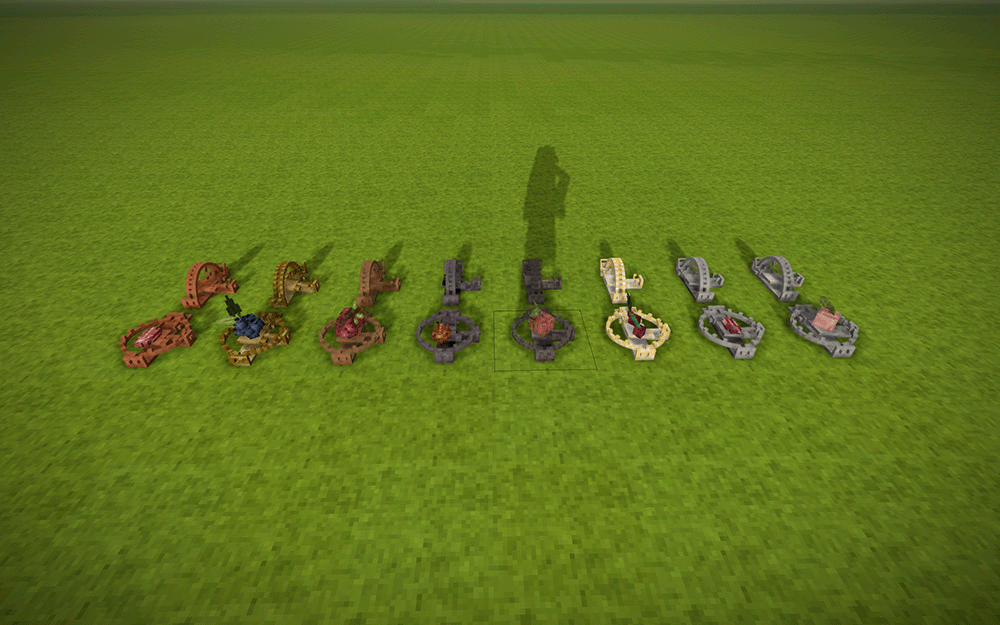
Tired of trapping bears in pits? Simple, add bear traps to the game. To craft them, obtain two bear trap jaws by smithing, then craft the trap using nails and strips to join them together. Be careful about handling the open trap when not sneaking! This mod adds a seeking food behaviour to bears, so placing appropriate bait in the traps (Protein or Fruit) will attract them. Other animals will also be attracted to proper bait, just like with a basket trap, but bear in mind that it will easily kill smaller animals. To use a bear trap, first place it down. Then, you can open it by sneaking. Bait can be placed by sneaking or sitting, trying to interact with the trap while standing will trap your hand! Traps have durability which scales with the material. Whenever a player or a trapped beast gets damaged by the trap, it will emit a metallic sound and lose 1 durability. Once that is exhausted, it will break and free the trapped animal. Be careful of trapping bears in low-tier traps for long as they might break them and escape. Breaking a broken trap will drop nuggets of that metal equivalent to roughly half the metal used for the trap. Similarly, traps can be recycled by smashing them with a hammer. Credits The model for the bear trap was designed by OriginlessGamer (Socials: YouTube, Discord, Patreon) in this video:
-
Hello everyone, I have been learning how to mod the past two weeks, until I finally released my first mod Bear Trap and I think it would be useful for me to list the things I've learnt about modding on Mac, since I couldn't find many resources online. So, if you currently are or are going to attempt to develop a mod on Mac, please share here all of your tips! From what I could find, there's not many of us, so we should try to pool together all we know to make ours and future modders' life a bit easier. Here is what I found so far, I will update this as I find out new things. Content Mods When zipping, do not select the directory and compress. This will compress it as a folder with your mod folder inside, instead of just its contents. The game will not be able to load the mod and will tell you it cannot find modinfo.json. What you should do instead is select all the contents of your mod folder at the same time and compress those. IDE I use Rider but VS Code should work perfectly fine too. Rider allows for hot-swapping code which is great for testing things like GUIs and small adjustments to non-static methods and parameters without restarting the game. Project Setup After following the setup instruction described here Setting up your Development Environment, I needed to slightly tweak the template to make it work. Since for some reason launching the Vintagestory unix executable with the --addModPath startup parameter didn't seem to work, I had to first set up a separate Vintage Story installation that I use only for modding (and set its location as the VINTAGE_STORY environment variable), then modify the launch configurations in launchSettings.json to copy the compiled mod to in the internal mods folder of the installation, and update it every time you change your code. Edit 29 October 2024: I updated this with a new simpler launch setting that works fine and does not require to move folders. It also allows to use the debugger! (finally) { "profiles": { "Client": { "commandName": "Executable", "executablePath": "$(VINTAGE_STORY)/Vintagestory", "commandLineArgs": "--tracelog --addModPath \"$(ProjectDir)/bin/$(Configuration)/Mods\"", "workingDirectory": "$(VINTAGE_STORY)" }, "Server": { "commandName": "Executable", "executablePath": "$(VINTAGE_STORY)/VintagestoryServer", "commandLineArgs": "--tracelog --addModPath \"$(ProjectDir)/bin/$(Configuration)/Mods\"", "workingDirectory": "$(VINTAGE_STORY)" } } }
- 6 replies
-
- 1
-

-
- mod development
- mac
- (and 2 more)
-
Mod Dev: Unable to Make Save to Test
jayu replied to SirR3AL's topic in [Legacy] Mods & Mod Development
Hey, how did you manage to get the game to run? I'm trying to get this working but when I run examplemod:client I get this error, here tested directly on Vintagestory.dll: dotnet ~/Downloads/vintagestory.app/Vintagestory.dll Unhandled exception. System.IO.FileLoadException: Could not load file or assembly 'Vintagestory, Version=0.0.0.0, Culture=neutral, PublicKeyToken=null'. Which I think comes from here in launchSettings.json: "commandName": "Executable", "executablePath": "dotnet", "commandLineArgs": "\"$(VINTAGE_STORY)/Vintagestory.dll\" --tracelog --addModPath \"$(ProjectDir)/bin/$(Configuration)/Mods\"", "workingDirectory": "$(VINTAGE_STORY)" I've been struggling at this for an hour but couldn't figure out how to fix this. I even removed the .dll to try and launch with the actual Unix executable but while the game launches the mod contents are missing, and I'm doubting if the executable even sees the arguments (--tracelog --addModPath \"$(ProjectDir)/bin/$(Configuration)/Mods\") Of course the actual file exists, and I also tried changing its permissions, so I don't understand why .NET cannot load it. I have .NET 7.0.410 which should be compatible with 1.19.8 as far as I could find. Update: Nevermind I found a workaround by having a separate vintagestory.app installation only for mod testing and modifying my launchSettings.json: { "profiles": { "Client": { "commandName": "Executable", "executablePath": "bash", "commandLineArgs": "-c \"cp -R $(ProjectDir)/bin/$(Configuration)/Mods/* $(VINTAGE_STORY)/Mods && $(VINTAGE_STORY)/Vintagestory --tracelog\"", "workingDirectory": "$(VINTAGE_STORY)" }, "Server": { "commandName": "Executable", "executablePath": "bash", "commandLineArgs": "-c \"cp -R $(ProjectDir)/bin/$(Configuration)/Mods/* $(VINTAGE_STORY)/Mods && $(VINTAGE_STORY)/VintagestoryServer --tracelog\"", "workingDirectory": "$(VINTAGE_STORY)" } } } This way the mod is copied in the Mods folder and then the game is launched.