


The Insanity God
-
Posts
72 -
Joined
-
Last visited
Content Type
Profiles
Forums
Blogs
News
Store
Everything posted by The Insanity God
-

New Trader: Not listed
The Insanity God replied to Micah Holmes's topic in Mod Development Questions/Troubleshooting
Traders are entities and what you see in the creative inventory are not entities, you need to create your own `creature` item/variant (the vintage story equivalent of a spawn egg), see `survival\itemtypes\creature.json` -
Actually should probably make this public or add a public add method. That way support can also be added the other way around (as in the other mod could register a method of their own to your mod if present)
-
This depends on how you do it, as long as you make sure to only access the code from the other mod when it is actually present then it will work just fine. Keep in mind however that this doesn't always behave as you might expect when looking at the uncompiled code, variables for instance are always declared at the start of the method when compiled, so doing this would fail if the mod is not present: public void DoStuff(ICoreAPI api) { if(api.ModLoader.IsModEnabled("ModB")) { var modBModSystem = api.ModLoader.GetModSystem<ModBModSystem>(); modBModSystem.PerformAction(); } } But if you extracted the content of the `if` statement to a new method then it would work. In your scenario you would probably want to make create a collection of delegates and only register the method for each different mod if they are present, which would look roughly like this: //Returns wether the provider is able to provide water and how much water was provided public delegate bool WaterProviderDelegate(ICoreAPI api, BlockPos pos, Block block, BlockEntity blockEntity, int requestedAmount, out int waterRetrieved); public class SprinklerModSystem : ModSystem { internal static readonly HashSet<WaterProviderDelegate> WaterProviders = []; public override void Start(ICoreAPI api) { if (api.ModLoader.IsModEnabled("hydrateordiedrate")) { WaterProviders.Add(WaterProvider_HoD); } } private static bool WaterProvider_HoD(ICoreAPI api, BlockPos pos, Block block, BlockEntity blockEntity, int requestedAmount, out int waterRetrieved) { waterRetrieved = 0; if (blockEntity is BlockEntityPipe) { if (FluidSearch.TryFindWellSpring(api.World, pos, out var foundWellSpring, maxVisited: 4096)) { int delta = foundWellSpring.TryChangeVolume(-requestedAmount); waterRetrieved = -delta; } return true; } return false; } public override void Dispose() { base.Dispose(); WaterProviders.Clear(); } } public class BlockEntitySprinkler : BlockEntity { public int WaterCapacity { get; protected set; } = 1000; public int CurrentWaterAmount { get; set; } = 0; public override void ToTreeAttributes(ITreeAttribute tree) { base.ToTreeAttributes(tree); tree.SetInt("currentWaterAmount", CurrentWaterAmount); } public override void FromTreeAttributes(ITreeAttribute tree, IWorldAccessor worldAccessForResolve) { base.FromTreeAttributes(tree, worldAccessForResolve); CurrentWaterAmount = tree.GetInt("currentWaterAmount", 0); } public override void Initialize(ICoreAPI api) { base.Initialize(api); if (api.Side != EnumAppSide.Server) return; RegisterGameTickListener(OnServerTick, 1000); } private void OnServerTick(float timePassedInMs) { CollectWaterFromProviders(); //Actually do something with the water } public void CollectWaterFromProviders() { if (SprinklerModSystem.WaterProviders.Count == 0) return; int remainingCapicity = WaterCapacity - CurrentWaterAmount; if (remainingCapicity <= 0) return; var downPos = Pos.DownCopy(); var block = Api.World.BlockAccessor.GetBlock(downPos); var blockEntity = Api.World.BlockAccessor.GetBlockEntity(downPos); foreach (var provider in SprinklerModSystem.WaterProviders) { if (provider(Api, downPos, block, blockEntity, remainingCapicity, out int waterCollected)) { CurrentWaterAmount += waterCollected; break; } } } }
-
Cache issue?
The Insanity God replied to Micah Holmes's topic in Mod Development Questions/Troubleshooting
They are not identical, the code is different. The code of the crashing version has a `-` in it, which is a big no no as it this symbol is used to separate variants. This means that whenever the game attempts to do any kind of logic for looking up variants it will think that your base code is "cabinet" (because it discards everything after the first variant separator) which generally results in it being unable to find the block or item. The method that is crashing does exactly that: `CodeWithVariant` attempts to take your code and replace the "side" variant with the value "east" (if present) but in the process it removes the `-1` and thus becomes unable to find it.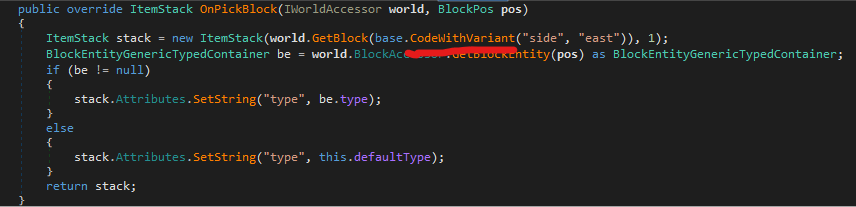
-
@Mrflaxe `BlockEntityChisel` is indeed the class you want but it's in `VSSurvivalMod.dll` not `VintageStoryLib.dll`.
-
As @Diff said, it's not an actual field but just a getter/setter method hence you cannot accept it using `___fieldname` as this is only a thing for fields. You'd have to either accept `___typeAttributes` and interface with it manually or use reflection: var pregnancyDays = Traverse.Create(__instance).Property<float>("PregnancyDays").Value; (I assume the utility method mentioned is referring to the `Traverse` class)
-
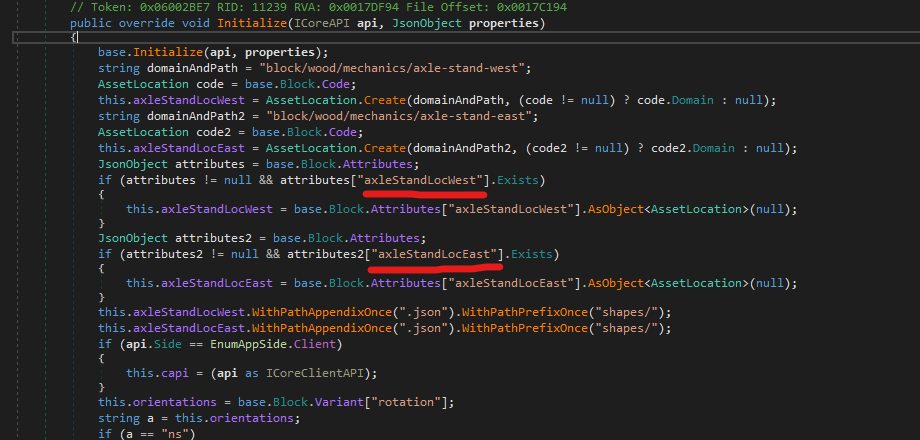
@joe saw They actually aren't hard coded, you can define them in the Block Attributes to override the default.
-
@AmethystZhou I haven't used it myself before so I don't have much in depth knowledge but it uses Dana's AttributeRenderingLibrary so would recommend reading their wiki and maybe looking into other mods using it. wiki: https://github.com/Craluminum-Mods/AttributeRenderingLibrary/wiki/Attributes-(ItemShapeTexturesFromAttributes)#name
-
Fence Crashing
The Insanity God replied to Micah Holmes's topic in Mod Development Questions/Troubleshooting
@Micah Holmes Well the fence classes are designed to select the variant that would connect the correct sides (I assume this is what you mean with rotation) and you just removed that altogether so makes sense that rotation doesn't work anymore... This is only relevant for stuff with the "BlockGenericTypedContainer" class (or a class inheriting it). Other blocks would generally use "HorizontalOrientable" (or "OmniRotatable") behavior but this won't work very well for fences as it has more then just rotations (it has different variants for connecting multiple sides after all) -
Fence Crashing
The Insanity God replied to Micah Holmes's topic in Mod Development Questions/Troubleshooting
You just changed your block class to ' BlockFenceStackAware' which requires a different kind of setup, like a "wall" texture and "-top" shapes. See `Vintagestory\assets\survival\blocktypes\stone\drystonefence-free.json` for example. -
Recipe not working
The Insanity God replied to Micah Holmes's topic in Mod Development Questions/Troubleshooting
Hmm how interesting, it seems that when you have a comment in an array it actually is read as an item in the array (of ValueType "comment") and because the game is manually grabbing each entry and trying to parse it to a GridRecipe, it ends up failing and crashes. As someone who likes to put down comments this is good to know.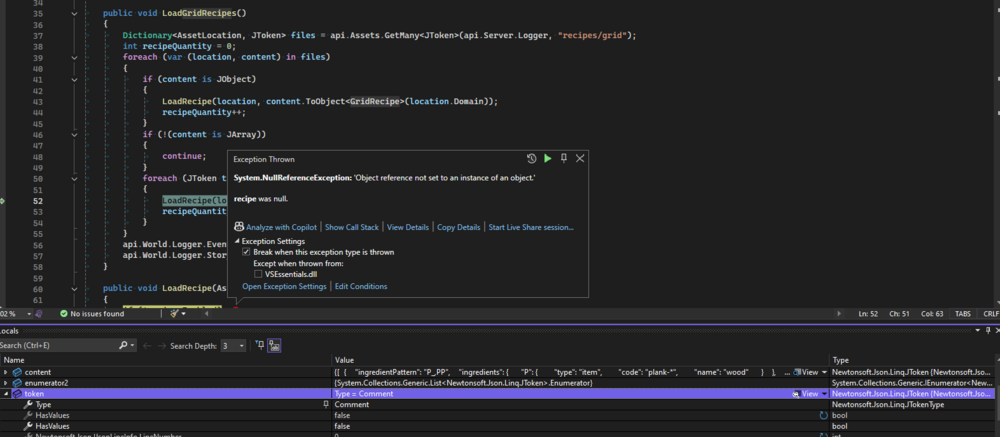
-
Recipe not working
The Insanity God replied to Micah Holmes's topic in Mod Development Questions/Troubleshooting
You sure? I comment out stuff in my files (including recipes) all the time during development and I never noticed any issue with that. Was under the impression that comments are ignored by Newtonsoft.JSON (the library responsible for parsing JSON) -
There is no such thing as "game:pressedmash-cranberry-dry", should be "game:pressedmash-cranberry". The Dry/Wet is decided by the presence of a "juiceableLitresLeft" attribute on the ItemStack. I'm not sure if inverted attribute requirements on recipes is a thing with pure JSON though (as in have it only allow items that don't have that attribute).

-
Sticks as Charcoal Pit Fuel
The Insanity God replied to aurora184's topic in Mod Development Questions/Troubleshooting
Hmm your packaged zip works just fine for me, I tested on windows 10 with 1.21.6 and 1.21.5 (just to make sure) without any other mods. So unless you are running some other mod with a conflict while testing then I honestly don't know what's causing this. This specific error message should only appear when it's trying to create a pit kiln -
Fence Crashing
The Insanity God replied to Micah Holmes's topic in Mod Development Questions/Troubleshooting
It's because the "drops" you defined are invalid "type" should be "block" not "blockfence" (type is purely to distinguish between "block" and "item") hence it's crashing, but you can just remove this entirely as BlockFence already has custom logic for dropping the correct variant and in doing so completely ignores the drops defined in the JSON file. -
Fence Crashing
The Insanity God replied to Micah Holmes's topic in Mod Development Questions/Troubleshooting
It's crashing because you have a "-" in the "code" field, this symbol is used as a separator for the variants defined in the variant group. In the case of BlockFence it has logic for always dropping the free (no snow cover) and ew (orientation) variant, this however is crashing because it's thinking that your base code is "lattice" and not "lattice-fence". (this custom dropping logic also means that the "drops" defined in the JSON are ignored btw) You also have an unrelated issue in your variant groups: You are adding [ "oak" ] and also everything in "game:block/wood" which already contains oak, meaning it will attempt to create the oak variant twice. (This is not fatal but will give an ugly error log) -
Sticks as Charcoal Pit Fuel
The Insanity God replied to aurora184's topic in Mod Development Questions/Troubleshooting
It actually does work (I tested it) but you can't place it by aiming at the stick pile because the hitbox is not a full block, you'd have to aim at a wall above it. Once you change the hitbox to end up as a full block you can place it just fine normally: [ { "op": "add", "path": "/class", "value": "ItemFirewood", //Only firewood is valid for charcoal pit (hard coded requirement) "file": "game:itemtypes/resource/stick.json", "side": "Server" }, { "op": "addmerge", //Has to be addmerge to prevent deleting other attributes "path": "/attributes", "value": { "firepitConstructable": true }, "file": "game:itemtypes/resource/stick.json", "side": "Server" }, { "op": "addmerge", "path": "/behaviors/0/properties", // need to select the first behavior through "/0" "value": { "stackingCapacity": 32, "bulkTransferQuantity": 8, "burnHoursPerItem": 0.1, //Change hitbox and scale so it ends up as a full block allowing you to place stuff by aiming at it rather then a wall above / next to it. "collisionBox": { "x1": 0, "y1": 0, "z1": 0, "x2": 1, "y2": 0.25, "z2": 1 }, "cbScaleYByLayer": 0.125, "upSolid": true // this is required to make it so you can put a firepit ontop of it and stack it more then 1 high }, "file": "game:itemtypes/resource/stick.json", "side": "Server" } ]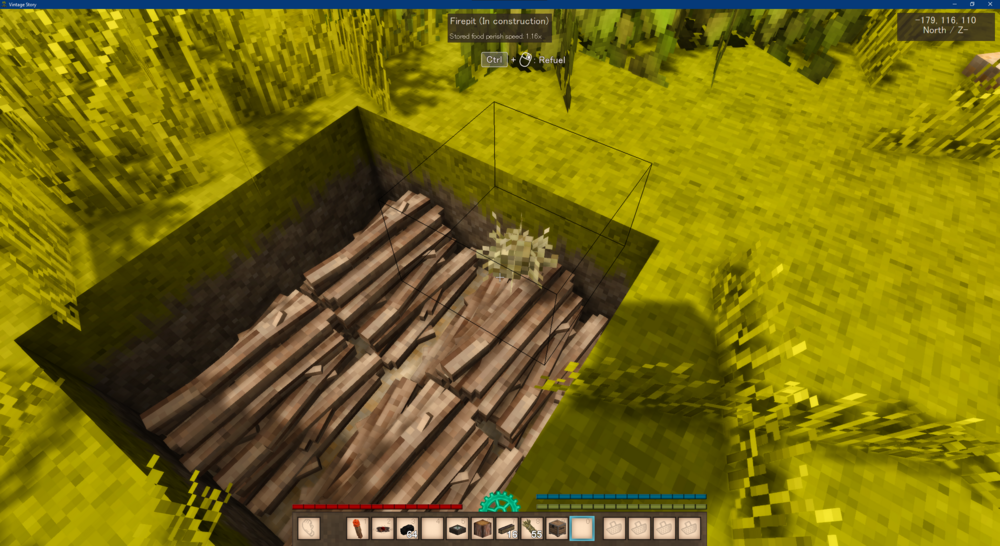
-
Sticks as Charcoal Pit Fuel
The Insanity God replied to aurora184's topic in Mod Development Questions/Troubleshooting
The efficiency is used to calculate the conversion to charcoal yes, idk if it's a 1 to 1 ratio though. (note: GetFireWoodQuantity collects the efficiency of the actual item, in this case sticks) NatFloat is a vintage story data type for generating random numbers https://wiki.vintagestory.at/Modding:NatFloat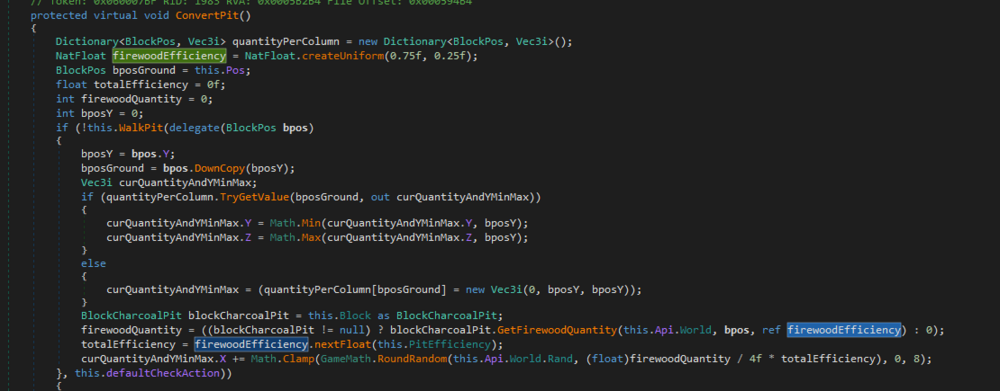
-
Block Face Conflict
The Insanity God replied to s3ptum's topic in Mod Development Questions/Troubleshooting
You have this invisible face because by default the game will try to cull any faces that are not visible (because they are touching a neighboring block) and your model does not cover the faces. You'd want to change the sideopaue and probably also sidesolid in the blocktype json file: "sidesolid": { "all": false }, "sideopaque": { "all": false }, As for not being able to place a block in the center position, well.. that makes sense as there already is a block there (your tent block that is). If using code you could probably use a BlockEntity or the Fluid Layer to somewhat make the space usable but it won't be easy. -
Sticks as Charcoal Pit Fuel
The Insanity God replied to aurora184's topic in Mod Development Questions/Troubleshooting
The attribute patch should be "addmerge" to prevent deleting other attributes The behavior properties path is incorrect should have a number indicating which item in the behavior list to edit, so "/behaviors/0/properties" for the first behavior (the game is made in a 0 indexed language so we start at 0) The behavior properties should also change "upSolid" to true, because otherwise you cannot place a campfire on it (which is required for a charcoal pit) All in all this would be the minimum changes you'd need for it to work: [ { "op": "add", "path": "/class", "value": "ItemFirewood", //Only firewood is valid for charcoal pit (hard coded requirement) "file": "game:itemtypes/resource/stick.json", "side": "Server" }, { "op": "addmerge", //Has to be addmerge to prevent deleting other attributes "path": "/attributes", "value": { "firepitConstructable": true }, "file": "game:itemtypes/resource/stick.json", "side": "Server" }, { "op": "addmerge", "path": "/behaviors/0/properties", // need to select the first behavior through "/0" "value": { "stackingCapacity": 32, "bulkTransferQuantity": 8, "burnHoursPerItem": 0.1, "upSolid": true // this is required to make it so you can put a firepit ontop of it and stack it more then 1 high }, "file": "game:itemtypes/resource/stick.json", "side": "Server" } ] Though you will likely also want to change the stacking model and it's ratio's (default one will look weird) and possibly also change the "efficiency" attribute (NatFloat) to change the conversion ratio to charcoal. -
Object Not Appearing
The Insanity God replied to Micah Holmes's topic in Mod Development Questions/Troubleshooting
Well I mean it's not really a limitation for code mods, but yeah still quite a lot of this stuff that needs to be refactored to be less hard coded. -
Object Not Appearing
The Insanity God replied to Micah Holmes's topic in Mod Development Questions/Troubleshooting
No the shape is fine, from the looks of it `ItemShield` has a lot of logic for rendering shields through attributes. The "construction" variant group states are used in a hard coded ways so a lot of the logic in `ItemShield` is not working because your item does not have one of the expected [ "crude", "woodmetal", "woodmetalleather", "metal", "blackguard" ] states variantgroups: [ { code: "construction", states: [ "scutum" ] } ], Relevant code: https://github.com/anegostudios/vssurvivalmod/blob/84c80e85f36e31d3b6454021da0fbbba4cba71a3/Item/ItemShield.cs#L53 -
Object Not Appearing
The Insanity God replied to Micah Holmes's topic in Mod Development Questions/Troubleshooting
the command you are thinking of is ".tfedit" (used while holding the item to bring up an interface for live editing these position transforms) -
Struggling with my JSON patch mod, SUPER NOOB
The Insanity God replied to happyone's topic in [Legacy] Mods & Mod Development
I normally just check the actual game files, but in this case it's a bit hard because the thing you are trying to patch is a value that's patched in. The `%appdata%\Vintagestory\assets\survival\blocktypes\soil\soil.json` file already contains 1 behavior (index 0, because the language is 0 indexed) and then a patch later adds the unstable behavior so I would assume it's at least index 1. -
Struggling with my JSON patch mod, SUPER NOOB
The Insanity God replied to happyone's topic in [Legacy] Mods & Mod Development
I can't help but notice the following: Your patch is a text file and not a json file. It's also missing comma's in between the different patches. The index is wrong on some of them (soil would be index 1 I believe not 0), you'd also have to ensure it runs after the base game patch (not sure if that's even a thing for patches but you could try dependson in the patches) I'll be honest though... this kinda thing is a lot easier and less prone to break with game updates and other mods when done from code.





