


Brady_The
-
Posts
733 -
Joined
-
Last visited
-
Days Won
7
Content Type
Profiles
Forums
Blogs
News
Store
Posts posted by Brady_The
-
-
-
Where did you download the game from and what version? I suppose the client area and 1.21.6? That wouldn't explain the missing files, though. Maybe your installation of Windows is doing something weird.I'd suggest you to reinstall VS but I doubt it would do you any good, considering the fact that you already did that twice.I personally would now get my hands a little dirty and see if doing some manual labour would proof successful.-
I'd download https://github.com/UserUnknownFactor/innoextract_win/releases/tag/670 into a special folder for it, start a command prompt in the folder and execute "innoextract vs_install_win-x64_1.21.6.exe". This will extract the entire installation file into a sub-folder called "app". -
Once the extraction has completed, enter the folder "app" and see if the server files are available. If they are, highlight the whole content of the folder and copy it. Head to your VS installation folder, paste the contents and skip any files which are already present. -
Now test if you can proceed with the server guide.
These steps really shouldn't be necessary by default, but something's going on in your case.Scrap all of that. I am just a gigantic moron without functioning eyes.
-
-
There you go.
(It took roughly 50 times longer to create that mod icon. Maybe I should have asked AI.
 )
)
-
If you are playing 1.22 you most likely ate a mushroom with psychedelic properties.
-
-
1 hour ago, Quertup said:
What is the purpose of the "Associate With" box and what happens if I decide to associate it with a "Single Game Account" of if I don't do it?
This is only theory, because I haven't done it myself, but I believe you choose to "not associate" if you want to gift the Supporter Addon. In that case you will most likely receive a Supporter Addon code per mail.
Great choice, btw, the devs truly deserve it!
-
I wonder if the opinions of Very supportive Vintarians are too precious to be deleted, because I am missing the option as well.
-
 2
2
-
-
Hello nixhiver, welcome to the forum and the game.
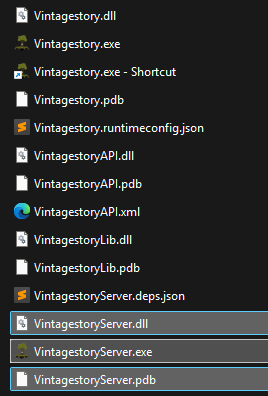
40 minutes ago, nixhiver said:Hey everybody, I am on Windows 11 and recently bought the game. While trying to create a server for friends to join using the dedicated server guide on the wiki I found that I don't have the 'VintagestoryServer.exe' file. Double checked it hadn't gone anywhere weird, but couldn't find the file anywhere. I checked windows defender to see if it had quarantined the file (suggested by a google search) but no luck. As a last ditch effort I deleted and reinstalled the game (twice!) but the file is still missing. I would greatly appreciate some help on solving this, thank you!
The server files should be in the installation directory. They are present for me in 1.21 and 1.22. If they don't show up for you after re-installing something must have gone seriously wrong. Very weird.
-
1
-
-
40 minutes ago, InternetDragon said:
I spawned like 500 traders in my creative base but now I can't get rid of em.
/entity remove e[type=trader*, range=x]
in which x is the range measured in blocks with the player as the centre."range" should be optional but I prefer to keep it in to be a bit more precise in targeting.
-
Textures:
- Your shape file doesn't contain legitimate texture references. They only contain names not paths.
- Your blocktypes file doesn't contain any texture references. This is very important if you want to support more colours (like different clay colours).
 In both cases compare your files against the Vanilla storagevessel files.
Because you are essentially creating variations of Vanilla assets it is perfectly fine to utilise the Vanilla textures. See Referencing Domains for a brief HowTo.
Recipes:
- All files contain errors and are, as a consequence, not read by the game.
Enable developer mode in the settings (interface -> developer mode. dev -> error reporter). This will give you error messages in the loading screen. It's also good practice to always have an eye on the logs (particularly client-main and server-main).
(Don't mind me, just copy-pasting my answer here in case anyone stumbles across this question in the future having the same issue.)
-
1
-
-
2 hours ago, SrGiggles said:
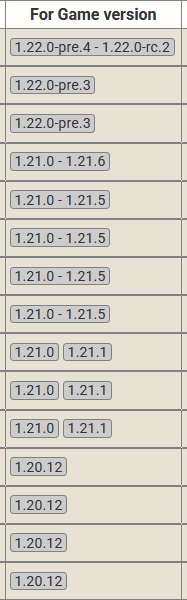
Ive been looking at this mod for a while now and Im starting a new world and would like to add it. I'm confused on which version Is safe to download for 1.21.6?
If you click on the Files tab of any mod it will bring you to a view that shows all available version for a mod. There you simply choose the mod version that either fits the direct game version or the range of the game version. In this screenshot it would be the fourth mod file from the top.
-
1
-
-
I myself am cautious about mods using anything that implies the usage of AI, to a point where I simply skip them, but I do not judge too harshly.
My personal take: If one has such a massive problem with AI thumbnails that they have to voice their concerns publicly, instead of doing that they should offer the mod authors to create a (better) thumbnail at the same cost. At the end of the day these mods are free of charge. Neither is one forced to use them.
-
7
-
-
1 hour ago, Spartankiller 73 said:
was playing on a new world when it crashed while looking at recipes relating to seaweed. i cant read/understand the report, so i ask the community for help.
The first crash was caused "immersivetpscamera", the second by "aculinaryartillery". You can see that in the line "Critical error occurred in the following mod:"
I would start by clearing the cache folder (found in %AppData%\VintagestoryData\Cache - just delete the folder "unpack"). Sometimes that fixes things.
If it doesn't and you repeatedly encounter the same problem I would go to the respective mod site and report the error there. The authors know their mods in and out and will be able to help much easier.
-
2
-
-
17 minutes ago, Peter Romanov said:
I'm slowly getting the hang of WorldEdit, and it's been interesting to work with this tool, but along the way, a question has arisen.
I've built a fairly complex landscape out of dirt blocks, and now I'm a bit stumped, as I need to somehow replace all the topsoil blocks to ensure they blend seamlessly with the surrounding terrain. Manually replacing each block would be incredibly time-consuming, and I'd really like to avoid that.
So, I'm wondering if there's a way to do this more or less automatically, using existing editor tools or console commands.I am not a WorldEdit pro by any means but, depending on how exactly your landscape looks and what you want to achieve there, I'd start wiith either the Pain Brush Tool (particularly with a focus on Depth Layer, starting at around 10:30) or the Air Brush Tool.
I recommend you to watch the whole video. Maybe you find techniques more suitable to what you want to achieve.
-
This particular error message is described here: https://github.com/anegostudios/VintageStory-Issues/issues/6517#issuecomment-3183224466
The mod list doesn't look too demanding but without having a deeper knowledge of your system it is hard to ascertain if the list is indeed not an issue.
If you can, I would suggest you to find out if the same error happens with no mods present. If the crash still occurs it is most likely a hardware issue. Here is somebody else having a similar issue with only one mod installed. Might be worth checking in there in case of Vanilla crashes for potentially better support: https://github.com/anegostudios/VintageStory-Issues/issues/7960
If the crash doesn't happen any more, it's time to employ a method called binary search to find the offending mod.
Important: Make a backup of your world before doing any of those tests to prevent any kind of corruption!
Edit: Also make sure that you are using the most up-to-date mod versions fit for 1.21.6.
Also clean up your mod folder, you have multiple mods with multiple versions (example: Multiple mods share the mod ID 'aculinaryartillery' ('ACulinaryArtillery 2.0.0-dev.11.zip', 'ACulinaryArtillery 2.0.0-dev.11.zip'). Will only load the highest version one - v2.0.0-dev.11.) in your mod folder. It shouldn't but still could lead too issues. -
6 hours ago, Bard the Shrimp said:
I was wondering if anyone knew where I could listen to an mp3 of the new songs being added to VS in 1.22. I've quite enjoyed hearing them in the recently released trailer but I cannot find any way to listen to them outside of it in their entirety.
Latvia in particular I would love to hear all of. If someone knows a way to listen to it I would appreciate the help.
The soundtrack is available here: https://lophi.bandcamp.com/album/vintage-story-ost. Currently it doesn't offer the newest version, though.
A lot of music players (at least Media Player (Windows 11) and foobar2000 can) should be able to play .ogg files though, so you should be able to listen to the files that are shipped with the game. You can find those in \assets\survival\music.(By default found in %AppData%\Vintagestory\assets\survival\music.)
-
2 hours ago, deathwolf54 said:
again how might one create such a creature?
The wiki has a very basic tutorial: https://wiki.vintagestory.at/Modding:Basic_Entity
If you get stuck somewhere, looking at Vanilla or Mod creatures which are similar to yours should help. I personally haven't worked on entities, so I can't be too much help.
To find information on how to make a creature harvestable, any Vanilla entity should do.
To find information on how to make a creature tamable and milkable, Vanilla sheep entities should help.
To make a creature shearable, you probably need https://mods.vintagestory.at/shearlib or https://mods.vintagestory.at/wool as a dependency to be able to reference wool items instead of creating them yourself. In the latter mod you should find examples on how to implement in the patches folder.
To find information on how to make a creature equipable and ridable like an elk, look at the elk. (Making a creature equipable is a bit convoluted so the task could be considered somewhat daunting.)That said, you presented a long and ambitious feature list. I would start small and get the basic creature to work first. Then go from there and add more features.
Godspeed!
-
24 minutes ago, cerberus_of_ferrets said:
Ctrl+F10
-
If people don't like the changes, they always have the option to install the inevitable 1.21 reversion mods.

-
1
-
-
It looks like https://mods.vintagestory.at/overhaullib is missing.
-
-
13 minutes ago, LadyWYT said:
I think it's going to have a pretty big impact on early game survival, given that now the player will need to actually sink some serious effort into farming
I only took a quick peek at the very first berry bushes I could find and neither had ripe fruits. Due to this small test sample I am not sure if it was just by random chance, a bug or if bushes simply don't spawn in bearing fruit. The latter would be very harsh.
Edit: It could have also been a seasonal thing. I was skipping time pretty generously testing other things beforehand.
-
1
-
-
.pre4 just dropped. Changelog included: https://info.vintagestory.at/v1dot22#pre4
The list of newly added features is rather short, but the bush propagation sounds very interesting. It's going to make berry farming for easy food access a lot harder, but a number one complaint is that food is too easy in VS, so this should be a good change.
-
3
-
-
49 minutes ago, Voxellian said:
Thank you. Wow, for the amount the coming update adds. It seems bitter sweet update for me. It adds a lot, while I am still trying to get my grips with the current game version. I just finished my first windmill; connected it to quern. It's about 10-15 block above ground. Hardly moves. I miss Minecraft redstone farms.
I feel that.
The quern shouldn't require too much power. If it is not completely windless it should rotate. It might require more than one set of sails, though. I can't say that I have too much current gameplay experience. I am still waiting on some (content of some) mods to be updated to 1.21.

-
1
-



Incorrect Russian translation
in Discussion
Posted · Edited by Brady_The
It would be even better if you create a crowdin account and correct any errors you find yourself: https://crowdin.com/editor/vintage-story-game/2/en-ru?view=comfortable#386700 If you decide to do that, don't forget to downvote any wrong translations to ensure that your translation is selected when the language files are downloaded.
Unless Anego has a Russian speaking devs on hand, it's probably hard to fix translations on a word-to-word basis, because certain replacements could potentially require more work to make it make sense.