Brady_The
-
Posts
739 -
Joined
-
Last visited
-
Days Won
7
7 Followers


Brady_The's Achievements

-
 Your attributes seems to be missing "pannedBlock" (see for example gravel.json). This could already be the solution to your problem. If that doesn't fix it, "inContainerTexture" might be required as well.
 -
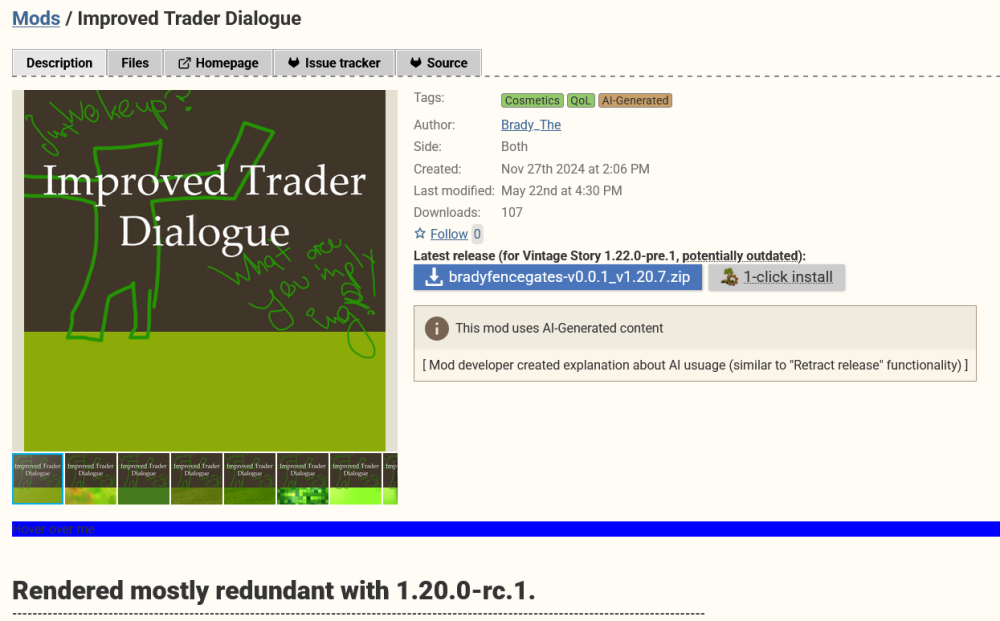
This is not a good idea. In my personal opinion the vast (and very loud) majority of people complaining about AI do so, because AI-generated thumbnails makes it easy for them. Remove these thumbnails and most if not all would probably praise the mods they claim to hate so much as the best inventions after sliced bread. People are not very smart. Moving the self-moderation from the user to the creator would be, in my opinion, the much better move. I would recommend taking a similar approach to modworkshop. On that database, mod authors have to denote mods including AI generated content with a tag, which also displays a banner on top of the mod details. Example: https://modworkshop.net/mod/57607 In the settings of modworkshop, users are given the options to block content, including tags. Failure to disclose AI usage could lead to penalisation. Little amateurish proof of concept:
-
It's a storage flag. https://github.com/anegostudios/vsapi/blob/caebe5cd00289f5deb7d9584ba8415f062225dc4/Common/Collectible/Item/EnumItemStorageFlags.cs#L49 Storage flags are summed up. Example: If you wanted your item to be put into a backpack and the offhand you'd give the item the storageFlag "257".
-
The old "allowed/skipVariants" format you are using only allows one {variable} per ingredient. The second in your recipe is effectively ignored. Switching to the new format for Grid Recipe Crafting introduced in 1.21.0 should get rid of these errors. { "ingredientPattern": "F,L", "width": 1, "height": 2, "ingredients": { "F": { "type": "item", "code": "framesaw-*", "isTool": true, "toolDurabilityCost": 8 }, "L": { "type": "block", "code": "woodstain:staineddebarkedlog-{color}-{logtype}-ud" } }, "allowedVariants": { "color": [ "black", "blue", "brown", "gray", "green", "orange", "pink", "purple", "red", "white", "yellow" ], "logtype": [ "acacia", "aged", "baldcypress", "birch", "ebony", "kapok", "larch", "maple", "oak", "pine", "purpleheart", "redwood", "veryaged", "walnut" ] }, "output": { "type": "block", "code": "woodstained-{color}-{logtype}-stain", "quantity": 16 } }
-
How to change sound files
Brady_The replied to Maisa Kuutonen's topic in Mod Development Questions/Troubleshooting
One small detail I forgot to mention: If you do not plan on sharing the mod, you can skip the zipping part. This is just for convenience and not required for a detection in the game. -
How to change sound files
Brady_The replied to Maisa Kuutonen's topic in Mod Development Questions/Troubleshooting
Somebody prepared a template for this case: https://mods.vintagestory.at/templateformusicadditions Starting with this will make it a bit easier. Download and unzip the file. Follow the instructions till "Navigate to ...". Now you write "replace some files". If you really just want to replace a couple of files, it'll be much easier to not use the subfolder as done in the template, but to overwrite the default Vanilla music files. This is rather crude, but is much easier than writing a patch that surgical removes some music tracks from the musicconfig.json file (which essentially contains the playlist). In this case navigate to the installation folder of Vintage Story -> assets -> survival -> music, write down the names of the music files you want to replace, add your music files straight into the music folder of the Music Pack Template (not the subfolder) and name them accordingly. In the example below I would replace the original daylight.ogg file with my own custom one. After you have done this with all the tracks you want to replace, skip to the last step of the template guide and follow it. Unless you are not interested in sharing the mod - zipping the files just makes the sharing easier. The game doesn't require zip files to recognise mods. If you want to replace all music files, you can essentially follow the template guide, with the small addition of changing a little detail in your "musicconfig.json". Replace the word addmerge with replace. This will overwrite the original musicconfig (or playlist), instead of just adding to the end of it. If you do not want to replace any music, but rather just add to the Vanilla playlist you can follow the whole template guide step by step. If you have any questions, feel free to ask them either here or in the mod page - the latter would help the author to improve the template, but either is fine to me. In case you are asking yourself, why the Vanilla music is contained in a "survival" folder but your music files are in a "game" folder - good question and eyes. That's because "game" on the mod side acts like an all-encompassing stand-in for all folders in the Vintage Story directory.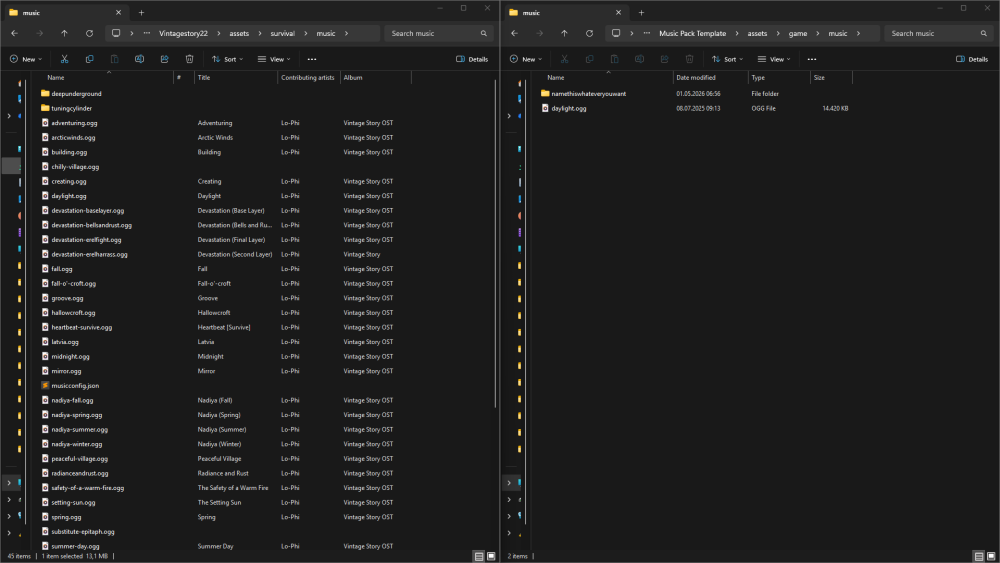
-
It would be even better if you create a crowdin account and correct any errors you find yourself: https://crowdin.com/editor/vintage-story-game/2/en-ru?view=comfortable#386700 If you decide to do that, don't forget to downvote any wrong translations to ensure that your translation is selected when the language files are downloaded. Unless Anego has a Russian speaking devs on hand, it's probably hard to fix translations on a word-to-word basis, because certain replacements could potentially require more work to make it make sense.
-
https://www.vintagestory.at/refund.html/
-
There you go. (It took roughly 50 times longer to create that mod icon. Maybe I should have asked AI. ) bradythrowablebricks.zip
-
Is the game supposed to occasionally go rainbow-y?
Brady_The replied to Silfrenbirce's topic in Questions
If you are playing 1.22 you most likely ate a mushroom with psychedelic properties. -
WorldEdit - How do I change the topsoil block?
Brady_The replied to Peter Romanov's topic in Questions
3332_yQ4dxcBCkXR54rLUd2m2.mp4 -
VS Forums update "let posters delete their posts"
Brady_The replied to DUCATISLO's topic in Suggestions
I wonder if the opinions of Very supportive Vintarians are too precious to be deleted, because I am missing the option as well. -
Is there any way to permanently kill a trader
Brady_The replied to InternetDragon's topic in Questions
/entity remove e[type=trader*, range=x] in which x is the range measured in blocks with the player as the centre. "range" should be optional but I prefer to keep it in to be a bit more precise in targeting. -
Textures: - Your shape file doesn't contain legitimate texture references. They only contain names not paths. - Your blocktypes file doesn't contain any texture references. This is very important if you want to support more colours (like different clay colours). In both cases compare your files against the Vanilla storagevessel files. Because you are essentially creating variations of Vanilla assets it is perfectly fine to utilise the Vanilla textures. See Referencing Domains for a brief HowTo. Recipes: - All files contain errors and are, as a consequence, not read by the game. Enable developer mode in the settings (interface -> developer mode. dev -> error reporter). This will give you error messages in the loading screen. It's also good practice to always have an eye on the logs (particularly client-main and server-main). (Don't mind me, just copy-pasting my answer here in case anyone stumbles across this question in the future having the same issue.)
- 1 reply
-
- 1
-

-
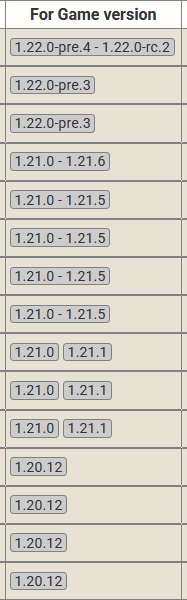
If you click on the Files tab of any mod it will bring you to a view that shows all available version for a mod. There you simply choose the mod version that either fits the direct game version or the range of the game version. In this screenshot it would be the fourth mod file from the top.