


captanredbeard
-
Posts
9 -
Joined
-
Last visited
Recent Profile Visitors
279 profile views


captanredbeard's Achievements

Wolf Bait (1/9)
15
Reputation
-
 Another quick point, it's important to keep these proposed changes to tutorials and guides on a good pacing, especially early on. The reason I suggested guided intermediate tutorials that a player could post onto the moddb is because it gives them a nice big win and attention from other people before they get into more complicated brain bendy stuff. It's also why I highly recommend pushing teaming up with other modders to combine skills, as knowing that someone is there to back you up if you burn out or get stuck on a part of the mod that you don't know how to code yet, does wonders to help keep you learning and moving forwards. You might not be able to figure out Block and Item Interaction methods, but your buddy Joe the software dev as a job is willing to fix you up in a jiffy in exchange for a model or two.
 -
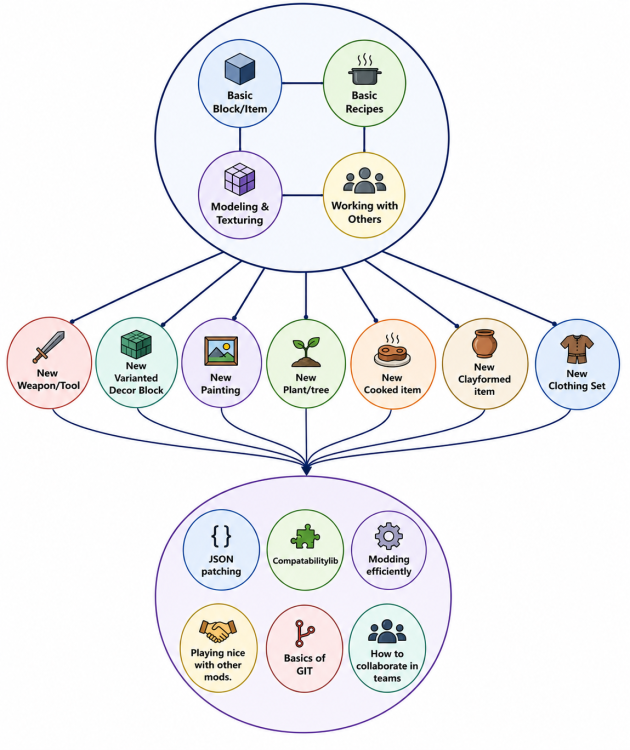
First gonna lay out where I'm coming from here. I started modding around 9 months ago or so, and when I first started I only knew JSON to a moderate degree. I taught myself C# to an ok degree so far, and while most of my published mods are JSON heavy, I have a couple that are using C# to a higher degree. I've also trained/guided a LOOOOOOOT of other people into modding, and would often dig through the wiki, game assets folder, API docs, and github for existing snippets of code or items/blocks to act as templates or examples when adding new items. I'm gonna try and split things up into a paragraph or two per area of modding/the wiki that needs focus. Resources https://wiki.vintagestory.at/Special:MyLanguage/Category:Modding https://apidocs.vintagestory.at/ https://github.com/anegostudios VINTAGE_STORY/assets The main resources I use both in my own projects and when finding the location of code for others in their own projects. The wiki is usually the best place for JSON. If I can't find the JSON format for what I'm currently working on, then I usually have to check the API, or worst case scenario dig through the raw C# classes on the github to find the object related to those JSON properties. It's usually the worst when I'm working with either JSON files in the config folder, or more obscure things like the details of allowed properties in shape files, or composite texture objects. The base game assets folder is where I usually go when I have an item which I'm working from, such as a new shield, sapling, painting, or other block or item that has a vanilla equivalent. It takes a little time to memorize where everything is, but when content modding, it's sometimes easier to just search all the JSON files in the assets folder for a specific JSON property that's not explained on the wiki or more obscure. for C# work, the majority of my digging is either via the API or searching the github repos for related code. I sometimes need to revisit the basic block and item code pages of the wiki in order to remember the basic format, but it usually isn't all that helpful. IDE setup and modding templates I've also recently moved to arch linux, and also VScode as my code editor, and setting up my IDE and handling my building code is definitely more painful then before. I wholeheartedly agree with @Nat_VS's second issue that we need to update the wiki pages and mod template to better facilitate more Operating Systems and modding cases. Maltiez has got his template, which I like the facts that his can run several instances in one Visual Studio instance. It makes developing several mods in one IDE a little easier, but on the downside it is harder to navigate and less intuitive for newer modders to handle then the csproj files and modinfo setup used in the anego provided template. I think there are about three different wiki pages dedicated to either setting up an IDE in general, an IDE on linux, and an old one for linux setup. The old ones should likely be removed or clearly listed as legacy pages. Biggest issues I find with the modding template rn are as follows. Linux support isn't the best, at least in my experience. I'm on Arch with VScode, and it's taking a decent bit of tweaking to each mod I have to properly build. Support for several mods in a parent directory. (currently you have to store mods as separate projects, an it's not easy to simultaneously work on and build/test several smaller mods and run the game in order to test them.) I tried resolving this myself with my Biodiversity git project, but it's still not perfect. Some people I've met don't really like how the folders are nested, where it goes If there are some modders skilled in writing the cakebuild or MSbuild files that control the file structure of the mod template, then we could likely co-opt the help of modding circles like @HugoCortell's to get feedback on proposed mod templates and areas needing improvement. Teaching New modders / Tutorials Most of the new things I start new people onto is first the basic modding tutorials and then onto some form of small project that they can complete with little to no C# work. Some of the more popular ones were clothing items, gag weapons, new blocks, shields, armor, and new plants. After that point they're usually well off enough to help one of the programmers by making the items and blocks that use a new custom class, or they move straight into learning C# themselves. By that point you're usually already using the API, JSON reference, or skimming through the old tutorials for information instead of reading through them all the way. For that reason I'd suggest we split up content modding at least into self guided tutorials that get you ready to work with others, and reference materials like the Item JSON properties or Recipe properties page that are more detailed and are less linear and more just information. First you learn how to use the IDE, and the basic structure of the assets folder, then move onto making your first block and item, and how to use VSMC, VMC2 or Blockbench to modify existing models or make models from scratch. You then get some extra tips and tricks on how to read logs, and how to work with other people and divide skillsets to make better mods, and move onto one of the intermediate tutorials. Each of the intermediate tutorials is self contained, and each one walks you through each step of the process or directly links to one of the JSON reference pages. For example instead of a lang file section in each tutorial, it links you directly to the exact page and subsection for adding a lang entry for that item/block type. Every intermediate tutorial gives you an end product which you can rename and retexture/remodel the tutorial assets, and now you have your own completely distinct mod that you can post on the moddb as your first win and first dopamine hit. After the intermediate tutorials and you have a mod or two out now, we give a capstone to fill out the rest of the JSON related stuff, and get you learning how to read the reference material and work with others on more unique modding projects in groups. Advanced tutorials on world gen, entities, JSONpatching / compatabilitylib, and more advanced collaboration driven stuff like Git, scope planning, the old modding efficiently tips, and anything else needed to get them to the point where they can read and understand the more detailed and information filled reference wiki pages. Only couple things I'm not sure where to fit in would be entities and advanced modeling work like animations or attachment points, Cue my sh**ty AI diagram to try and visualize my point. Resources Item JSON properties is an ok example of this kind of page. They are less readable then the tutorials, but they have far more information available and you spend less time skimming in order to find what you're looking for. There's been countless times that I've had to skim through the two grid recipe tutorials in order to find a specific syntax for a varianted item and the limitations there.We can throw some examples either on a sister page or a dropdown for advanced use cases. https://wiki.vintagestory.at/Modding:Item_Json_Properties https://apidocs.vintagestory.at/json-docs/jsondocs/Vintagestory.API.Common.GridRecipe.html The World gen pages and json files located in assets/game/config are frequent culprits here. I often find myself searching the API or github for hours to find out how XYZ json file is parsed and utilized in the game if it's from the worldgen or config folders. As I've just read from @Domtron Vox above. Splitting it into Guides, Notebooks, and References sounds like a good idea. the Basic and intermediate tutorials are guides, and the level above either notebooks like world gen and JSON patching, or references like the master recipe or master grid recipe resource with advanced use cases. Code If someone is getting into coding in C#, by this point I hope they're either alraedy an accomplished programmer or they've managed to find someone to work with that is a programmer, and they can slowly learn while having help completing what ideas they have in their mind. This is exactly how @Owling and I first started with his shields mod. I would come in and give comment on and fix any issues with his C# parts, and then he'd do the rest and see both the broken and fixed versions and get to compare. If that's not the case, then just given the nature of that you can code almost anything into the game, you're liable to get of track quickly, and in my opinion guides don't work quite as easily as they do with content modding. I think the current code tutorials for the simple block and simple item are alright, but it might be good to have some form of progression here where you first learn the basics of how to use override methods in a block/item class, and then have a notebooks on particles, inventories, GUIs, BlockAccessor, etc. and then players can attempt to mix and match their desired effects to make some simpler items and blocks that follow a trigger > effect format. Conclusion Gonna try and wrap this up now. I think that first the mod template needs a good go over to allow for some more flexible modding setups, while we re-write the wiki page for IDE setup for more operating systems and IDE programs, then move onto splitting tutorials into step by step guides, followed by more detailed resources for content modding. If we can somehow co-opt the modding community into writing the wiki pages and making a template, that'd likely help take the weight off of the VS devs. I think the main put off for me on wiki writing is the way you need to manually format the entire page if it's a new one. Maybe I or someone else can host a regular discord VC hangout where we get together and write up wiki articles together, and then any kind of roadblocks to writing wiki pages can get beaten down easier.
-
captanredbeard changed their profile photo
-
Rework Shape system to use BBmodels instead of the VSMC
captanredbeard posted a topic in Suggestions
Currently what we have in terms of shape files certainly works, but it's harder to make more complex shapes with just cubes. If we changed the ways shapes/block models work to either use Java/Bedrock JSON files, GLTF, or a custom format compatible enough with blockbench or blender to be exportable via a plugin, it would make creating complex models much easier then when using the current VSMC Sure making and maintaining a blockbench or blender plugin would take time and resources, but using blockbench as a base would save the Vintage Story team the time and cost of needing to develop and maintain their own Vintage Story Specific 3D modeling software. Wouldn't changing the shape format, and writing a plugin be easier then developing and maintaining your own 3D modeling software?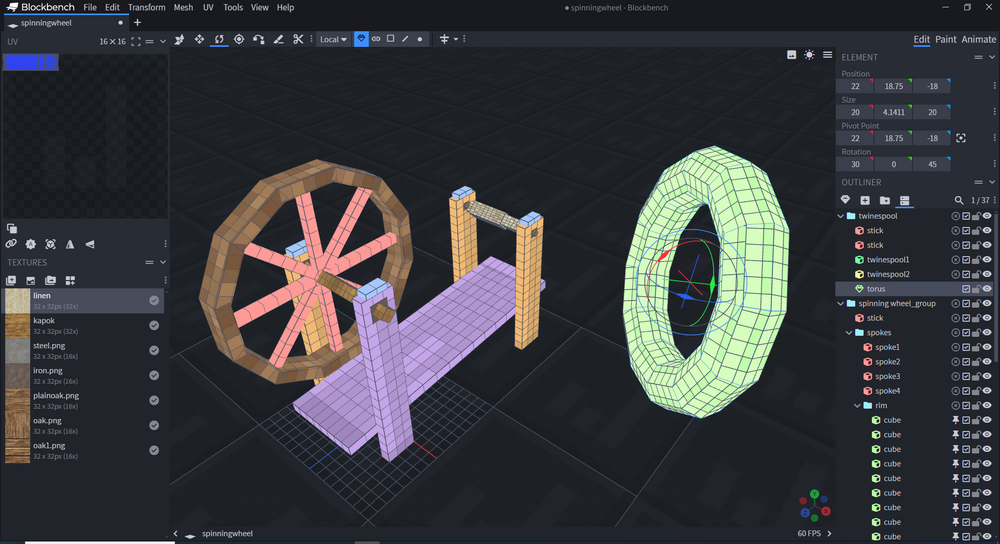
-
- 1
-

-
All this sounds amazing, but is the kind of thing that should be regulated to a mod.
-
Sure, we have the version in the bottom right corner, but It would also be nice to see it in the window title as well

-
- 2
-

-
Cartography, Coligraphy, and Ceramics Mod
captanredbeard replied to exception_null's topic in [Legacy] Mods & Mod Development
I was actually just thinking about making a stoneware/porcelainware mod to expand the beehive kiln, if by glaze you mean glazing pottery, then I'd be happy to work on something with ya. -
Carry on does help, however it only helps with moving barrels with fluids from one place to another (and at a very slow pace at that.) It does not help with storing general fluids inside of barrels and using barrels as a method to store large amounts of fluids in say, a lime shed, to pull out and use as needed. Purposeful storage likewise helps slightly with barrel racks and tuns to use as fluid storage, however both are stationary objects and cannot be moved once filled with even 1 Liter. If both mods interacted with each other, it would almost fix my second suggestion, but sadly they do not mesh together perfectly
-
I've recently started using barrels a lot more as I'm a Tailor on a Server, and therefore using a lot of barrels for leather, cloth dying, etc. Here are a few suggestions I have in regards to making barrels easier to use. 1. making quicklime, borax, and other recipes involving instantly converting water to another liquid via powder/item. Currently, to make a solution of quicklime, you MUST, ratio out both the water, and the lime to the radio inside the recipe book and only then will the water in the barrel convert to quicklime. I suggest that when an item is placed in a barrel and the stack size is larger than the recipe required, the game converts the water to quicklime, and the lime powder is subtracted leaving any extra unused in the recipe in the slot to be removed or used later. 2. Greater Seal-ablity and Movable Barrels. Option to seal and unseal barrels that don't have a sealed recipe to allow for moving them around. buckets stack to 4, so if barrels aern't stackable, it means that you only gain 10 Liters per slot by putting the fluid into a barrel. As shown by this lovely stock image, there are sizes of barrels which people carry on their shoulders, and barrels of similar were often used on ships for drinking water and other fluids. Mods such as A culinary Artillery, and Food Shelves, provide greater fluid storage, however you can't move the tun if it has fluids, and bottles are useful, but don't have the volume to be used for industrial purposes.

-
One really annoying control mechanic I keep trying to do it shift click items into an inventory and it instead moves into my inventory/hotbar instead. When the inventory and hotbar windows are open, in addition to a container, shift clicking items from the hotbar defaults the destination to the player's inventory, and vice versa. This isn't changed when you also have an inventory like a chest or clay vessel also open, meaning that shift clicking only goes into the vessel if your hotbar is completely full. It's more intuitive to me, and probably many others, that the container you open has greater priority than your own inventory, and therefore shiftclicking targets and free slots inside the container first.
- 1 reply
-
- 2
-
-


