


Professor Dragon
-
Posts
709 -
Joined
-
Last visited
-
Days Won
3
Content Type
Profiles
Forums
Blogs
News
Store
Everything posted by Professor Dragon
-
Silly question time . . . it is just YOU who has this issue on the server? I'm wondering if it is a hardware issue (like the mouse) or O/S issue, as you have eliminated most if not all of the Vintage Story client side software. If it is just you, see if you can get access to a friend's computer, load Vintage Story and access from there with the same issue or not. Or ask the server administrator to try logging on with your credentials. If it is not your server, try contacting the server owner. They can access the server logs. You will likely need the server and client logs to access either of the next two sources. There is a Vintarian Support section on this forum which handles troubleshooting here: https://www.vintagestory.at/forums/forum/15-vintarian-support/ The VS Issue Tracker, which would need the full log set that the server owner can provide is here: https://github.com/anegostudios/VintageStory-Issues I don't know if I can add much more. Professor Dragon.
-
Try the copy and repair idea then. If that still fails, you can send me a copy of your world save and I'll try loading it and see if I get the same issue. Private message me the save file location link. Only if it is 8GB or less though . . . that's all the hard disk space I have left at most Professor Dragon.
-
Well, my very first quenched item, my steel hammer (when I was just starting steel and didn't have a lot), shattered on that 5% chance. "Typical" I thought. I'm just doing a single Quench and one Durability buff now - I'm discouraged from trying more.
-
 Hello @Nickitkat, Welcome to the forum. I've tried on v1.22.5 (Stable) with World Edit, Paintbrush tool and can replace fences and slabs one by one with a right click. The method has two parts: 1) Bound your Selection to be ONLY the parts you wish to replace with the select block. Taking an example from your windmill, this might be every fence in the front fence selection only. Use "/we constrain selection" 2) Change the Paint Brush tool to Mode "Replace Selected Block", put the block that you wish to replace into your Hot Bar slot and then you can <right mouse> drag and only items within the bounded selection (1) will be replaced. CAUTION: This does NOT check for original block type - it just overwrites whatever block is there. I found this method from Tyron, the lead developer in another thread: "1.19 allows you to constrain all tool brush operations to your selection via "/we constrain selection". That plus a large enough paint brush with place mode "Replace selected" should about do the same thing." There is also "Chisel brush Tool" which I THINK does something similar for chiselled blocks, but have not tested. I'm pretty sure that the QP chisel mod can help to some extent, but you'd need to go watch a video for that to confirm. The downside is that you will need to do that selection for every part of your build. It is not a "search and replace all" ability. This makes it good for things like a large section - such as a big, uniform wall. But poor for a complex build with lots of little parts. Honestly, moving over to Creative and replacing it block by block might be easier. Hello @Tyron, Is it possible to do a "Search and Replace" on a bounded section in a build? For example, to bound a whole build and replace pine fences with birch fences? Or is this a case for an Export, text file search and replace, and Import? Thanks, Professor Dragon. EDIT Hello @Nickitkat - I experimented some more, and I think that doing an Export and then manipulating the text file is the way to go for you. 1. Select and bound your build. 2. Export the build eg "/we export D:\MyVSExport.json" This will generate a file with contents similar to the following: {"GameVersion":"1.22.5","SizeX":4,"SizeY":1,"SizeZ":3,"BlockCodes":{"11667":"game:woodenfence-purpleheart-empty-free","7575":"game:cobblestoneslab-sandstone-down-free","11704":"game:woodenfence-baldcypress-s-free","11732":"game:woodenfence-baldcypress-ne-free"},"ItemCodes":{},"Indices":[1024,2048,1,1025,2049,2,1026,2050,1027,2051],"BlockIds":[11667,7575,7575,7575,7575,7575,7575,7575,11704,11732],"DecorIndices":[],"DecorIds":[],"BlockEntities":{},"Entities":[],"ReplaceMode":2,"EntranceRotation":-1,"OriginalPos":{"X":511964,"Z":511890,"InternalY":114}} 3. Manipulate the text file with a Search and Replace (I find Notepad++ useful, but even basic Notepad will work). TIP: Make up a simple build with the block types in your original build, and the block types in your replacement parts - this will give you a list of both names. 4. Import the file with World Edit. Professor Dragon.
 -
No, chiselled snow blocks do not melt. I created a test world on the current v1.22.5 (Stable) and advanced time to confirm. Professor Dragon.
-
Could be a bug, especially if you bought the map on the earlier version and only travelled during the later version. I've never seen a trader spawn their whole base underground, no. They should be above ground - maybe surrounded by trees, but above ground anyway. So you have a number of options. Wander around on your own until you find another Treasure Hunter. They're not really rare - possibly far apart, maybe, but not rare. Spawn one in with commands or with a mod Try a "wgen" in those chunks and see if one generates (maybe won't) If you just want the map or item they sell, then use Creative to gift it to yourself Try buying another map from a different Trader and seeing if they give you a new location Professor Dragon
-
EDIT: Ooops. Didn't' see that you ran the server. In this case, create a Copy of the World, run it in Repair Mode, then continue as below. It still sounds like a mod issue, but there could be a corrupted chunk. _ _ _ __ This sounds like a mod issue. Check that your mods are on the servers supported mod list, and the right version. Disable any client mods that you have that aren't on that list or get the right version. If the issue is not at your end, then reach out to the server's support page, or whatever they have. It could be a server side mod/issue. Ask if other people have a similar issue on that server. Be sure to note anything unusual, such as if you are using Linux. See also: https://wiki.vintagestory.at/Troubleshooting_Guide Finally, your own logs (when you start a world, there should be a logs link you can click) might have some information. May be at: %AppData%\VintagestoryData\Logs Professor Dragon.
-
food storage Using Crates for food storage in a Cellar
Professor Dragon replied to DapperLucario's topic in Questions
@Rainbow Fresh has the technicalities right. I'll just add my own experiences, as I was in a similar position with huge amounts of grain. The crates within a cellar DID cheaply do the trick, for a while. Ultimately though, the fundamental problem was that I had too much grain to use. I think that the "input vs output" is as important here as "How long will it keep?" So, sure, use Crates to get over a temporary storage hump, but longer term think about getting the annual input/output balance right. Set up animal farms (This will end up just giving you a different type of volume output issue) Set up bakeries near Traders who buy bread Set up rot farms to make compost to make . . . more crops Accept the losses as the cost of having nice big grain farms Also, Artisan Trader Storage Vessels are very pretty, and just having a few walls of those and ditching the crates is probably a nice medium term goal. Professor Dragon. -
Well, you're up against it, and it looks like you're aware of the issues. Not only can't you get flax from ruins, monsters or traders, but the temperature range not only hits growing conditions hard, but also natural flax spawns. Maybe you can find some at elevation, and then grow it at elevation, but I'm not sure. The good news is that there is now the water wheel in the game, and I don't see any flax requirements to get to that level (???). So you don't need a huge flax farm for windmill sails. Also, don't forget that going South may get you to colder climate quicker rather than north, depending on how you got to your current spawn location. Enjoy your run. Professor Dragon. P.S. If desperate, mods or /gamemode creative, especially if you like cabbages.
-
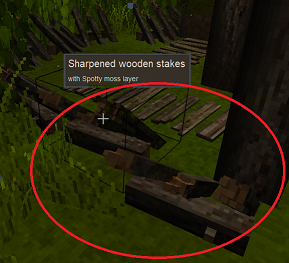
This is not technically a bug, but it is a design choice which is producing an unexpected behaviour. There are "Sharpened wooden stakes" outside on of the Survival Goods Trader's new outpost. On level ground, they: BLOCK movement when trying to EXIT out past the spikes ALLOW movement when trying to ENTER into the spikes SUGGESTION: If anything, this makes sense to be reversed. I realise that you can do jump to clear this when leaving, but it still feels odd. Professor Dragon
- 1 reply
-
- 4
-

-

-
help required PLEASE someone fix my save game
Professor Dragon replied to Benjo's topic in Questions
Hello @Benjo, Sorry about your world. It's a reminder to all of us to take backups - I haven't done one lately. @Rainbow Fresh is right - it would really help to know what the issues are. I have done the following though: Downloaded cumberland.vcdbs and copied to my Saves folder. I ignored the other two files. I clicked the Pencil icon and chose "Run in Repair Mode" on v1.22.5 (stable) This started up and I was able to access the world, but it did give errors along the way I flew around to confirm I could see some of your activity Save and Exit, rerun in Repair mode - this time no errors Once in the world, there were chunks missing immediately at the spawn in location 0, 125, 0. Only a wgen command to regenerate the default terrain in that location would work. (Potentially those other two files contain uncommited writes, but I didn't want to go down that path in this test.) The rest of the map looked good. I found your base - looks nice. Maybe try those same steps and see if it helps. Professor Dragon.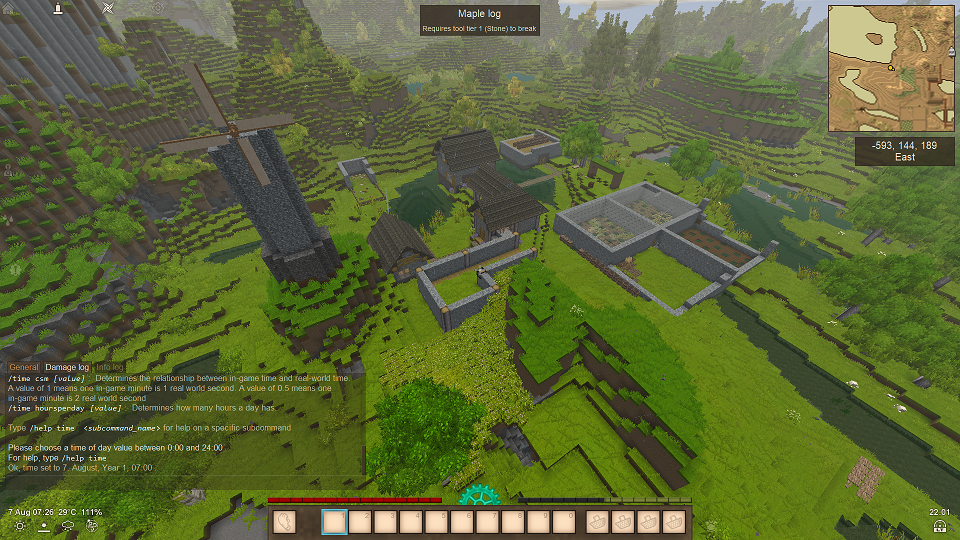
-
How do i keep all nutrition bars full all year?
Professor Dragon replied to Hunbird1's topic in Questions
. . . You can do THAT? Good reminder. This is one of those things that I knew and then completely forgot. -
How do i keep all nutrition bars full all year?
Professor Dragon replied to Hunbird1's topic in Questions
@Maelstrom is right. Bears can climb blocks but not fences. Some of them also rarely can jump - but typically only towards a player. I've yet to experience that myself, but then I'm usually trying to stay away from them. Double-height fences stop the head-butting. I always do this near animals and paths . . . the little buggers darlings always get ya. Double-height exterior perimeter fencing should be a standard anyway, just to avoid annoying Bowtorns sniping you as you honestly work the land. The "belt and braces" animal enclosure will have: Double-height exterior fence. "Air-lock" entry gates to lessen escapes. An interior fence to contain the animals. Non-spawnable blocks for the animal enclosure and/or a permanent light source covering the whole enclosure to the distance of the perimeter fence. Light "Transparent" roof. Optional, but removes all chance of incursions, escapees and gives nice protection from rain and hail. Bonus points if the enclosure meets "house" room conditions, as then you can work without wind. Seperated male and female animals. Seperated Generations of female animals. Lightning rods covering to the perimeter fence. A secure back-up breeding pair. Safe feeding mechanism, such as large troughs partway under fences or ladders and walkways above. Safer harvesting methods. Depends on your risk level, but you can treat them like a drifter spawner and half-slab a killing/milking chamber, or at least separate pens to isolate out members. (Remember kids - the sheep and goats have it in for you.) Storage Vessel/s to contain food for feeding. Buckets for milking etc. A nearby farm to produce fodder. Or just leave them in a few large separated fields and run around like a madman - that's an option for the brave few Professor Dragon. EDIT Optional: 5 deep pit traps beyond perimeter fence without ladders inside. -
There is no configuration file or command to change this currently. I can't find a mod for this - but I only did a quick search. Adding an Option to disable/enable the Respawn Glow has been suggested previously - but you may want to add your own full Suggestion to the Forum. It is time related for the glow to cease effect, so maybe test (use a small Creative world) the easiest way is to bump the time forward with a command? A quick test on my Creative World seems to show that advancing the clock 3 hours seemed to do the trick. Of course, you do lose 3 hours. eg If it is currently 02:00 when you die, then "/time set 05:00" will advance your day 3 hours and make you lose the glow. I'm NOT a coder (NOT!), but I found this snippet: https://github.com/anegostudios/vssurvivalmod/blob/36d9550e19c32197e8f0d8a9780a5d0b1320dc7c/Entity/Behavior/BehaviorPlayerRevivable.cs#L61 entityPlayer.LastReviveTotalHours = entityPlayer.World.Calendar.TotalHours - 2; // No respawn glow So if you wanted to do a deeper dive, you could start using the Search function against that code database, with the aim of finding out what causes the glow, and then knobbling it. Messing with the above calculation would be a start. Professor Dragon.
-
can't see letters in the key controls screen
Professor Dragon replied to Kekic10's topic in Questions
Hello @Kekic10, You've got two posts open for this - maybe delete the other one. I'm going to assume that you're on Windows and the latest version of Vintage Story. Try backing up and deleting the file clientsettings.json. The process is mentioned here, for a different issue, but the steps would be the same: https://wiki.vintagestory.at/Troubleshooting_Guide#I_cannot_login_inside_the_game Otherwise, let us know more details, such as old working installation or new one, the O/S and version and anything else that may be relevant, such as whether other tabs work, if mods have been disabled and so on. Thanks, Professor Dragon. -
Yes, it can melt. This is a recent change. Gameplay balance affecting changes Tweak: Glacier ice and packed glacier ice that have been collected and placed again will begin to melt, if the local temperature is above freezing Professor Dragon.
-
How do i keep all nutrition bars full all year?
Professor Dragon replied to Hunbird1's topic in Questions
Hi there, Not trying to be flippant, but I suggest you just play the game more. The actual answer depends on what Class you've chosen, and how much health you've assigned, you'll notice these things: In your first year, fruit nutrition bars will be easy to fill up, as when berries come in, they're scattered about the world. Before that, if you're the hunting type, then protein will fill quickly. Grain will take a little longer, but once you have your first farm up, then grain will never be an issue ever again. It keeps for ages and is a good food. Dairy is almost a vanity stat. Although you can buy cheese from a Trader, in practice, it is probably a multi-year set-up of raising animals to get a steady source. And they're honestly a lot of trouble when you're starting out. Growing fruit trees is another multi-year endeavor (or finding them in the game). But you only need a few to be set for life. You'll also notice that you like some activities a lot more than others. Maybe you're a born hunter, or gear trader, or grain farmer. That will influence your nutrition. Any of the things you've mentioned will be a good start for food. I always start with a quick farm, preferably in a greenhouse, but that's just me. Finally, full nutrition bars aren't really required in this game. Having enough food not to starve IS required, but anything beyond that is just a bonus - unless you're expecting a lot of combat, and then having better armour and weapons is actually your bottleneck, not food. > How much food of each type should I store to make sure I can keep all nutrition bars full all year? A: Until you get farms going, you can always do with more food of any type. Once you have farms going, you'll have too much of that type. But a Storage Vessel full of any food will do to start. > Also what is the best forms to keep them in,I was thinking of keeping grains and vegetables in storage vessels in my cellar, make milk in to cheese, Yes, that's fine. > and just kill one of my animals (likely pigs) or collect eggs when I need protein. Either is fine. Or hunting. Chickens are a pain to raise initially. Then they're a pain to harvest for meals. You really do chickens (a) for the farm vibes or (b) to trade their feathers. > Not sure about fruit maybe wine? Find a few fruit trees or raise your own. Plant from berry crops. Wine is something to do for fun, not because you need to. > How many animal an how much food for them do I need for meat and cheese, and how much if i keep chickens for eggs and feathers. You need a "small herd" to get enough for breeding up the generations and to cull the extras. > Speaking about cheese will cheese-making use up pickled vegetables or can I reuse them. No, the cheese making process consumes them - but it's not a lot. You'll typically have pickled vegetables coming out of your ears, compared to the amount of cheese you have. Professor Dragon. -
Maybe add your logs and version to this issue: Berry bushes losing traits #9215 https://github.com/anegostudios/VintageStory-Issues/issues/9215 Professor Dragon.
-
Has Anybody Else Experienced Glitchy Crafting Output Slots?
Professor Dragon replied to ThePeterCopter's topic in Questions
If you were to enable that environment variable (VAO_DEBUG_DISPOSE to true), you could then get a stack trace and isolate it down to the culprit, likely a mod. I'm not going to pretend I'm qualified for that, but if you move over to the Mods Troubleshooting forum or to the VS Issue Tracker, then maybe you'll get the help you need. The former is community run - you may get lucky, maybe not. There's some insanely talented modders there. The latter has Dev. input, who are more used to the code analysis and who can tackle vanilla game bugs and interactions, but I can't speak to how they prioritise queries. You can do the usual and create a clone world, disable all mods etc and see if you can rule if it is mod related or not. It's usually one of the more obvious mods that does block replacement, or one of the bigger mods. Just don't forget to re-enable mods before going back to your current world. Professor Dragon. -
Not what you asked, but a different approach. If this is a NEW world, then (A) copy the world seed (B) Save the world configuration (C) make a new world with BOTH of those settings. I think you should find the water in the same place, and there will be no map markings. Otherwise, I'm sure we can work out the answer to your original question . . . although you seem to be hitting the right areas(?). Professor Dragon.
-
I found crouching worked . . . but that idea is better. I have a similar problem with anvils especially. There are just So Many Voxels that I can't see what I'm supposed to move and where. There's got to be a better way to handle the wire-frame in this case. Colour representation? Partial removal of some of the wire frame layers view. Something. Professor Dragon.
-
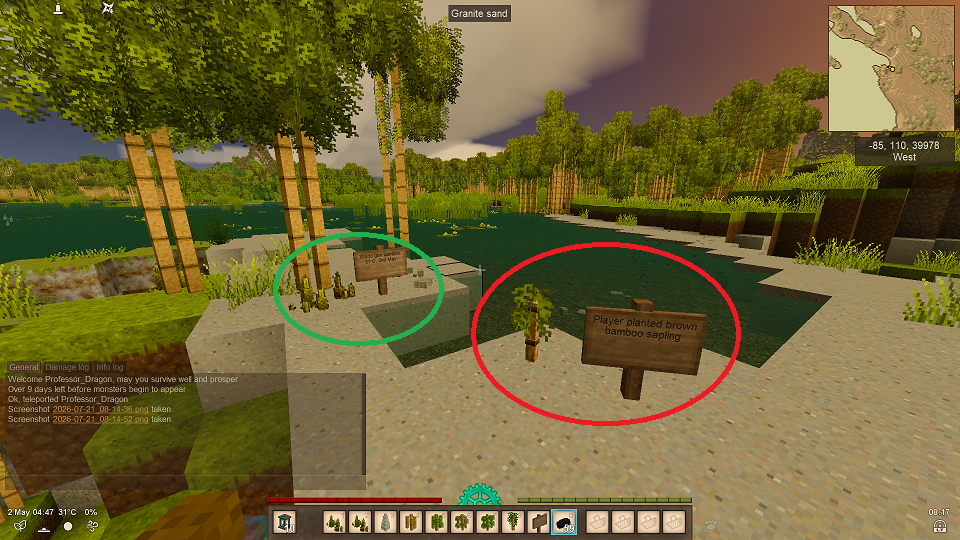
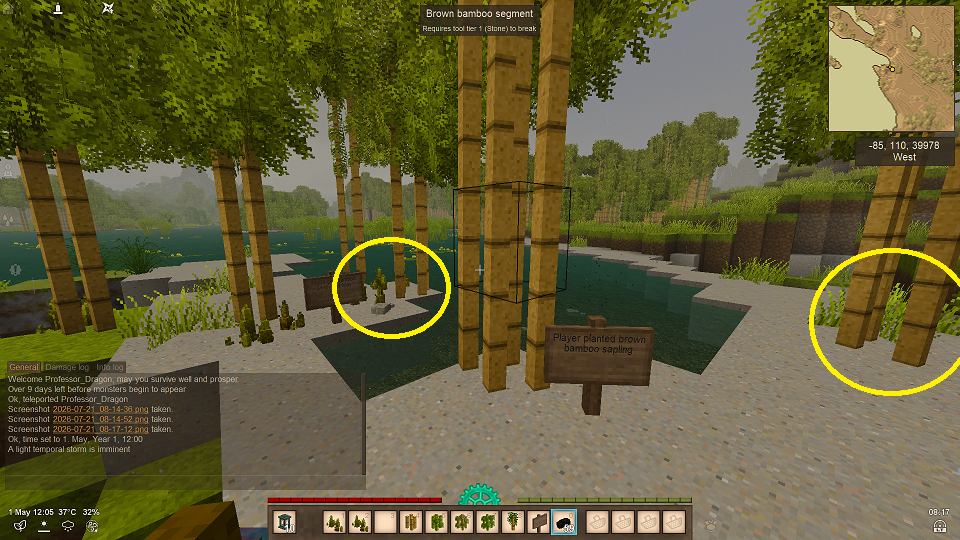
Well, this one gave some interesting results! I was sure that I knew the answer to this one, but was surprised. TEST METHOD 1. Load up a "small" Creative test world on 1.22.3. 2. Teleport to a warm area and find some brown bamboo shoots (green circle) 3. Plant the same type of brown bamboo sampling next to it (red circle). 4. Time skip ahead one year with "/time setmonth may". TEST RESULTS 1. The existing world gen. brown bamboo shoots did NOT grow themselves. 2. The player planted brown bamboo shoots did grow. 3. Bamboo grew not close to the player planted brown bamboo shoots (yellow circles). 4. None of the bamboo every grew again, even with 10 years of time skips. TEST CONCLUSIONS 1. World Gen. bamboo shoots do NOT grow. 2. Player planted bamboo saplings do grow. 3. Player planted bamboo saplings not only grow bamboo on the target block, but on blocks that can be several blocks away. (Test was repeated many times in different areas, with world gen and player bamboo.) 4. Once the final growth stage is reached, there is no more growth. Even the newly generated bamboo shoots do not grow more. Professor Dragon.
-
Can I use creative mode to fix question mark blocks?
Professor Dragon replied to Jubal's topic in Questions
Yes, kind of, no. Going into Creative (/gm Creative) would allow you to DESTROY the question mark blocks, and then replace them with a block of your choice. This should suffice for MOST cases, as typically they are just decorative blocks, so take your pick on what goes back. This should be safe to do, I think, however . . . WARNING: Before loading your world, go into the Options for it and SAVE A BACKUP. This is to guard against world crashes when interacting with these block types. The other is tackling the issue at root cause. If in vanilla and getting this issue, or if on the new version and you haven't been able to identify the mods that are causing this issue, then pay this GitHub thread a visit, and load up your details, including logs. It also has good troubleshooting on creating a copy of your world (including without mods) and seeing is the same issue exists - do that. https://github.com/anegostudios/VintageStory-Issues/issues/9172 WARNING: Using the "wgen" solution will often remove the structure you are in completely. But you are in a COPY of your world, so that will be okay for a test. Professor Dragon. -
All good points. I did find one other similar use to the one I mentioned earlier - and that is that you can clear snow off broken blocks. For example, thatch roof when broken will retain snow on it, meaning that you now have two inventory items (times the number of different thatch block types you are using) instead of one. You can now place each block down again individually on the floor, clean it, and then stack it again in your inventory. So yeah, all nice little tweaks, and good suggestions. But add a buff to ACTUAL SNOW CLEARING and it will be a better tool. Professor Dragon.
-
The Lung Capacity value you are changing only impacts new players. Check out this thread for how to impact an existing player. EDIT: In particular the last post: “/player entity maxoxygen ######” Professor Dragon.

