


Professor Dragon
-
Posts
709 -
Joined
-
Last visited
-
Days Won
3
Content Type
Profiles
Forums
Blogs
News
Store
Everything posted by Professor Dragon
-

Menu weirdness, not sure if real issue or just a PEBKAC
Professor Dragon replied to Alelurak's topic in Questions
Also try going to Settings, Graphics, Windowed Mode, "Windowed" and see if that allows you to see the full menus. -
What's your goal? In addition to @River Oak's suggestion, you'd probably be served well by simply turning off falling dirt blocks. See: https://wiki.vintagestory.at/World_Configuration /worldconfig blockGravity [sandgravel|sandgravelsoil] Sets the block gravity behavior for either just sand and gravel or additionally also soil (default: sandgravel) /worldconfig caveIns [on|off] If on, solid rocks and cracked rocks now collapse if not supported while being broken/placed (default: off (except in Wilderness Survival)) /worldconfig allowFallingBlocks [true|false] If true, blocks such as sand and gravel can fall when unsupported (default: true) Or as usual, an answer may be "mods" - maybe one will come close? https://mods.vintagestory.at/stickydirt Soil Must Fall (vertically) https://mods.vintagestory.at/steadyground There is no way apart from using Creative Mode with World Edit to do a Block Replace over a Selection to otherwise "replace" one block with another. Professor Dragon.
-
Nah. It's pretty casual - go for it! As you've got this thread open, you may as well put a link in THIS thread as well to your next thread in the Offtopic, so we can go and have a look at it.
-
In addition to @LadyWYT's comments, according to the Forum guidelines, content creators are welcome to put posts about their videos in the General Offtopic section.
-
I use wattle fences all the way through, up until the point I've made a design choice on the actual fences/walls that I would like aesthetically/have stacks of material for. Shears make this an easier choice once you're along that far. There is just something that seems extravagant about throwing a whole log or two into a fence, when you could just be using sticks. Logs are your source of firewood, charcoal and later all your boards. Besides, throwing three sticks and a knife to whip up a wattle gate to stick outside your front door is just so useful. I use that on every bunker that I build, just to stop drifters poking their heads THROUGH my door (visually only). I agree with both @River Oak and @Vratislav's take on things though also. Nothing wrong with a good rough hewn fence around your garden.
-
You could be right about the worldgen part. There is an Issue logged for the meta block pathway not connecting the structure to a cave, and it includes sample code (worth having a look at). The structure schematics are included in a section called "worldgen." Unfortunately, I am NOT a modder. In over my head here, honestly. Can't help but think if this thread was in the modding section, you maybe might have got help from someone with more skill and less enthusiasm. Best I can recommend is to experiment a bit more, search through existing Mods and the modding guides, and see how people have used these commands.
-
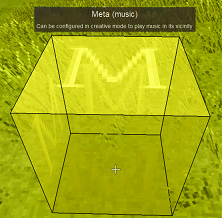
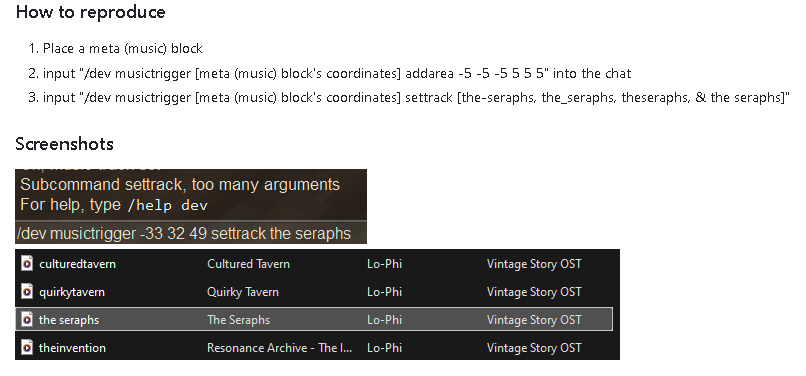
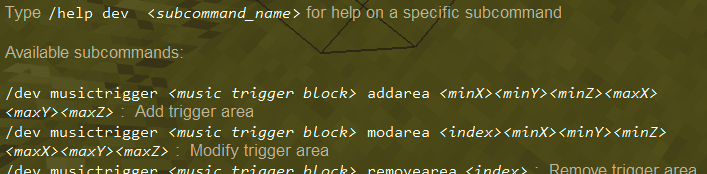
EDIT - Read the "EDIT EDIT" first I've left the prior rantings here in case useful ________________________________________ I don't know if there is a lot of information out there. I'm guessing that our modders over at the modding forum might be in this category. Use Cntrl F4 to see Meta blocks, then manipulate them in Creative Mode. One place to start would be to look at code from an existing Mod that makes extensive use of Meta blocks, and try and understand what they are doing. I think* that the Mod "Better Ruins" is the premiere example in class. It might be too big to learn from, but it would also contain a wealth of information. This is the only other thread on this forum that I found a snippet of information on Meta Blocks. The Command Handbook (.chb) may advise on specific commands, but you kind of need to know what you're looking for. P.D. * I'm not sure. For example, here is a code snippet from their stackrandomizer-betterruins.json. "maxstacksize": 1, "texture": { "base": "item/meta/randomizer/{type}" }, "creativeinventory": { "meta": ["*"] }, "materialDensity": 600 EDIT Sorry. Maybe someone else with experience sees this thread. I haven't given as much information as I would have liked by a long shot, and I've used up your "0 replies" counter which may have attracted more responses. I've tried playing around in Creative, and I can't even interact with the "Meta (Music)" block in place, unlike the other Meta blocks, so I dunno. ___________________________________________________________ EDIT EDIT Ah. Bug reports to the rescue! Found out how to use the Meta (Music) Block by searching the Issue Tracker on that keyword. I suggest you try the same for the other blocks. For example: https://github.com/anegostudios/VintageStory-Issues/issues/4379 This is how it SHOULD work - just read through the notes on the thread for the wrinkles. I also found you can get help on these Meta blocks via the "help" command as follows. For example, for the Meta Music block, the help command is: /help dev musictrigger Professor Dragon
-
Yes, with World Edit and Creative Mode. IMPORTANT: Save your world first! ! ! You would use World Edit to "Select" and "Move" (up) the Building and Trader. Then you'd use Creative Mode to fix up the water source blocks, which no doubt will be wrong. Put a Hay Bale where the water source is wrong, then break the block. Use a Water Bucket to place water source blocks. (Maybe a wgen would also work, but that would take more experimentation.) I recommend Art Gnat's video for a quick overview on moving a build. Professor Dragon
-
One more thought, as you're not in a room. Check that your crocks are not going rotten. They shouldn't as quickly, as it is cold. But a partially rotten crock of food will only partial satiate your hunger. Again, the solution is a Room. In particular, a Storage Vessel within a Basement in order to keep your food good for longer. Then eat a good crock.
-
@Hanril is right that you are seeing a temperature debuff. That can be negated by wearing warmer clothing, or by being in a Room. However, to reach 145% hunger debuff, you are also carrying something in your off-hand. Have your Character sheet open (C) and remove from the off-hand and you should see it change. Same with moving indoors. TIP: Use the "X" key to swap something in and out of your off-hand, so it is not burning extra calories when not needed. Eating a cooked meal (crock or pie) WILL have an impact, but it is a positive one - it will stop your hunger going down for a while immediately after consumption. Being a Malefactor is not having an impact. See here for more details: Satiety Professor Dragon.
-
Could you expand on what you mean by "how to upload that mod"? Do you mean to the mod site, to a multi-player server, to your single player world . . . ? The default Mod site upload is here: https://mods.vintagestory.at/edit/mod P.D.
-
Does Anyone Know Why I Can't Craft The Pickaxe Mold?(Found Out Why)
Professor Dragon replied to Zarroman's topic in Questions
That's a lot of mods that "do things" - and a very quick read of me through some of their descriptions doesn't shed any light on whether any impact pickaxe mold making. Still, you should double check. Suggestions: Was this working? If working in the past, back out some mods. Is it clay type dependent? For example, requiring Fire Clay? Nip into Creative and test. Try on a small test world. Then try without half the mod list loaded and keep halving until you find the culprit. Are there errors in the log files indicating a mod conflict? %appdata%\VintagestoryData\Logs Professor Dragon. -
My mods are getting blocked by my fire wall and i dont know why
Professor Dragon replied to mox3's topic in Questions
Hello @mox3, Just checking where this is at. To summarise, the original issue seems to originate with the SAC, as confirmed by disabling it. To progress this further (and keep SAC on, if that is your choice), you'd need to go through the steps outlined by Teh Pizza Lady (above). Find out what SAC is objecting to, and address that. For the new issue about logging in when opening the world to multi-player, I'm not sure of the impact of this message to you. However, if you plug that message along with "Vintage Story" into your browser search, the recommendations that come back should be a good starting point. P.D. -
Do butterflies have any effect on performance?
Professor Dragon replied to IAmMoss's topic in Questions
Honestly, if you could get a significant adverse performance impact via butterflies, I would be impressed. To answer the question though - Mods! This is an OLD one, but which will probably still work: Butterfly Extinction Event As per the mod notes: Disables butterfly spawning. Does not remove any already spawned butterflies! To remove previously-spawned butterflies: `/entity removebyclass EntityButterfly` IMPORTANT: Read the Comments on this Mod. It will probably address your issue. Professor Dragon. -
Lamellae and chains are presented as smeltable, but how?
Professor Dragon replied to Mesmoros's topic in Questions
This is true - you can use a chisel and break down materials and then smelt them again in Crucible. HOWEVER, you can also directly smelt many materials into ingots directly with a Bloomery. This includes copper lamellae and chain. The maximum load is six copper lamellae, which will produce six copper ingots with six pieces of charcoal as fuel, consuming several fire bricks in breakages. It is an interesting change that I'm not surprised isn't known more. The Handbook could mention the Bloomery part, but is not wrong technically in this case. Professor Dragon. -
O.M.G. This is FANTASTIC!
-
Need I say more? My four footed "friends" have likely been my downfall more times than all of the Rust Monsters combined.

-
My mods are getting blocked by my fire wall and i dont know why
Professor Dragon replied to mox3's topic in Questions
Thanks for your understanding. You've eliminated the major causes, which means (as you've guessed) that something funky is going on. I know that it is a bit of a pain, but next step may be a complete VS reinstall. Problems rarely "fix themselves" unfortunately. * Backup any Worlds that you care about. Two forms (A) The "Backup" of the world itself (.vcdbs) AND (B) the World Config settings (Pencil icon against world, copy to clipboard, save to a text file.) * Put both of the above to a safe space. * Take a list of Mods. that you have. * Uninstall Vintage Story completely. Check that files (including the Mod folder - everything) are deleted * Reboot * Download again the COMPLETE Vintage Story package. (Might be worth reinstalling the .NET framework at this point, but maybe not.) * Reinstall. Test a new, small world on vanilla before going any further. * If problems here at this point, then redo the above security deactivations temporarily as a test. If still problems, stop here. Something is very wrong. * REDOWNLOAD the mods from the sites, getting newest updates. Do not use your existing mod folder - there could be issues with them. * Load up HALF of your mods. Retest on a small test world. If problems, stop here. If not, load up the rest and retest. * Copy a copy of your world backup in place and retest. If problems, stop here. If not, done! Professor Dragon. -
My mods are getting blocked by my fire wall and i dont know why
Professor Dragon replied to mox3's topic in Questions
Try turning off the whole of Windows Defender TEMPORARILY to confirm that the block is actually coming from Windows Defender. P.D. EDIT Confusingly, Windows Defender and Windows Security got their names similar when it came to Windows 11. The test we may need is to temporarily turn off Windows Security as a whole. (I'm still Windows 10 myself, so sometimes mix up the names.) The important point is to "box the problem." Confirm which part of your computer is complaining, by turning things off and on. Even if we don't know (yet) how to fix it, if we can be sure that it is a specific point complaining, that would be useful. -
My mods are getting blocked by my fire wall and i dont know why
Professor Dragon replied to mox3's topic in Questions
Thanks for the extra details. @hjvtdev is on the money for the place to start. See this Microsoft article for steps at "Check whether a file is blocked": https://support.microsoft.com/en-us/windows/security/information-about-the-attachment-manager-in-microsoft-windows Professor Dragon -
My mods are getting blocked by my fire wall and i dont know why
Professor Dragon replied to mox3's topic in Questions
Hello @mox3, More details, please. Examples: * What do you SEE (messages, errors, behaviour etc) that tell you there is a problem? For example, what makes you think it is an issue with your "mods" and the "firewall"? A screenshot would help. * Which operating system? * Which firewall? * Private computer or playing on a multi-player server hosted by someone else? * What have you tried so far? For example, adding VS folders to exception lists - which ones? Thanks, Professor Dragon. -
I just tested on v1.22.7 and can craft "Larch ladder" just fine from Larch planks and sticks.
-
You could also copy your world to a test world (along with the world settings) and see if the same issue persists. And/or copy and rotate the build in the test world, with World Edit and see if that fixes it. Also, you yoinked me into this thread with that heading. I was too intrigued to move past.
-
Worst case scenario, nip into Creative and create a second rapid source to achieve the original effect.
-
Traders are tethered to a four block point from where they are spawned. This is to prevent them from wandering out of their carts into the scary night. They are not tethered or tied to particular buildings. Feel free to delete and recreate his accommodation. Feel free to spawn in more traders. I like the idea of giving a trader a spouse, and having two of them hang out in a larger Outpost. I haven't tested if OTHER traders will recognise a Treasure Hunter Trader that you have spawned in from Creative, on their menu option where they can tell you where this dude hangs out. But given that you know exactly where he is anyway, this is not likely a problem for you in a single player world. P.D.



