Soulstuff
-
Posts
5 -
Joined
-
Last visited
Content Type
Profiles
Forums
Blogs
News
Store
Everything posted by Soulstuff
-
Well an update TLDR: Nothing i tried fixed the issue, wiped OS clean from the drive, installed fresh and it just works It was caused by just classic Windows killing itself over time "decay" That installation was at least ~8 years old and you are kinda supposed to reinstall every 4 years or so when in active use And before you say its probably the hard drive, the Crucial MX500 SATA SSD that the windows image was on that i bought when it was freshly released still has not a single issue with it and at 93% health according to CrystalDiskInfo and no issues shown after multiple Victoria HDD/SSD runs (reason why it took this long for update) After trying to fix the installation with multiple techniques (from cmd prompts to using windows image to repair and ect) and them doing nothing for this issue And hours of looking what could just be the cause of this annoyance i just bit the bullet and wiped OS clean into Win10 21H1 copy i had on hand Reinstalled everything i had and it just works with any 1.22 version even the freshly released 1.22.4 (yes i did test them all again) At this point because i still didnt clutter the disk space back again will try Linux again, im tired of microslop and maybe this time Linux will stick with me due to recent leaps of progress...
-
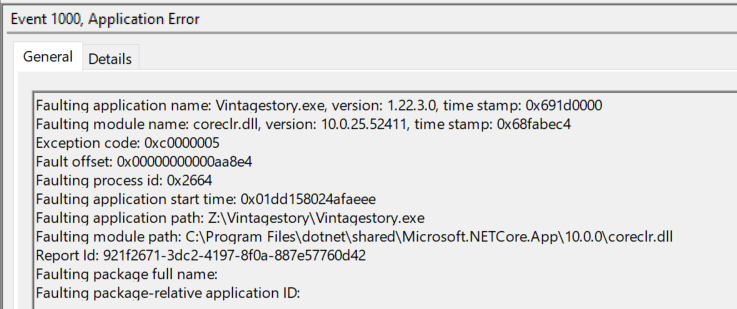
Prof Dragon i dont want to be rude, but dont use threads like this to just forum post count farm That was just useless especially when i posted system specs already and whole layout of the post is taken from github page The only problem is that i posted it in wrong subforum as i was tired and didnt notice this existing: https://www.vintagestory.at/forums/forum/15-vintarian-support/ Anyways Grabbed my side laptop Installed and ran 1.22.3 successfully with no issues (Albeit heavily under the specs so it was a slideshow but that machine is not made for gaming) Machine runs even older version of windows: 1709 Build 16299.15 (2017 September Update) Copied over .NET folder from that machine to the one with the issues and nothing changed Seems like i need to figure out what permission is messed up so .NET10 fails to work properly or its just windows being the useless thing that it is and corrupting itself The only hint was actually on .NET10 10.0.0 crash log with "0xC0000005" code for Access Violation
-
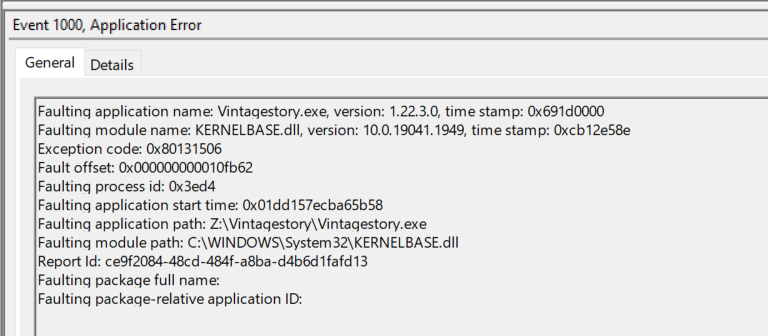
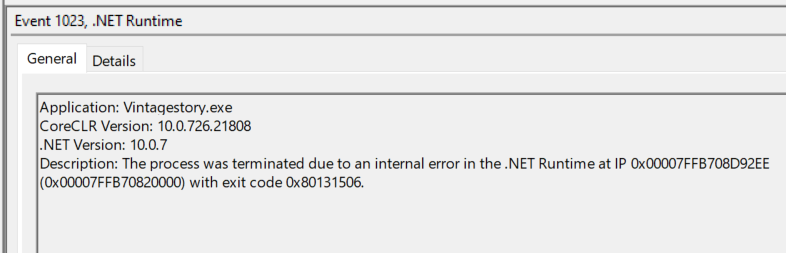
As title says im unable to play VS since 1.22 Update introduced .NET 10 Runtime requirement Game Version: 1.22.x Platform: Windows 10 Pro 22H2 (OS Build: 19045.2006) Ryzen 7 5800X3D 48GB RAM (G.Skill Trident Z DDR4-3000 CL16-18-18-38 1.35V 8+8kit / 16+16kit - yes its perfectly stable) XFX SPEEDSTER SWFT RX 6700 XT 12GB GDDR6 Modded: No SP/MP: None Description: No Issues with 1.21.7 but the second i try to run any 1.22 version (yes i took time and tested each version) that requires .NET 10 it crashes on launch Be it updating from 1.21.7 to 1.22.3 or just full uninstall of VS, (deleting folder in appdata/roaming, restarting pc and installing any 1.22 version) This was the first time .NET 10 version was installed on this machine .NET installation verifies nothing is damaged and running repair doesnt change anything So far have tried: (Each time i install new version of runtime i Delete the old one, clear %TEMP% folder, run registry clean up, restart PC, Install the next one) .NET 10.0.7 (x64) - Provided in the VS downloads section .NET 10.0.10 (x64) Both standalone and "SDK 10.0.302" package that contains everything: Visual Studio support Visual Studio 2026 (v18.8) Included in Visual Studio 18.8.0 Included runtimes .NET Runtime 10.0.10 ASP.NET Core Runtime 10.0.10 .NET Desktop Runtime 10.0.10 Language support C# 14.0 F# 10.0 Visual Basic 17.13 .NET10.0.0 - This actually produces different looking crash log on Event Viewer compared to later versions but it points at the same module "CoreCLR" Everything points that crashes are caused by .NET Runtime internal error (0x80131506) How to Reproduce: Launch any version of VS that requires .NET 10 (1.22 / 1.22.1 / 1.22.2 / 1.22.3) with any version of .NET 10 on my machine Screenshots: Attached screenshots of crash log from Event Viewer that are generated with .NET 10 versions listed in description Logs: Refer to attached screenshots Game crashes before it manages to launch therefore there is no VS crash log generated Edit: Just hit me that there might be more suitable place to post this at "Vintarian Support" Could any mod please more it there? Thanks upfront
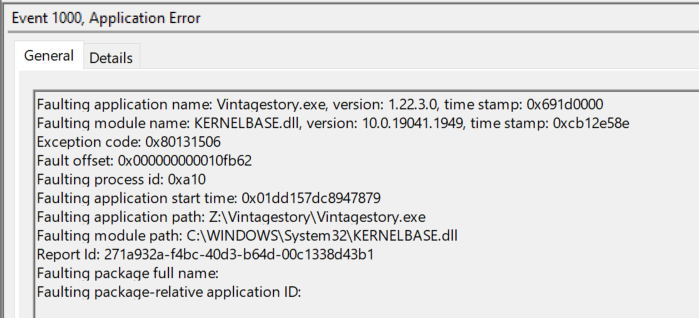
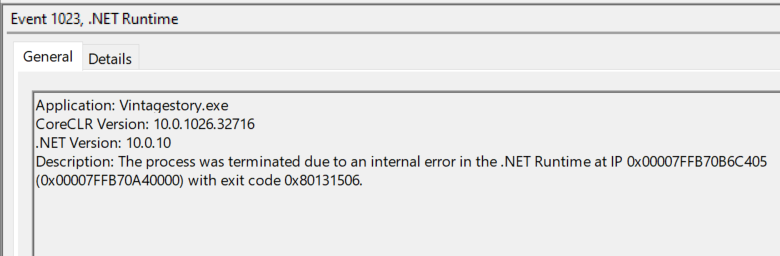
-

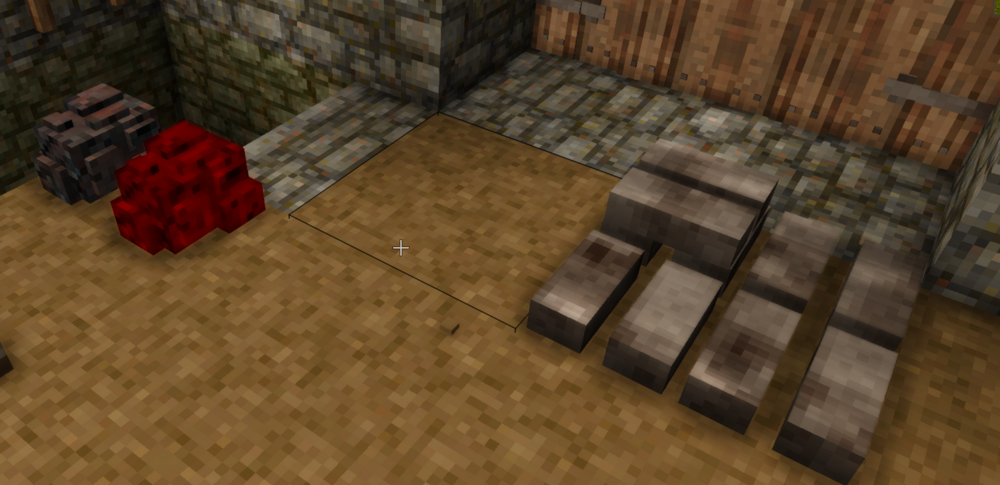
Iron bloom didnt spawn with enough voxels to finish the thing
Soulstuff replied to NastyFlytrap's topic in Discussion
I think what is happening is that they are trying to make it really realistic or just ended up like that without actually realizing it IRL slag sometimes can trap some iron due to how this type of smelting works, i think that its the same thing happening here You smack some slag off and it might take off 1 voxel of iron with it, get unlucky and you end up with voxels missing due to how the game works If anything we are lucky that slag doesnt generate holes in our blooms IRL blooms were just random sized chunks with sometimes slag trapped inside and took long time to work them out of the metal While its annoying at least helve hammer can fix them and you should have mechanical power at that point of progression In my opinion the only thing they should do about this is to add some information in the handbook, that if you cant finish the bloom you need to use helve hammer Ill be honest it still irks me that 1 bar is 1 knife blade instead of at least 2 but this is not the topic on hand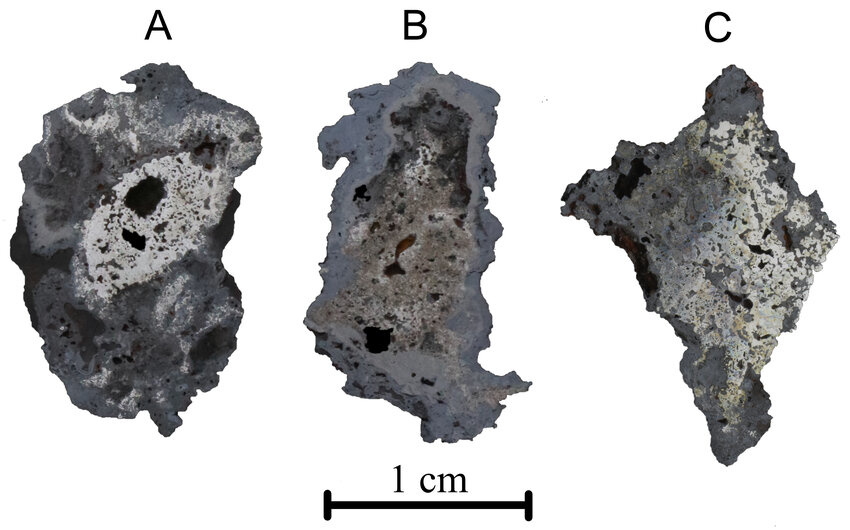
-
Iron bloom didnt spawn with enough voxels to finish the thing
Soulstuff replied to NastyFlytrap's topic in Discussion
Not so rare in my case, time to make the helve hammer i guess as i do have most of the things for it Ended up with 2 duds missing 1 voxel in 12 bars