iodide
-
Posts
8 -
Joined
-
Last visited
Content Type
Profiles
Forums
Blogs
News
Store
Everything posted by iodide
-
Hey everyone, recently saw some gameplay footage for the indie game Lay of the Land. Anyone have thoughts or experiences with it in its current state? Looks somewhat like vintage story though with a much bigger focus on microblock physics which are really impressive (ie cutting down a tree voxel by vozel). I don't believe it has many survival like mechanics (no food for example) so it's more adventure focused but wow are the voxel physics super impressive.
-
FYI, I've created a little web app that can help address the same problem (seeing latest compatibility of installed mods). Check out Vintage Vitals page if interested.
-
Hi everyone, Check out Vintage-Vitals to compare latest major.minor compatibility with your installed mods without having to install any apps, extensions or send your data anywhere. The in-game mod browser only shows semantic versions of the mods themselves, it doesn't display either the supported game version nor does it display whether an updated version with major.minor release compatibility has been published. This makes it annoying to figure out if you should upgrade to the latest version because you don't know how many of your mods will subsequently break. I developed Vintage-Vitals which is a web app requiring no installation and requiring no data to leave your computer. You simply point it to your mod cache files and it reads every modinfo.json file found Now simply upload your latest main-client.log file and checks it against a daily cache of the ModDB API filtered to mods supporting the latest major.minor release (e.g. 1.22.x) I've "published" this on ModDB with a little FAQ and details but the latest version of the actual web app can always be found here:
-
Thanks for sharing, ugh I wish there was an easier way to check for 1.22 support en-masse with the game itself. edit: I'm experimenting with pyscript/pyodide for a clientside app to upload local files to then cross-reference the Mod DB. Hoping there's a better way to get installed mods but reaching from this cache folder seems to be the quickest/easiest (couldn't find a json with like all installed mods anywhere). When you first load it, it might take a few minutes to load-in the required runtimes but then subsequent loads should be snappy. Check out Vintage-Vitals
-
Hey there, just saw your post here and realized my latest one on the same topic is a duplicate of the topic, so I've deleted my other post and thought I'd piggy back on yours here. I'm also in the same boat and wish there was some kind of good guidance out there even if it is an old question (there doesn't seem to be any wiki page or anything). Question for me at this stage is how does one even go about checking which mods of yours even have a version adapted for 1.22 stable? My biggest problem is simply figuring out the scope of changes required as the in-game mod browser does not show game version compatibility only mod semantic version. How are you able to basically list out your mods and quickly see which have updated versions in 1.22? Are you just cross-referencing your mods and then finding them in ModDB manually? While someone in my (now deleted) original thread recommended I "follow" the mod, this would only give me notifications moving forward and not historical notifications on updates.,
-
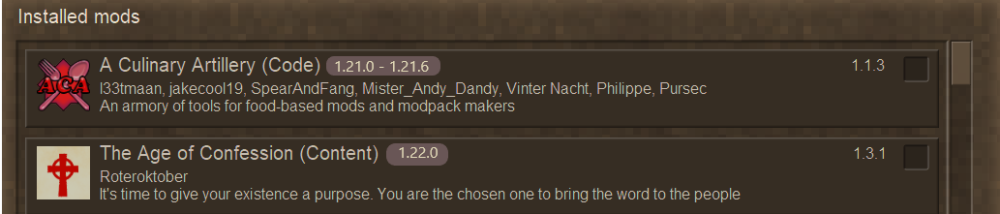
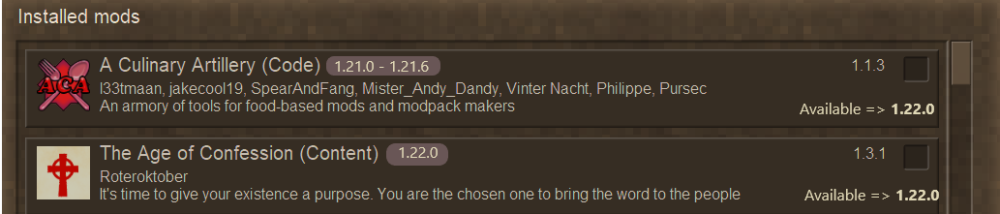
I tried searching but couldn't see this, and to me it seems like a rather simple quality of life that would really help with game updates and managing mods. Sorry if duplicate. I'd like to recommend two features: R1. In-game mod browser shows the "For Game version" underneath on the mod in the browser. R2. In-game mod browser shows "Available for game version" on the mod in the browser (either by default or through some filter mechanic). Right now the in-game mod browser only shows the version of the mod itself. But really when troubleshooting or updating a game to a new version, what I care about is available mod compatibility. The ModDB listings for the mods have "For Game version" but this isn't viewable using the in-game mod browser. I've found it extremely difficult to do updates to new versions of the games because now I have to go, mod-by-mod down my list of installed mods in the game and cross-reference that with mods.vintagestory.at listings. Attached two mockup photos for both R1 and R2. Separated these because I don't know the live connectivity that the in-game mod browser has to the ModDB so it might be more difficult to be able to pull the latest meta mod info from ModDB versus simply just statically displaying the {"dependencies": {"game"}} value that's found in the modinfo.json for every mod. Thanks