Laerinok
-
Posts
9 -
Joined
-
Last visited
Laerinok's Achievements

Berry Picker (2/9)
4
Reputation
-
Fixed in the V2.2.0 I'll release on ModDB when it is possible. At the moment only mods with a modinfo.json file can be uploaded. Not external programs..
-
@HerbDashwell Hello, It seems there another issue with getting changelogs. Can you send me the modlist.json please ? With my installed mods, v2.1.3 works (but without changelog). Maybe one of your mods breaks the update process.
-
Yes, this has been the case for the past 2-3 days. I assume the scan detection rules have changed recently with an update because Windows Defender is going crazy when it used to be very calm. I did a scan on VirusTotal, with only 2 detections, and now there are 9 / 66. It's still not many, but still. I advise you to take a look at the page on ModDB if you haven't already. There are quite a few comments that have come in, and I explain the reasons there. Besides the fact that it's a Python script, which is already a frequent cause of false positives, the problem apparently is Nuitka, the library I use to compile the code, which seems to no longer be appreciated, even though it's supposed to be more compliant... I've sent the file to Microsoft, but I imagine it will take some time... I'm aware that this can be stressful (it is for me), but obviously, the program is clean. It's just another false positive.
-
Just so you know, I don't use (or very little) Linux. So my knowledge is limited... Are you using the AppImage or the zip version? (FYI, I'm new to AppImages. It's mostly for testing at the moment.) I'm not sure I fully understand "run the update binary from a different directory". You shouldn't take the binary out of the rest of the folder, otherwise it will indeed break. If you want to change the location, you need to move the entire contents of the folder. Or else, I misunderstood what you want. Indeed, the config is stored in ~/.config/VS_ModsUpdater /mnt/user/appdata/vintagestory/lang/en_US.json Can you explain exactly what you are doing? If you only moved the binary file, it's normal, the program looks for the 'lang' folder at its root (like the other folders). You can use arguments --no-pause: allows to deactivate the final pause. https://github.com/Laerinok/VS_ModsUpdater_v2/wiki/3.-Usage#32-command-line-arguments
-
Hello, This should be fixed with the v1. 3.2
-
There is only about 20% translated, but I guess the handbook is the most important
-
Pour les joueurs francophones J'ai entamé la traduction du mod, mais c'est long et je n'ai pas beaucoup (ni le courage) de temps pour m'y mettre tous les jours. J'ai néanmoins traduit tout le guide ce qui permet d'avoir les recettes et le mode d'emploi en français. La traduction en cours est sur Crowdin, si jamais... For French-speaking players I started translating the mod, but it's long and I don't have much time (neither the courage) to work on it every day. However, I translated the entire guide which allows you to have the recipes and instructions in French. The current translation is on Crowdin, if ever... fr.json
-
 Laerinok changed their profile photo
 -
Thanks ! I'll add it as soon as I get my PC back
-
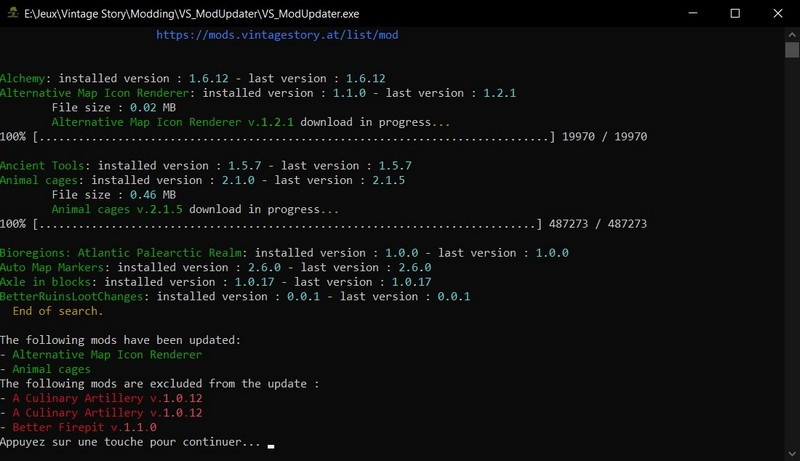
ModsUpdater Download link What the script does: Creates a "ModsUpdate" folder located in the "VintagestoryData\ModConfig" folder and creates a config.ini file Browses mods folde Extracts the modinfo.json from ZIP-files of each mod into the "temp" folder (created at the root of the program) Compares the version number shown in the modinfo.json and the online one and downloads the mod if the version is more recent. Deletes zip file of the old version mod. Deletes the created 'temp' folder. Detects the language of your system and automatically loads the language file (for now only english and french) if presents in lang directory. If not, english is loaded. You can add yours yourself or send it to me. ** Basic use ** Run the program, you don't have to do anything. The script takes care of comparing the versions of the installed mods and those online and automatically downloads the new versions in the "Mods" folder. **Advanced usage (via config.ini)** The [ModPath] is for those who use VintageLauncher. You have to uncomment the path \VintageStoryModVault and comment \VintagestoryData\Mods in order the program looks for the right mods directory. The [Mod_Exclusion] section allows you to exclude mods from the update process. This is useful for mods with unsupported or unwanted alternative versions. Just add the name of the zip file (with the extension). 1 Mod per line. If you need more than 10 slots just add additional lines to the end : mod11 = mod12 = etc... You may need put some mods in the [Mod_Exclusion] in these situations : - if there is a .net7 version of the mod and you're not running the .net7 version of Vinstage Story. (ex: Better Firepit, A Culinary Artillery) - if there several versions of a same mod (ex : StructuresSpawnChances) PS : If the program closes immediately after launch, that's probably because there is a mod which canot be updated and shoud be put into the [Mod_exclusion] section.. ****************************************************************** I first wrote this program as a programming exercise in Python. And then, as I found it useful, I decided to share it.