.png.c80d3302722a8d261dd21c61f6b4eb7b.png)
ArtGnat
-
Posts
17 -
Joined
ArtGnat's Achievements

Berry Picker (2/9)
18
Reputation
-
.thumb.png.0d6e7c478d763f3bcc6fe518d6ea2e2e.png) Thank You!
Thank You! -
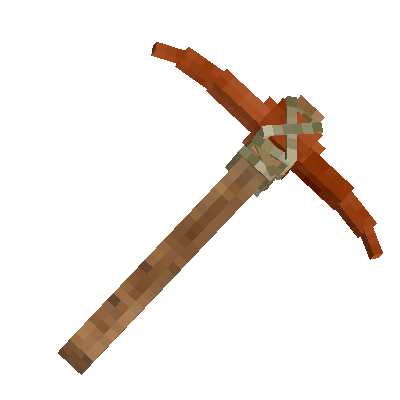
So I'm talking about nice Item renders with a transparent background like the one below I got this one from the VS Wiki. where there are a few more. but it is very lacking in images like these for most items/things in the game. So I was wondering if there was a good place where there are more of these to find than what's on the wiki? and if not, what's an easy quick way to make my own PNG renders of items in game? The reason for this is that I like to use PNGs like these at times in my YT videos and/or thumbnails. I specifically was wanting a Tin Bronze Pickaxe render and was sad to be reminded that the Wiki only has a render of the Copper Pickaxe.
-
That would be awesome! Oh cool! I'll have to give that a try. thx! where would I find the working session key?/what does it look like? is the file just called Session Key or something?
- 52 replies
-
- 1
-

-
- discussion
- logic
- (and 2 more)
-
I don't see the full on hate too often (I'm not on the reddit all the time), but I do always see the sentiments even from the friends I play with that VS is better/objectively better Minecraft (Which maybe that's the type of Hate your talking about). and I can get where they are coming from, but it can bother me sometimes. cuz I don't have a problem with people liking VS more than Minecraft or thinking it's a better fit for what they want. VS is likely giving them the experience they wish Minecraft could be and I get that. but since Minecraft isn't trying to be the same experience I just don't like it when people will blanket say VS is Better than Minecraft like it's a Fact that is true for everyone. People can still have their opinions and criticize Minecraft for what it is trying to do and criticize Microsoft/Mojang for their decisions. and I think it can be fair to compare certain parts of both block games, but when doing that they still need to consider that both games are serving two different play styles/ethos. I think a lot of what I'm talking about to, with the "VS Objectively better than Minecraft" statements can come from personal built up frustration/resentment. because some of those people did enjoy the early days of Minecraft but as it got more updates and it became more clear that Minecraft isn't really going to focus certain genres/playstyles and instead be more of jack of all trades sandbox of tools/elements that you on your end can then do what you want with. which does leave in the base game to have just little things in every direction of gameplay. Those people became frustrated/sad over time because they wanted Minecraft to add/ lean more into the type of genres/gameplay that they like. Like there's a section of the Minecraft community that wants the game to be more RPG like and have a bunch of Bosses like Terraria, there are people that want more comprehensive survival mechanics/progression and just survival challenges. Those latter half of people that eventually came across Vintage Story which they realized is almost exactly how they wish Minecraft would be. and those feeling of joy and "Finally! a block game that focuses on the gameplay I want!" can transform/result in them having the "VS Objectively better than Minecraft" sentiments. also sometimes the Minecraft hate/negative comparisons can be a reaction to how some outsider minecraft players will stumble upon some VS media and just leave negative comments towards VS purely because it looks like Minecraft, and they don't know what VS is and they don't want to see it in their media timeline and or just want to be an jerk to make themselves feel better. So I'm sure that can be annoying (which it is, I also don't like those negative nothing burger comments on VS) So it's tough, since I can see how/why they might be thinking like this, but it still bothers me/makes me a lil sad as a Big enjoyer of Both Minecraft and Vintage Story.
-
I deal with this a lot. VS DRM is better than a lot of games. but because I like to have different mod folders/instances it does get annoying the extra amount of logging in that I need to do. I wish they had a way to know that I've already logged in, but I'm just switching to a different Instance or Version of VS. (I also have VS 1.20 and 1.21rc installed separately for easy back and forth right now since the server I play on won't be updating to 1.21 right away)
- 52 replies
-
- 3
-
-
- discussion
- logic
- (and 2 more)
-
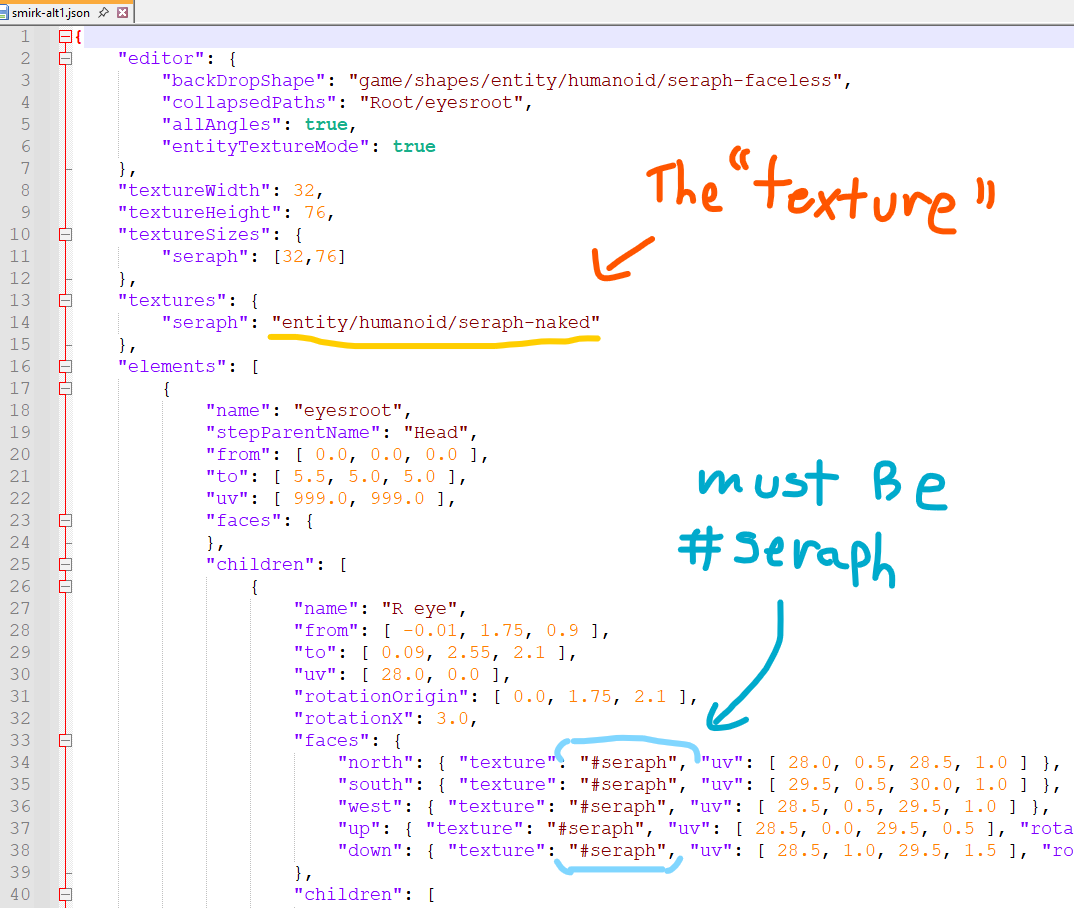
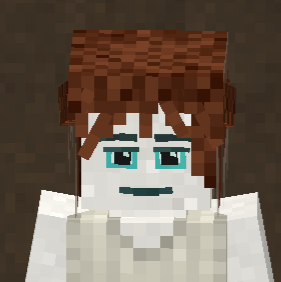
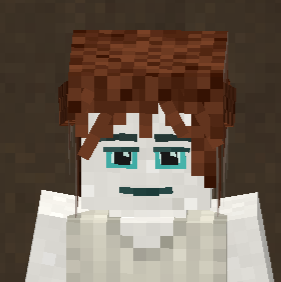
Thanks I think that helped me understand it a little bit! So can the "Seraph": be named whatever I want as long as I also replace all the #seraph's in the rest of the shape file with what I changed "Seraph": to? or is that a no, cuz the game is looking for the "Seraph": ID specifically? and if that's the case. is that why when I did initially use the seraph-naked.png for my Face shapes but with the "Seraph-naked": at the beginning instead of "Seraph":, it wasn't using it the same way as the other vanilla face shapes? and causing the weird texturing in the eyes as seen bellow, also locking out the ability for the eye colors to influence it.
-
I'm looking forward to checking it out when it's done!
-
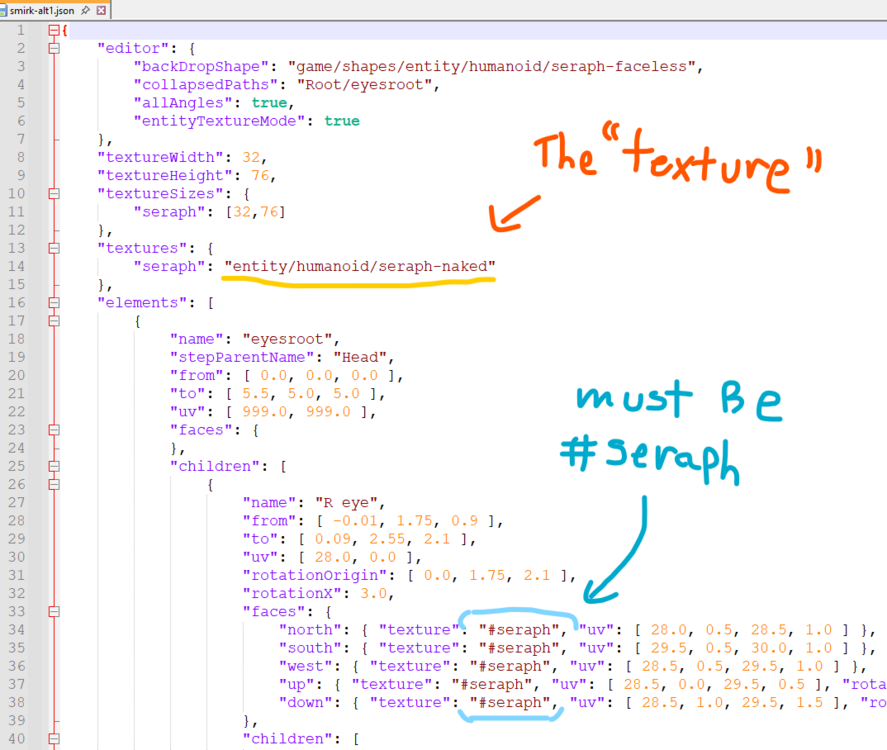
Maybe I'm just phrasing it weird, sorry. but I didn't know how else to talk about it. I was able to get it to work in the end. as shown in this post below. it just confused me that it starts with seraph but then ends with seraph-naked, because when I applied seraph-naked or any other texture to the shape using the VS model creator. the Shape json file would have the same name of the texture at the start and the end. it would say "seraph-naked": "entity/humanoid/seraph-naked" but the vanilla faces texture looked like "seraph": "entity/humanoid/seraph-naked". and I understand domains to some extent. but there is no "seraph" Folder/domain in the vanilla folders for the "seraph-naked" texture to reside. so it just all confused me. even more because when I do just use the textures provided (specifically the seraph-naked.png) and apply it through the VSmodel software it will work and show up in game but it would show with permanent Blue eyes and white around the eye which is not how the vanilla faces look like. like shown below. Hopefully I was able to make it more clear where my confusion/question was coming from, but apologizes If I confused you more.
-
Maximized Borderless isn't acting like borderless with overlays.
ArtGnat replied to Hades_Gui's topic in Discussion
I believe it's a bug/issue with Vintage Story. I'm someone who loves Fullscreen Window Borderless in games. And ever since I started playing this game again at the start of 2025 it's Borderless mode just didn't work and acts like normal Fullscreen. (I can't recall if it ever worked since i didn't touch the game much when i first bought it) And when i looked into it myself if I recall people were saying it's just bug/oversight. But sadly it doesn't look like it's a priority for them right now since i didn't see it addressed in the patch notes for the upcoming 1.21 update.- 1 reply
-
- 3
-
-
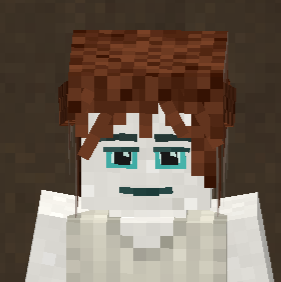
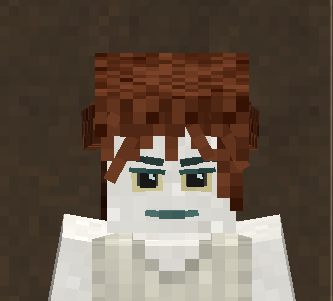
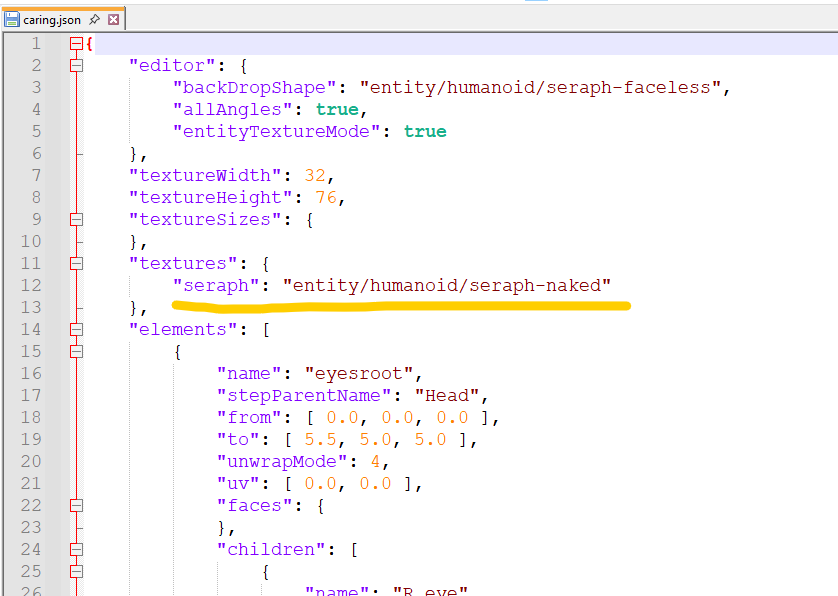
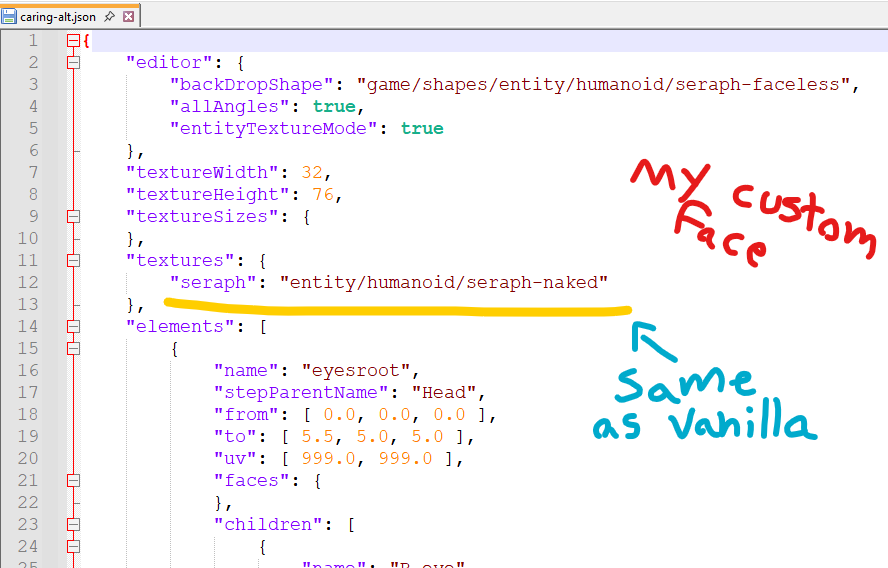
So I can make them use the seraph-naked.png or the seraph-naked-hairless.png but when rendered in game like I showed in my Topic post. it would force the eyes to be blue and so the eye color you chose won't affect it. and it had a weird white around the eyes. and the blue for the mouth and eyebrows were not the same as the vanilla faces. So when the vanilla faces shape files are referencing "seraph": "entity/humanoid/seraph-naked" they must be doing something funky that allows the right colors to appear and to let the eye color chosen to affect the texture. because when I apply any texture to my shapes using the VSmodelcreator in the file it would end up looking like this "seraph-naked": "entity/humanoid/seraph-naked". where it repeats the name of the texture twice, once at the start and once at the end. but the vanilla's face shapes texture reference has a different name at the beginning and end of it's texture path. "seraph": "entity/humanoid/seraph-naked". I appreciate the help though! although I still don't understand how "seraph": "entity/humanoid/seraph-naked" works in the vanilla face shapes. I made a reply post showing how I was able to get it to work for my Face Shapes.
-
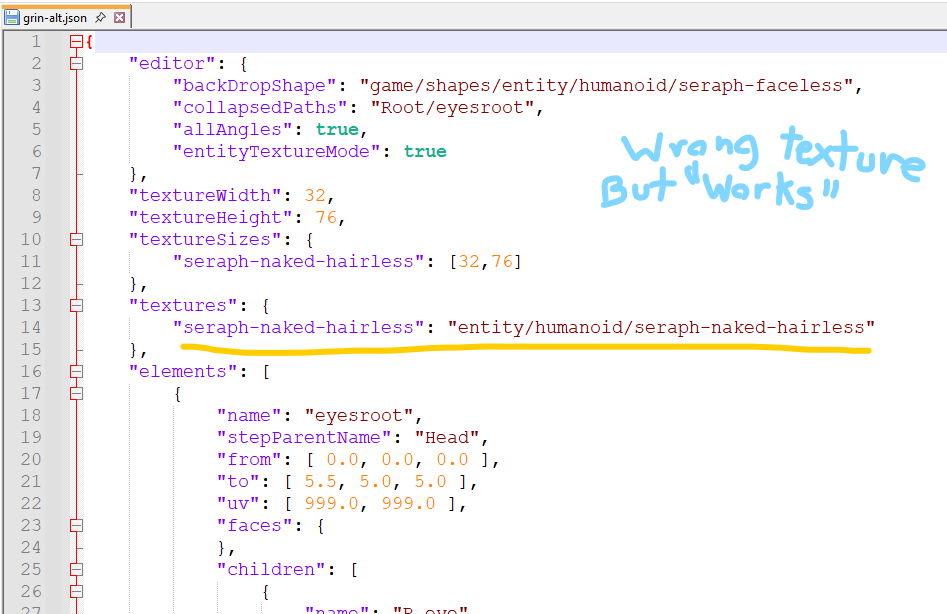
SOLVED Thank you all for your replies! I was able to figure it out. So I still don't know what the vanilla face shape files are referencing when using "seraph": "entity/humanoid/seraph-naked". but I figured out why it wasn't working when I used the same texture path in my face shape jsons. and that's because the texture also get's referenced multiple times throughout the shape file as "#seraph". where I had it saying "#seraph-naked-hairless" due to when I had it assigned to that texture since that one rendered before. after I changed all those to use "#seraph" it worked!
-
Hi thanks for the response! I already have been using the VS Model Creator. that's how I made the altered shape files. And I also have been using the player.json found in Vintagestory > assets > game > entities > humanoid. Using a patch file for the player.json is what let's me have the game actually make my new face expressions appear in the Character Select screen. but it does not seem to handle what texture the face expressions use from what I can tell. Instead it seems the texture is defined in the shape's json file like the screenshots I showed in my post That's how I was able to get the wrong texture to apply to the face by defining it in the shape json file My issue is that the Texture that the Vanilla Facial expressions seem to define/use in their shape json files is no where to be found. and when I try to use the same texture path as the vanilla shapes have defined but in my Facial expressions it won't work. even if I just to ensure I have the texture, copy over all the humanoid textures to my mod. it still doesn't find anything and just renders white.
-
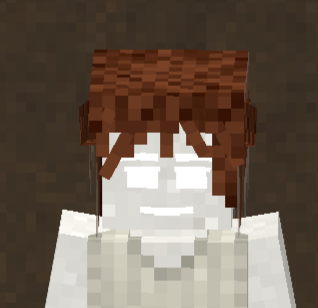
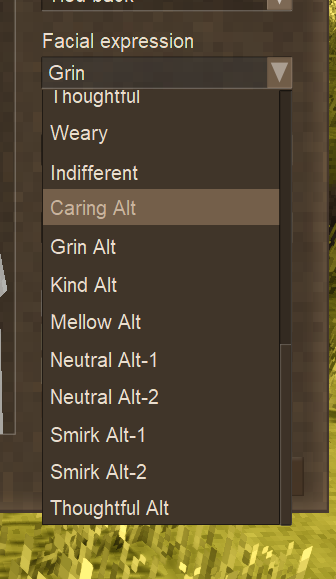
Hello, I'm still new to making Mods and I need some help. I'm trying to make this mod to add new kinder alternative facial expressions for 1.21. I was able to get the models to show up in the game and appear in the drop down along side the vanilla faces. But for the life of me I can not find the Texture file that the vanilla faces are referencing. This is what the 1.21 vanilla Caring Face references for it's texture I Can't find it in the Game's Texture folders. I've tried to just copy and past all of the Textures in game/textures/entity/humanoid into my Mods assets/modid/textures folder and then Copy and past how the Vanilla faces reference it into my Caring Alt Face like this. but that won't work and in game it will just render the face all white like this. What I was able to do is get another Texture to Work. I got my faces to use the seraph-naked-hairless texture and have that render in-game But as you can see it doesn't look right. there isn't supposed to be White around the Pupil. the Blue for the mouth and eyebrows are not the same as the vanilla 1.21 faces. and the Eye color you choose doesn't actually show up with my Faces and instead is always this bright blue. 1st image is my Caring-Alt using the "wrong" texture. and the 2nd picture is what the Vanilla 1.21 Caring face looks like. Both pics have the Sandy Eye color selected. I don't know what I'm doing wrong or Missing for getting my Faces to use the Same Texture as the Vanilla Faces.
-
I don't believe any content from mods were implemented into 1.21. I think it's just a handful of some Quality of life mods and some mods that fix bugs. Like there was a mod that gives you some minor Qol stuff with text with modifying/editing your text in chat, handbook search, signs, etc... and 1.21 has implemented those Qol things.
-
I wish I tested chiseled blocks with schematics for the video, it didn't cross my mind at the time. It doesn't hurt to try though and worst case although it's more effort, you can use the QP's Chisel Mod. In the mod there is this Pantograph tool and portfolio feature that let's you save a chiseled block as a file that you can then use to apply to blocks in another world. Here is a tutorial for the whole QP chisel mod, but i don't think they go over the portfolio. Sadly i don't know of a tutorial that explains how to use the Portfolio, sorry.