


Wondiws98
-
Posts
24 -
Joined
-
Last visited
-
Days Won
1
Content Type
Profiles
Forums
Blogs
News
Store
Everything posted by Wondiws98
-
 So basically have the tool disappear when used in the crafting grid? Just remove the line "isTool": true.
 -
Are bloomery recipies moddable
Wondiws98 replied to Wahazar's topic in [Legacy] Mods & Mod Development
Yes! There are two ways you can override vanilla code behaviours. The best way in terms of compatibility would be to use Harmony. It's takes a bit of time to learn how and figure out how to properly use it (at least it did for me) but when you get the hang of it, the sky's the limit! The other way, although bad in terms of compatibility but much easier to achieve and limited to blocks, items, entities, etc. Is to simply create a new class that inherits the class of the thing you want to change the behaviour of, override the method you want to modify, and then register that class. You can then use a json patch to swap the class of the thing you want to change to your own customized class, in your case that would be would be "BlockEntityBloomery". I don't recommend the second method unless you are really overhauling something and need change to most of the code. It's also important to note that both these method would require some knowledge in c#. If you do want to get serious in making code mods for Vintage Story, this is where I think you should start. -
Are bloomery recipies moddable
Wondiws98 replied to Wahazar's topic in [Legacy] Mods & Mod Development
Changing these lines would require a code mod, you cannot make changes to code using Jsons. -
Are bloomery recipies moddable
Wondiws98 replied to Wahazar's topic in [Legacy] Mods & Mod Development
Here is the code that is responsible for determining whether an item can be bloomed or not. BlockEntityBloomery.cs From what I can tell, it's a mix of collectible object attributes and smelting props. The methods you'd want to take a close look at are "DoSmelt()", "CanAdd()" and "TryAdd()". Edit: To answer your question, yes, it's totally possible to make bloomery "recipes" with content only. No code required. -
Help with BlockBehaviour.GetMiningSpeedModifier
Wondiws98 replied to Vinny's topic in [Legacy] Mods & Mod Development
One way I can think of achieving that, on top of my head. Is to somehow look for when a player attempt to break or select a block, check if the player has the right to do anything with it, and then prevent/modify whatever that player is trying to do. Basically altering the player's behaviour rather than the block's behaviour. Though I don't know how or if that is possible. Just an idea. -
Content mod: Working with other mods' patches?
Wondiws98 replied to Billiam's topic in [Legacy] Mods & Mod Development
I think what you're looking for is an Asset Patcher. While this is code sided, it is very lightweight and would allow you to iterate through every asset registered by the game and make changes to them using code logics. I know you don't want code but if I had to do what you're trying to do, I'd use an asset patcher. -
The new "outdated" tag on mods.
Wondiws98 replied to Wondiws98's topic in [Legacy] Mods & Mod Development
I disagree. My complaint is how the tag portrays the mod as being straight up "outdated", which is usually far from being the case. The problem that I have is that it tags every mods which doesn't have a tag of the most recent version of the game. And it may not seem like a big deal to just have to add the tag to releases but when you have 20+ mods to manage, it adds up. Also, I don't add tags to mods which I didn't test and confirmed that it does work in said version, so for me to add the most recent tag to every mod would mean to test all 20+ one by one, which is a lot of work, especially considering the game releases tiny little updates every week which is very unlikely to break a well made mod. The unbiased "outdated" is still a very bad idea in my opinion. I don't think it should be straight up removed, maybe toned down to some degree. For instance, it could be changed to something like a yellow thing that says "may be outdated". I just really think it's a bit over-the-top and that there's room for improvement. Just to give some breathing room for modders. -
Just logged on this morning to see this tag on all of my mods. I hate it. I don't think it's necessary and it just makes it look like the mod is broken or something and i think it could be misleading for some people. I think it also kind of stresses modders to go and update everything single one of their mods to make sure they don't look like they're outdated when they really aren't. Maybe we could tone it down a little? Like make it so that tag only appears on mods made for 1.19 and below. That's just my opinion, maybe there's an actually good reason why it's there. Edit: Especially considering the game gets small updates every week...

-
Please Help with mod Recipe
Wondiws98 replied to SoggyGravel's topic in [Legacy] Mods & Mod Development
No problem! Glad i can help! -
Please Help with mod Recipe
Wondiws98 replied to SoggyGravel's topic in [Legacy] Mods & Mod Development
Here is the file: fruitpantographs.json Just replace your original fruit pantograph recipe file with it and it should work just fine. -
Please Help with mod Recipe
Wondiws98 replied to SoggyGravel's topic in [Legacy] Mods & Mod Development
Actually, I don't have anything to do right now so imma make a recipe json file for you and post it here when it's done -
Please Help with mod Recipe
Wondiws98 replied to SoggyGravel's topic in [Legacy] Mods & Mod Development
Ok so after doing a little digging I've figured out that this isn't working because fruit cuttings doesn't have the "fruit" type stored as a variant. It is stored as an attribute. This means that for this to work you will probably need to create a recipe for each fruit types. Here is an example for red apple. { "ingredientPattern": "LH", "ingredients": { "L": { "type": "item", "code": "game:chisel-*", "quantity": 1, "isTool": true }, "H": { "type": "block", "code": "game:fruittree-cutting", "attributes": {"type": "redapple"}, "quantity": 1 } }, "width": 2, "height": 1, "output": { "type": "item", "code": "simplepantograph-redapple" } } -
Please Help with mod Recipe
Wondiws98 replied to SoggyGravel's topic in [Legacy] Mods & Mod Development
Does that work? { "ingredientPattern": "LH", "ingredients": { "L": { "type": "item", "code": "game:chisel-*", "quantity": 1, "isTool": true }, "H": { "type": "block", "code": "game:fruittree-cutting-*", "name": "type", "quantity": 1 } }, "width": 2, "height": 1, "output": { "type": "item", "code": "simplepantograph-{type}" } } -
Please Help with mod Recipe
Wondiws98 replied to SoggyGravel's topic in [Legacy] Mods & Mod Development
If i understand correctly, you're trying to move over the "metal" of the chisel to your output code? In the "L" ingredient you should have a "name" field with "material" as the value. Like so: "L": { "type": "item", "code": "game:chisel-*", "name": "material", "quantity": 1, "isTool": true } You can then refer back to that value in your output code by entering the code like "chiseltools:pantograph-{material}" Like so: "output": { "type": "item", "code": "chiseltools:pantograph-{material}" } -
Trying to understand X rotation in VS Model Creator
Wondiws98 replied to Verto's topic in [Legacy] Mods & Mod Development
No I don't know about that sorry. Not very familiar either but if i had to make a mod compatible with I'd first start by checking the mod's files and see what's inside the patches folder. I found armour.json which seems to add behaviours to vanilla armour and i think this is what you are looking for. [ { "file": "game:itemtypes/wearable/seraph/armor", "op": "addmerge", "path": "/behaviors", "value": [ { "name": "CombatOverhaul:Armor", "propertiesByType": { "armor-body-improvised-wood": { "Layers": ["Outer", "Middle"], "Zones": ["Torso", "Arms", "Hands"], "Resists": {"PiercingAttack": 1, "SlashingAttack": 2, "BluntAttack": 0}, "FlatReduction": {}, "PlayerStats": {"walkspeed": -0.02, "manipulationSpeed": -0.09, "steadyAim": -0.1, "healingeffectivness": -0.09, "hungerrate": 0.09} }, .... -
Trying to understand X rotation in VS Model Creator
Wondiws98 replied to Verto's topic in [Legacy] Mods & Mod Development
I discovered this a while back. It's a Blender plugin that allows you to import and export shape.json files. Not sure how good it is at exporting stuff because I've only used it to import vanilla models but it could be worth a try. -
What new gameplay loops would you like to see?
Wondiws98 replied to Josiah Gibbonson's topic in Discussion
Hygiene, oil and soap making. Infections and wound treatment. -
How to eliminate "Birch leaves" shrubs?
Wondiws98 replied to florins's topic in [Legacy] Mods & Mod Development
I found a way to stop shrubs from growing and it's by setting it's size multiplier to 0. This can be done with any trees inside the folder "/worldgen/treegen". Here is an example json file: tree-patch.json- 1 reply
-
- 1
-

-
Trying to understand X rotation in VS Model Creator
Wondiws98 replied to Verto's topic in [Legacy] Mods & Mod Development
You're right not to understand it and it's because it is currently bugged. Just messed around with it and from what i can tell, axis Y and Z rotations are applied "locally" while the X axis is applied "globally". Not sure if there's are way around that. Looked around on the issue tracker of the VS Model Creator and someone mentioned this issue back in February 2024 with no comments. -
Mod Request: Mushrooms To Protein
Wondiws98 replied to VaelophisNyx's topic in [Legacy] Mods & Mod Development
@VaelophisNyx Done! https://mods.vintagestory.at/show/mod/22738 -
Mod Request: Mushrooms To Protein
Wondiws98 replied to VaelophisNyx's topic in [Legacy] Mods & Mod Development
Totally agree. Working on it! -
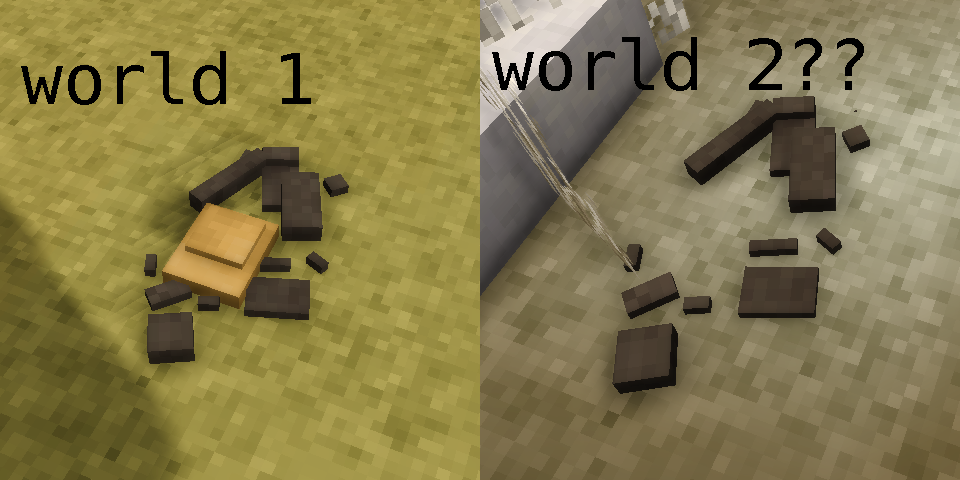
Currently trying to make a content mod which allows the user to melt beeswax into ingots for storage and because i think it's cool. It is achieved by making usage of the metal smelting feature of the game. I've got everything working beautifully except for the fact that when the ingot mold shatters after being wetted, the "metal" texture of the shattered mold shape is invisible. Which is weird because the "metal" texture of the unshattered mold is rendered properly. I started digging in the source code of "BlockEntityIngotMold" and discovered that it essentially gets the "shattered" metal texture the same way as it does for the "unshattered" metal texture. Which is by getting the last part of the code of the smelted item which it assumes is the metal, in my case it's "beeswax". I had already included my beeswax texture in the folder where the code looks for the texture (game:block/metal/ingot/beeswax). When a mold shatters, this error is printed in client-debug: 12.4.2025 13:54:54 [Error] Exception thrown during OnTesselation() of block entity Vintagestory.GameContent.BlockEntityIngotMold@512028/116/512021. Block will probably not be rendered as intended. 12.4.2025 13:54:54 [Error] Exception: Value cannot be null. (Parameter 'Unable to find a texture for texture code 'metal' in shatteredmold. Giving up. Sorry.') at Vintagestory.Client.NoObf.ShapeTesselator.TesselateShapeElement(Int32 indexForLogging, MeshData meshdata, ShapeElement element, TesselationMetaData meta) in VintagestoryLib\Client\Render\Tesselation\ShapeTesselator.cs:line 400 at Vintagestory.Client.NoObf.ShapeTesselator.TesselateShapeElements(MeshData meshdata, ShapeElement[] elements, TesselationMetaData meta) in VintagestoryLib\Client\Render\Tesselation\ShapeTesselator.cs:line 309 at Vintagestory.Client.NoObf.ShapeTesselator.TesselateShape(Shape shapeBase, MeshData& modeldata, Vec3f wholeMeshRotation, Vec3f wholeMeshOffset, Single wholeMeshScale, TesselationMetaData meta) in VintagestoryLib\Client\Render\Tesselation\ShapeTesselator.cs:line 250 at Vintagestory.GameContent.BlockEntityIngotMold.EnsureShatteredMeshesLoaded_Patch2(BlockEntityIngotMold this) at Vintagestory.GameContent.BlockEntityIngotMold.OnTesselation_Patch2(BlockEntityIngotMold this, ITerrainMeshPool mesher, ITesselatorAPI tesselator) at Vintagestory.Client.NoObf.JsonTesselator.Tesselate(TCTCache vars) in VintagestoryLib\Client\Render\Tesselation\ChunkTesselator\JsonTesselator.cs:line 162 I started a code project just to debug and pin down the source of my problem and can confirm that the path and domain of the texture it uses is indeed "game:block/metal/ingot/beeswax". While digging deeper i discovered that the issue is related to when the "ShapeTesselator" tries to get the "TextureAtlasPosition" with the texture code "metal". The issue is driving me absolutely nuts and it got even weirder... It magically started working after right after while debugging i ran the command "/time csm 1" which was not intentional. So i created and new world and tried shattering an ingot mold full of beeswax and it was not rendering properly. So now i have a world where it is consistently rendered properly and another one where it's just is not, even after running the previously mentioned command. HOW is that even possible? HOW can it not be the same? Is there something i missed? What am i not taking into account? Is it possible that I've discovered an api bug? Thanks to anyone knowledgeable enough to point me in the right direction I've hit a brick wall.
-
I know it's been a while since you posted this but just in case you still need help. My guess is the reason that it is not working is because in the second patch in "value" you named your field "trunk-east" and it should instead be "*-trunk-east" or "chest-trunk-east". Adding the wildcard ("*-") or specifying the first part of the code is important because the game looks for the code "trunk-east" which does not exist and should instead be looking for "chest-trunk-east". Another thing I'd like to point out is in the second patch you set the operation to "addmerge" which is only needed if the path already exist and you want to append values to it. You can use "add" instead. Also (i might be wrong on that) i think you should remove both "side" fields because the client also needs to know what are the combustibleProps in order to be properly displayed in the item info. But again, i might be wrong. I was wrong never mind that. Hope this helps!

