


Drahkar
-
Posts
28 -
Joined
-
Last visited
Drahkar's Achievements

Stone Age Settler (3/9)
15
Reputation
-
Vintage Story 1.22.7 The latest tag will pick up 1.22.7 from now on. Docker Hub: ralnoc/vintagestory ralnoc/vintagestory:1.22.7 GitHub Container Registry: ghcr.io/darkmatterproductions/vintagestory ghcr.io/darkmatterproductions/vintagestory:1.22.7 CRITICALLY IMPORTANT!! Always remember to backup your data files, before you do any kind of upgrade. Some Mods are not backwards compatible with worlds running mods from version 1.21.6 and lower!! Make sure to read ALL the information for your Mods, before you upgrade!!
-
Vintage Story 1.22.6 The latest tag will pick up 1.22.6 from now on. Docker Hub: ralnoc/vintagestory ralnoc/vintagestory:1.22.6 GitHub Container Registry: ghcr.io/darkmatterproductions/vintagestory ghcr.io/darkmatterproductions/vintagestory:1.22.6 CRITICALLY IMPORTANT!! Always remember to backup your data files, before you do any kind of upgrade. Some Mods are not backwards compatible with worlds running mods from version 1.21.6 and lower!! Make sure to read ALL the information for your Mods, before you upgrade!!
-
Vintage Story 1.22.5 The latest tag will pick up 1.22.5 from now on. Docker Hub: ralnoc/vintagestory ralnoc/vintagestory:1.22.5 GitHub Container Registry: ghcr.io/darkmatterproductions/vintagestory ghcr.io/darkmatterproductions/vintagestory:1.22.5 CRITICALLY IMPORTANT!! Always remember to backup your data files, before you do any kind of upgrade. Some Mods are not backwards compatible with worlds running mods from version 1.21.6 and lower!! Make sure to read ALL the information for your Mods, before you upgrade!!
-
Vintage Story 1.22.3 The latest tag will pick up 1.22.3 from now on. Docker Hub: ralnoc/vintagestory ralnoc/vintagestory:1.22.3 GitHub Container Registry: ghcr.io/darkmatterproductions/vintagestory ghcr.io/darkmatterproductions/vintagestory:1.22.3 CRITICALLY IMPORTANT!! Always remember to backup your data files, before you do any kind of upgrade. Some Mods are not backwards compatible with worlds running mods from version 1.21.6 and lower!! Make sure to read ALL the information for your Mods, before you upgrade!!
-
Vintage Story 1.22.2. The latest tag will also pick up 1.22.2 from now on. Docker Hub: ralnoc/vintagestory ralnoc/vintagestory:1.22.2 GitHub Container Registry: ghcr.io/darkmatterproductions/vintagestory ghcr.io/darkmatterproductions/vintagestory:1.22.2 CRITICALLY IMPORTANT!! Always remember to backup your data files, before you do any kind of upgrade. Some Mods are not backwards compatible with worlds running mods from version 1.21.6 and lower!! Make sure to read ALL the information for your Mods, before you upgrade!!
-
Vintage Story 1.22.1. The latest tag will also pick up 1.22.1 from now on. Docker Hub: ralnoc/vintagestory ralnoc/vintagestory:1.22.1 GitHub Container Registry: ghcr.io/darkmatterproductions/vintagestory ghcr.io/darkmatterproductions/vintagestory:1.22.1 IMPORTANT!! Always remember to backup your data files, before you do any kind of upgrade. Not all Mods are compatible with 1.22.1 yet. CRITICALLY IMPORTANT!! Some Mods are not backwards compatible with worlds from previous versions!! Make sure to read ALL the information for your Mods, before you upgrade!!
-
He were go! Vintage Story 1.22.0, fresh off the presses! The latest tag will also pick up 1.22.0 from now on. Docker Hub: ralnoc/vintagestory ralnoc/vintagestory:1.22.0 GitHub Container Registry: ghcr.io/darkmatterproductions/vintagestory ghcr.io/darkmatterproductions/vintagestory:1.22.0 IMPORTANT!! Always remember to backup your data files, before you do any kind of upgrade. Not all Mods are compatible with 1.22.0 yet.
-
It seems 1.22.0 has dropped as stable! I will be getting the image built and deployed, tonight!
-
The container runs using a user assigned the UID:GID of 1100:1100. As long as you have the directory you are mounting owned by that, and given proper write permissions, you should be set. Running : chmod -R 1100:1100 /path/to/data/directory will set ownership correctly. Can you detail how you are running it? It might help with offering suggestions.
-
With the ModDB error verified to have been fixed, I've published 1.22.0-rc.5. I hope everyone finds it interesting. I plan to dig into it more, as well. I will be offline until April 7th, so if the next RC drops before then, I'll take care of it, as soon as I get back. Docker Hub: ralnoc/vintagestory ralnoc/vintagestory:1.21.6 ralnoc/vintagestory:1.22.0-rc.5 GitHub Container Registry: ghcr.io/darkmatterproductions/vintagestory ghcr.io/darkmatterproductions/vintagestory:1.21.6 ghcr.io/darkmatterproductions/vintagestory:1.22.0-rc.5
-
@Shijikori Perfect. I'll make sure future builds leverage 2.0.2. I've already confirmed everything in place works with the new version, so it looks good. For anyone waiting on 1.22.0-rc.*, I'm sourcing your opinion. Currently, I'm seeing a pretty consistent failure when you have more than one Mod loaded on the dedicated server. The client gets a bad request error when trying to communicate with ModDB. I've been holding off making the build, due to that error. Would you all like me to build it anyway? NOTE: ALWAYS backup your saves before doing any upgrade. I've seen a few posts of people being burned because of that.
-
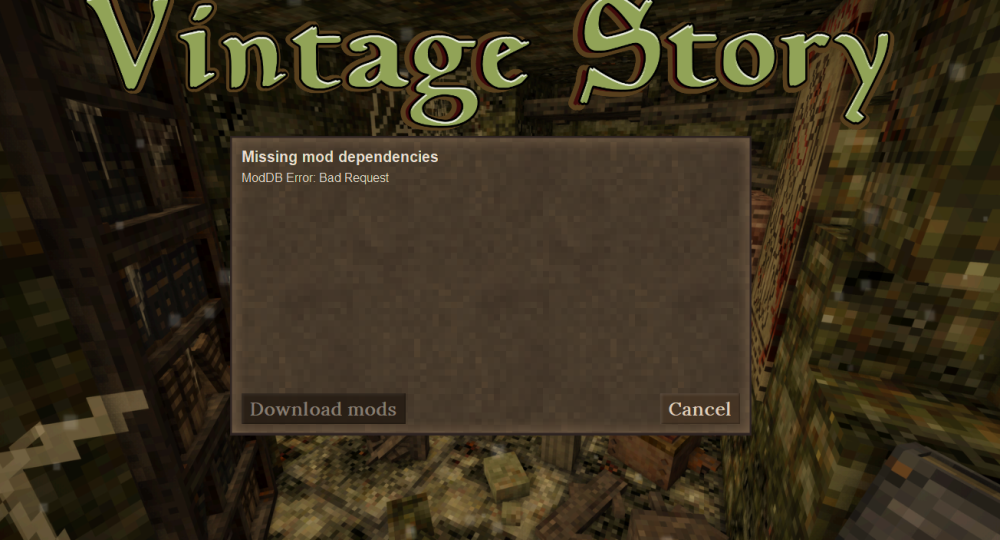
Has anyone been able to solve the "Bad Request" error, when connecting to Dedicated Servers that have more than one mod installed? Everything works fine with one Mod, but as soon as you have more, this is what you see.
-
@Shijikori That is a solid recommendation. The standard configuration for the server has RCON only accessible through the WebUI, but calling it out is definitely a valid point. I should also look into updating the process for handling the WebUI to also support using Let's Encrypt, so it will just natively support SSL, and then give them a way to deploy it with their own certs, if that is what is preferred. I've opened Github Issue #65 for implementing a solution that will allow for simple automated support, if they are using anything more than localhost access.
-
@Shijikori Thanks for the heads up! I'll update the version and test. I actually suspect that may have been the cause of a id count error I was running into that ultimately had me change to an async call through the python rcon library. I'll let you know!
-
Wonderful! Glad I could help!


