-
Posts
79 -
Joined
-
Last visited
Content Type
Profiles
Forums
Blogs
News
Store
Everything posted by Feycat
-
Can you change things like ocean amounts with the console?
-
I know you can regenerate chunks in order to make sure you get the story locations added to your world, but is it possible to change your world settings and then regen? My world doesn't really have oceans because it was made before 1.20 and I'd like to change that. I do not want to restart with a new world.
-
We went from the nice scribe's office to... the collapsing library. That's unnerving. Does that mean something?
-
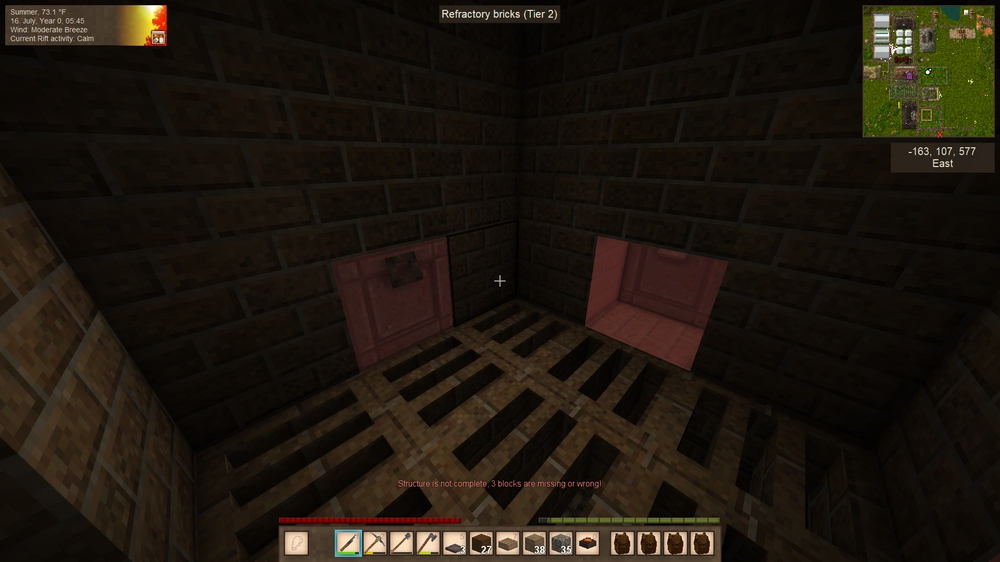
I ran my first load of blister steel just fine and replaced the broken block (yay for the updated visuals!) but now every time I click the coffin it says this. I've gone all around it and can't find anything damaged, but it won't let me load more iron in. Has anyone else had this happen?
-
Maybe this could be hunter-only to keep it from being too OP, but the ability to track a wounded animal via a blood trail would be amazing.
-
- 2
-
-
Did the voices change in 20 or is this complaint about the voices we've always had?
-
You can use the worldedit function to save all your buildings, that way you can find a new place in your new world and plop your settlement down again! I'm very attached to mine, I carry it with me >.>

-
I really like your table and stairs designs, might steal that!
-
I've honestly got 2 windmills. One is for my quern and built into a windmill building. The other is atop my smithing building and has one 5-long sail and powers a single helve hammer and a pulverizer with no problem. It's obviously dependant on the wind, but since the only thing I use the hammer for is clearing iron blooms/blister steel and plates for lanterns, it's plenty for my single player needs.
-
I was in the middle of chiseling blocks in a tower when it crashed. Now every time I try to reload it, I get this: Running on 64 bit Windows 10.0.19045.0 with 16281 MB RAM Game Version: v1.19.8 (Stable) 10/12/2024 4:14:54 PM: Critical error occurred Loaded Mods: System.ObjectDisposedException: Cannot access a disposed object. Object name: 'The ThreadLocal object has been disposed.'. at System.Threading.ThreadLocal`1.GetValueSlow() at Vintagestory.GameContent.EntityBehaviorControlledPhysics.Initialize(EntityProperties properties, JsonObject typeAttributes) in VSEssentials\Entity\Behavior\BehaviorControlledPhysics.cs:line 102 at Vintagestory.API.Common.Entities.EntitySidedProperties.loadBehaviors(Entity entity, EntityProperties properties, IWorldAccessor world) in VintagestoryApi\Common\Entity\EntityProperties.cs:line 363 at Vintagestory.API.Common.Entities.EntityProperties.Initialize(Entity entity, ICoreAPI api) in VintagestoryApi\Common\Entity\EntityProperties.cs:line 247 at Vintagestory.API.Common.Entities.Entity.Initialize(EntityProperties properties, ICoreAPI api, Int64 InChunkIndex3d) in VintagestoryApi\Common\Entity\Entity.cs:line 558 at Vintagestory.API.Common.EntityAgent.Initialize(EntityProperties properties, ICoreAPI api, Int64 InChunkIndex3d) in VintagestoryApi\Common\Entity\EntityAgent.cs:line 122 at Vintagestory.Client.NoObf.ClientSystemEntities.entityFromPacket(Packet_Entity entitypacket, ClientMain game) in VintagestoryLib\Client\Systems\Entities.cs:line 553 at Vintagestory.Client.NoObf.ClientSystemEntities.createOrUpdateEntityFromPacket(Packet_Entity entitypacket, ClientMain game, Boolean addToLoadQueue) in VintagestoryLib\Client\Systems\Entities.cs:line 515 at Vintagestory.Client.NoObf.ClientSystemEntities.<>c__DisplayClass8_0.<HandleEntityLoadedPacket>b__0() in VintagestoryLib\Client\Systems\Entities.cs:line 218 at Vintagestory.Client.NoObf.ClientMain.ExecuteMainThreadTasks(Single deltaTime) in VintagestoryLib\Client\ClientMain.cs:line 776 at Vintagestory.Client.NoObf.ClientMain.MainGameLoop(Single deltaTime) in VintagestoryLib\Client\ClientMain.cs:line 731 at Vintagestory.Client.GuiScreenRunningGame.RenderToPrimary(Single dt) in VintagestoryLib\Client\MainMenu\Screens\GuiScreenRunningGame.cs:line 163 at Vintagestory.Client.ScreenManager.Render(Single dt) in VintagestoryLib\Client\ScreenManager.cs:line 676 at Vintagestory.Client.ScreenManager.OnNewFrame(Single dt) in VintagestoryLib\Client\ScreenManager.cs:line 651 at Vintagestory.Client.NoObf.ClientPlatformWindows.window_RenderFrame(FrameEventArgs e) in VintagestoryLib\Client\ClientPlatform\GameWindow.cs:line 88 at OpenTK.Windowing.Desktop.GameWindow.Run() at Vintagestory.Client.ClientProgram.Start(ClientProgramArgs args, String[] rawArgs) in VintagestoryLib\Client\ClientProgram.cs:line 324 at Vintagestory.Client.ClientProgram.<>c__DisplayClass9_0.<.ctor>b__1() in VintagestoryLib\Client\ClientProgram.cs:line 128 at Vintagestory.ClientNative.CrashReporter.Start(ThreadStart start) in VintagestoryLib\Client\ClientPlatform\ClientNative\CrashReporter.cs:line 93 Event Log entries for Vintagestory.exe, the latest 1 ================================== { TimeGenerated = 10/12/2024 4:09:49 PM, Site = , Source = Application Error, Message = Faulting application name: Vintagestory.exe, version: 1.19.8.0, time stamp: 0x661e0000 Faulting module name: KERNELBASE.dll, version: 10.0.19041.4957, time stamp: 0xc5225d0f Exception code: 0xe0434352 Fault offset: 0x000000000003b699 Faulting process id: 0x1da0 Faulting application start time: 0x01db1ccbe7f0ae13 Faulting application path: C:\Users\Gabe\AppData\Roaming\Vintagestory\Vintagestory.exe Faulting module path: C:\WINDOWS\System32\KERNELBASE.dll Report Id: 8169b979-a3d1-4c55-ba4d-52f4570a4d62 Faulting package full name: Faulting package-relative application ID: } Running on 64 bit Windows 10.0.19045.0 with 16281 MB RAM Game Version: v1.19.8 (Stable) 10/12/2024 4:14:54 PM: Critical error occurred Loaded Mods: System.ObjectDisposedException: Cannot access a disposed object. Object name: 'The ThreadLocal object has been disposed.'. at System.Threading.ThreadLocal`1.GetValueSlow() at Vintagestory.GameContent.EntityBehaviorControlledPhysics.Initialize(EntityProperties properties, JsonObject typeAttributes) in VSEssentials\Entity\Behavior\BehaviorControlledPhysics.cs:line 102 at Vintagestory.API.Common.Entities.EntitySidedProperties.loadBehaviors(Entity entity, EntityProperties properties, IWorldAccessor world) in VintagestoryApi\Common\Entity\EntityProperties.cs:line 363 at Vintagestory.API.Common.Entities.EntityProperties.Initialize(Entity entity, ICoreAPI api) in VintagestoryApi\Common\Entity\EntityProperties.cs:line 247 at Vintagestory.API.Common.Entities.Entity.Initialize(EntityProperties properties, ICoreAPI api, Int64 InChunkIndex3d) in VintagestoryApi\Common\Entity\Entity.cs:line 558 at Vintagestory.API.Common.EntityAgent.Initialize(EntityProperties properties, ICoreAPI api, Int64 InChunkIndex3d) in VintagestoryApi\Common\Entity\EntityAgent.cs:line 122 at Vintagestory.Client.NoObf.ClientSystemEntities.entityFromPacket(Packet_Entity entitypacket, ClientMain game) in VintagestoryLib\Client\Systems\Entities.cs:line 553 at Vintagestory.Client.NoObf.ClientSystemEntities.createOrUpdateEntityFromPacket(Packet_Entity entitypacket, ClientMain game, Boolean addToLoadQueue) in VintagestoryLib\Client\Systems\Entities.cs:line 515 at Vintagestory.Client.NoObf.ClientSystemEntities.<>c__DisplayClass8_0.<HandleEntityLoadedPacket>b__0() in VintagestoryLib\Client\Systems\Entities.cs:line 218 at Vintagestory.Client.NoObf.ClientMain.ExecuteMainThreadTasks(Single deltaTime) in VintagestoryLib\Client\ClientMain.cs:line 776 at Vintagestory.Client.NoObf.ClientMain.MainGameLoop(Single deltaTime) in VintagestoryLib\Client\ClientMain.cs:line 731 at Vintagestory.Client.GuiScreenRunningGame.RenderToPrimary(Single dt) in VintagestoryLib\Client\MainMenu\Screens\GuiScreenRunningGame.cs:line 163 at Vintagestory.Client.ScreenManager.Render(Single dt) in VintagestoryLib\Client\ScreenManager.cs:line 676 at Vintagestory.Client.ScreenManager.OnNewFrame(Single dt) in VintagestoryLib\Client\ScreenManager.cs:line 651 at Vintagestory.Client.NoObf.ClientPlatformWindows.window_RenderFrame(FrameEventArgs e) in VintagestoryLib\Client\ClientPlatform\GameWindow.cs:line 88 at OpenTK.Windowing.Desktop.GameWindow.Run() at Vintagestory.Client.ClientProgram.Start(ClientProgramArgs args, String[] rawArgs) in VintagestoryLib\Client\ClientProgram.cs:line 324 at Vintagestory.Client.ClientProgram.<>c__DisplayClass9_0.<.ctor>b__1() in VintagestoryLib\Client\ClientProgram.cs:line 128 at Vintagestory.ClientNative.CrashReporter.Start(ThreadStart start) in VintagestoryLib\Client\ClientPlatform\ClientNative\CrashReporter.cs:line 93 Event Log entries for Vintagestory.exe, the latest 1 ================================== { TimeGenerated = 10/12/2024 4:09:49 PM, Site = , Source = Application Error, Message = Faulting application name: Vintagestory.exe, version: 1.19.8.0, time stamp: 0x661e0000 Faulting module name: KERNELBASE.dll, version: 10.0.19041.4957, time stamp: 0xc5225d0f Exception code: 0xe0434352 Fault offset: 0x000000000003b699 Faulting process id: 0x1da0 Faulting application start time: 0x01db1ccbe7f0ae13 Faulting application path: C:\Users\Gabe\AppData\Roaming\Vintagestory\Vintagestory.exe Faulting module path: C:\WINDOWS\System32\KERNELBASE.dll Report Id: 8169b979-a3d1-4c55-ba4d-52f4570a4d62 Faulting package full name: Faulting package-relative application ID: } Running on 64 bit Windows 10.0.19045.0 with 16281 MB RAM Game Version: v1.19.8 (Stable) 10/12/2024 4:14:54 PM: Critical error occurred Loaded Mods: System.ObjectDisposedException: Cannot access a disposed object. Object name: 'The ThreadLocal object has been disposed.'. at System.Threading.ThreadLocal`1.GetValueSlow() at Vintagestory.GameContent.EntityBehaviorControlledPhysics.Initialize(EntityProperties properties, JsonObject typeAttributes) in VSEssentials\Entity\Behavior\BehaviorControlledPhysics.cs:line 102 at Vintagestory.API.Common.Entities.EntitySidedProperties.loadBehaviors(Entity entity, EntityProperties properties, IWorldAccessor world) in VintagestoryApi\Common\Entity\EntityProperties.cs:line 363 at Vintagestory.API.Common.Entities.EntityProperties.Initialize(Entity entity, ICoreAPI api) in VintagestoryApi\Common\Entity\EntityProperties.cs:line 247 at Vintagestory.API.Common.Entities.Entity.Initialize(EntityProperties properties, ICoreAPI api, Int64 InChunkIndex3d) in VintagestoryApi\Common\Entity\Entity.cs:line 558 at Vintagestory.API.Common.EntityAgent.Initialize(EntityProperties properties, ICoreAPI api, Int64 InChunkIndex3d) in VintagestoryApi\Common\Entity\EntityAgent.cs:line 122 at Vintagestory.Client.NoObf.ClientSystemEntities.entityFromPacket(Packet_Entity entitypacket, ClientMain game) in VintagestoryLib\Client\Systems\Entities.cs:line 553 at Vintagestory.Client.NoObf.ClientSystemEntities.createOrUpdateEntityFromPacket(Packet_Entity entitypacket, ClientMain game, Boolean addToLoadQueue) in VintagestoryLib\Client\Systems\Entities.cs:line 515 at Vintagestory.Client.NoObf.ClientSystemEntities.<>c__DisplayClass8_0.<HandleEntityLoadedPacket>b__0() in VintagestoryLib\Client\Systems\Entities.cs:line 218 at Vintagestory.Client.NoObf.ClientMain.ExecuteMainThreadTasks(Single deltaTime) in VintagestoryLib\Client\ClientMain.cs:line 776 at Vintagestory.Client.NoObf.ClientMain.MainGameLoop(Single deltaTime) in VintagestoryLib\Client\ClientMain.cs:line 731 at Vintagestory.Client.GuiScreenRunningGame.RenderToPrimary(Single dt) in VintagestoryLib\Client\MainMenu\Screens\GuiScreenRunningGame.cs:line 163 at Vintagestory.Client.ScreenManager.Render(Single dt) in VintagestoryLib\Client\ScreenManager.cs:line 676 at Vintagestory.Client.ScreenManager.OnNewFrame(Single dt) in VintagestoryLib\Client\ScreenManager.cs:line 651 at Vintagestory.Client.NoObf.ClientPlatformWindows.window_RenderFrame(FrameEventArgs e) in VintagestoryLib\Client\ClientPlatform\GameWindow.cs:line 88 at OpenTK.Windowing.Desktop.GameWindow.Run() at Vintagestory.Client.ClientProgram.Start(ClientProgramArgs args, String[] rawArgs) in VintagestoryLib\Client\ClientProgram.cs:line 324 at Vintagestory.Client.ClientProgram.<>c__DisplayClass9_0.<.ctor>b__1() in VintagestoryLib\Client\ClientProgram.cs:line 128 at Vintagestory.ClientNative.CrashReporter.Start(ThreadStart start) in VintagestoryLib\Client\ClientPlatform\ClientNative\CrashReporter.cs:line 93 Event Log entries for Vintagestory.exe, the latest 1 ================================== { TimeGenerated = 10/12/2024 4:09:49 PM, Site = , Source = Application Error, Message = Faulting application name: Vintagestory.exe, version: 1.19.8.0, time stamp: 0x661e0000 Faulting module name: KERNELBASE.dll, version: 10.0.19041.4957, time stamp: 0xc5225d0f Exception code: 0xe0434352 Fault offset: 0x000000000003b699 Faulting process id: 0x1da0 Faulting application start time: 0x01db1ccbe7f0ae13 Faulting application path: C:\Users\Gabe\AppData\Roaming\Vintagestory\Vintagestory.exe Faulting module path: C:\WINDOWS\System32\KERNELBASE.dll Report Id: 8169b979-a3d1-4c55-ba4d-52f4570a4d62 Faulting package full name: Faulting package-relative application ID: }
-
The wiki says 11 x 11 x 11 for a greenhouse, 7x7 is for cellars There are no slabs and no chiseled blocks used in the actual greenhouse, nor are any of the ceiling blocks covered at all I've built 4 others of this *exact* greenhouse and they all work. I've just turned this one into my bee enclosure since it refuses to be a greenhouse for no reason I can detect.
-
I mean, I've lived in Michigan (basically southern Canada lol) since the 70s and it stays green most of the summer. We don't start getting brown until October, depending on when the snow first starts. Also even on "warm," the grass and leaves brown by mid-summer. Spring is SO lovely and green, it would be nice if we could keep it for most of the summer too. VS doesn't have to model pre-industrial world climate, just raise the amount of time it gets brown. I'd love to wait til fall for it to get brown and winter til it snows.
-
Halfway through Summer the grass and leaves are already brown/red, whether I'm in temperate or warm climate. I hate it, can it please stay green til fall? Would also be great if I wasn't standing in a half-block of snow in the middle of fall!
-
There's no slabs or chiseling on the roof, It's all solid blocks.
-
I don't know, I made another in exactly this design and it's still working so... I don't know.
-
None of the chiseled blocks are in any critical use. The whole structure except for the pine planks at the bottom are full glass blocks. None of the chiseled blocks are glass, they're all outside of it.
-
The problem is that, as I understand it, world generation is based on your settings AND a seed. If you and I used the same seed but with different world settings, we'd get totally different worlds.
-
Ok, so this WAS counting as a greenhouse, I had the +5 C from it on the planted crops. NONE of the blocks are on top of the glass, they're only on the sides. I put some decorative blocks on top (WAY less than 50% of the roof and also chiseled small) and it stopped counting as a greenhouse. I removed the blocks and it still won't count as a greenhouse anymore. I tore the glass out, tore the doors out, and re-placed them. No good. Slept, restarted game, still nothing. I ran the debug rooms command and the whole inside shows green, but it also says I'm standing in 9 rooms? Standing on the ground, my hud shows a cellar. Pillaring up near the ceiling, the hud shows a house? The inside dimensions are 10x10x6 tall. Is there any command to just make the game re-check the building? Or re-check the chunk? I honestly don't know what's wrong here and why it changed.
-
I've built a lot of really great buildings but I don't really like the place I decided to build. Is there any way to move the chunks into another save? I know the Chiseltools pantograph will let me save each block, but there's SO MANY blocks.
-
I just noticed that while I had a huge thunderstorm going on, my windmills were still. The wind speed should definitely at least be related to the weather. No reason you can't have a strong wind during a clear day, but having a calm wind during a huge storm is really not immersive.
-
I could do without all of it except leather.
-
Lovely, interesting or just plain bizarre landscapes
Feycat replied to Maelstrom's topic in Videos, Art or Screenshots
I really loved living across the lake from this mountain. I accidentally deleted my savegame so it's gone forever. The very top had a camp of 3 traders on it. -
I removed the amaranth grain since it needs to be ground but it's still not cooking with the meat, mushrooms and berries
-
I've let this thing cook for a full day and it remains cold. I have the same amount in every spot? Can anyone let me know what I'm doing wrong?