


Brady_The
-
Posts
750 -
Joined
-
Last visited
-
Days Won
7
Content Type
Profiles
Forums
Blogs
News
Store
Everything posted by Brady_The
-
That could be it. It's very doubtful that the door state (closed) was changed by the game on an update. Depending on the distance and the openness of the area to the coop you could block in any gaps and simply herd the chickens back (albeit I don't know how easy this will be on gen 11, luring them with food might be an option), or if that option is not feasible, catch them with the new (considering you updated from 1.18) reed basket trap one by one and bring them back this way.
-
I can't say that I have seen that many of them bundled up together before, but they most likely are lighting errors. If they are, entering those chunks and executing "/debug cr" should fix them.
-

Can someone please explain to me what all this means?
Brady_The replied to circusseal's topic in Questions
There are definitely some outdated mods (monitor lizards, just to name two examples), some incompatibilities (mainly between AAAEntityCorrect and animal mods which utilize the current vanilla file structure to patch, which is patched by AAAEntityCorrect), two versions of PetAI fighting each other (delete the older one), but the main problem seems to be related to Microsoft.NETCore.App/7.0.20 and non-existing files or directories within that installation. Linux is totally alien to me, so I am afraid I can't help you there. You probably get faster and better help on the Discord server. Sorry! -
server-main.log
-
Extensive guide or explanation of the chiseling system
Brady_The replied to xXx_Ape_xXx's topic in Discussion
You can only add non-chiselled blocks to the selection. -
mod "No modinfo.json" error question
Brady_The replied to Zapplay's topic in [Legacy] Mods & Mod Development
Thank you. These files are sending me mixed signals. client-crash seems to be pretty old, the latest entries is dated "9/24/2024", telling me that you are using game version 1.19.8. client-main is showing me today's date, which is good, but it tells me that you are using game version 1.19.2, which is quite old, over a year to be more exact. If it is true that you are currently using game version 1.19.2, it could with a very high degree of certainty explain the crashes. I can already tell by reading the log file that you are using quite a few mod versions created for later versions of the game. Configure Everything for example requires at least game version 1.20.0. Expanded Matter requests game version 1.19.7. So do Tailors Delight and Upholstery. VS Imgui requests game version 1.19.4. Greenhousebuff seems to be expecting game version 1.19.8. Etc, pp. You have to decide which way to go: Update to the newest game version 1.20.4. Update all mods that need updating. Check outdated mods if they crash the game. If they do, remove them. If you don't want to update to the newest game version, you have to figure out which mods you are using are made for newer versions, and either downgrade the mods to match your game version, or remove those mods. -
mod "No modinfo.json" error question
Brady_The replied to Zapplay's topic in [Legacy] Mods & Mod Development
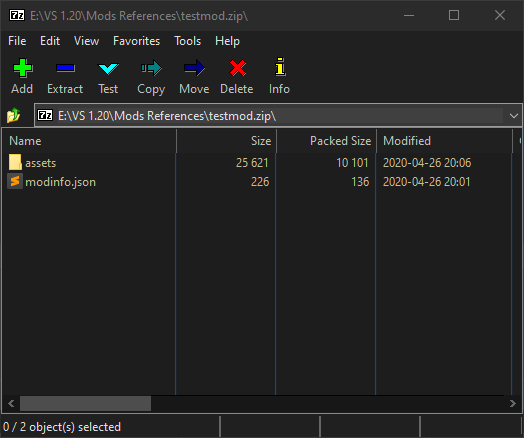
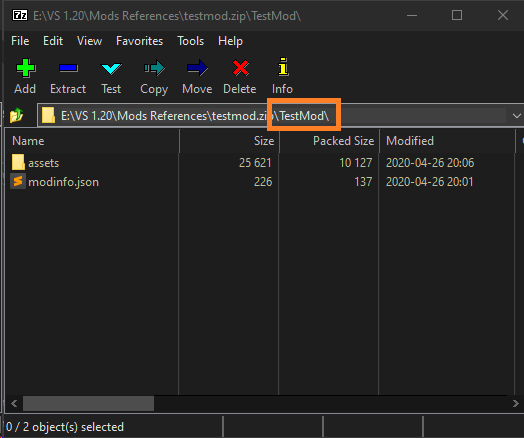
Take for example the testmod found here in this topic: Comment-8185 If you open the zip-file it looks like this: That's wrong. Instead it should look like this: That would be nice. Mind you, I am not the greatest crash log reader, so I might have to refer you to the Discord server for help.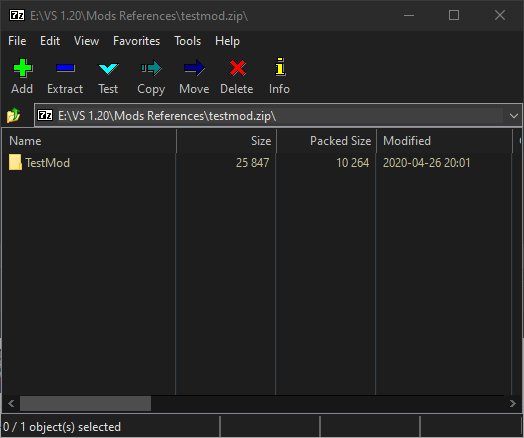
-
mod "No modinfo.json" error question
Brady_The replied to Zapplay's topic in [Legacy] Mods & Mod Development
That's exactly the problem OP had. Like Tyron said, modinfo.json (an the assets folder) needs to be at the root of the zip to work. You can fix this error very easily yourself, or look if an update for the mod is available. Wrong packaging is a common beginner mistake. I take it that with "correct version" you mean the appropriate mod version for the game version you are using? Does the crash occur when you load the game with any mod enabled, or just a particular one? Head over to: "%AppData%\VintagestoryData\Logs". client-crash.log is the most interesting log in this case, but it won't hurt to upload client-main.log and server-main.log as well. The easiest way to share those is by either zipping them or changing the file extension from ".log" to ".txt", and attaching the files to a comment. -
It's a spawn chance. You don't have to set up traps near physical fish entities in the world.
- 1 reply
-
- 1
-

-
I can't wait to see what the future holds.
-
Do the error messages appear in the loading screen? They should be printed in those logs.
-
mod "No modinfo.json" error question
Brady_The replied to Zapplay's topic in [Legacy] Mods & Mod Development
I suppose you are talking about a downloaded mod? What happens if you double-click the .zip-file of that mod? -
Logs can be found here: "%AppData%\VintagestoryData\Logs". Generally for this sort of problem the most interesting logs are client-main.log and server-main.log. The easiest way to share those is by either zipping them or changing the file extension from ".log" to ".txt", and attaching the files to a comment.
-
Weaver's Weed 0.4.17 - New source for Reeds and Fibers
Brady_The replied to Jobediah Timberman's topic in Mod Releases
That's it then. The mod on the ModDB is outdated. There's a version mismatch. I am not too well versed on Multiplayer mods, but it might be possible to manually install the mods. At least the wording on the screenshot seems to imply that this is possible. To do that, ask your friends to download the mod version in the post linked below into "%AppData%\VintagestoryData\ModsByServer\[YOUR-SERVER-IP]". Hopefully that's sufficient to make this work. If that doesn't pan out, my next step would be to ask for help in the #multiplayer channel of the VS Discord server, because unfortunately the above idea is all I got. Sorry! -
I'd try to remove .1 litres of water.
-
Weaver's Weed 0.4.17 - New source for Reeds and Fibers
Brady_The replied to Jobediah Timberman's topic in Mod Releases
It's just how it is with mod project. People come, people go. My comment above still holds true. 1.20.4. I spawned in a new world just to make sure, and 6 blocks away I found the first plants. Mods should be installed in "%AppData%\VintagestoryData\Mods". What isn't working for you? -
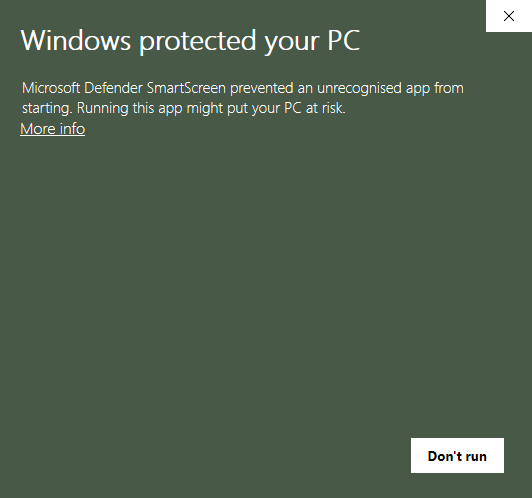
Specify. Do you mean https://account.vintagestory.at/ or do you mean ? If it is the latter, click on "More info" and "Run anyway". If it is the former, we'll need more information.
-
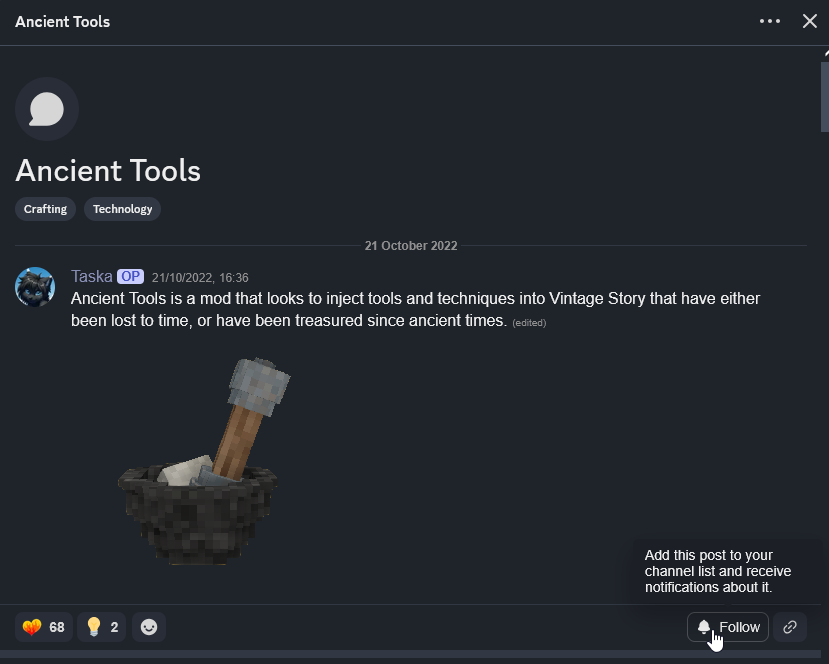
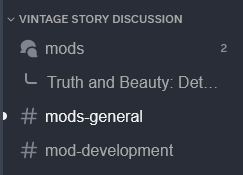
You can follow threads via two ways: Click on the three dots shown in the upper right corner of the screenshot and on Follow Post in the context menu that opens. Click on the Follow button shown in the lower right corner. The mod thread should then appear in the navigation pane:
-
https://discord.com/channels/302152934249070593/1291558226093146143
-
Varient-Based Recipes
Brady_The replied to SketchySpaghetti's topic in [Legacy] Mods & Mod Development
Unfortunately currently only one wildcard (character) per recipe ingredient is allowed. You'll have to create 7 different recipes to cater to all size variants. A tip: If you add to the recipe, you can put the ingredients anywhere in the grid without particular order. -
Weaver's Weed 0.4.17 - New source for Reeds and Fibers
Brady_The replied to Jobediah Timberman's topic in Mod Releases
Everything seems to be in working order. I quickly started a new world and almost immediately stumbled across some of the modded plants. Error logs show nothing either, so you should be good. -
Do you already own https://www.vintagestory.at/store/product/7-simple-server-hosting-8-slots/? If that is not the case, which I currently assume due to the information you have given us, I'd wager a guess and say that the item linked above is a prerequisite for the server upgrade you want to purchase.
-
That mod already exists: https://mods.vintagestory.at/offlinefoodnospoil Your container suggestion sounds very nice, but I don't think that mod exists yet.
-
Welcome, Mellow_Punk. Halite is set up differently than saltpeter. It's a variation of rock, so the code for halite would be "rock-halite". If you are interested in finding naturally spawned blocks or generally experimenting with the world generation in-game, I can recommend this mod: https://mods.vintagestory.at/xray
-
How to update abandoned mods?
Brady_The replied to drakrochma's topic in [Legacy] Mods & Mod Development
Hey there, drakrochma, updating abandoned and outdated content mods is fairly easy. Judging from your description you are thinking about updating old code mods, though. That's a lot less straightforward. The older the mod, the more invasive a mod, the more likely you'll have to adjust huge parts of it to make it work again.- 1 reply
-
- 1
-


