


Brady_The
-
Posts
750 -
Joined
-
Last visited
-
Days Won
7
Content Type
Profiles
Forums
Blogs
News
Store
Everything posted by Brady_The
-
Use a more stable area, like the ground or a flat wall. Or use some support beams to stabilize the area.
-
Check if this fixes anything: It might not. Maybe there is more than one bag bug floating around.
-
You should be good by copying the whole %appdata%\VintagestoryData folder on your old system and pasting it onto your new system. sounds a bit like you just copied parts of the folder. Which would explain the missing bed'o'nails block and could explain your missing backpacks.
-
Most probably will, but the one poor bugger that doesn't will appreciate this.
-
A link to the moddb page would be nice.
-
You craft both. You can find the recipes in the handbook.
-
If I had to guess, I would say the default installation path is C:\Program Files (x86)\Vintagestory\
-
-
Can't use an item in a recipe for some reason
Brady_The replied to Maldrak's topic in [Legacy] Mods & Mod Development
Existing strings in the language files don't necessarily point towards an existing or working block/item in-game. Might be a left-over, a future-proof, or simply generated. There are two ways I use to look up a code. Either via Creative Inventory or the games files (made much easier with a search utility like Everything). -
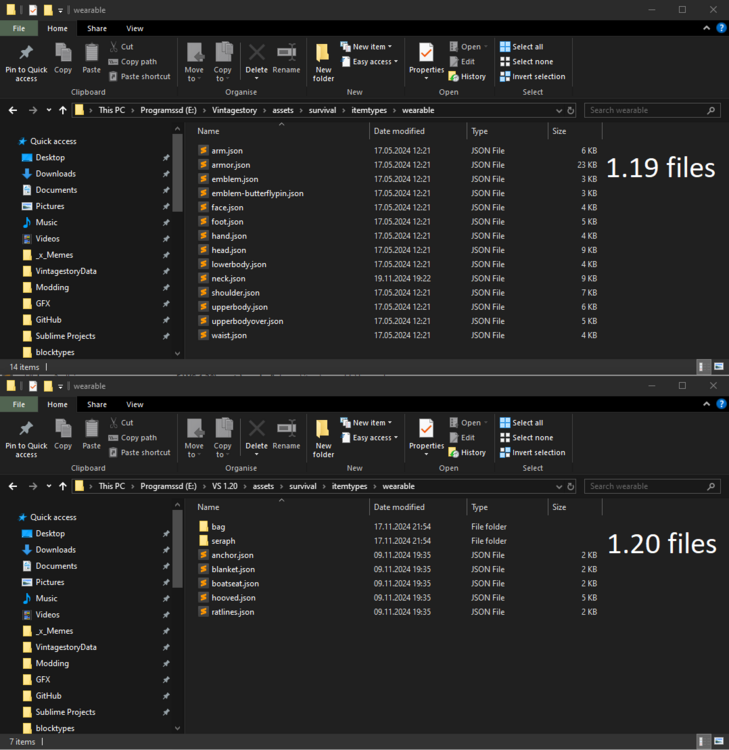
Check [1.20 VintageStory Installation path]\assets\survival\itemtypes\wearable for a sub-folder called "bag". If that subfolder does not exist, go up one folder (itemtypes), cut the folder "bag", go back into the folder "wearable" and paste the folder "bag". See if that fixes things.
-
Do the hunter bags (or any backpacks for that matter) work in that new world, or do they create no inventory slots either? Are you using mods on your old world on your old laptop? Are those mods installed and activated on your new laptop? Are you using the same game version on your new laptop?
-
There are two mods that come to mind. https://mods.vintagestory.at/show/mod/9705 https://mods.vintagestory.at/show/mod/14300 They don't exactly seem to modify content in a way you would like to, but it might still be worth a look.
-
Unfortunately not. For my purpose I would need the bot to be Human. They also seem to be not supporting the emotes I would like them to play (basically anything Balanced-, Formal-, Rowdy-, Lazy-). Thanks, though.
-
Can't use an item in a recipe for some reason
Brady_The replied to Maldrak's topic in [Legacy] Mods & Mod Development
Lose the "-dry" and you are good. -
The length of the antlers depends on the time of the elk in your possession. The longer you have him, the longer the antlers grow each year. Sadly shed antlers cannot picked up yet.
-
As the title might suggest, I am looking for a way to force an entity, such as a trader, to perform an animation in-game. Preferably something akin to stopanim, but I wouldn't mind a bit more work if it'd deliver. Cheers.
-
Until then https://mods.vintagestory.at/simplefootstepsredux should take care of this problem.
-
In 1.20 spider spider webs will be combustible, so you can be a regular Indiana Jones, clearing layers and layers of web with a torch.
-
Link from mod manager back to mods VSModDB web page
Brady_The replied to Vileace's topic in Suggestions
Good idea. -
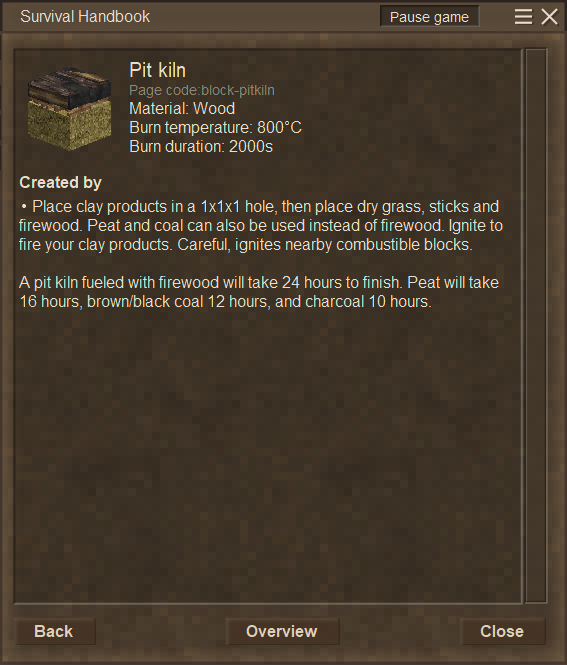
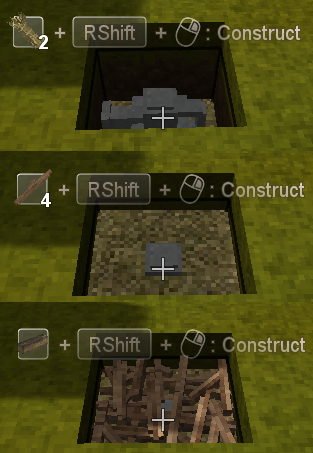
Welcome to the forum, Vileace. From the perspective of a new player, what information about the pit kiln are you missing, or could be presented better? The build order is there. The materials are shown. To me it looks pretty straight-forward.
-
Area temporal instabilities are killing my creativity...
Brady_The replied to Squishy_Oni's topic in Discussion
That really depends on how you want to play VS. There's the option that @mmgodog mentioned. But that removes the Temporal Stability completely. You can toggle this option after world creation with the command /wc temporalStability false If you don't want that, you could install a mod. I know of https://mods.vintagestory.at/stablesurface and https://mods.vintagestory.at/chunkstaboverride. Judging from the comments both should still work.- 12 replies
-
- 3
-

-
- frustration
- temporal instabilities
- (and 1 more)
-
Currently probably/maybe just as wallpaper or flooring with different patterns? I have absolutely no idea. At this time there don't seem to be any exclusive uses in Vanilla.
-
Weaver's Weed 0.4.17 - New source for Reeds and Fibers
Brady_The replied to Jobediah Timberman's topic in Mod Releases
I only had access to the first release of the mod from the mods.page, not any other dropped in this thread, because apparently zips lead to an error page, so I don't know what Mysticar did, but it wasn't much I had to change. I only replaced the "add" op with (the much later added) "addmerge" and precautionally changed the target from "worldgen/blockpatches.json" to "worldgen/blockpatches/other.json" in the patch. Don't know if that was really necessary, but it seemed cleaner to me. I really have to go back and compare the 1.14.8 game files to see if they changed so drastically. Additionally I fixed the texture paths in shapes, which were hard links to the textures save location on OP's computer. -
[Mod Request] Simple Pelt Cutting
Brady_The replied to Dragnier's topic in [Legacy] Mods & Mod Development
Done. Download link I used the transformation rate you suggested. Currently the only difference between knifes and shears as tools, is the durability cost. Any suggestion what kind of tool variation should be useable? All? Metal? The recipe is not shapeless due to possible conflicts with raw hide clothing recipes. Definitely not done. Unfortunately I would need to learn programming first. I bet SaltyWalter would be up for that, though. He already released a manual scraping mod. This wouldn't be too far off. Leaving some feedback would have been nice. Can't really act on "but it doesn't do exactly what I'd like it to" if you don't post it here. Lmao -
Oh. I thought you were interested in crafting fancy clothing. You stumbled across the recipe rotation problem instead. Recipes rotate through all possible combinations (more easily noticeable on the chest recipe for example, combining all sorts of different planks). If you hover a recipe it will stop the rotation, so that the player gets the chance to examine the recipe. You happened to stop the recipe which showcased the diamond-stitched linen. All "default" linen recipes like sails or gambeson accept all sorts of linen, including the normal version.


