


Professor Dragon
-
Posts
709 -
Joined
-
Last visited
-
Days Won
3
Content Type
Profiles
Forums
Blogs
News
Store
Everything posted by Professor Dragon
-
 I've just reached the Nadiya Village, for the Chapter 2 Story. Honestly, it is so pretty that I regret putting it off for so long. I should have come here straight away! It's a beautiful village, and having a population to interact with is just so much better than living alone in the wild. Annnnnwaaay, my suggestion: SUGGESTION Have a small "Player buildable" allotment within the village. Or just extend one of the walls a little and have it there. It doesn't have to be big. Say 20 wide by 20 long by 30 high (10 blocks "underground" and 20 blocks above ground). This would let the player build their own house, and integrate into the village better. Currently, you've got to build your house a good way from the walls. I understand why the Devs. have done this - it is so that they can update the story location in future updates. This would be the same principle - they could update everything except this one player section. I'm suggesting a small footprint, just so that people aren't tempted to put a skyscraper above with a 20 floor basement under. Thanks, Professor Dragon.
 -
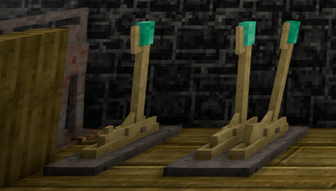
I've just played the Story Chapter 2 location - and there is a perfectly servicable lift there! It is already in game! And it looks very nice too. (Add a storage trunk to it and would be even better.) So if this could also be implemented into the Story 1 location, that would be grand. QUESTION: Does the lift in the Chapter 2 location work for anyone in v1.21.5? It no longer has the four levers on the floor as per the Wiki - that is now out of date: And although I could CALL the lift, the up and down levers did not work. Thanks.
-
Hi Everyone, I've put this over to the Issue Tracker, but I'm doubling up here in case you can help here. https://github.com/anegostudios/VintageStory-Issues/issues/7555 My Elk disappeared while in the Chapter 2 location, after a server crash: His marker is on the map, but he isn't there. I probably shouldn't have taken him there. I definitely shouldn't have put the one book on him that I couldn't lose - the "diary" that I track all of my progress in. It is a player created "Book" written with an Ink& Quill, and yes, it really is the only diary that I have of 14 years in this world. I put the book on the Elk because I was afraid that *I* would die. I thought I could always get the Elk back. . . I do have a game backup, which would include the diary. REQUEST * Anyone got ideas on getting the Elk back? I've tried the usual bone flute, new bone flute, teleporting to and from the location etc. Is there a teleport command (tp) which allows entity teleporting, or teleporting to entities? Is there a way to access the data of the Elk? * Is there any way to retrieve the contents of the book? It is the only custom book I've written. Is it in a file? In a SQL database? I do have a Save backup, which includes a current copy of the book. It is not recent enough really to include other progress, so I don't want to go back to it as a whole. I could load it back up, and if there is a "good" way to get 80 pages out of the book easily, then I'll do it. Note that player books this big currently have a bug where going through the pages is slow. As I said, I've got a Dev. request open, but they are busy, and if anyone has thoughts, that would be great. Thanks, Professor Dragon.
-
After much play time using both a Straw Hat, and the even better Bamboo hat, the weather protection bonus is just fine. If anything, the effect may be a little too strong for an entry level item. Since having a hat, I effectively haven't needed to worry about the "Soaking Wet" status from regular play in the rain at all. Admittedly I'm in full fur, but definitely if this status ever needs tuning, it would be downward and not upward. And this amount of weather protection given to a harder to obtain hat. Thanks.
-
Why on earth does the 1st boss have so much health?
Professor Dragon replied to Facethief's topic in Discussion
Spoiler. -
Why on earth does the 1st boss have so much health?
Professor Dragon replied to Facethief's topic in Discussion
I'll test it out. I think you can only Transcribe a page at a time, which is why the other person went the route of making a new book and copying from the Wiki. You could add your idea to the "Suggestions" thread. If the functionality is not added as you described, then we could get a new contraption called the "Printing Press" which does exactly that. Put books or Parchment/ink/coloured leather in, and you can print out a full book from your Journal to it. -
Why on earth does the 1st boss have so much health?
Professor Dragon replied to Facethief's topic in Discussion
I can confirm that the RA Library had a full set on my run on v.1.21.5 just yesterday. However, it took me FOREVER checking and rechecking EACH SHELF before I completed the final book. -
Why on earth does the 1st boss have so much health?
Professor Dragon replied to Facethief's topic in Discussion
Is that the Transcribe function? Sounds like a great idea. Beats lugging several trips worth of books back and forth over 30,000 blocks. From this post it seems like the process is: Make a new book in the colour of your choice Copy text from a source eg Wiki into the book Is that it? Or is there a way of Transcribing from the Journal, then squishing the resulting individual Parchment papers into one Book? What can I say, I'm a completionist. I didn't want to miss out on any of the shiny loot at all. But you do have to go by at least one - there's no avoiding that.
-
Can anyone recommend a display mod for "Butterfly Pins" that they have used? Not Butterflies the animal, but Butterfly Pins the jewellery. I see several mods out there, such as https://mods.vintagestory.at/shelfobsessed But if anyone has a favourite that works with these, that would be good. I've just completed the first story mission, and have a lot of nice loot without storage options that I wish to display. It would be really nice to have the armour stands display clothes also. (There's a mod for that I can find . . .) Thanks!
-
Is there a way to change from Celsius to Fahrenheit?
Professor Dragon replied to ElvenMage13's topic in Questions
Specifically, either of these two is a good start: Freedom Units Simple HUD clock Professor Dragon. -
Just look at Chuck Norris over here. I'm mentally moving you into the same category now as @Thorfinn - swiping away lesser hazards that makes stout hearts tremble. In the meantime, the rest of us will be running, pillaring, digging, fencing, water-logging, climbing, pyroing, modding and cheesing bears.
-
ISSUE There is a lot of loot worth having in the Resonance Archive Library - and from the Resonance Archive in general. The walk is long and the climb tedious to get back out. SUGGESTION Add a "Service Elevator" to the Resonance Archive, which takes you back to the top level. It could be a wooden platform with a fixed trunk, attached by ropes like the winch first encountered. Or a fancier elevator with brass details, befitting the rest of the Library decor. Perhaps it exits to a corridor with a door that can only be opened from the inside to your original entry point to the Resonance Archive. Once this door is opened, it either stays opened, or can be opened from both sides from that point on. (Perhaps with a key, to allow multi-player so that the door is not always open once one player clears it.) BACKGROUND There is an existing winch there, so the technology exists. We have the Boiler powered up. There is a lot of nice loot in the whole place. Having cleared the horrors, let us take our fancy finery out in style! Professor Dragon.
-
Mod Idea - Lighthouse and/or Lighthouse Beacon
Professor Dragon replied to Dr B's topic in [Legacy] Mods & Mod Development
I like this idea a lot. I'm sure that a lot of us have placed a lantern at the very top of our base - or mountain - as a navigation aid back to home. The troubles are: It's not really that visible from a great distance It is small and not to scale of what you imagine such a light should be So, yes, let's have a "big light" added to the game. Specifically to stick on top of your base, so it need not actually do any "anti-spawn" - it just needs to be visible from a distance. Professor Dragon. -
Why on earth does the 1st boss have so much health?
Professor Dragon replied to Facethief's topic in Discussion
Professor Dragon's First Boss Fight I've actually just done the Boss fight in the Resonance Archives for the first time, so this is fresh in my head. Why Tackle the Resonance Archive I chose to do the Story for these reasons: I went in cold, but did spend far, far longer than most players doing other things in the game, and prepared for what I anticipated to be a tough challenge. So by contrast with the experience above, the boss fight actually felt relatively easy, and I attribute that mostly to the gear that I took. I would call it a "satisfying" encounter. And the general boss concept I feel is great. You can't help but think "I'd be in so much more trouble if this thing wasn't crippled!" I am a complete combat scaredy cat and adverse to combat in general, staying out of the caves. Gear loadout Fight Strategy And though I tried many different things in the fight, this method proved effective. In the end, it seemed to be about the right length of a fight, and I was never seriously in danger. Having said that, I was obviously overgeared. Many people do this way earlier in the story, with much lesser gear. And there is a stack of resources in the Resonance Archive itself before you get to the fight which can help. Toughest Enemy The enemy which actually claimed one life, to my disappointment, was one of these two, because by contrast with the boss, I knew these were coming: Partly it was overconfidence. My encounter with the first one went just fine. But then on the second one nothing connected from my end. It broke my otherwise clean run. Rusty little bugger. Thoughts But to your original point, yes, it is a big change of pace: You can't pillar, dig holes, place blocks, retreat, place bombs or effectively use a water bucket. These are all combat techniques a player has probably been drilled in with the different natural animals and rust monsters prior. There are few "alternative methods" here where you can get creative. Either face tank it and whack, or snipe. It is a bottle neck. You can't go around this thing. You need to defeat it. I understand why they've done this. I'm not sure how I feel about it. The health pool is enormous. But not hugely so for what it is. I like Thorfinn's suggestion, as a practical measure. I'm not sure how I'd change this boss battle, if at all. There are some issues, but I'm not sure how to address them. The Real Challenge and a Suggestion My actual biggest "enemy" in the Resonance Archive, which easily consumed 10 times more time, food and coal than the rest combined was: Thanks for reading, Professor Dragon. -
Knapping, clay forming and smithing textures question
Professor Dragon replied to Torvosaure's topic in Questions
Sorry, I know nothing about modding, and your questions seems reasonably advanced. However, this question may get more traction if posted in the mods area of the forum here: https://www.vintagestory.at/forums/forum/27-mods-mod-development/ I'm going to flag @Spear and Fang in case they have comments. For reference, the Modding pages are here: https://wiki.vintagestory.at/Special:MyLanguage/Modding:Modding_Basics_Portal https://wiki.vintagestory.at/Category:Modding Anyone else in the meantime, have at this. Professor Dragon. -
Ooops. Forgot to include that here. v1.16.4.
-
Thanks LadyWYT. Unfortunately, the repair did nothing - not even replace the missing chunks with default world gen chunks. I will put this to the Issue Tracker and see what they say. It is not super important, besides nostalgia really. It was my first real base where I started out, and I was keen to see the transition between "then and now," 1,000 hours on. The only fragment that escaped unharmed had dirt walls with glass panes in them. And the farm fields had one water source at an end, rather than placed as still water. So I can see I've moved a long way. I do have my original Save game from that point, not that I suppose that helps. I was going to use it as a jumping off point to Story 2, because everything seems to generate based off a distance from world spawn, rather than my current spawn (Hmmm. I probably could have reset world spawn if I had thought about it, before asking for directions . . . ). In practical terms, I'm regrouping, building up a new "northern base" from which to launch story forays, and will chalk this one up to "instability from the Rust World seeping through." Worst case, I can try rebuilding whole chunks just to patch that area - although I'm not sure how far it extends, as there was nothing to see in any direction. Professor Dragon. EDIT Logged to: https://github.com/anegostudios/VintageStory-Issues/issues/7540
-
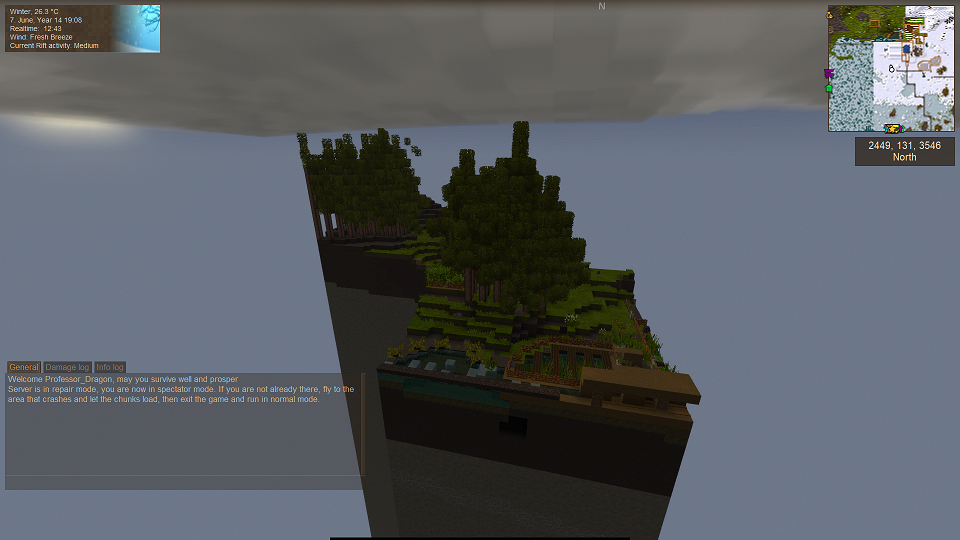
I'm looking for suggestions on how to continue from here. I've got a very old world, which has been updated through multiple major versions. For a long time, I have been moving south, but came back after 14 game years to complete the Resonance Archive. That went fine. However, going back to my original main base, it is simply gone - along with all of the chunks around it. Running in "Repair mode" does not appear to change anything. The best that I could do was fly in Spectator mode back to a part of the map where it was previously okay, and even though that now also had all missing chunks, exiting, running in Repair mode and coming back in appears to have made that region just fine. I have the log set. I don't know if there is any chance of recovering my previous main base area and farms. I am assuming it is gone? Should I just attempt chunk regeneration? OR should I just walk away from this area and never come back? Practically speaking, apart from nostalgia, I probably don't need anything from this base or area. (Was going to pick up a supply of leather for a saddle, but will sort that another way.) I could also put this to the Issue Tracker for help. I don't know how to read the logs effectively. client-debug.log: 18.11.2025 12:05:11 [Debug] MeshRef with vao id 17771 with 600 indices is leaking memory, missing call to Dispose. Set env var VAO_DEBUG_DISPOSE to get allocation trace. client-main.log: Nothing obvious. server-main.log: After waiting, did not seem to do anything. 18.11.2025 12:05:28 [Warning] Server overloaded. A tick took 3396ms to complete. server-debug.log: 18.11.2025 09:58:39 [Debug] Found 3864 Item requiring remapping 18.11.2025 09:58:39 [Debug] Remapped 0 new Itemids 18.11.2025 09:58:39.249 [VerboseDebug] Remapped existing Itemids: 2416=>2, 2419=>3, 2421=>4, 2422=>5, 2423=>6, 2425=>7, 2=>8, 3=>9, 4=>10, 5=>11, 6=>12, 7=>13, 8=>14, 9=>15, 10=>16, . . . 18.11.2025 09:59:07.879 [VerboseDebug] Done spawn chunk The visible green part in the map at top right is all that remains in this area. You cannot leave this area in Creatie mode - you need to enter Spectator mode to be able to fly out. The rest of the world does not exist at this point - you need to fly to an "existing" chunk, log out, repair mode, come back in and then that chunk is fine. This lot is all still missing though. Thoughts appreciated. Thanks, Professor Dragon.
-
Found it! All books were in the Library, on the shelves. It just took a loooooooot of searching. Honestly, they could probably make all the books glow with coloured spines, not just most, and it would still be "fair."
-
Found it! I now have a complete set. For the record, it took a looooong time to find. Much longer than clearing the archive. I feel no guilt at all about going into Creative Mode and gifting myself more black coal to keep the place lit, as it took forever to find this last one. The one that caught me up was located at: So, there is a complete set in the library as of v1.21.5, but you need to click on every single shelf to find it. (Multiple times in my case, because I went top to bottom I thought many, many times.) Thanks, Professor Dragon.
-
Both. It is mostly for showing off. However, if space was super tight, such as a greenhouse, you could put multiple fruit tree types into the one area. From a food perspective, there is not a lot of point to that apart from the different cropping times. And it is easy enough to get more space for fruit trees. It has decorative uses: According to the wiki, it makes fruit trees one block wider. I can't say that I've seen that myself, never having done it. And I thought regular fruit trees could go out three blocks anyway (???). However definitely, you can get different colour blossom on the one tree, and different fruits of course. I suspect that it is an undeveloped feature, where they are leaving room to add more features to fruit trees, such as grafting different temperature regions to trees. That's just a guess though. Professor Dragon.
-
Because of this, I now have my main "recipes" on signs in my smithing room, despite having done this countless times. It just saves on the brain work - you can grab exactly what you need, and plonk down the right number of moulds. The sign looks like this: <Type and Number of INGOTS PRODUCED> <Nuggets of first ore> <Nuggets of second ore> etc. <Amount of warming fuel> <Amount of main fuel> There's also mods for those who don't like to track this stuff, that does the mathy math.
-
My Server World Was Replaced With My Single Player World?
Professor Dragon replied to HumanDude's topic in Questions
Sounds like you've recovered the situation. Yay A lesson for all of us to take backups. I periodically back up my main world - not nearly often enough though. I hadn't given a thought to the files outside of the main save though, such as configurations and mods. It would be wise to do that. Professor Dragon. -
Thank you. That helps a lot. I guess I'm going to go back with another stack of coal then - courtesy of Creative Mode, as I'm feeling like the Library hasn't played fair at this point. I've already been through all of the side rooms many times, but I'll give it another go. I've already pretty thoroughly looted the rest of the Resonance Archive. If it is somewhere there . . . well, I don't really have a chance of finding it. Regarding particles off of books:
-
No problem. Also, each animals' page will give you the basic spawn rules for that creature eg: https://wiki.vintagestory.at/Bighorn_sheep Professor Dragon.
- 3 replies
-
- 1
-

-
- animal
- animal behavior
- (and 4 more)

