Professor Dragon
-
Posts
709 -
Joined
-
Last visited
-
Days Won
3
Content Type
Profiles
Forums
Blogs
News
Store
Everything posted by Professor Dragon
-
Check out this issue and see if it is similar. https://github.com/anegostudios/VintageStory-Issues/issues/5957#issuecomment-3368608500
-

v1.21.2/4 Story Chapter 2 Redux, TOPS-Lagspike patch
Professor Dragon replied to Tyron's topic in News
I'm not sure this is fixed. Fixed: Flat fog from weather no longer reduces deep cave visibility This picture was taken at L49 in a surface fog prone area. One second the cave visibility was fine, and the next the cave darkened over. The back circled torches are 8 blocks away. The closest torch is next to me. On the other hand, I'm enjoying a lot of the other changes. Too many to call out, so I'll just highlight that single shield display is back! I've added a Comment to: https://github.com/anegostudios/VintageStory-Issues/issues/6228 Thanks, Professor Dragon.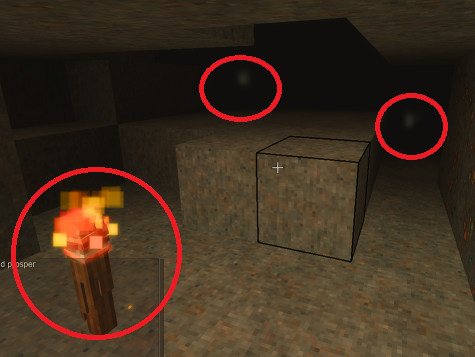
-
v1.21.2/4 Story Chapter 2 Redux, TOPS-Lagspike patch
Professor Dragon replied to Tyron's topic in News
Is clay forming quicker, or am I imagining things? -
It's a higher bar than that, even. My guess is that people would consult most of these if they seriously engage with the Prospecting system: Handbook and Prospecting Guide VS Wiki YouTube videos VS Forum/VS Discord/VS Reddit And even when they are specifically talking about the Prospecting mechanic, you need to sort through the well-intentioned but non-Prospecting advice, such as: Use a mod. Go caving. Toughen up, it is meant to be hard. I found it on my first try, what's your problem? Just get good. A specific criticism I have is that the "in-game" player does not have access to a lot of that information. Such as the spawn rates and generations of ores. Or the levels that specific ores spawn at or under or above. How is the in-game player meant to know at what levels the different ores spawn at? It takes a LOT of mining attempts under different conditions before you can say from experience that "Ore X likely spawns between these levels." And the thing about Prospecting, is that the default scenario that causes so many problems is Prospecting for an ore that you haven't searched for before, or is rare. So you don't have that benchmark. Does this ore spawn near the mantle, or near the surface, or do I need to sample every single space between? Over which hangs the whole issue that the Density search result can be completely unreliable. Thanks. Professor Dragon. EDIT This change is very welcome. I wonder if it will fix some of my issues, as I'm very likely in this spot: Fixed: Propick density search mode readings in areas originally created in very old saves (1.18 and older) could become incorrect when nearby (map border) areas were generated in game version 1.21.x
- 143 replies
-
- 1
-

-
- prospecting
- prospecting pick
- (and 2 more)
-
Could we have an "auto forward" for the raft? Double tap the forward key (W) and it will just keep rowing forward in a straight line. Tap W again to cancel and return to default behaviour. Thanks.
-
@Brady_The is correct as to the best approach. Using "/gamemode creative" and "/gamemode survival" is exactly the same thing - but easier to remember for me. I have noticed in the current build that I am getting "invisible items" for things such as armour placed onto armour stands, or stacks placed on the ground. They appear to vanish, but they CAN be interacted with (unlike the OP report). I don't see anything on the bug list for this, but I suspect that something is going on which is not mod related.
-
Yes, I understand that approach of making the best of what is hand, and see its benefits. That's for the future for me. I'm more moving along a series of check marks "Get iron", "Get steel", "Get chromite." Also, I feel like I've been "speed rushing" the game content, but I'm still on my first serious play through, several real life years into my world. I'm still gearing up to savour the story missions. I'll get there after better armour, bigger backpack, beehive kiln up, some of my own home coloured pots in my base, making the orchards larger and prettier . . . and so on. But I am speed rushing to get to the story content - there are just a few detours along the way. It will feel so good when I can slow down and start decorating properly. Solid points on the optimisation. The map readings are from my "surface" Chromite Density readings, so they will show L110 or whatever. I've gone back and Edited my dig post above, as really these are the essential Node (6) readings to take for likely Chromite in a default world: Level 7, 19, 31, 43. So a network at L43 would be optimal for tool durability. Note though that to go 12 sideways actually consumes 24 durability, because you need to stand up. A shaft down only consumes single durability per level. However, I do have an underground lower network of tunnels I sunk a bit lower to be similar to what you said. Not as low as 44. Mainly to be able to dig in any Rift conditions. The existing pattern of five going surface to mantle were mainly to conclusively say "There is NO Chromite here for certainty" rather than being an optimised tool durability saver. The Temporal Stability at L44 is pretty bad. It takes me roughly a 1/2 day to sink a shaft, prospect it, retrieve ladders, and move out of area to recover. Then usually the full day is done by the time I recover stability and have been distracted by base building or whatever. Then I go back and repeat. I'm going on holidays so I'm going to give this problem a rest. (Headline: Professor Dragon gives up on Prospecting!) I've decided to give prospecting Chromite a break for a while, and focus on base building and other activities, while taking further Prospecting readings in case there is another site out there. I am undecided as of now whether I will (a) Give up totally on this particular dig site and use an x-ray mod just to see where/if there was Chromite there and how close I got (b) Use Creative to gift myself some Chromite for the backpacks, so that I can get on with other "more interesting" parts of the game, and then prospect later again and throw the resulting Chromite into an ocean (c) Prospect elsewhere and/or cave (d) Come back here for "Round 3" attempt. Oh, I totally would like: Sturdy backpacks Mordanted cloth The former for making bigger builds easier, and the latter for decorating builds. I agree, neither is necessary, but both are nice. Plus they are obviously there like Gen 10 Sheep and Dairy - things for the long term players to tick off. I just happen to currently like base building a lot more than caving, despite the promised treasures. Thanks everyone. Professor Dragon.
- 143 replies
-
- 3
-
-

-
- prospecting
- prospecting pick
- (and 2 more)
-
Thank you for such a detailed explanation! I am just at the beginning of that journey you've described. My trade routes are up and running well (Baking bread for me and selling to three Commodity Traders, as well as feathers and string, is profitable). Steel Tools have been a game changer - they've finally allowed proper building, at scale. I agree about the mods. I have not got to QP Chisel yet, but it is an obvious requirement for anyone working in this space. Love your item sorter - I hadn't appreciated that such technology was possible in VS. Anyway, I've been inspired. Thanks for the notes and the build images! Professor Dragon.
-
Flowerpot/planter/decorated vessel variant availability
Professor Dragon replied to franzanth's topic in Questions
Amazing! I'll be using that list myself. I wonder how one goes about getting edit rights to the Wiki to add this type of thing? It seems like just the place for it. Professor Dragon. -
Flowerpot/planter/decorated vessel variant availability
Professor Dragon replied to franzanth's topic in Questions
Small correction. The Luxury Trader BUYS the Chthonic Storage Vessel, not sells. Different part of the file. That's what happens when you use a "Search" function in a file without checking carefully where it is. Oops! -
This is amazing work. So lovely! Any individual room would be worthy of high praise on its own . . . but it just keeps coming! I particularly like the fluted ceiling above the stairs (last image), but it is all glorious. (Please don't tell me you did this in Survival . . . although you did mention getting another Chandelier, which makes it seem you are . . . )
-
Even if they were attracted to meat, I wouldn't recommend it. It will despawn, and you have better uses for your meat. Wolves ARE attracted for sure to live prey and, well, you. Same thing really. So dig your standard pit as the trap, and put a small prey animal like a rabbit or chicken in a safe spot above the pit as bait. The little animals don't despawn. So it is a bit of work, but you only need to do it once. You could just try a big trench and that would probably work without bait.
-
+1 for that tip. I find that mod indispensable - as I do the light source checker mod when building rooms and corridors and adding permanent light. I see a problem - you have stone path under the doors. They are not a full block. So replace those with solid blocks (eg dirt or a stone block) and you should be fine. The only other thing that I'd add is that there could be a delay before the Greenhouse bonus hits, so give it some time. Up to 4 in game hours, although in practice it is usually only a few seconds for me. Professor Dragon.
-
[1.21.1] [Vanilla] Any ideas how my goat escaped?
Professor Dragon replied to KrampusKid's topic in Questions
In theory, Ricky should not be able to get out. Both fences and gates are intended to prevent animals from stepping on and over them. That is a fix that is occasionally called out in patch notes. Your enclosure looks fine: It is all fences and gates. No stray blocks. Snow does not matter since patched. There are no troughs or other steppable areas There is only one animal, so there shouldn't be collision climbing escapes However, Ricky, like all goats, has a step height of over three blocks - so maybe somehow that is still coming into effect, even though it shouldn't. \Vintage_Story\assets\survival\entities\animal\mammal\hooved\goat-adult.json stepHeight: 3.1251 I have a lot of sheep contained, which are similar to goats in many ways, behind 2 high fences and have only had one escapee - and it is possible that is because I left a trough in that location. Their step height is lower though. So you may simply want to try a 3 or 4 height fence. Anyway, practically speaking, I'd secure Ricky a little more. Give him the full treatment: Slabs or grated trapdoors for a roof (Anti-escape) A light source (Anti dark-despawn if solid roofs or walls) Another perimeter fence two blocks out from the current fence (Anti-bear swipe) Backup Ricky II in a secure location (Just in case) If Ricky were a chicken, I'd add: Lightning rod (Anti-instant death from lightning) Fireproof blocks around fence enclosure (Anti fire spread) ___ The Wiki says that Goat Horns take a year to grow: https://wiki.vintagestory.at/Goat#Horns Adult male goats (including ox) grow horns over the course of 12 months. Professor Dragon.- 2 replies
-
- 2
-
-

-
- help me please
- goat
- (and 1 more)
-
Huh. You're right - I'd never really appreciated that. Probably because I'm never working in a dark forge room, but you know, it's still a valid point. Forges emit light in the same way that the embers from a recently burning Firepit (Extinguished) do. You can see the light, but the light isn't strong enough to light up the block next to it. Anyway, I agree that forges could emit at least some light, as they LOOK like they should. At least a few candles worth equivalent. (I couldn't find a mod that already does this.) Forges could do with a few tweaks in general. There are already a few quality of life mods out there which could be in base game, such as auto-igniting if the fuel runs out while the forge is hot and you put more fuel in, the same way that a cook fire does.
- 1 reply
-
- 2
-
-
I think it would be best if you: Created the world with your favourite land forming settings. Switched to Creative and flew to an ocean: /gamemode creative (Optional) Use the "setspawnhere" command to now zero your co-ordinates to the spot you are on: /serverconfig setspawnhere See: https://wiki.vintagestory.at/List_of_server_commands/serverconfig And: https://wiki.vintagestory.at/Coordinates Switch back to Survival and enjoy: /gamemode survival Otherwise what you are asking is "Can the world generation make an ocean where I will spawn in?" and that would be a "No" in practice. I included the second link because there are two different co-ordinate systems in the game. The "friendly" 0,0 one displayed in the HUD, and the "real" one used in the back end. You don't need to know about the second type - just be aware that it exists, and why it means that the above command is useful. Professor Dragon.
-
Flowerpot/planter/decorated vessel variant availability
Professor Dragon replied to franzanth's topic in Questions
I can go the other way and tell you which ones the Traders sell. A process of elimination should tell you the others - and let us know the list \Vintage_Story\assets\survival\entities\humanoid\trader-artisan.json Line 48: "code": "storagevessel-burned", Line 64: "code": "storagevessel-copper", Line 80: "code": "storagevessel-earthen", Line 96: "code": "storagevessel-ashforest", Line 112: "code": "storagevessel-rain", Line 128: "code": "storagevessel-rime", Line 144: "code": "storagevessel-undergrowth", Line 160: "code": "storagevessel-oxblood", Line 176: "code": "storagevessel-cowrie", Line 192: "code": "storagevessel-seasalt", Line 208: "code": "storagevessel-honeydew", Line 224: "code": "storagevessel-beehive", Line 240: "code": "storagevessel-harvest", Line 256: "code": "storagevessel-springflowers", Line 272: "code": "storagevessel-volcanic", Line 288: "code": "storagevessel-rutile", Line 955: "code": "storagevessel-chthonic", Line 1115: "code": "storagevessel-loam", \Vintage_Story\Vintage_Story\assets\survival\config\tradelists\trader-luxuries.json Line 1045: "code": "storagevessel-chthonic", I put the question to a web search, and it says that there is a Ruin loot table. Is there really? For the life of me I couldn't find it, so is it an AI hallucination? Or do my search skills just suck? I'll paste that response here just as an "FYI" but please note that it may be wrong. (Let me know if it isn't though.) The link was off to a Youtube video which didn't really seem to mention it, so I didn't include it here. Professor Dragon.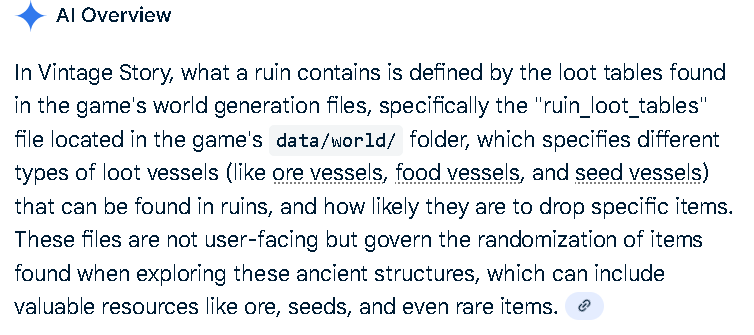
-
Is it safe to update my 1.21.0 world (100+ HOURS) TO 1.21.1
Professor Dragon replied to breeze108's topic in Questions
Yes, but . . . Yes, it should be safe to do the the update. It's going from one stable version to another, and so that is fine. You can check out the "News" page against the latest release, and people post there if there are issues, and in general there have not been. Always take a backup anyway - it is good practice. Now, the "but." The base game should be fine, but mods may be a different story. You can see mods fail to take effect after an update. Usually it is no big deal, and as soon as the mod writer updates it, then it picks up where it left off and everything is fine. I wouldn't really anticipate anything major, as it is just going between point releases. Most of them will still work as if nothing has changed. It really depends on the mod though. You could always pick out "likely suspects" and then check the mod page for that mod - there will be a dump of posts if something broke. -
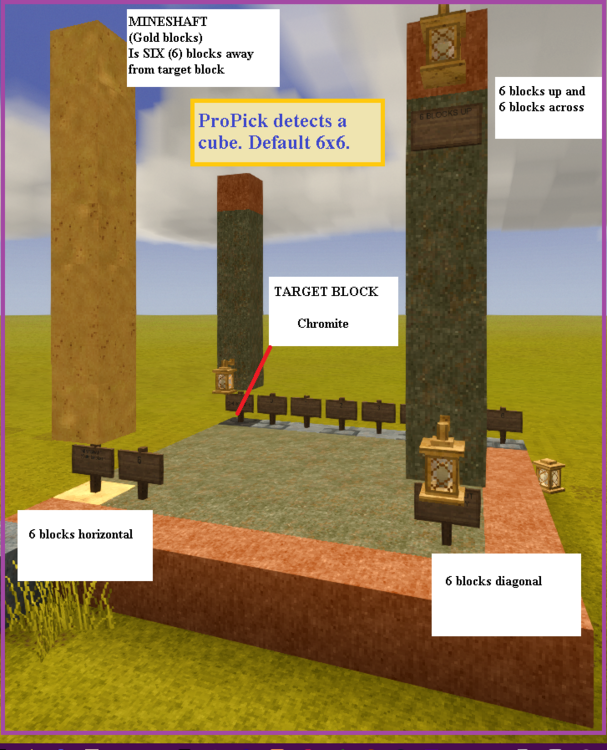
Thanks Thorfinn. I just did some testing to confirm what "radius" means - and for the ProPick, it means a cube. ProPick detects for a cube around itself. With a default setting of "6 blocks", count six blocks away (the block you are on is "0") horizontally , vertically, or both horizontally and vertically, any sample in that region will return a hit. In this image: TARGET BLOCK (Chromite) is at 0,0 at the back left of the image. MINE SHAFT is six blocks away. So if the mineshaft is "0", you count 1, 2, 3, 4, 5 and 6 is the target block. Every green Periodote block in the image is where a ProPick (6) can detect the target block. Every orange Bauxite block is where the ProPick is out of range of the target block. What this means in practice (explaining this to other people, not you ). HOW TO USE PROPICK 1) A ProPick with default setting of Node Search radius "6" will need shafts dug every 12 blocks. 2) Put down a shaft. This is block "0." Count 12 blocks away in any horizontal direction (NOT including the "0" block you are standing on) and sink the next shaft. 3) Vertically, take readings every 12 blocks. So if you take a reading at Level 1, the next reading will be Level 13, Level 25 and so on: 1, 13, 25, 37, 49, 61, 73, 85, 97, 109, 121, 133, 145, 157, 169 etc. EDIT: If coming up FROM the mantle, an optimised level dig pattern would be: L7, 19, 31, 43, (Probably stop there for Chromite), 55, 67, 79, 91, 103, 115, 127, 139 . . . L+12 4) Two stacks of rope ladders are an effective way to get down and up. 5) ProPick only detects readings from "rock". So other "similar to rock block types" won't give a reading. Obviously, there shouldn't be any if you are caving, but it is interesting. Don't try to ProPick a Ruin wall - it won't help. CAVING VS PROSPECTING I've been too much of a coward to go caving, because, that's where the monsters are. I saw a single corrupt shiver in a big dark cave, when doing these shafts, and bolted away. That is a natural response to monsters, is it not? Honestly, I'm amazed that you can find what you want caving. We obviously have totally different play styles. That's why I'm all about sinking nice controlled mineshafts. Prospecting should be a viable alternate way to play. But I'm getting the sense one needs to pluck up one's courage and brave the dark. SUGGESTION I wonder if the Handbook and Wiki should have the word "radius" defined more clearly, because it is clearly neither a sphere nor a taxi-cab radius, but just a straight cube. WRAPPING UP Interesting the different takes that you and LadyWYT have on the same information. Thorfinn - Well, yar, it might only spawn in a single measly block and that is giving you a reading. LadyWYT - But it can spawn in decent size veins, and then you're set for life! Rich, I say, rich! I'm not sure what to do with my Chromite search in this region. It might be time to pack it in, and go make a Beehive Kiln to have some nice pots. Then just do Prospecting more while doing other things and see if I hit another reading. Or come back to this one. Don't know. Anyway, thanks everyone. Professor Dragon.
- 143 replies
-
- 5
-
-

-
- prospecting
- prospecting pick
- (and 2 more)
-
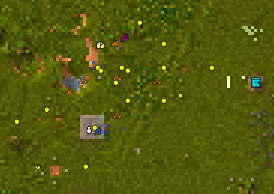
PROGRESS REPORT Eight play sessions. 4th May - Back to the mines. 5th June - Five shafts now sunk surface to mantle. No Chromite Node readings found. The shafts were spaced 12 blocks apart around the highest reading, and with vertical Node readings 12 blocks apart. Each orange ladder in this image. (Shaft spacings are exact - ladder images above are not.) New steel pick for this mission now at 1628/2500. Some additional horizontal shafts and clean-up. The new two stacks of rope ladders have been working a lot better than the old ladders. At least I get them back. Fewer torches needed also. Intersected with one cave system. Explored it a little, but no ores seen. It was a bit high up, but still low enough for some corrupted mobs. I sealed it off and continued with the shaft. I can keep extending the drop shafts in a grid outwards, but I'd really have expected to have hit a vein by now, if there was anything here to find. And yet, there are readings all over the place of "Decent." That indicates that there likely should be some. Are there? I have no idea. I've decided to burn a lot of the "good part" of this year on this mining expedition, but when Summer rolls around, I'd like to be back at my base harvesting the fruit trees. So there is an opportunity cost, apart from the tool wear, hours spent placing shafts and running from the bear and wolves on the trip out of zone. Professor Dragon.
- 143 replies
-
- 1
-
-
- prospecting
- prospecting pick
- (and 2 more)
-
Oh yeah! But also the bear statue part - really, it's all gold. We've all had that experience! I feel that Vintage Story is almost the opposite of Minecraft. In Minecraft, you launch into building, and get your uber-tools much later. In Vintage Story, you need your uber-tools before you can get into building. I'm simplifying, of course. But take chiselling as an example. It is one of the standout features of Vintage Story, and yet in effect it is gated behind iron/steel tools. Yes, you can do some chiselling with a copper chisel - but it will wear out before you can do much. In a way, it would be good to separate out the chisel feature so that you can use it earlier (in practice). Maybe purchasable from Traders, or increase the copper durability massively.
-
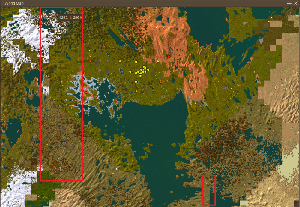
Thanks. I hadn't properly considered using Temporal Gears for stability. It's a bit pricey, but thanks for that suggestion. Each reading shown is filtered for Chromite only. These are the only readings I have for Chromite. Maybe I should switch from regular ladders to rope ladders and just poke vertical shafts down at each reading from surface to mantle (???). As part of this same cluster, there are some Poor and Very Poor readings further out from the central blob. As best as I can work out from the Wiki, Chromite spawns from near the mantle to around 40 (ish)? And web searches show that people have luck around either the the mantle or L18 on a default world. Unfortunately for me, I plonked down my "main base" without realising it would now be in the middle of broken chunks after version updates. The red rectangles contain clearly broken chunks. This is why I've tried to travel out a bit. The region of of the Chromite cluster appears to be in a fairly unbroken section. But I take your point - if this doesn't "pan out," then I'll move east or west to a clearly new section. Thank you again, LadyWYT. Back to the mines! Professor Dragon.
- 143 replies
-
- 1
-
-
- prospecting
- prospecting pick
- (and 2 more)
-
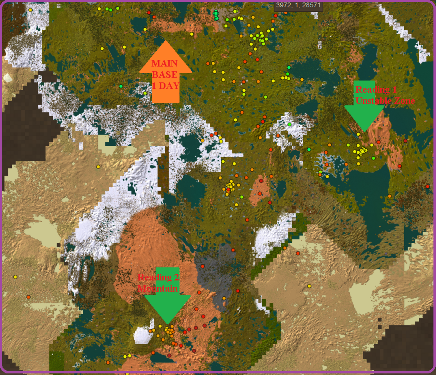
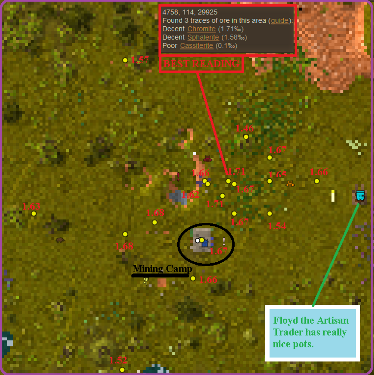
CASE STUDY: RECOMMEND A COURSE OF ACTION IN THE SEARCH FOR CHROMITE Here's the example that is facing me, Professor Dragon, right now: "The Hunt for Chromite." REQUEST: If anyone would like to make suggestions or a course of action, I'll implement them in my world. AIM: Find Chromite. BACKGROUND: The world is 11 game years old, and I am a little way from world spawn. Game was created on v1.16.4 and has been updated to 1.21.1 Stable. Steel tools are available, as are most resources. Prospecting has been done haphazardly for several thousand blocks around my current main base in all directions. Denser along trade routes. ProPick Node setting is 6 blocks. Two Chromite readings have been found with Density mode. Reading 1 - In a mildly Temporally Unstable zone. Bauxite over Andesite. (Referred to as "Unstable") Reading 2 - In the most mountainous region found. Bauxite over Andesite. (Referred to as "Mountain") Nine game days were spent travelling to and prospecting at Reading 1 (Unstable) sinking shafts to mantle and triangulating readings. Best reading "Decent" at 1.71%%. Broken chunk borders were several chunks away and appeared out of range. It had three large caves nearby, but all three collapsed due to ground instability, and poking around in them didn't show anything but mobs. No other ores seen. Called a halt here due to Temporal Instability making mining and recovery hard, winter, and "over it." Spent three game days travelling to and prospecting Reading 2 (Mountains). I never found another reading for Chromite, even when taking a Density reading right next to the original reading spot, which was "Poor" at 0.76%% Called a halt here due to not repeating a single reading. World height also varied sharply from near limit to sea level at times. No broken chunks. POSSIBLE ACTIONS: 1) Dig at Reading 1 (Unstable) more. 2) Prospect more. 3) Other? COMMENTS: I'm willing to keep digging the Reading 1 (Unstable) area if suggested. I have given up on Reading 2 (Mountains) as a weird anomaly. I am holding off using an x-ray mod, to see what can be done with good ol' fashioned prospecting. The Temporal Instability is mild at ground, but severe at lower levels. Recovery is hard, as even though the surface is mildly positive, I effectively need to move out-of-zone to recover, and that takes a while both for the recovery and the travel. I have put down one main shaft at the main source, and then poked other shafts down around it, but there is only one that goes surface to mantle at the highest Density reading. ProPick Node readings at 6 - 12 block intervals have so far shown no ore (but some copper and odds and ends), but mostly nothing. I have tried some horizontal shafts at mantle, and +18 from mantle. Plus some miscellaneous. Nothing. Plus burnt the last of my iron ProPick taking readings - now onto a new shiny steel one. On the upside, Floyd the Artisan Trader runs a really nice line in decorated pots at reasonable prices, so it is worth the trip just for that. MAPS: Reading 1 (Unstable) map. Zoomed IN to maximum. Plots of ProPick readings for everything (not just Chromite). Zoomed OUT maximum. Suggestions are welcome. Really. I'd like that Chromite. Thanks, Professor Dragon.
-
Maybe try disabling authentication and seeing if that helps? Set this value to "false", restart Vintage Story and see if that changes anything: https://wiki.vintagestory.at/index.php/Server_Config // If true, every time a player joins the server verifies if that player is a valid, logged in, registered buyer of the game. "VerifyPlayerAuth": true, This is just a guess. You could always post a log set to the Issue Tracker and if the Devs. have time they may be able to say root cause. Professor Dragon. EDIT I suppose I should ask if this has been a previously working setup which has stopped OR if this is a brand new attempt at setting up Vintage Story.
-
What server providers would you recommend?
Professor Dragon replied to ChiyannaD's topic in Questions
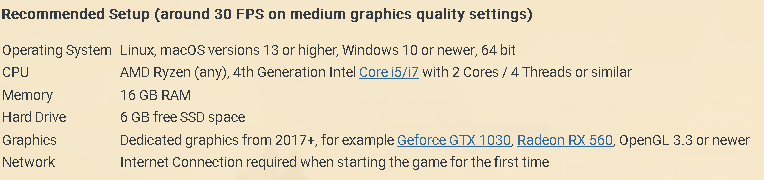
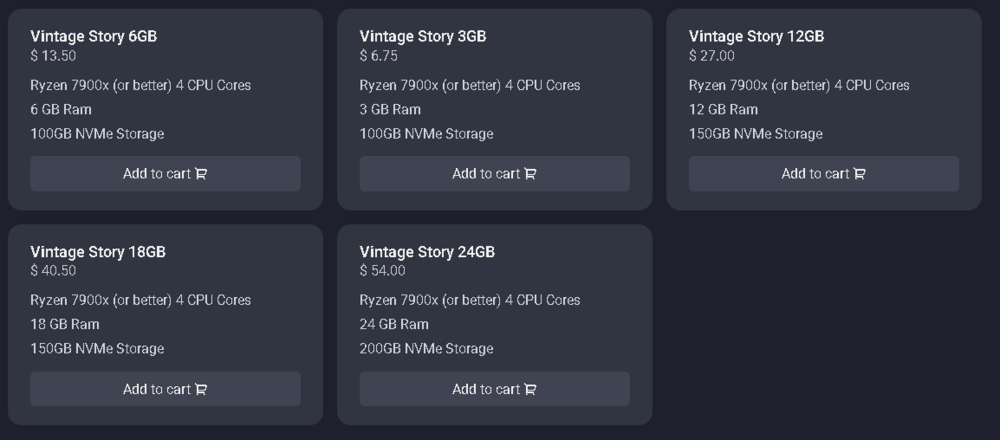
Hello @ChiyannaD, Welcome to the forums. I don't have a lot of experience on hosting, but as it looks like you're keen to get on with things, I'll advise what I can. There is a good chance that pretty much ANY hosting option you choose will be fine, especially for only a few players. Hosting has come a long way, and Vintage Story is not like a First Person Shooter where every frame counts. You should look at the single player recommended system requirements here as a baseline: https://www.vintagestory.at/sysrequirements/ I'll assume you are looking here: https://suhosting.net/Vintage-Story The 100GB Storage is way more than ample. My own world with hundreds of thousands of blocks travelled (straight line, not circle) is under 10 GB. Seriously, I would not factor in traveling to the "edges of the world." Most people don't actually travel significant distances in practice. I'd hang a question mark over the 3 GB memory. It is below recommended specifications, HOWEVER they are providing a decent CPU, so maybe that will offset it (?). Still, it might be good enough for a few players, without heavy mod use. I'd probably want 6GB+ myself as a wild, not fact checked, guess. Network speed might be a factor, but I can't comment on that in your scenario. QUESTION: Does the host (whoever they may be), allow you to switch plans? If yes, then it really does not matter. You can choose a plan and then move it up or down as your needs become clear. If no, then either look for someone who does or slightly oversize your requirements. If anyone with experience with hosting can comment, that would be great. Thanks, Professor Dragon.