Professor Dragon
-
Posts
736 -
Joined
-
Last visited
-
Days Won
4
Content Type
Profiles
Forums
Blogs
News
Store
Everything posted by Professor Dragon
-
 Thank you. That helps a lot. I guess I'm going to go back with another stack of coal then - courtesy of Creative Mode, as I'm feeling like the Library hasn't played fair at this point. I've already been through all of the side rooms many times, but I'll give it another go. I've already pretty thoroughly looted the rest of the Resonance Archive. If it is somewhere there . . . well, I don't really have a chance of finding it. Regarding particles off of books:
 -
No problem. Also, each animals' page will give you the basic spawn rules for that creature eg: https://wiki.vintagestory.at/Bighorn_sheep Professor Dragon.
- 3 replies
-
- 1
-

-
- animal
- animal behavior
- (and 4 more)
-
Assuming that the mods aren't interfering, then animals should eventually spawn there. It's often a feature of new worlds that some areas will have animals and some won't for a while. A key point is that this is not Minecraft - the spawn rates are a lot lower. You might be better off traveling though and trapping some and bringing them back, rather than waiting the - possibly years in some cases - for the natural spawns to occur. You can check the .json files if you like, and find out what blocks prevent spawning for mobs. Usually, it is nothing to be concerned about on a standard world - there is always space between unspawnable blocks.
- 3 replies
-
- 1
-
-
- animal
- animal behavior
- (and 4 more)
-
My Server World Was Replaced With My Single Player World?
Professor Dragon replied to HumanDude's topic in Questions
Hello @HumanDude, That's rough. If you search your disk for *.vcdbs files, do you find your Save? The save is the most important bit. You should be able to replicate the server config settings well enough to at least load the world, and tune those settings later if needed. Default data locations here: https://wiki.vintagestory.at/VintagestoryData_folder Professor Dragon. -
1) Is this a Single player server or a multi-player server? 2) Please give some examples of the types of Configurations being changed. 3) Do you have any useful information the log files? \AppData\Roaming\VintagestoryData\Logs Professor Dragon.
-
Trying to see if it's their PC or a mod causing frequent crashes
Professor Dragon replied to Hezrou's topic in Questions
It's probably going to be hard for people on this forum to give advice on just that snippet. A lot of the lines are referencing common files. There is nothing obvious like a ".dll" crash. But the biggest stand out is that there are a lot of mods. That, and it is referencing a lot of things that are graphics related, like particles. Suggestions: Are any of those client mods? Have him join without client mods and see. Disable any mods that you can (take a backup first) and see if the issue goes away. Try taking away half at a time, to reduce the problem space more quickly. Have him set minimum graphics settings and try again. He can load up Settings I think without going into your multi-player world, set Graphics to minimum and try again. Backup your current world, create a new small test world, and see if there are any issues. Other than that, maybe log a request to the Issue Tracker to see if they can provide assistance. I don't know if they will or won't look into a crash such as these, given the number of mods involved, but that would be the last place to go. The first question that they will ask is "Does it happen without mods?" Something like what happened here: https://github.com/anegostudios/VintageStory-Issues/issues/4126 Professor Dragon. -
It is most likely simply not enough power for that setup. Each piece adds friction, and needs enough torque and speed to work well. Not enough sails on the windmill Not enough height to give sufficient wind speed Not enough sets of windmills connected to the vertical axle in the image Not enough wind at that time. Recommendations: Try addressing all of the above Switch to Creative Mode (/gamemode creative) and temporally add in an "Auto rotor" set to 100% as a power source. Does it work? Remove the Helve Hammer and see if it spins. Removing the clutches and transmissions and simply have one angled gear to bend the power from vertical to horizontal, as a test. The first thing I would try though is raising your windmill blades 100 blocks in the air. Professor Dragon.
-
Hi @williams_482 - did you ever get a full set? I've posted a similar question here: Thanks.
-
Unless something has changed, no. The graft must be of a similar temperature variation tree to the host. "A grafted cutting, even if successful, does not completely integrate with the host tree. It will keep the temperature requirements of its own type, and every leaf block calculates these independently. This results in an important point to keep in mind when preparing and caring for a graft"
-
SPOILER WARNING Spoilers ahead regarding the loot drops from the final Story 1 location. Anyone replying to this thread - please use a spoiler tag if it gives out spoiler type information. But you don't need it for general responses. REQUEST I am missing a specific loot drop from the final location, and I am after advice on whether this is likely to be glitched, or I just missed the location, and/or if the loot can be generated by a command. Thanks. Thanks, Professor Dragon.
-
Adding to what @LadyWYT said, also greenhouses - they don't speed up crop growth, but they give you longer to get crops. And traders - they sell food. Creative mode - get food in bulk for free. And if you're doing this for fun, and can do mods, then hit the mods hard. Endless options for easier fun. Crop Speed If you can use commands, then you can adjust crop cross (typo!) growth speed directly via cropGrowthRateMul. https://wiki.vintagestory.at/World_Configuration/en Configurations not in the customize world screen These configs need to be created first. Subsequent edits to those can be done with /worldconfig [variable name] [value] /worldconfigcreate double cropGrowthRateMul [0.1 ... 10] Sets the growth rate for crops and berry bushes. Professor Dragon.
-
I think we know why your food get eaten now. They're a solid option! Only three sticks and a knife. Every single "travelers hut" that I build gets a wicker gate outside of its door. The wicker gate stops the drifters from clipping through the door at night. I know it is only a visual glitch, but it just makes things much nicer when the outside drifters are staying outside when they are outside.
-
Where does the "map" get placed for wgen commands?
Professor Dragon replied to mildly_upset's topic in Questions
I don't know about ore maps. Are they server side? Stored in the main Save? Not sure. Try starting here. I don't know if it will help, but try it - you might be able to rule this location out at any rate. These might just be for the maps you see as a player top right. \AppData\Roaming\VintagestoryData\Maps https://wiki.vintagestory.at/VintagestoryData_folder Professor Dragon. EDIT I may have misunderstood the question. Anyway, note on that page this comment: "Radius can only be up to 2 - larger radius doesn't seem to show more. May require increasing viewing range." Also this comment on an earlier worldgen map command on the same page: ". . . saved where the game executables is located." EDIT - SOLUTION Ok, Peoples. I have my act together now! A command such as: /wgen regions ore 2 cassiterite As referenced in https://wiki.vintagestory.at/VintagestoryData_folder Is indeed ". . . saved where the game executables is located." On my system, this is where I manually told it to put "Vintagestory.exe", but it may be different on your system. After running the command, you will see an update to the "General" tab: "cassiterite ore map generated." And a new file such as this: map-ore-cassiteritearound-50-51.png Which when opened will show something like this: Thanks for staying with me! Professor Dragon.


-
SUGGESTION: Show peat bricks in the Firepit texture and animation instead of the firewood, if peat is used as a cooking fuel.
-
Does depth affect how well a cellar works?
Professor Dragon replied to Ihavenothing364's topic in Questions
It's one of those cellar things where the walls, floor and roof must be stone or dirt. As per the Handbook "Build cellar walls from soil, brick or stone materials." Your main enemy though is sunlight, so building it a few blocks down helps. Professor Dragon. -
I suspect that you did, in fact, spend all your cassiterite on tin bronze chain-mail armour. You don't get to be a Professor Dragon without a little intuition You most likely got it all - the deposits aren't that large, especially if you had enough to <checks notes> . . . make chain-mail armour and delight in the noises it makes while walking around in it. Still, put your Prospecting Pick into "Node" search (F), if you have that option allowed in world settings, and see if you did in fact get it all. It might be worth doing another Density Search and checking the chunks around. There's nothing to say that there is anything more there . . . but it is probably as likely there as anywhere else If nothing after a few attempts, then move further afield again. Professor Dragon.
-
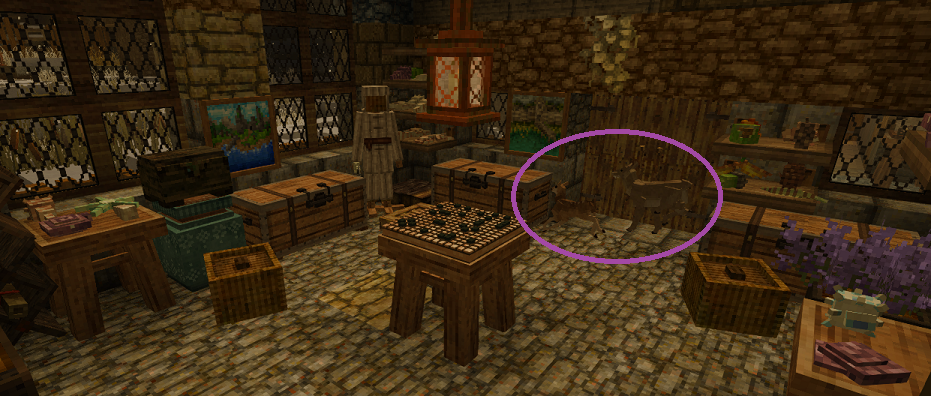
I've complained previously about not being able to make a room safe from rust monsters. I'm now beginning to think that I can't make a room safe at all. Behold, two water deer in my inner sanctum. At least they had the courtesy to colour match. They are now in their own pen just outside with a trough of carrots, awaiting more permanent quarters. Professor Dragon.
-
You can probably use the "Need Help" and "Support" links. I imagine they should be able to help with this.
-
Separate World Music and Music Box [Resonator] Audio.
Professor Dragon replied to Kolljak's topic in Suggestions
Ok, so I'm a year late to this thread. However, it was the closest match to a Suggestion that I would also like to see, and that is: * Can we have a separate slider for the Resonator music and general music volumes? The reason is that I like to have the game music set to infrequent, and at a lower volume. But at that level the Resonator tunes aren't that audio, so I have to go into Settings, and put the volume up for that. Then some songs are short, and some are long, and none are in a loop option - so it all gets a bit messy. Separated volume slider for both would address this. I couldn't find a mod on a quick search (?). Thanks. -
Ooooh no, no, no, no nooooooooo! Let's not go down that path! ! ! Every Single Base I have has a reed basket with a pair of lit torches in it and wood.
-
Hello @Laguna You may go to the story location (Resonance Archive) even if other players have completed them. However, the loot drop only happens once. See here: https://wiki.vintagestory.at/Resonance_Archives#Multiplayer ___ WIKI EXTRACT Spoilers for Story ___ END EXTRACT Also see this thread for more discussion, including how to regenerate the story structures. If you are thinking of joining an existing server, then possibly this is a question that has come up before on that server. So it may be a good idea to ask the server admins. how the situation is handled. Maybe they manually reset it. Maybe they don't. Professor Dragon.
-
That's a good idea. As I've got a long lasting world, I go further. Each Trader automatically gets their own colour symbol generated by Auto Map Marker mod. At that point I edit their name from "Artisan trader" to be "Floyd the Artisan Trader", as I prefer that. (And also the Auto Map Markers tend to double up sometimes.) Then I add a separate map marker "!" just next to them. This is my "editing" marker, which I'll put notes on such as "Bring flax, leather" or "Out of gears" or "Restock in 5 days from 2 Jan Y8" or whatever. But it's got to the point where I now maintain a separate document to track some key items for traders, such as which of the Collectibles I still need. Professor Dragon.

-
Seconded! "My goodness!" Absolutely amazing build. Hi @Nymue What are the lanterns placed for? Are you testing where light will need to go, final placements or what? I'm assuming that you are familiar with setting the time (eg /time set day) if you are just testing a build. And Creative Mode also has a block called "CreativeLight" that you can place around builds if you just want to quickly throw some light down. They can go under blocks also. Professor Dragon.
-
Sounds like a good idea, although you might want to check under "Suggestions" and the Dev logs what is already suggested/planned in this space. This would be a huge project. I can't emphasize that enough. You might wish to cut your teeth on something a lot smaller - one small piece of functionality only. Still, assuming you want to go ahead, you should check two things: The current ways that multiple versions of Vintage Story are handled. See this thread for a great discussion: How mods in Vintage Story are handled. See here: https://wiki.vintagestory.at/Modding:Getting_Started https://wiki.vintagestory.at/Modding:Code_Mods_Portal You should also think about the different ways that VS is installed. There are Linux and Apple users as well as Windows, so you may want to focus on just the Windows O/S - or have a plan at least on how to extend to handle all the different platforms. Finally, I'm fine with just a short-cut to one version. However, it would be very nice to have a front end where different versions and different mod sets could be handled. As I said to start with though, this would be a huge undertaking, so there is no harm in backing out now and trying something smaller. Professor Dragon.
-
How to suggest an Edit to the VS Wiki?
Professor Dragon replied to Professor Dragon's topic in Questions
Thanks @Forks, thanks @hstone32. I'll try the Discord. That's not usually my thing, but I'll take a look. It kind of boggles my mind that: Discord seems to be replacing the Forums/Wiki as "the official information source", unofficially. (That's not the problem of anyone here - just a comment. ) The Wiki hasn't yet got around to implementing more granular edit access. The Devs. don't have a more active hand in maintaining the Wiki. That there is no thread here for "Suggest changes to the Wiki." Hmmm. Perhaps I'll make one. I might even have to consider Wiki access. I didn't wish to go that deep though. Professor Dragon.