

xXx_Ape_xXx
-
Posts
294 -
Joined
-
Last visited
-
Days Won
11
3 Followers



Recent Profile Visitors


xXx_Ape_xXx's Achievements

-

Animation Help crude Bow
xXx_Ape_xXx replied to Micah Holmes's topic in Mod Development Questions/Troubleshooting
It looks like the whole shape for the bow is missing. Try adding "game:" prefix to all the shape references: -
Seed gathering bonus?
xXx_Ape_xXx replied to Micah Holmes's topic in Mod Development Questions/Troubleshooting
Yeah it's the class "ItemKnife" that controls the harvesting of entities, so you might have to create a custom class to achieve what you want. -
Seed gathering bonus?
xXx_Ape_xXx replied to Micah Holmes's topic in Mod Development Questions/Troubleshooting
Grass uses "dropsByType" because there are several types of grass registered by the tallgrass.json { code: "tallgrass", class: "BlockTallGrass", entityClassByType: { "tallgrass-eaten-*": "Transient" }, variantgroups: [ { loadFromProperties: "block/tallgrass" }, { code: "cover", states: ["free", "snow", "snow2", "snow3"] }, ], This results in tallgrass-veryshort-free, tallgrass-veryshort-snow etc etc The "dropsByType" matches the key to find what it drops when harvested/cut. What you want to achieve does not require "dropsByType", unless you want to have different drops for male/female types of raccoons. I've had a closer look at your files above, and there's several things that needs fixing. I'll attach them under, so you can test to see if they work now. -
Seed gathering bonus?
xXx_Ape_xXx replied to Micah Holmes's topic in Mod Development Questions/Troubleshooting
The tool needs to be the same as in your skinningknife json: If you want to prevent a regular knife from being used, you'll need to assign a different tool type from the list I posted earlier here: In this list, there are several that are not used in the game. Try using "sickle", as that is not used by any currently available tools in the game. So change "tool: knife" to "tool: sickle" in your skinningknife.json, and same in the raccoon harvesting properties. -
Seed gathering bonus?
xXx_Ape_xXx replied to Micah Holmes's topic in Mod Development Questions/Troubleshooting
Looks good to me -
Japanese kitbash designs on my long-term island world
xXx_Ape_xXx replied to EnbyKaiju's topic in Builds
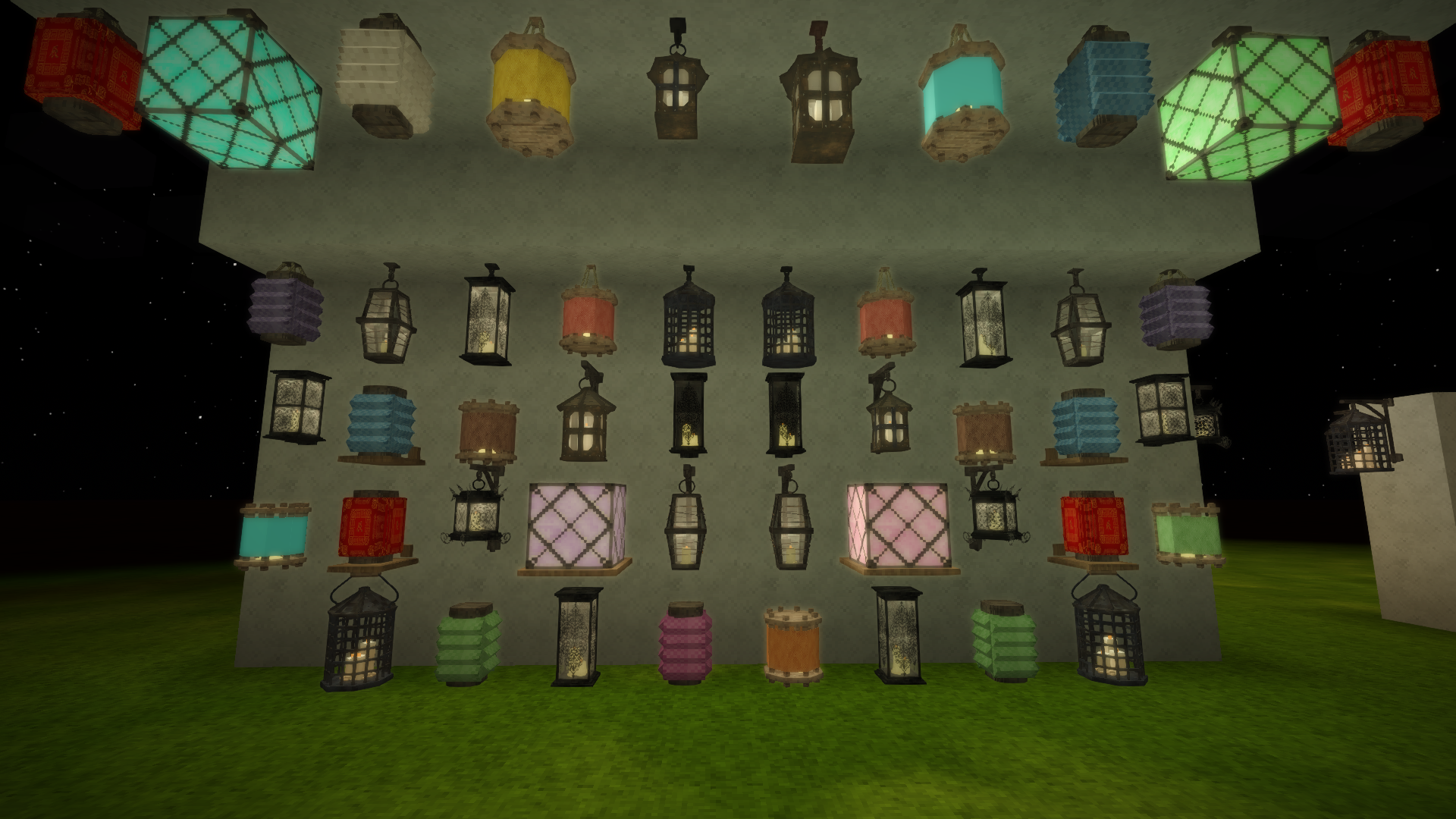
This looks awesome! Have you had a look at the mods Japanese Architecture and More Lanterns? There's some great Japanese inspired building pieces and stone lanterns that might catch your interest -
Seed gathering bonus?
xXx_Ape_xXx replied to Micah Holmes's topic in Mod Development Questions/Troubleshooting
It's still a content mod, unless you plan to provide your own dll with custom classes etc. Yes, this can be done via the Compability api, by having your file replace the vanilla file. CompabilityLib If you want to replace the carrot like in your example above, just place the edited file in you mods asset folder: assets/game/blocktypes/plant/crop/carrot.json Also make sure your modinfo's "side:" is either "server" or "universal". -
References in content script hurdle
xXx_Ape_xXx replied to ThornRanger's topic in Mod Development Questions/Troubleshooting
Not entirely sure what you're asking here, but do you mean that the chisel should be of the same metal type, or better, when used in the recipe? If so, you'll have to, unfortunately, make specific recipes for each metal type, and add a list of valid metals for the chisel via "allowedVariants". "C": { type: "item", code: "game:chisel-*", isTool: true, toolDurabilityCost:10, allowedVariants: ["copper","tinbronze","iron"], -
Seed gathering bonus?
xXx_Ape_xXx replied to Micah Holmes's topic in Mod Development Questions/Troubleshooting
Yes, this can be done by adding your tool as a special tool for harvesting the crop, or what ever you're harvesting. Have a look at the vanilla file blocktypes/plant/tallgrass.json to see how this is done in vanilla: dropsByType: { "tallgrass-eaten-*": [], "*": [ { type: "item", code: "drygrass", quantity: { avg: 1 }, tool: "knife" }, { type: "item", code: "drygrass", quantity: { avg: 1 }, tool: "scythe" } ], }, Here, the knife and scythe are both defined as valid tools that can be used for harvesting grass. This is why you don't get any grass drop by just punching the grass, but have to use a tool. This means you'll need to patch every type of crop that you wish to adjust the drop when using your tool. Note that the tool property, is not the actual key for the item, but a hardcoded list of tool types defined in the API here: EnumTools.cs So, to get your tool to work, you need to assign it to one of these. Take a look at any of the files in "itemtypes/tool/" to see how it's used. -
Patches not working in multiplayer
xXx_Ape_xXx replied to Slye_Fox's topic in [Legacy] Mods & Mod Development
That is correct! -
Patches not working in multiplayer
xXx_Ape_xXx replied to Slye_Fox's topic in [Legacy] Mods & Mod Development
Yes, just make your own shape file and name it the same as the shape you want to replace, then place it within the "game" namespace, aka a folder inside your mods asset folder called game, at the same location you would find the vanilla shape you want to replace. So if the file is called "slab-up.json" and is located in "your-game-install-dir/assets/survival/shapes/block/basic/slab/", then you create your shape, name it exactly the same, and place it in the folder "assets/game/shapes/block/basic/slab/" within your mod. When the game loads, the Compability Lib will look for these files and replace any it finds that match vanilla files, with your version provided in your mod. This same method can, to some extent, also be used to swap files in other mods, though patching is usually the safer way to go in these circumstances. Edit: They are not hardcoded per se, as they are defined in the blocktype/itemtype json files, and can easily be patched if need be. But then it's no longer a client only mod, as only the server reads the blocktype/itemtype files in a multiplayer setting. -
Patches not working in multiplayer
xXx_Ape_xXx replied to Slye_Fox's topic in [Legacy] Mods & Mod Development
Yes, that mod uses the exact method I described above, by replacing the shape files with its own versions. So when the server tells the client to render a tool, it sends info to the client of what file to look up, and since the mod have replaced the shape with its own, the client then looks up the new shape file provided by the mod for all its info. -
Patches not working in multiplayer
xXx_Ape_xXx replied to Slye_Fox's topic in [Legacy] Mods & Mod Development
Yes there is a way. If all your mod does is to change textures for various blocks/items, you don't need to patch anything. Set the side to "client" in your modinfo.json. All you need to do, is to create your custom textures and name them exactly the same as the textures you're trying to replace. Then place them inside the "game" name space in your mod asset folder, with the exact same placement as the texture has in vanilla game. And this is important, the path and the names must match what you're trying to replace. To clarify, here's a picture of the file structure of a mod that will replace the textures for granite cobblestone: It does not matter if the texture you want to replace is located in the creative,game or survival folders in the vanilla game, they are all referenced with the "game" prefix when targeting them in mods. This method uses the compability layer of the API. For more information about how compaility "patching" works, you can read about it here in the wiki: Wiki: CompatibilityLib If anything is unclear, just ping me and I'll take a look.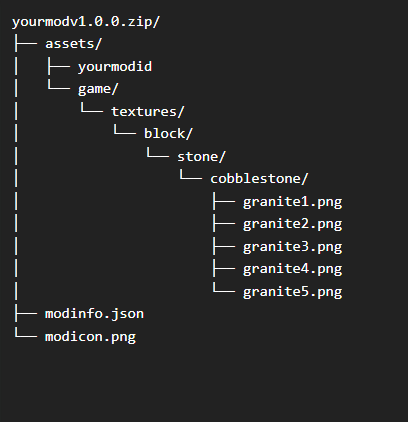
-
Patches not working in multiplayer
xXx_Ape_xXx replied to Slye_Fox's topic in [Legacy] Mods & Mod Development
Changing textures need to be done server side, because all the information of how a block/item etc should render, is transmitted from the server to the client in a multiplayer setting. The reason it works in singleplayer is simple, you ARE the server, as well as the client. Change it to "Universal", and it should be fine. -
Hm you have a point.. I remember trying to do something similar some time ago, and never got it to work until I listed everything separately, but I might have just missed something or got the syntax wrong.

