Mrozak
-
Posts
103 -
Joined
Content Type
Profiles
Forums
Blogs
News
Store
Everything posted by Mrozak
-
a Vintage Story Short Cinematic, based on the Event Logs
Mrozak replied to quihyr's topic in Videos, Art or Screenshots
I couldn't help it and kept expecting to hear the narration in a David Attenborough's voice -
I am sorry, but your checklist is garbage. But you can fix it by add the tasks you forgot: Get eaten by an angry boar. Get mauled by a sneaky bear. Get ass torn by a pack of wolves. Fall into a hole and die. Fall in a deep hole in the rock, without pickaxe.
-
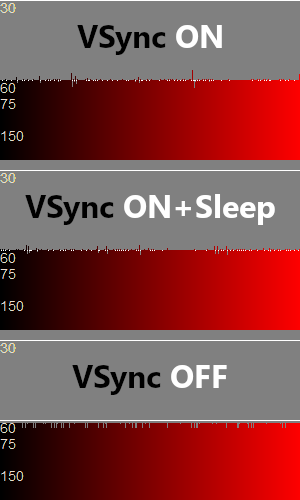
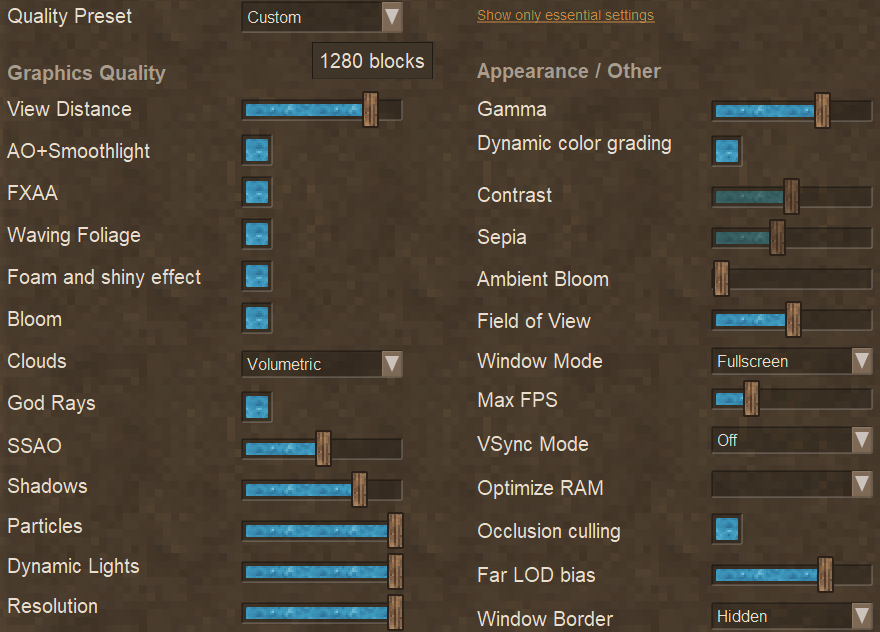
Regarding the in-game VSync... I used to experience very mild, but frequent stuttering with in-game VSync - it was barely noticeable, but still felt weird. It stopped after i set the in-game VSync to OFF and only use the Max FPS of 63 (using a 60Hz display). (also not using frame rate limit or VSync in Nvidia control panel - i did not test how that feels) I have Nvidia 4070S, and i play in 1080p, but with high-ish graphics settings (in spoiler). Here is an in-game FPS graph. As you can see, both VSync options come with a subtle frame rate jitter that goes under 60 FPS. With VSync OFF, that downward jitter is gone, the lows are nicely flat, never going under 60 (well, 61 to be exact).
-
As it is now, the game uses 3 types of crosshair, each using separate texture file: - assets\game\textures\gui\target.png - assets\game\textures\gui\targetfriendly.png - assets\game\textures\gui\targethostile.png I HATE CROSSHAIR in games. I can't stand having some dot or crosshair constantly present in the middle of my screen, staring back at me. I can't think of anything else that breaks my immersion as a crosshair/dot, no matter the game (yes, even in FPS games). So, i remove the crosshair. In Vintage Story, i can make a simple mod that replaces the textures mentioned above, with empty/transparent textures. (i actually replace only the first two, keeping the red crosshair that shows when targeting enemy creatures) So far so good. That said, the crosshair can be really really useful when chiseling. Sure, i mostly use Left Alt and use the mouse to point at a voxel i want to remove/add, but often enough i also do it without using Left Alt - at which moment, it would be really nice to have some crosshair. So i suggest adding another crosshair texture that would be used to display crosshair only when chiseling: - assets\game\textures\gui\targetchisel.png
-
LOL, or you know... just throw a bunch of stacks of dirt into a friends house! Aaaah, that would sooo evil, but i don't think i could resist
-
I partially like the idea, provided of course that it would be possible to switch the feature Off in the world config (should be Off by default). I would want the feature to affect only various rocks/dirt/etc. that are normally part of the terrain. So when it comes to items like flax and whatnot, those would still disappear after some time as it is now. It could even be a useful feature. Need to fill a hole? Just gather a stack of dirt, throw it in the hole and wait (or rather, go about your usual business, instead of having to manually fill the hole block by block). And watching the mentioned "explosive expansion" of the blocks would be fun too - i can see myself doing it a few times just for the giggles.
-
The mod Still Necessaries has a trashcan. I used it on my server some time ago and it worked perfectly, 9 out of 10 garbage men recommend (the remaining one who wouldn't is a moron, obviously).
-
Also, what are your other audio sliders set to in VS? Here are my settings for comparison: - Master: 60% - Effects: 80% - Entity: 100% - Ambient: 80% - Weather: 80% - Music: 8% - Directional Audio: ON As you can see, i too have the Music set waaaay lower than anything else, but it just stays like that, it doesn't change, the music doesn't suddenly play louder (of course, some tracks vary in loudness, but not to an extent where i would need to go fiddle with the slider). But this is all subjective. Maybe it would help you if you'd make a mod with the music files normalized like Thorfinn mentioned. Or maybe he will be nice enough to share it with you.
-
How about the mixer in Windows (or whatever OS you are on)? Maybe it's sliders got changed. (i assume you are not using something like VoiceMeeter? - assuming if you did, you would know to look in there anyway). Or if you are on Windows, look at the audio ducking feature (i forgot where that is) - it's supposed to lower the volume of everything else when you have some voice communication going on (a phone call, or things like Discord voice chat, etc.). Sure, it is supposed to make other things quieter, not louder, but maybe it could misbehave, or maybe it was active for some reason all the time, and now it finally isn't. Could be also a bug in VS, but i didn't experience anything like that, not even in 1.21.0-rc.2. Then again, not all bugs always happen to everyone.
-
Aha. You are modifying the music audio files - that wasn't clear from what you wrote earlier.
-
Aha, like i wrote, no separate output for music. So the effects you put on the one output, will affect every sound the game makes. Sure, depending on settings and IF only the music gets loud, it may not be a problem in case of limiter or even compressor, but that wouldn't work for me (i'd need the music level at ~25% compared to the rest of the audio). Fortunately, i never experienced the music getting too loud for no reason. But i could still use a separate output for music, so i can have a quick keyboard shortcut to mute that output when i am not in the mood for music (even with music freq. set to "sometimes", there are times when the music plays while i want silence).
-
You mean ALL game audio, not just music, right? Or is there some way to separate the music from the rest? i don't see any means to set a different audio output just for music in VS - is there maybe some hidden setting???
-
/weather setprecipa
-
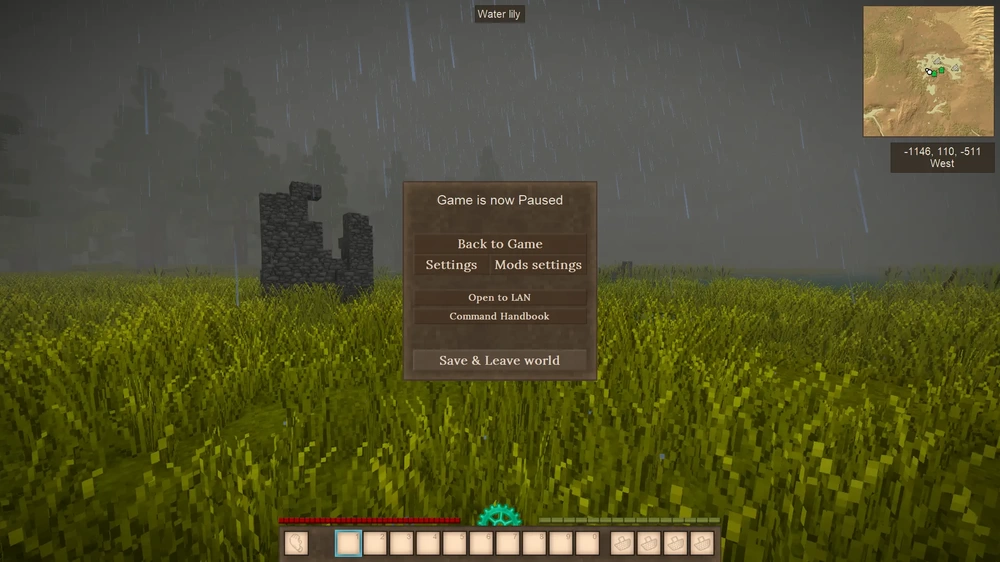
I would like to try tweaking the color of the rain drops. I looked through the directories for something related to rain, textures, shapes, shaders, but i didn't find anything. Can somebody point me to the right direction? See how blue the rain drops are on the image below? I don't like that, i want to try to make it less blue, less saturated, maybe even tiny bit more transparent, just to see how that would look.
-
I would move all those trashcans from the front of the bar to the back. Having them near the rear exit would be much more convenient for the staff. It would also help as it wouldn't disgust and scare away your customers anymore (unless you don't empty them regularly, then the whole place would still smell like an armpit anyway). Other than that, nice!
-
Hmmm, it didn't seem so. Based on what you wrote earlier, it looked to me as if you think i want the map to remember the last position. To make really sure we truly are on the same page: I want the game to remember (and respect) the zoom value (the amount of zoom, how much zoomed in/out the map was) from the last time the map was open. So, when i open the map, change it's zoom, then close it, and later i open the map again, it would be drawn with the same amount of zoom in/out as it was just before i closed it. Zoom, not position. And "zoom" is probably not the right word, what i mean is probably "scale"
-
That is not what i am suggesting. I am suggesting that the game would remember the last used zoom value.
-
Everytime i open the map, the map opens zoomed in, regardless of what was the zoom when i had it open the last time. It would be really really nice, if the game would remember the map zoom as i left it the last time using it.
-
I had same/similar problem. I think it had something to do with the "Master server" (duh, obviously, as your post already implies). And i could be wrong, but i believe that for some unknown reason, my serverconfig.json configuration was using wrong URL for the master server. I am no longer running the server, so i can only tell you what correct URL was my server using the LAST TIME i had it running (which was back when v1.19 was the new hot thing): "MasterserverUrl": "http://masterserver.vintagestory.at/api/v1/servers/", Again, i do not know if this is CURRENTLY the correct setting, but it is something you can at least try and see what happens.
-
I find the world a bit too crowded, with animals almost everywhere. It reminds me of the mobs from World of Warcraft, and my immersion suffers greatly because of this. I am currently trying Biomes together with Entities Configuration, and Entities Interact with Feverstone Wilds (to add a little more types of animals). Trying for hours to find the "right" configuration values, but it is very hit and miss, and confusing - for example, even with same settings, sometimes i get 0 bears, then i start new server (same settings and seed) and the same area has suddenly 6 bears even though i didn't change anything regarding bear spawns. I am getting closer to what i think makes sense regarding perceived animal population density, but some animal spawns are weird. Notably the foxes - i lowered the values enough so there isn't a fox every 100m2 as before, but they sometimes come in "bulks" - nothing nothing, one fox, nothing nothing nothing, so far so good, but then suddenly a group of 5 foxes at the same place, which doesn't make sense to me. To illustrate what i am trying to do, here is how i got the foxes setup in Entities Configuration: Foxes-Arctic-Worldgen-Vintage: 0.05 # from 0 to 0.2 with step of 0.001 (default: 0.15) Foxes-Red-Worldgen-READ-Vintage: 0.02 # from 0 to 0.2 with step of 0.001 (default: 0.075) Foxes-All-Runtime-Vintage: 2 # from 0 to 500 with step of 0.05 (default: 60) Note the huge difference from the default values. As i wrote, i got their population under control now, maybe i could even increase it by a tiny bit, but what's with them sometimes appearing in groups? Clearly, i need some help Maybe somebody else went through the same and can share some tips or even config files?