


wildforester
-
Posts
123 -
Joined
-
Last visited
wildforester's Achievements

-
You must play the slow game if you’ve got charred bread on you by the time you search for bronze
-
I’m reaching that point in the game where I’ll be getting into the Bronze Age, I’ve always gone with tin bronze in the past, but this time I’ve found good readings for bismuth bronze (my cassiterite readings were only decent). What are ppl’s preferences? Always go for one bronze type over the other or pick whichever has been found? Also, what sort of readings do ppl consider worth mining for?
-
Best food? Maybe. Idk much about pies specifically, but I’d think foods that last forever (not really long) would be up there as the best food. honey and rendered fat/walnuts are good for that. Alcohols too, but they lack any food category benefit
-
That doesn’t say much… link it?
-
cellar effectiveness? what the material is best?
wildforester replied to Michaś P's topic in Questions
Yup, mountain cellars sadly do not have any benefit. -
Follow up on my mod manager question: Using a mod manager isn’t that bad, it’s fairly useful I think. I’m using Mystivald’s vintagestory launcher and besides awkwardness with the English translation, it is working fairly well. Compared to a gold standard mod manager (my opinion) like prism launcher for the other block game ofc, it has a ways to go.
-
cellar effectiveness? what the material is best?
wildforester replied to Michaś P's topic in Questions
This is a valid cellar Besides being valid, it also has a perfect cellar score. It works because the chiseled blocks are counted as soil (the base material) and by chiseling them at a diagonal there is no direct view to the outside when constrained to an axis. Besides being useful for access, this can be used to transport items in and out of a cellar, you could even setup your quern in there. One thing of note, vertical placement of a cellar does not affect cellar score, it will always use the sea level temperature of your world when checking outside temperature.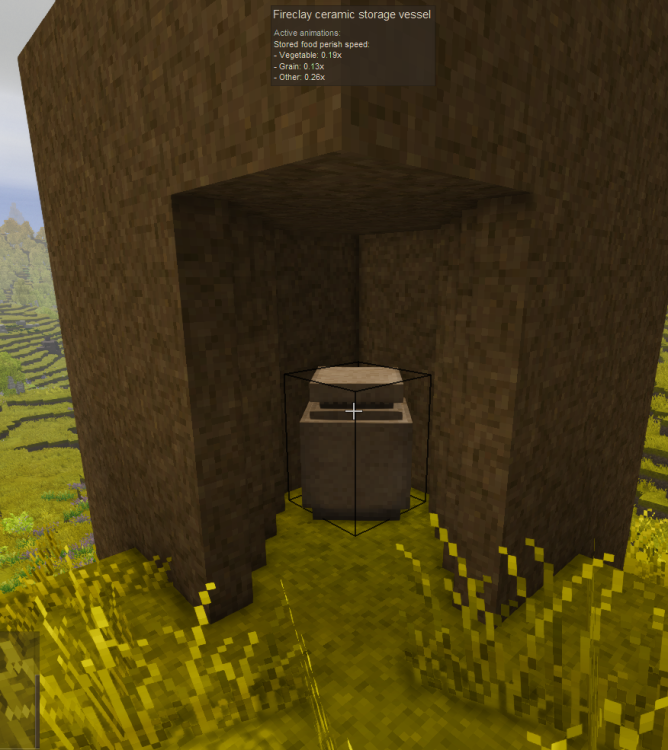
-
You must look at the chicken and run the command, the l[] operator targets the looked at entity
-
My concern with better ruins would be ease of access to too many late game things, plus in some cases I could imagine a ruin taking away the need for a base or putting a player’s own dirt hut to shame
-
Saw salty’s climb/catch as well but didn’t look that deeply. I think I’ll have to try it out
-
Game is prefering to use iGPU over dGPU on Arch Linux
wildforester replied to aCaveManFromACaveLand's topic in Questions
With KDE you should be able to edit the app and enable an option to prefer dedicated gpu over igpu. -
I imagine the same may happen for me, although I may be removing mods rather than adding mods (I made a list of 101 mods that looked interesting). I came across Simple VS Manager too, unfortunately is windows only from what I can see. Looks very featureful/quite useful. MVL as an alternative looks good too, although I don't know if it has the same number of features as the latter. Being able to use it across windows and linux will be good for me.
-
I’m considering playing a bit of lightly modded vs and am looking for suggestions on mods that work really well together/with base vs. I’m also curious to know what ppl generally play with (not just mods, can be recipe/world tweaks, etc). Additionally, how do ppl manage their mods? I’ve not kept up with any of the clients/mod managers that seem to exist now, anyone think they’re necessary for playing the game?
-
Looks like some of the post processing settings were majors skewed, contrast, minimum brightness, etc. But that may not be the case, I don't think that'd mess with transparency. I'd suggest updating your graphics drivers or if you recently updated graphics drivers, it is possible that they're the root cause. Hopefully you'll get it fixed
-
doesn't even need to be glass, all it needs to be is airtight and let light through


