


Brady_The
-
Posts
750 -
Joined
-
Last visited
-
Days Won
7
Content Type
Profiles
Forums
Blogs
News
Store
Everything posted by Brady_The
-
 To be fair, the ModDB hasn't been updated in a long while. Now the team has a designated maintainer who regularly works on it. It might have worked in the past, but it probably was patched.
 -
These are the worst kind of errors to figure out, due to how these patches are set up. It's probably a food mod, it might be a compatibility mod. Judging from the error message, you are most likely okay to ignore this message. If you want to figure out what mod is causing this issue, you have two options. If you only got a few, maybe already one or two contestants: Open the .zip-files of the mods, open the "assets" folder, open the "game" folder, open the "patches" folder, see if it contains a folder called "Food". If it does, check if the folder contains a file called "potingredients". If not, check the next patch. If you got a couple of dozen mods: Do a binary search. Disable the latter half of your mods. Check if the error message pops. If it does, disable half of your enabled mods. Continue, until the error message stops. If not, disable the first half, enable the second half. Rinse and repeat.
-
That'd be great. How many times did I want to check something and had to load into a world to be able to. Even though, I have the feeling that the handbook is currently only populated or created while logging into a world.
-
Don't worry, it happens to the best of us. You must have accidentality pressed a key combination. This is a dev view. Press Alt+F10 (default binding) until all lines have disappeared. If that doesn't work, head to the Controls settings and look up the combo for "Cycle Dialog Outline Modes".
-
Without screenshots we could only guess what you might be talking about.
-
Unable to read models from the game
Brady_The replied to Flagadar's topic in [Legacy] Mods & Mod Development
They are indeed! One tip for VSMC: Set up the texture and shape base paths. The former one will cause textures to be displayed on shapes. The latter will make life easier for you later down the line.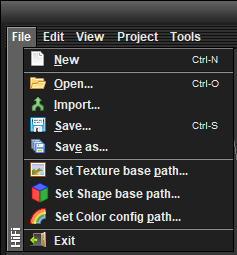
-
Unable to read models from the game
Brady_The replied to Flagadar's topic in [Legacy] Mods & Mod Development
Hey there. Open the shape file (found in "\survival\shapes"). You are trying to open the deer entity file. -
Hey there. Overall the patch looks good. You only got two small mistakes. You initiate the file reference after the domain with a slash, that prevents the patch from being applied. The server-debug log would have given you this error message: That's the reason why you wouldn't have seen any error messages in the server-main log, if you would have looked. Which btw, I can only recommend. Especially the client- and server-main.log files are a great tool to figure out if something is wrong and what it is. The next mistake happens in the path. Drops are always formatted as an array (identifiable by the square brackets [ ]). If you want to access an array, you have to address the array like any other key ("dropsByType", "*-phormiumtenax-*-harvested-*", "quantity", "avg"). You do that via their indices. Arrays start counting at 0, which in this case, is your harvested phormiumtenax. If you would have wanted to address the drops of the normal phormiumtenax you would have used "1" in the path instead.
-
How to report a bug on a mod
Brady_The replied to NitwitNolan's topic in [Legacy] Mods & Mod Development
What if they don't. I am not going to suggest to a user, who might not even know what a .zip-file is, to go to a third-party website, create an account, and explain how to fill out an issue report. If I can keep this answer civilised, so can you. -
How to report a bug on a mod
Brady_The replied to NitwitNolan's topic in [Legacy] Mods & Mod Development
You have to log-in with your game account to post comments. Even as a guest you should see the comment section, though.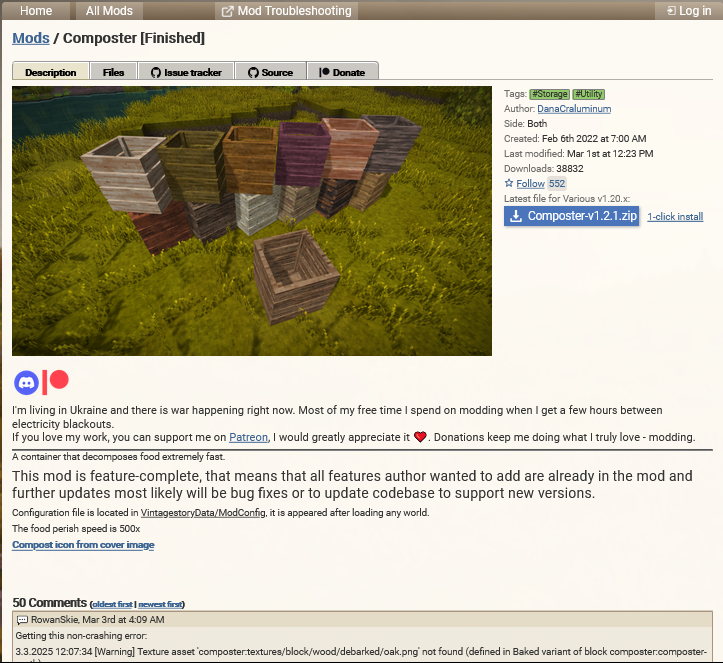
-
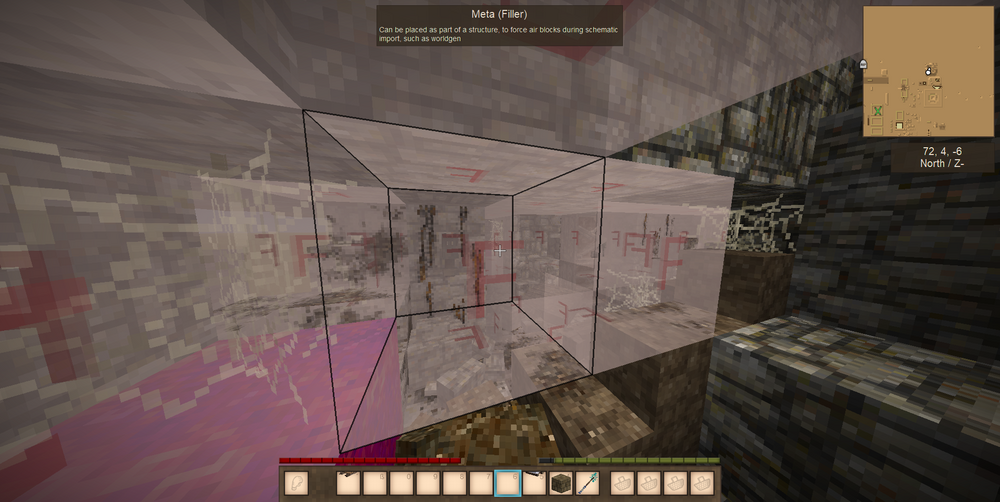
Go into Creative ("/gm 2"), and hit Ctrl+F4. This will toggle the display of so called meta block. Generally they shouldn't interfere with your ability to place blocks, but structures spawned via World Edit act differently. Destroy one or two of those meta blocks, switch back into Survival ("/gm 1) and try to place blocks on the cleared position. If it works now, you probably have to do some more cleaning to get the whole ruin working.
- 1 reply
-
- 4
-

-
How to report a bug on a mod
Brady_The replied to NitwitNolan's topic in [Legacy] Mods & Mod Development
Just post a comment explaining the bug. If you get a warning or error in the logs, post those as well. The mod author will receive a notification. -
I consider the glider more of a slower-falling than a flying contraption.
-
There is. Open chat. Execute "/player yourplayername allowcharselonce". Open chat. Execute ".charsel".
-
Hey there, unfortunately I cannot help you directly because I've not worked with the distilling mechanic. Documentation appears to be sparse to non-existent. I personally would have a look at this wiki page: https://wiki.vintagestory.at/Alcohol_brewing/en#Distillation, have a look at the in-game processes (I am not much of a theoretician.) and have a look at the game files "cider.json" and "spirit.json" (found in "\assets\survival\itemtypes\liquid"), particularly anything that includes the word "distill". There are also a couple of mods that utilise the distillation process, which you could potentially use as reference. Among others, for example: https://mods.vintagestory.at/warriordrink or https://mods.vintagestory.at/balancedthirst.
-
how do i texture more then one side of a thing
Brady_The replied to deathwolf54's topic in Questions
-
The way compatibility is currently set up between those two is a bit unfortunate. You either have to decide between the Primitive Survival or Better Hoe hoe functionality. This doesn't affect the already created blocks at all. Which means that you can switch between those. That will require a world reload every time, which could be somewhat annoying but it would definitely be feasible, because how often do you use those two hoe mechanics combined.
-
There is indeed. If you don't mind using mods. https://mods.vintagestory.at/betterhoe (It still works on 1.20.6.)
-
Have you tried removing the acid the same way you remove water from the pot (clicking on the liquid in the opened pot interface with a vessel)?
-
Unfortunately it's doubtful that you will get a meaningful response here. There are a couple of modders around in the forum, but they are generally more content and not coding focused. You will most likely receive better support in the dedicated ImGUI thread on the VS Discord server. There's also the option to simply set the whole game font to a font that supports these special characters, either by editing the clientsettings file (defaultFontName) or using this mod: https://mods.vintagestory.at/fontsettings, which of course would require everyone who is using your mod to do the same, so this might not be the best option.
-
Help! Clarity with starting VS modding?
Brady_The replied to Space Goldfish's topic in [Legacy] Mods & Mod Development
That's completely up to you, for pure content mods (JSON only, that includes models) you can theoretically use Notepad (albeit that would be quite painful). Use whatever suits your fancy. Install Java 8. (e.g. https://adoptium.net/en-GB/) Install https://github.com/anegostudios/vsmodelcreator/releases/tag/18Sep2024 For coding, the overall community recommendation is Visual Studio. If you know that you eventually want to code, I'd say that it's probably not the worst idea to start out with Visual Studio as an IDE. The wiki tutorials are great to get into modding, but unfortunately they are rather lacklustre when it comes to these two topics. Looking at Vanilla creatures or plants can be helpful, but can also be somewhat overwhelming, if it is your first time. Generally I would recommend you to go through the tutorials just to get familiar with the whole process. Like learning vocabulary for a new language. If you are not interested in doing that, my next recommendation would be to check out mods on the ModDB that do something similar, preferably smaller in scope, adding just one or two plants or creatures for example. This will remove a lot of "beginners noise". Suggestions: Plant: https://mods.vintagestory.at/brazilpiratefoods Creature: https://mods.vintagestory.at/show/user/5a00335ba25788911434 -
I am somewhat confident, that we will eventually get official means of air travel in the game. It'll probably take years, though. Until then you could have a look at some modded air vehicles. You got this mod: https://mods.vintagestory.at/viescraftmachines You got a wip mod you should follow to get updates about the progress: https://mods.vintagestory.at/airshipsmod And then there's at least one other mod in development adding, albeit a little bit smaller, air vehicles.
-
This problem is known: https://github.com/anegostudios/VintageStory-Issues/issues/4748.
-
Inconsistent Disconnects for one Player on a Modded Server
Brady_The replied to ardentEscalator's topic in Discussion
I am no MP-guy, so I doubt I can be of much help here, but it would be interesting to see this players client-main and server-main log files, when his joining attempts fails. They are found in "%AppData%\VintagestoryData\Logs". Unfortunately the forum doesn't accept the .log file type as an attachment, but they can be easily zipped and uploaded here, or their file extension can simply be changed from .log to .txt and then be attached to a comment here. -
You are not the only one experiencing this problem: https://github.com/anegostudios/VintageStory-Issues/issues/5132. The cause appears to be not determined yet.
- 3 replies
-
- 1
-
-
- help me please
- issue
- (and 1 more)



