Professor Dragon
-
Posts
709 -
Joined
-
Last visited
-
Days Won
3
Content Type
Profiles
Forums
Blogs
News
Store
Everything posted by Professor Dragon
-
Sure you don't want to call that "Blackguard's Restaurant"?
-

Handbook a better way to display mutliple options
Professor Dragon replied to Descruff's topic in Suggestions
I like this idea. I find myself forever moving my mouse back and forth over the items to get the ones that I want. The different Tiers of Refractory Bricks (I have to check the spelling on that one nearly ever time . . .) stand out, because they look kind of similar, but aren't. Minecraft does this rather well. It has the same cycle of items (for example fences cycle through different woods), but if you right click the item it brings up a list of all the types that you can make with the materials you have on hand, and you click from that list. -
Have you ever found a walnut seed in an underground dungeon?
Professor Dragon replied to Shv1sh's topic in Questions
Oh My Goodness! @Heart_Afire and @Shv1sh! That is beyond anything I could have hoped for! ! ! ! Thank you! -
Yes, for charm, intelligence and overall good looks.
-
Have you ever found a walnut seed in an underground dungeon?
Professor Dragon replied to Shv1sh's topic in Questions
"Have you ever found a walnut seed in an underground dungeon?" That sounds like a beautiful first line of a poem! I'd love to hear it continued. Professor Dragon. P.S. I usually find my walnut seeds on walnut trees. P.P.S. It is possible to read the drop rates from the game files of what could be in there, if it needs checking. I can't remember, but the loot table has "Ruins" in the name I think . . . -
Restoring Vanilla server to backup (Solved)
Professor Dragon replied to TungstenWall's topic in Questions
It should be sufficient to copy over the "\Backup Saves\<filename>.vcdbs" to your "\Saves" game data folder, and then the game will pick it up after the client is restarted. There are no other files. Make sure to be using the same game version and mods. So if it is not, then maybe the backup is no good? Check to see that the general concept of backing up and restoring is working on your current system, by making up a new small size test world and trying that out. * If that fails (which I don't expect), then there is a general backup/restore issue to be addressed first. * If it works, then there is an issue with the save file (different version, different mods did something). Be sure to align the version/mods first. Then if needed try the Save file with a "Repair" option and see what happens. Professor Dragon.- 1 reply
-
- 1
-

-
If we're going down that path of changing standing water elevation, maybe we could have ways to create locks, to raise and lower sail boats across terrain level changes.
-
Okay, but "Why?" We currently don't have any machinery in VS that is direction dependent.
-
Bread vs Pie vs Porridge for consuming grain?
Professor Dragon replied to Vexxvididu's topic in Discussion
Ahem. <Whispers> They were referencing your Black Guard friend, not you. -
Server allows player to join only once
Professor Dragon replied to TungstenWall's topic in Questions
Might be a static ports issue or UPNP at a guess. Check these two threads: and: Professor Dragon. -
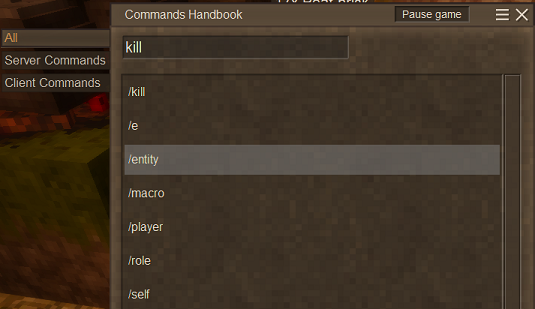
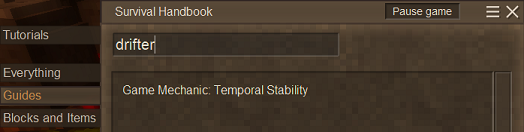
And the list of console commands in the "Commands Handbook" accessed via ".chb". Not to be confused with the "Survival Handbook" accessed via "h". Professor Dragon.
-
This thread so needs a "Spoiler" tag at the top . . .
-
Or instead of going down our Earth tech path of steam, electricity and nuclear, we could continue further down the Vintage Story path of Jonas tech for everyday use. Although . . . look how well that turned out last time . . .
-
As above. But Vintage Story has something akin to an arch generator built into "World Edit." You generate domes, and then manually slice away the edges of the dome to leave an arch. Get what you like in Creative, and the Export/Import it into your main world - or just rebuild it there once you have the dimensions worked out in the normal way. You could even do a half and half by starting the Import to get the transparent shadow build in place to get an idea, but then NOT completing the import. World Edit is a beast unto itself, but quite powerful. Call it via the "Tilda" key when in Creative Mode. See the Paint Brush mode here: https://wiki.vintagestory.at/How_to_use_WorldEdit#Paint_Brush_Tool Specifically: /we ts [0-8] Sets the paint brushes shape: 0 = Ball / Ellipsoid Or use the GUI mode. It has Ball on the drop down once you select the Brush tool. See here in this video for using the Paint Brush Tool to put down a Ball shape: Other than that, using the Minecraft Cricle Generator, as per @Forks, is much easier than tangling with World Edit if you just need a correct shape. Professor Dragon.
-
In addition to the good advice above, consider saving up a lot of Rusty Gears and finding a Clothing Trader to buy Gambeson. And a Wooden Shield. And a black bronze weapon if the budget can spare it. It handles most surface stuff reasonably well except for "surprise bear to the face" - but that's a challenge for anything. You're still early game, relatively, so probably that seems as big a challenge as iron. However, I find it much easier to obtain via farming and trading. It lets you save your other resources and not feel rushed into the other parts of the game.
-
Amberfields, New Server Looking For Players
Professor Dragon replied to Kunling's topic in Multiplayer
Oh, that worked. I needed to enter it from within the desktop Discord "Join a Server." Just following the link via web Discord doesn't work for some reason. -
Amberfields, New Server Looking For Players
Professor Dragon replied to Kunling's topic in Multiplayer
Same issue. If you want to test, private message me.
-
Bread vs Pie vs Porridge for consuming grain?
Professor Dragon replied to Vexxvididu's topic in Discussion
Can build detailed mega base. Can't sew -
Thanks. That then presents the nub of the problem. Earth references throughout Sky does not match Earth So which option is it? This is an "alternate Earth" scenario from the very beginning - from the start of the universe for the stars to be different. The Earth moved through the universe after the event. The universe changed around the Earth after the event. The whole visible night sky. Pulling on a thread, I tell ya . . . Professor Dragon.
-
Bread vs Pie vs Porridge for consuming grain?
Professor Dragon replied to Vexxvididu's topic in Discussion
Thank you. I do all of that as well. Those fancy ceramic pots, tapestries and paintings are demanding on gears. Long runs: When I'm after gears in bulk, I'll do really long trading runs with a lot of cracked vessels, wolf pups, clothing etc. Day trips: Bread, twine, feathers and leather are handy because I have many traders within an easy day loop who take these, and it all adds up. Besides, who doesn't like homesteading? -
Hello @Barbaris Sorry about your Elk. A similar thing happened to me recently - it doesn't feel good. I recommend that you go straight to recreating it via Creative Mode. If you are playing on a server, see if you can contact the admin. to do this for you, otherwise you can do it yourself. Be in a safe place eg base. Clear out your Hotbar completely by moving your items to Player Inventory or storage Switch to Creative mode: /gamemode Creative Gift yourself a replacement Elk, and whatever equipment (Elk Medallion, saddle, saddlebags, bridle etc) and gear you had on the Elk Switch back to Survival and load up: /gamemode Survival There's not really a better way around this. Yes, you could Backup your game at this point, and post your logs to the Issue Tracker - but that is a potentially long process, with no guarantee of success. Possibly you'll stumble across your "original" Elk later. Doubtful, but he may be at one of your spawn points or bases. If so, then you've just got another Elk standing around. Professor Dragon.
-
Thanks @LadyWYT - Always love reading your posts. Thanks for the calendar update. As to the star field - this was tickling something in the back of my head, and found it here. Thank goodness for our resident geeks astronomers. And here: I'm going to try a page out to @Tom Cantine and @IronOre, who have gone into some depths on this (apologies to anyone else who has!), with the question: Does Vintage Story use an "earth like" star map, or is it completely different? Thanks, Professor Dragon.
-
In the meantime, use this: https://mods.vintagestory.at/relighttorches I've done my time creating torches. This just makes things easier in a good way.
-
Yes, on reflection, I don't mind it as a divergent Earth timeline. Let's run with that as being the case. I know that we have some astronomically minded people who have looked into this. But is the sky: 1) An Earth sky, but run through a simulation far into the future. So correct - apart from devastation - but future. Q1) Following from that is the key question "How much time has passed?" 2) Or is the sky completely different? Then the key question becomes: Q2A) "Has the Earth moved and is now in a different place in the universe?" or Q2B) "Has the universe itself changed?" (There probably should be a big ol' "SPOILERS" tag slapped in the thread title by this point ) Professor Dragon.
-
I'd actually prefer it if there were NO EARTH HISTORY references at all. I believe one of the story missions references France as well. Let's just have it as a true "alternate world" scenario. Sure, it looks like Earth, but it need not be Earth. Those look like wolves and bears and raccoons, but it is just similar evolution. They're actually space wolves and space bears and space raccoons on an Earth-like planet. Actually . . . are the star maps ours? Or are they completely different? It kind of feels like they wanted to go with "Like Earth, but not Earth", and that there are just hangover elements in the lore that need to be scrubbed. As it stands though, it is a "divergent timeline Earth".