


Spear and Fang
-
Posts
493 -
Joined
-
Last visited
-
Days Won
8
Content Type
Profiles
Forums
Blogs
News
Store
Everything posted by Spear and Fang
-
 All of the most downloaded mods are flagged as such. So much low-effort.
 -
Summoning Stones Not working
Spear and Fang replied to Micah Holmes's topic in Mod Development Questions/Troubleshooting
server-main.log and/or client-main.log probably has a clue -
I haven't seen the third one named but somewhat assumed it was one of Zaldaryon's, since they were the only other modder that I'm aware of that was obfuscating code. Not sure if the timelines line up though.
-
Having been in and around conversations with Maltiez frequently, I would describe him as relatively emotionless, admittedly having zero sense of humor, and always straight to the point (which was often borderline offensive, especially to those who were unfamiliar with his personality). Add to this his acknowledgement of using ai at times to work though some difficult hurdles. So yeah, he rubbed a lot of people the wrong way. I'd be curious to see a venn diagram of the Maltiez is a jerk crowd, the anti-AI crowd, and the fire Maltiez crowd.
-
You spelt Ahegao wrong
-
well there is a mod... https://mods.vintagestory.at/flawless but I'm not sure if it works
-
If it's a brand new thing I find it's easier to write entirely new files, and players prefer this as well because they can then distinguish between your mods assets and vanilla assets. But you could get the same results with either approach.
-
modmaker could in fact be the problem here. before using modmaker, make the vanilla edits and then test the change(s) If they work prior to making the mod, then modmaker has made a mistake. One notable thing that modmaker always gets wrong is the positioning of entries in a "......bytype". It simply doesn't account for the "move" that is often a requirement. https://wiki.vintagestory.at/Modding:JSON_Patching#Move_operation
-
agreed, almost certainly a mod that hasn't been updated to 1.22 because that Entity.Pos was made obsolete in vanilla in 1.22
-
1. _Patch1 indicates the use of a harmony patch 2. WatershedsMod is identified as the harmony patcher So probably that mod. Could of course be a conflict between that mod and another too.

-
Spawning mushroom
Spear and Fang replied to Dong Dong's topic in Mod Development Questions/Troubleshooting
you can grab them from creative inventory and place them on a tree. to place them you probably need to shift-right click (or crouch click) if you don't see them in the creative menu you can "expose" them by changing this line to creativeinventory: { "general": ["*-north"], "flora": ["*-north"] }, or even creativeinventory: { "general": ["*"], "flora": ["*"] }, I placed these mushrooms like this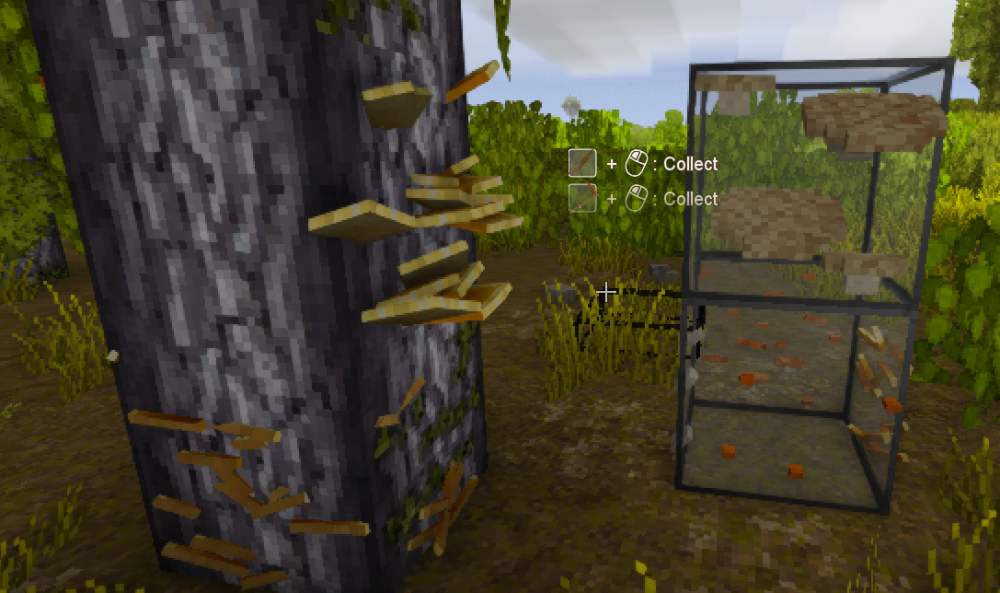
-
Creating Custom Cabinets
Spear and Fang replied to jun1per's topic in Mod Development Questions/Troubleshooting
I am not familiar with the new recipes, but your wildcard assessment seems about right. I suppose I'd temporarally edit OR json patch the cabinet block file itself with your new wood type to see if that is all you need. Not sure about domain though. EDIT: Also seems like I'm missing something else here - not sure if it's related to the new tags system, or it's hardcoded, or what...likely your wood type must exist in assets\survival\blocktypes\wood\woodtyped\planks.json. And then there's assets\survival\itemtypes\utility\cabinetdoor.json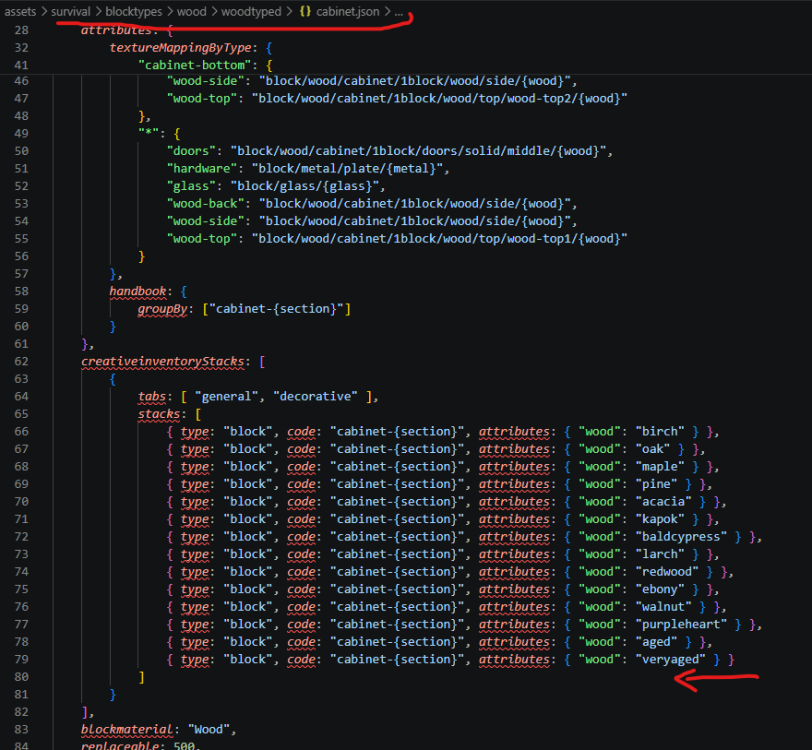
-
This has been discussed with the VS team and I don't think it will ever happen. iirc the decision made was that the modDB is for public mods only and anything else either needs to be in Server Tweaks or distributed via some other means.
-
Barrel Block Swap - Pre 1.19
Spear and Fang replied to EIDOLON-M74's topic in Mod Development Questions/Troubleshooting
probably like this is best. it's what I'd call a theme pack. By creating a "game" folder in your mod, you can put assets inside of it (in a folder structure that mimics the game's folder structures) to directly overwrite vanilla assets at runtime. In this case, I'm stomping over the barrel and related shapes with ones from an older version of the game. Lightly tested in VS 1.22. Should work with any version of the game I imagine. oldbarrel.zip -
I'm really struggling with this part of the new logo graphic design is my passion

-
While you may in fact be experiencing a mod related memory leak, keep in mind that by its very nature this game wants to use a LOT of ram, and more so when using mods. This game is written in C#/.NET and the longer you play a single session, the more ram it tends to use. C#/.NET memory usage is elastic — it grows to meet demand and may not shrink immediately, but that’s by design for performance. High “used” memory in Task Manager doesn’t necessarily mean a memory leak. A few simple ways to mitigate this, in order of importance: 1. Never exit to the main menu and then immediately load into a world again. If you exit to the main menu, exit the game completely. 2. Exit the game completely after x number of hours of gameplay. Some people say 3, but it depends entirely on personal experience. 3. Do not run any other applications while playing the game, and ensure that external startup apps (i.e. 3rd party antivirus software) are not running in the background. (not directly related to your issue, but these apps can "muddy the waters" so to speak). 4. Ensure Settings - Graphics - Optimize RAM is set to "Aggressively...". Warning: this change will probably impact performance. Anecdotally while playing game version 1.22 (lightly modded) I noticed that changing the view distance frequently in order to map more of my world seemed to cause a memory leak of sorts, or at least greatly increased memory usage. And lag. I believe that this was entirely related to the vanilla game and exiting the game completely and reloading cleared this up completely. Having said that, please consider disabling any "map" related mods to see if things improve for you. Shader type mods often use a lot of memory and are easy to disable, so also worth your consideration. This game is constantly being updated and the focus is often performance related. The trade-off for high performance is often high memory usage. Thank you for attending my TED talk.
-
Fair enough. I just thought I'd point that out, because I've found the moderation team to be fair and reasonable. I like Billy a lot but he brought this on himself.
- 14 replies
-
- 1
-

-
- confession
- mod
- (and 2 more)
-
what no Billy was asked to change his Discord profile description, and he said fuck that and left. hardly bullying
-
no animals were harmed Primitive Survival
Spear and Fang replied to Spear and Fang's topic in Mod Releases
no. but that is the case with water in vanilla, so the same applies here. -
Same, but I feel obligated to keep updating it. And yes, my worms are still edible.
-
VS model crashing
Spear and Fang replied to swordman's topic in Mod Development Questions/Troubleshooting
if the file you are trying to open is not in a folder called "shapes", it probably isn't a model and will error out. -
yeah I don't think that is possible, at least I don't see anything like that in vanilla. BUT if you have another recipe ingredient that doesn't return anything maybe you could stick it in there?
-
if you mean more than one of the same item, here is an example cut and pasted directly from vanilla assets returnedStack: { type: "item", code: "metalbit-cupronickel", quantity: 8 }
-
HELP game keeps crashing when joining multiplayer server
Spear and Fang replied to xanh's topic in Using Mods Troubleshooting
hmm the timestamps on those logs don't seem to line up with the crash log you originally posted 2/27/2026 8:34:29 PM: Critical error occurred -
HELP game keeps crashing when joining multiplayer server
Spear and Fang replied to xanh's topic in Using Mods Troubleshooting
Not much to go on here other than this: RegenMipMaps_Patch0 This tells us that the problem is with a mod that is harmony patching RegenMipMaps Searching github, the only one I can find is Player Model Lib vsmod_PlayerModelLib/source/Patches/OtherPatches.cs at bb33d30abf18d731a9a09ca9af74ae4af32422de · maltiez2/vsmod_PlayerModelLib So if you are using that mod - this one Player Model lib - Vintage Story Mod DB I would make certain it is the latest correct version for your game version 1.10.11 It may also be a mod the depends on Player Model Lib - see "Some mods that use this library" on that mods page. Otherwise, posting your server-main.log file and client-main.log file might provide more clues - those two files are often much more useful than the crash log.




