


Spear and Fang
-
Posts
493 -
Joined
-
Last visited
-
Days Won
8
Content Type
Profiles
Forums
Blogs
News
Store
Everything posted by Spear and Fang
-

no animals were harmed Primitive Survival
Spear and Fang replied to Spear and Fang's topic in Mod Releases
Just putting this here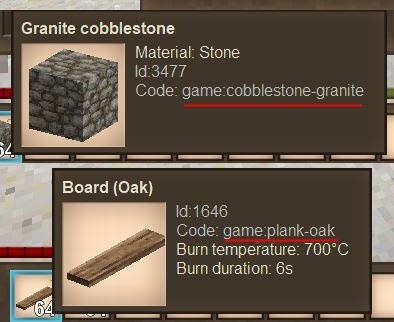
-
That crash is happening in the game engine itself so it doesn't reveal much. Looks like an entity (typically a creature) is causing the crash though. I'd start by updating the game to 1.19.1 - lots of bugs fixed there. Beyond that, I guess I'd check the comments in the individual mod pages to see if any similar reports have popped up, or new releases. I can tell you that I've been playing with Buzzwords, Primitive Survival, and Hudclock (across many 1.19 releases), and haven't had any serious crashes with those. That's not to say it isn't a mod conflicting with one of those though.
-
I hate to be the bearer of bad news, but this: https://www.vintagestory.at/store/product/7-simple-server-hosting-8-slots/ states that it does not have mod support: "Does not support 3rd party mods (we are working on it)" I believe that ANY other server hosting will support mods
-
Just a player needing help with a mod
Spear and Fang replied to GawdAwful's topic in [Legacy] Mods & Mod Development
oh sorry I'm just seeing this now. You've got the wrong version of Translocator Engineering for your game version. You'll need version 1.4.7. You'll also want to check the Files tab of your other mods to ensure they are the correct version. -
How to use Shape Overlays?
Spear and Fang replied to RickyZ's topic in [Legacy] Mods & Mod Development
oh are you talking about shape overlays for the player model? I think they are unique and only apply to the player, not other creatures See ..\game\entities\humanoid\player.json shape overlays are defined in attributes\skinnableParts - the type: "shape" sections. Just spitballing - I've never mucked with these in json or c#. -
How to use Shape Overlays?
Spear and Fang replied to RickyZ's topic in [Legacy] Mods & Mod Development
a search of the vanilla assets for "overlays" reveals that they are used almost exclusively with blocks, and just a couple of times with items. This tells me that they have not been implemented (via json at least) for entities. if you saw an entity.Properties.Client.Shape.Overlays then I bet that is actually shader overlays (i.e. the thing that makes entities all frosty looking in the winter) -
Now I'm no expert on storage flags but my gut tells me that you need to stick to one of the predefined ones on the list that's less than 1024. Or combine some that are less than 1024 (if I remember correctly it's a bitwise thing). If you use one of the custom ones then you'll likely need some supporting c# code to make it function properly EDIT: Oh maybe you don't need any c#, just try adding 1 to your existing values (so bitwise that's your new storage option AND General). For your patches of course, not your bags. General = 1, /// The item can be placed into a backpack slot Backpack = 2, /// The item can be placed in a slot related to mining or smithing Metallurgy = 4, /// The item can be placed in a slot related to jewelcrafting Jewellery = 8, /// The item can be placed in a slot related to alchemy Alchemy = 16, /// The item can be placed in a slot related to farming Agriculture = 32, /// Moneys Currency = 64, /// Clothes, Armor and Accessories Outfit = 128, /// Off hand slot Offhand = 256, /// Arrows Arrow = 512, /// Reserved for vanilla Reserved2 = 1024, /// Custom storage flag for mods Custom1 = 2048, /// Custom storage flag for mods Custom2 = 4096, /// Custom storage flag for mods Custom3 = 8192, /// Custom storage flag for mods Custom4 = 16384, /// Custom storage flag for mods Custom5 = 32768, /// Custom storage flag for mods Custom6 = 65536, /// Custom storage flag for mods Custom7 = 131072, /// Custom storage flag for mods Custom8 = 262144, /// Custom storage flag for mods Custom9 = 524288, /// Custom storage flag for mods Custom10 = 1048576
-
no animals were harmed Primitive Survival
Spear and Fang replied to Spear and Fang's topic in Mod Releases
Hmmm. A lot of mods and not much to go on in the log file I'm afraid, so any supporting info might help. First and foremost, can this crash be recreated, or was this just a one off? If it just happened once I can think of a few reasons why such a thing might happen. If it's an ongoing issue, does it happen when you're just walking around ,or perhaps when are you interacting with a tree hollow? -
Is there a decent modding guide?
Spear and Fang replied to Meowsers's topic in [Legacy] Mods & Mod Development
The wiki is probably your best resource for getting started - it's got a lot of info packed in there. Maybe I'm biased since I released my first mod using that resource alone. Other resources... 1. VintageStory official Discord and VSWorks Discord 2. Anego Studios Github https://github.com/anegostudios (which is searchable) in conjunction with the installed game's assets i.e. use a "grep" like tool like Visual Studio Code to search for json asset keys to understand how they work and link to the code on the github. 3. Decompiling the dll's that ship with the game (with ILSpy, dnSpy, or similar) - very searchable, somewhat documented, and much better than the online API docs (which I won't even link to) 4. All of the mods and their source links available on the modDB 5. This forum 6. Buggi's videos https://www.youtube.com/playlist?list=PLkA9Q5ltQPCK-9zPxYAnWKY4TF3YE1e8o 7. Vies' videos https://www.youtube.com/@viescraft/videos I'm sure I'm missing something valuable. Maybe it's this worldedit video https://www.youtube.com/watch?v=we2WyxKSRuc&ab_channel=VintageStory- 1 reply
-
- 2
-

-

-
no animals were harmed Primitive Survival
Spear and Fang replied to Spear and Fang's topic in Mod Releases
There is a hint in the necronomicon for this but it is rather vague.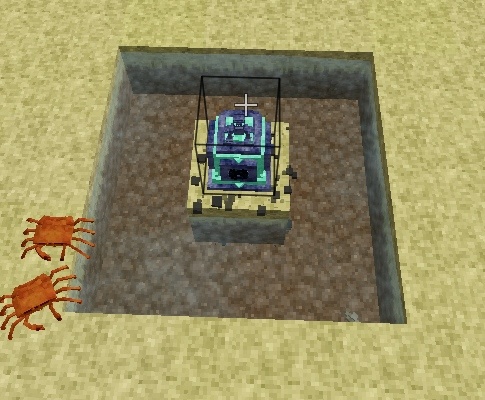
-
Registering Object Classes
Spear and Fang replied to Vintagebob's topic in [Legacy] Mods & Mod Development
I don't think anything has changed with respect to class registrations. For entities I AM using this though: api.RegisterEntity() The rest looks good. i.e. https://github.com/SpearAndFang/primitive-survival/blob/main/PrimitiveSurvival/ModSystem/PrimitiveSurvivalSystem.cs#L109 called from https://github.com/SpearAndFang/primitive-survival/blob/main/PrimitiveSurvival/ModSystem/PrimitiveSurvivalSystem.cs#L287 -
Well the easiest way is to create a brand new characterclasses.json file and put it in a folder called game in your mod. Files in "game" will completely replace files in vanilla. ../assets/game/config/characterclasses.json This is a mod that replaced all classes like above. https://mods.vintagestory.at/show/mod/8445 personally, I don't think it's ever a good idea to outright remove stuff from vanilla, as it may have unexpected consequences, not only for vanilla but for other mods.
-
JSON Validity/Superset?
Spear and Fang replied to twizzork's topic in [Legacy] Mods & Mod Development
I'm not near a VS installation so I may make some mistakes, but.... I typically start by 1. locating the json asset that I want to change, so if it's the bed ...assets/game/blocktypes/wood/bed.json 2. look at keys like "class", "entityclass", "behaviour(s)", "entityBehaviors", that sort of thing. These are attaching c# code to the json asset 3. track those classes down on the anegostudio github, i.e. https://github.com/search?q=org%3Aanegostudios bed&type=code and familiarize yourself with the bed 4. Now you decide if you want to do a. something heavy handed like add or replace one of those classes entirely (class or entityclass) via a json patch i.e. - replace an existing class https://github.com/SpearAndFang/primitive-survival/blob/main/PrimitiveSurvival/PrimitiveSurvival/assets/primitivesurvival/patches/ps-oreminingbomb.json - add where one doesn't exist https://github.com/SpearAndFang/primitive-survival/blob/main/PrimitiveSurvival/PrimitiveSurvival/assets/primitivesurvival/patches/ps-pelt.json b. something much more light touch like extend one of those classes by adding a behavior or entitybehavior (or append one to a list of already existing behaviors) via a jjson patch i.e. https://github.com/SpearAndFang/buzzwords/blob/main/assets/buzzwords/patches/bebwildbeehive.json c. or circumvent all of that by using a harmony patch. https://harmony.pardeike.net/articles/patching.html https://github.com/SpearAndFang/wildfarmingrevival/blob/main/WildFarmingRevival/ModSystem/WildFarmingRevivalSystem.cs#L109 note: definitely check out other people's harmony patches, mine are well blech. In the case of a. and b. above, you then register your new classes in c# when your mod first starts, several i.e. https://github.com/SpearAndFang/primitive-survival/blob/main/PrimitiveSurvival/PrimitiveSurvival/ModSystem/PrimitiveSurvivalSystem.cs#L108 and then do the same sorts of things that the vanilla game does inside your new classes, or entirely different things ;). Plenty of examples of this on the wiki, the anego studios github, the moddb. The modding section of the VS wiki is where I started. It's a little outdated at times but contains a lot of invaluable information. -
JSON Validity/Superset?
Spear and Fang replied to twizzork's topic in [Legacy] Mods & Mod Development
I am also a little confused as to your end goal here. In general I'd say to approach it differently - don't collect an array of all bed variants, but rather attach a c# class of some sort to the bed block itself - so that that class impacts all beds, regardless of the variant - especially the rather irrelevant direction variant . Or use harmony to attach your code to one of the existing bed classes. On the API documentation front - if you're referring to this https://apidocs.vintagestory.at/api/index.html I'd highly recommend using DNSpy or ILSpy or Visual Studio and opening the games shipped DLL's with that instead. It's much more searchable and just as informative. -
JSON Validity/Superset?
Spear and Fang replied to twizzork's topic in [Legacy] Mods & Mod Development
JSON5 yeah. Tyron says it saves him time - a lot less keystrokes. Regular JSON works fine too, and the consensus is that it's a little more performant. It's the newtonsoft json framework being used. https://www.newtonsoft.com/json -
Quite a bit of the modding section of the wiki - start at the start, but pay close attention to the stuff related to blocks https://wiki.vintagestory.at/index.php/Main_Page The see how Zig did it. His source code is on github: https://github.com/ZigTheHedge/vsmods/blob/1.14/mods/necessaries/assets/necessaries/blocktypes/grindstone.json https://github.com/ZigTheHedge/vsmods/tree/1.14/mods/necessaries/src/SharpenerStuff The VS source can also be quite helpful https://github.com/anegostudios
-
Mod Conflicts and Crashing
Spear and Fang replied to Komissar-bAv's topic in [Legacy] Mods & Mod Development
Not familiar with a number of these mods, but yeah it looks like an item renderer is crashing - if I had to guess it would be a mod like fsmlib@0.1.7, rustboundmagic@0.2.5, bullseye@2.5.0, maltiezfirearms@0.3.3 Also I see buzzwords@1.6.0 on your list, which is ONLY for the 1.19 prerelease of Vintage Story (as it says on the Files tab of that mod's page.) You're going to want to be real careful when downloading mods right now, as a number of them will be major version specific (1.18.x, 1.19.x) -
Recipes with attributes
Spear and Fang replied to KA3NMNP's topic in [Legacy] Mods & Mod Development
I'm just not seeing a more rational only solution without getting C# involved. On the upside, this sort of thing only applies to shields and junk in ruins afaik. I guess one slightly more sane solution would be to use your language of preference to autogenerate the json files, if c# is not an option for you. -
I *think* that "mechPartShape" is an arbitrary name that is required to initialize that object, and is entirely unused. But I believe that BEBehaviorMPConsumer is the wrong thing to use in your situation (and no I have not used it). It's used for the top of the quern only, which is pretty far removed from what you are trying to do. And it's initialize method is problematic. It wouldn't be much of a stretch to just use BEBehaviorMPBase instead and add any methods from BEBehaviorMPConsumer that you *think* you might need. There's not much to it. Try this autosift.zip mod. I quickly threw it together so it's still got some issues, but it certainly works (the axle turns inside the sifter when connected to mechanical power, passes power out the other side), and is based on what I was saying above. autosift.zip source.zip
-
You *might* also look at my passthrough axle, which has plenty of outstanding issues but rendering was not one of them. It is based on the vanilla axle. It has two unique blocks - axlepassthroughfull.json and axlepassthrough.json https://github.com/SpearAndFang/millwright/tree/main/assets/millwright/blocktypes/mechanics and three shapes https://github.com/SpearAndFang/millwright/tree/main/assets/millwright/shapes/block/wood/mechanics The block axlepassthoughfull is the entire gizmo - all of the components are static and in a single shape: axle-passthrough-full.json - it's the one you craft and carry around with you. When you place it, I swap it to the other block: axlepassthough - and the shape defined in that block is the moving part only. axle-passthrough.json The non-moving part (the shape axle-plate.json) is initialized and added to the mix entirely in the behavior and just like you describe above https://github.com/SpearAndFang/millwright/blob/main/ModSystem/bebehavior/bebehavioraxlepassthrough.cs - Initialize - GetPlateMesh - OnTesselation Your code looks about right to me and very similar to what I'm doing. Maybe this helps.
-
no animals were harmed Primitive Survival
Spear and Fang replied to Spear and Fang's topic in Mod Releases
Well, not intended. I just didn't dig in my heels and make that work like I wanted. If you place the bed of nails in a checkerboard pattern (or just space them out a bit) it will work for you. -
no animals were harmed Primitive Survival
Spear and Fang replied to Spear and Fang's topic in Mod Releases
Game version? Mod version? If you're not on the latest version of both do that first. Vanilla moisture levels were pretty buggy for a while but I think Tyron has sorted that out now. -
You can't specify the order in this case, so I'm assuming you used this common technique for moving a wildcard out of the way and then putting it back again. The temporary destination path "hax" is just a made up location. It can be any arbitrary name really. You can put your patch first, and then these two patches afterwards. Or put your patch between these two. Either way works. [ { "file": "game:itemtypes/resource/stone.json", "op": "move", "frompath": "/texturesByType/*", "path": "/hax", }, { "file": "game:itemtypes/resource/stone.json", "op": "move", "frompath": "/hax", "path": "/texturesByType/*", } ]
-
Nope. Not unless I can make some serious progress on it. But my other mods and irl are consuming way too much time right now
