Brady_The
-
Posts
750 -
Joined
-
Last visited
-
Days Won
7
Content Type
Profiles
Forums
Blogs
News
Store
Everything posted by Brady_The
-
Can someone explain textures to me?
Brady_The replied to Lucas Alexander's topic in [Legacy] Mods & Mod Development
You can define textures in two places. The shape The xtype Generally textures are applied via shapes (this is the case for mushrooms). If you apply a texture via xtype, this definition will take priority and overwrite the shape textures. A perfect example for this is the door. shapes/block/wood/door/solid.json "textures": { "iron": "block/metal/ingot/iron", "wood": "block/wood/door/plain/acacia" }, Even if you define textures in xtype it's never a bad idea to have them in the shape file as well. For one, it makes editing the shapes in the VSMC much easier. Defining your textures in xtype has some advantages, though. You can use variant codes in them. The variant code in this case is {wood}. It's defined in the same door.json file and includes all wood types (birch, oak, pine, etc). With this information at hand, you now can simply create one configuration (block/wood/debarked/{wood}) that's automatically adjusted by the game, instead of having to define either a dozen or so texture variations (block/wood/debarked/birch, block/wood/debarked/oak, block/wood/debarked/pine, ...) or create a dozen different shapes (solid-birch, solid-oak, solid-pine, ...) to include all wooden doors. blocktype/door.json "texturesByType": { "door-solid-*": { "wood": { "base": "block/wood/debarked/{wood}", "rotation": 90, "blendedOverlays": [{ "base": "block/wood/door/overlay-solid", "blendMode": "Overlay" }] } }, }, (abridged for readability reasons) I venture a guess and assume that e stands for East and s for South. Both of these elements are the greens on top of the carrot. The growth of the greens is "simulated" by simply exchanging the textures on different growth stages via s{stage} and e{stage} where {stage} is a wildcard for a number, resulting in s1 till s7 (or whatever the highest growth stage for that particular crop is). Bulb is the body of the carrot. It doesn't need to be defined in the blocktype file, because it has been applied via the shape.- 1 reply
-
- 1
-

-
Game won't launch at full screen 1920x1080
Brady_The replied to bladymir lombardo's topic in Questions
Welcome to the forum, bladymir. I am not going to insult you with the "upgrade, downgrade, reinstall graphics driver" spiel. Delete clientsettings.json in %appdata%\VintagestoryData and start the game. This will regenerate the clientsettings. Hopefully that's enough. If you made extensive changes to your settings (keybindings, etc. pp) make a backup of the file beforehand. If that doesn't solve the problem, I'd actually try to reinstall/update the graphics driver. If that doesn't help, this problem will be over my head. (Don't bother with github, you'll be fobbed off with the aforementioned copypasta comment about your drivers. Potentially you would get better responses on the Discord server.) -
You could nuke all entities in a certain range, or, what I prefer to do, be a little more precise and only remove the entity you are looking at. To do that, look at an entity and execute /entity remove l[] If you want to go nuclear and remove all dead entities, execute /entity remove e[alive=false] If you want to bomb with a precision strike, you could add a range argument to the command, where x is the range in blocks. /entity remove e[range=x,alive=false]
-
I haven't played 1.20, but I know somebody who regularly mentions the lack of female bears in the game. Have you run across any females in your play sessions?
-
Crock pots added to the items you can hang from your elk.
Brady_The replied to Apocalypse_Andy's topic in Suggestions
Interesting decision indeed. Of course there's a mod for it. https://mods.vintagestory.at/show/mod/16222 -
Welcome to the Forum, Sérgio. The game offers several modes. From what you are writing here, I assume, that you are playing the Homo Sapiens mode, which removes all lore content, including any NPCs. In the current stable version (1.19.8) the other game modes only include merchant NPCs. However, this will change with the upcoming version (1.20.0). This update will add more lore content, including several lore locations, which includes one village with inhabitants. There is one big mod that adds villages and more NPCs to the game. It's called VS Villages and comes with several addons.
-
Allow users to report bugs here in your forum.
Brady_The replied to jumpityjumpjump's topic in Suggestions
I suppose that's true. I haven't thought about it from an end user pov. Managing issues on two or (with the forum) three different platform adds to the workflow significantly in terms of tracking, duplication, same issues with different feedback spread over different places, etc. -
Allow users to report bugs here in your forum.
Brady_The replied to jumpityjumpjump's topic in Suggestions
That's unlikely. The devs moved away from bug reports in the forum. Reporting problems on platforms like Github with their workflow features makes a lot of sense. Why you can report them in their Discord server puzzles me a bit, though. -
https://wiki.vintagestory.at/Rooms have a couple of rules that have to be met. Currently I don't see anything wrong with it, but I don't see the whole building/rooms. It just needs one block to not meet the requirements to annul a room. I'd just start testing this mess, by sectioning off the room with hay blocks to find out which section doesn't not become a room. If you found the offending sector, narrow it down by blocking off blocks you suspect.
-
That would be grand. I an older issue tyron stated, that rebinding ESC would be a bit more complicated. Maybe one could ask in that issue if this is still a considered change.
-
If you look at blocktype mushroom.json, you can see that it has two variantgroups, the type and the state, translating into the block names "mushroom-{mushroom}-{state}". Mushrooms which grow on trees are configured in mushrooms-side.json. The biggest difference in this particular case is, that they also have an orientation added to the name (mushroom-{mushroom}-{state}-{side}). Because of this you could actually skip "allowedVariants" all together. Currently the recipe isn't working, because the input block "mushroom-*" doesn't exist in combination with the allowed Variants. It would be "mushroom-*-normal". (If you wanted to allow polypores, you would have to add a recipe that accepts "mushroom-*-normal-north".) If you want to keep your current recipe as is, you could add tinderhoof-normal-north (and all other unwanted mushrooms) to your skipVariants. Tinderhoof belongs to the polypores btw, they do not grow on the ground. https://wiki.vintagestory.at/Mushroom#Ground_mushrooms
- 1 reply
-
- 1
-
-
Welcome to the forum, ILoveBushy. That looks very nice!
-
Got bored, decided to make a unicorn
Brady_The replied to TheChickenWizard's topic in [Legacy] Mods & Mod Development
Nicely done. I suppose you could start by copying deer/moose or elk-tamed (all of them found in survival/entities/land/hooved) and go from there, adjusting the parameters as needed. Depending on where you want to go with the unicorn, you might have to start coding at some point. -
You create them yourself via graphics editor, find free textures on the web, commission them, or reuse Vintage Story textures.
-
Help with lang files
Brady_The replied to Lucas Alexander's topic in [Legacy] Mods & Mod Development
We all have been and eventually will be again there. -
Help with lang files
Brady_The replied to Lucas Alexander's topic in [Legacy] Mods & Mod Development
You are missing a comma after "block-decorice": "Ice" -
Did you have a look at the VSMC tutorial on the wiki? If so, on what step are you stuck? https://wiki.vintagestory.at/Modding:VS_Model_Creator_tutorials#Texturing
-
helve hammers and querns indoors with valid rooms possible?
Brady_The replied to TheRealDiggyCheese's topic in Questions
Unfortunately that's not possible in Vanilla. There are two mods which add axels that create a valid room. If you only look for a way to do that, this mod would be enough: https://mods.vintagestory.at/axleinblocks If you wouldn't mind a milling upgrade on top of that, this mod will do that: https://mods.vintagestory.at/millwright -
There's no need for that. I appreciate the thought, though!
-
According to the boat configuration file, the halyard cleat is supposed to accept ropes. I guess it could be a future-proof (or due to bugs disabled) slot the player can use to manipulate the sails. The figurehead mounting point will eventually accept a figurehead the player can create by chiselling. (The port prow storage accepts an anchor which currently has no use.)
-
Don't worry, I explained it too poorly. Did you have a look at https://wiki.vintagestory.at/index.php/Modding:JSON_Patching beforehand? The article should explain everything much better than I did. I also included my solution in the spoiler. I am no master patcher but technically this should work.
-
That would contribute to your problem. Following your patch order, your problem starts with the path. Currently you are replacing the whole transitionablePropsByType property, which includes much more than just the cloudberry definition. The correct path would read "path": "/transitionablePropsByType/*-cloudberry" But because you are changing only two values, fresh- and transitionHours it will be much easier to replace only these values. We can do that by navigating all the way to avg. Keep in mind, *-cloudberry's content is in array format, you have to address the array number you want to open as well (arrays start on position 0, not 1). If you are stumped by this and can't find the solution: I made it a bit easier for you, and marked in the spoiler the correct path to the hours the cloudberries stay fresh. (Of course you would need to write a second patch for transitionHours.) The next problem would be the file property. With the domain wildcraftfruit you already told VintageStory to look in the assets folder of wildcraftfruit. Currently you are essentially telling the game to patch fruit.json in assets/wildcraftfruit/assets/wildcraftfruit/itemtypes/food/. Starting your file path with itemtypes is sufficient.
-
How's the rot wasted? You can still put it in a barrel to create compost. Ctrl+Click to empty the bowl.
-
Importing Vanilla textures into vs model?
Brady_The replied to TheChickenWizard's topic in [Legacy] Mods & Mod Development
Is View -> Show textures ticked? That shouldn't be it either, though. Your UV Editor view is messed up, which probably explains your trouble. What VS Model Creator version are you using? https://github.com/anegostudios/vsmodelcreator/releases What game version are you using? In the 18Sep2024 release with game version 1.19.8/1.20.x shapes it should look like this (I did nothing special, didn't change any options, just opened the file. Don't mind the extended Face options. I haven't ticked Auto-Unwrap.): Edit: Re-reading your initial comment, I realised I completely missed This sounds like an issue with the game. I'd reinstall and see if that fixes your problems.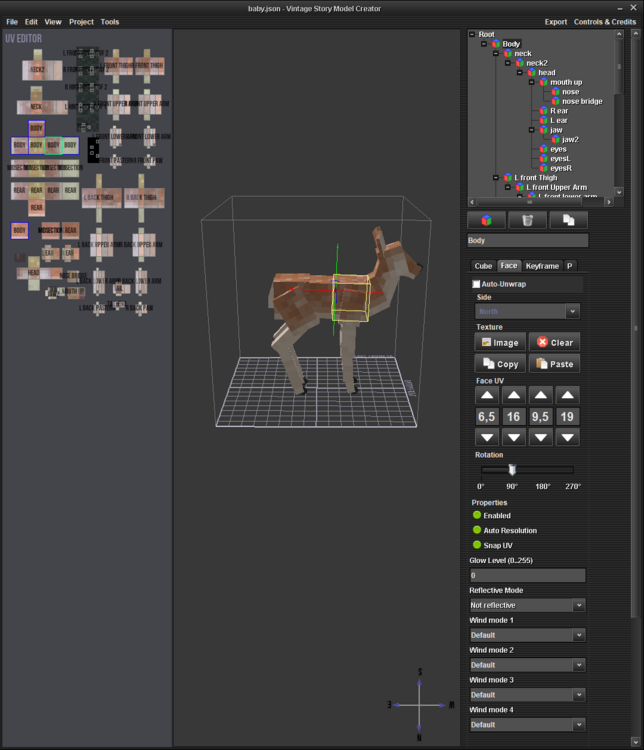
-
Maybe you mix up the record (or blog entry) with the forum post?