Brady_The
-
Posts
750 -
Joined
-
Last visited
-
Days Won
7
Content Type
Profiles
Forums
Blogs
News
Store
Everything posted by Brady_The
-
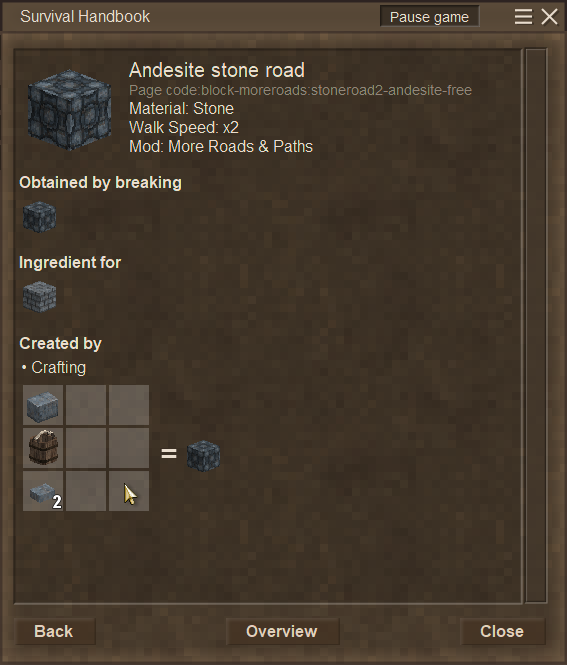
In that case I apologize for that question. You have no idea, how "inexperienced" some players are. It appears that the default stone roads are crafted like this: The alternative version seem to be toggled with the default stone road via the crafting grid.
-
Did you heed this hint?
-
There might be a fancier way, but I copied the contents of "[VS Installation]\assets\survival\worldgen\schematics" into "%AppData%\VintagestoryData\WorldEdit", which adds all contents of the folder into the World Edit Import tool. This adds all schematics, so you might want to shrink the list down only to the structures you actually want to repair.
-
 Welcome to the forum, Warden_Priest. There is a way you can retroactively change the path where you Vintage Story settings are stored. This includes mods and save files. You can find a very in-depth comment about the how here (the topic is about multiple installations, but the same applies in your case): Just follow the Step-by-step guide, and you should be good.
 -
Elk question: Can you ride an elk through a translocator?
Brady_The replied to Maethius's topic in Discussion
If the mechanic hasn't changed between the .pre versions and the stable release, you cannot ride on top of the elk through the translocators, but guiding the elk on top of the translocator pad will transport it. Fun fact: That functionality hasn't been added in 1.20, translocators have been able to transport entities and even blocks or items that enter the teleportation zone for a pretty long time. -
Does mods need to be updated to stable ver. of 1.20
Brady_The replied to jaqqu's topic in Mod Releases
You are in luck. Both mods have already been updated for 1.20. -
Can't move unless holding right mouse click
Brady_The replied to Pijavica's topic in Bugs (archived)
Judging from the comment of the original poster it appears, that he had "Immersive Mouse Mode", found in "Interface" activated. I am not sure if you are having the same problem, though, because this option should not activate itself with a key combination. -
Does mods need to be updated to stable ver. of 1.20
Brady_The replied to jaqqu's topic in Mod Releases
That depends entirely on the complexity of the mod. Take Step Up as example. This mod was written for version 1.14.7, but worked until 1.19.8, because it basically just changed one part of a line of code. The more code a mod changes or interjects into, the more likely the mod is to break on an update, if this update changes anything the mod touches. Content mods are more resilient, because content files are rarely changed to such a degree, that a mod utilizing these files will stop working, when those files are updated. -
Unfortunately I don't know exactly what you are asking. If you want to remove the support beams: Target the area where you placed down the support beam:
-
-
Color config is not something you have to use. It's a VSMC feature to make navigating complex shapes easier. There's a short explanation all the way at the bottom of the VSMC release link I posted in my first comment (https://github.com/anegostudios/vsmodelcreator/releases/tag/18Sep2024).
-
You can choose which texture to resize. If you look at the screenshots in the spoiler, you can see that all textures included in the shape are listed. You have to find the one you want to adjust and edit the values.
-
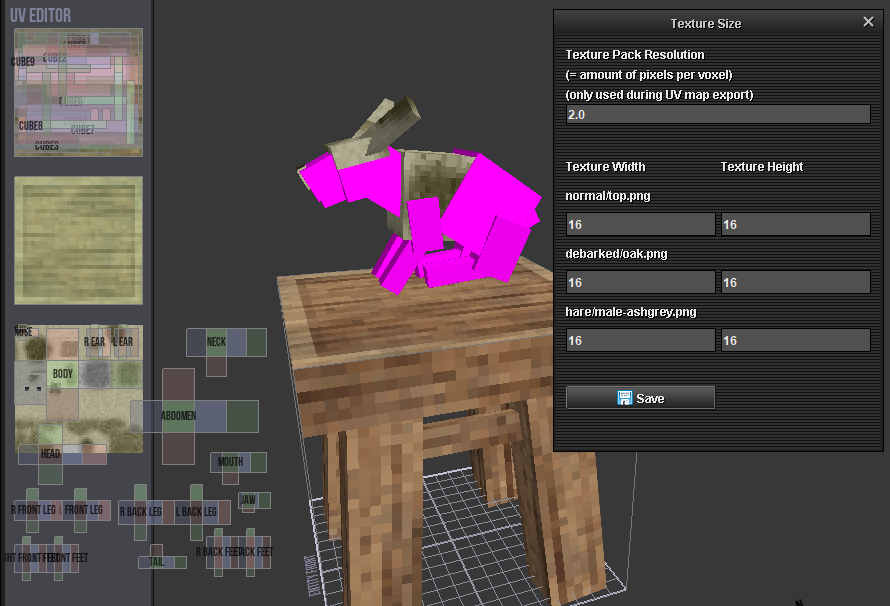
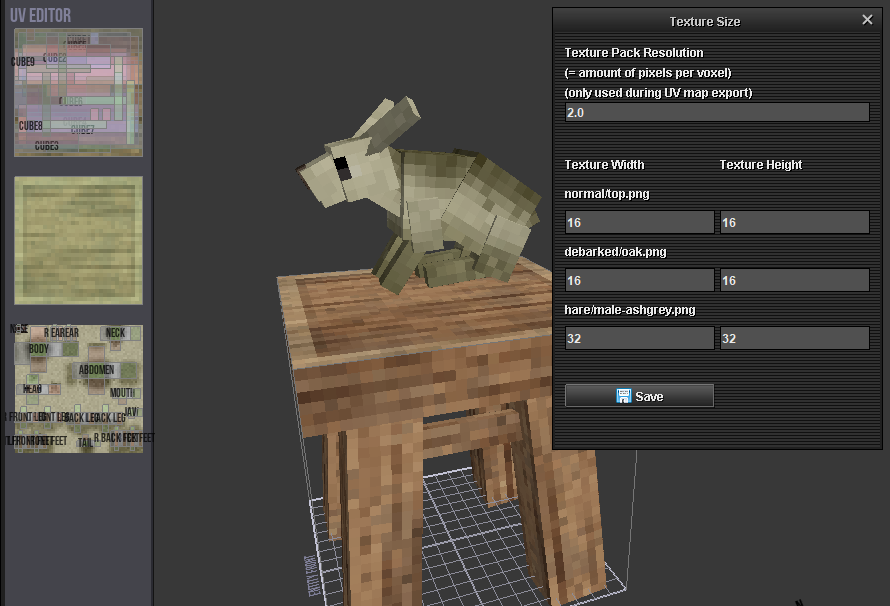
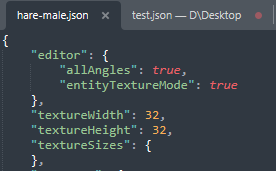
I figured out your problem. You probably imported the rabbit after opening or creating another shape which has its texture size set to (most likely) 16. The hare in your example has its texture size set to 32. This leads to the texture size of the rabbit being adjusted to the size of the original shape and to the misaligned mapping you experienced. Changing the texture size of the hare (or any other shape with this problem) to its appropriate size via Project > Texture Size should fix this problem. 32x32 should be the max size for any Vanilla shapes you use, but to make sure, you can simply open any shape with a text and code editor of your choice and check sizes:
-
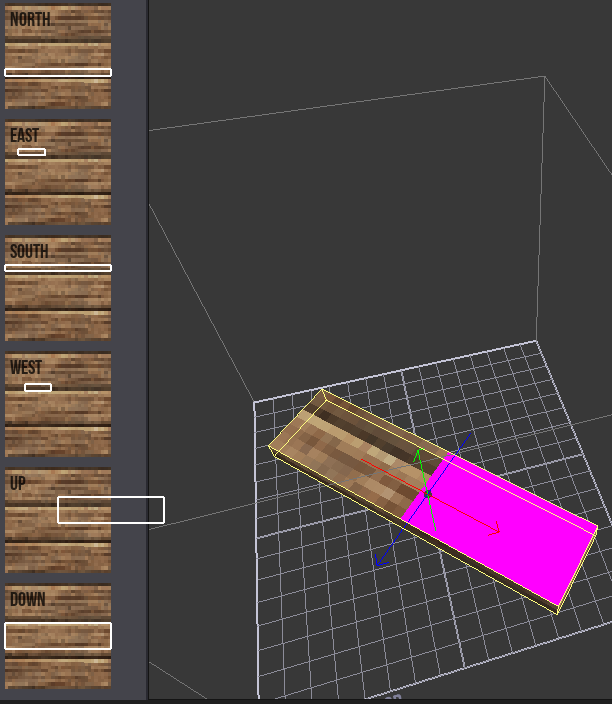
Hold on for a moment. I misremembered. The pink colour is displayed when the UV mapping is out of whack. It shouldn't happen on a freshly imported shape, though. What game version are you running?
-
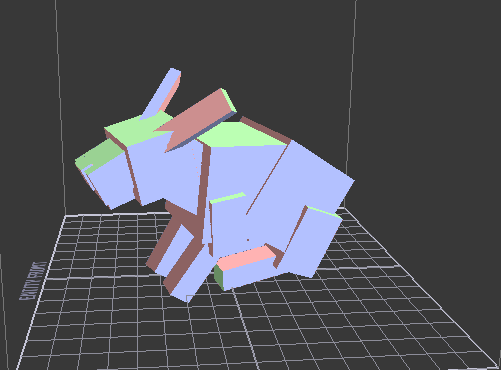
Welcome to the forum! Generally missing textures appear like this: I am not very well versed with the VSMC and haven't come across this particular issue, so I don't think I can be of too much help. Judging from the textures I suppose you set up the Texture Base path correctly. All shapes you mentioned work on my end as well, so it most likely a problem with your shape files or the VSMC install. Are you on the newest VSMC version? https://github.com/anegostudios/vsmodelcreator/releases/tag/18Sep2024
-
Tyron made a tool available, which should help you in your endeavours: https://tyron.at/vs/landformcreator.html# There's also @CreativeRealms, who just recently updated/rewrote a worldgeneration mod. Hours of content should still be available on his twitch page: https://www.twitch.tv/creativerealms. He also has a dedicated VS Discord server thread for the mod, in which you could probably ask for assistance explaining a couple of things. I am sure he'd more than happy to help out a fellow land generation enthusiast. If I remember correctly, this is exactly what it means. Mutations are variants of landforms. You can, for example, have a "cliff" landform and then mutations (or variations) of it. I don't know how exactly they work, though. Of course there is also the wiki, that could clear up a couple of things, even though articles on the wiki can be slightly out of date: https://wiki.vintagestory.at/Modding:WorldGen_Configuration/en
-
Welcome to the forum, solisamor. I haven't played in a while, and I don't know your exact circumstance, but could it be that those piglet were born wild (aka spawned in by the game)?
-
Welcome MaskE, have you tried the discord invite link in the header? It should be the same as the one in-game, and it should work. At least it did just now for me.
-
Welcome VikingHavel, if you friend is on a different network (not in the same house) you most likely have to go through one or two extra steps, so that you friend can see your server: https://wiki.vintagestory.at/Setting_up_a_Multiplayer_Server#Ad-hoc_Server
-
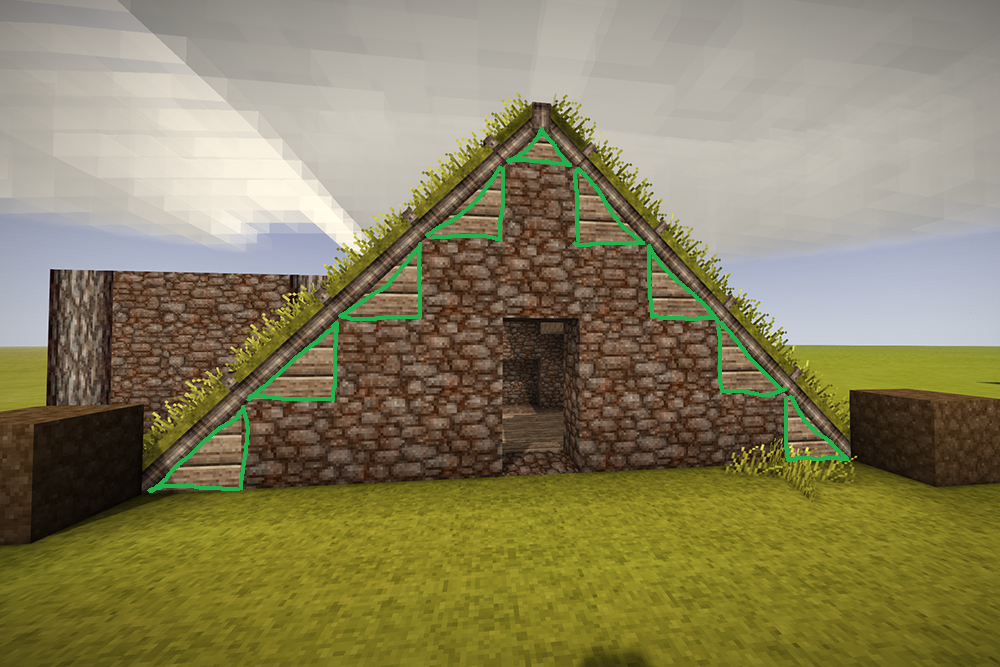
The ModDB needs a lot of work. If I remember correctly the devs are aware, but they currently don't have a dedicated web designer on board. Nice mod, btw. If you are interested in suggestions for potential future updates. It would be nice, if one could craft sod roofing with any building block that's generally used to build walls with, using the texture of that building block to change the look of the sod roofing. Example: In your mod screenshot the marked areas could have the chert instead of the oak texture. Related reading material: https://wiki.vintagestory.at/index.php/Modding:Content_Tutorial_Complex_Grid_Recipes#Variant-Based_Recipes
-
Those parts will the auto-filled with the appropriate information from the modinfo.json.
-
Aye, having any window open while sleeping will prevent "Shift" from working.
-
A mod for recycling decorative building blocks?
Brady_The replied to BriarBlack's topic in [Legacy] Mods & Mod Development
https://mods.vintagestory.at/scraps does something like that, but for clutter instead of buildings blocks. It looks like there's an open spot for your idea. The mod I linked is probably a good starting point to get an impression how to realize your idea. It's also a good idea to go through the tutorial on the wiki to get a better understanding of the mod creation process, but I you would want to skip straight to the recipes, I'd suggest these articles: https://wiki.vintagestory.at/Modding:Creating_Recipes/en https://wiki.vintagestory.at/Modding:Content_Tutorial_Simple_Recipe https://wiki.vintagestory.at/index.php/Modding:Content_Tutorial_Complex_Grid_Recipes -
Oceans are made of saltwater (while still-water is used for fresh water), so that shouldn't be the greatest hurdle.
-
Welcome to the forum, Glifider. What kind of mod would you like to make? Simple content mods can be done with only a text and code editor. The wiki has great tutorials to get you started: https://wiki.vintagestory.at/Modding:Content_Mods Models can be created with the Vintage Story Model Creator: https://github.com/anegostudios/vsmodelcreator/releases/tag/18Sep2024 - https://wiki.vintagestory.at/index.php/Modding:VS_Model_Creator Code mods require a few more steps: https://wiki.vintagestory.at/Modding:Preparing_For_Code_Mods If you want to look into dll files (with the default game ones located in [Vintage Story installation]\Mods) you can use: https://github.com/dnSpy/dnSpy/releases - https://github.com/icsharpcode/ILSpy/releases