


Professor Dragon
-
Posts
709 -
Joined
-
Last visited
-
Days Won
3
Content Type
Profiles
Forums
Blogs
News
Store
Everything posted by Professor Dragon
-

Bread vs Pie vs Porridge for consuming grain?
Professor Dragon replied to Vexxvididu's topic in Discussion
I spend most of my time base building, so it is Crocks and porridge all the way for me. Crocks let you mix up the ingredients to satisfy different food satiety. Standard is grain, grain, vegetable, fruit. Plus you put one on, come back later, and it's ready. No waiting. And beeswax farms exist for shelf life. My main base will have 2x Cooking Pots, 3x Crocks, 1x Bowl, 1+ Firepits, 2 - 4x Ovens. I'll bake bread en masse - but usually only for a specific trader. As head to the late game, ovens will be added. Once at four, they'll then go up in increments of four as needed. Eight is usually more than enough for any individual trader. Four is honestly fine most of the time. If spare bread, you char and eat that later. Once you are late game, then cured meat for completing the Resonance Archive or similar. Lets you carry more loot. My sheep farm finally paid off. For very long distance travel, I find forage is effective most of the time - you need much less food than you think, with good clothing. You need much more food than you think for looting the story locations. Backed up by a Cooking Pot, Crock, Bowl and stacks of grain. Once you have an Elk, then they take two full Cooking pots filled with food, plus a heap of storage. Circling back, you really only need to count the nutrition stats in the early game. Once you have farms up, food is no longer an issue. You cook and eat flax porridge because you have so much flax, even after feeding the animals. Or spelt, or turnips, or whatever is on hand. You can even stop cooking altogether and just throw back raw grain like a madman, although I try and remain a little civilised. -
Yes please! I can't upvote this highly enough. I see that there have been some mod attempts . . . but can't see anything in the "two wide" space - which seems odd??? This one does "3x" signs, for example https://mods.vintagestory.at/bigboards Not sure what this older one does - the screenshot doesn't have a 2x sign though: https://mods.vintagestory.at/signs Surely some valiant modder can come to our rescue? <Hint, hint> Although, yes. Base game, please. Professor Dragon.
-
Is that it? ? ? Goodness knows that I've hit this issue myself any number of times! As LadyLWT excellently put it - "Janky." Will have to see if I can confirm that as a cause when "sleeping in" because the <Shift> doesn't respond. If that is true, then that is a bug pure and simple, to be reported. So much so that in my main base, I keep the three different types of beds available, so that I can pick the one best suited to my wake up time. Preventing sleep during Temporal Storms is something different - a configuration setting: /worldconfig temporalStormSleeping 1 And as I've commented in other posts, that's basically a trap to get you killed, as it doesn't actually prevent anything from spawning next to your bed and killing you. Sleep in the vanilla game should always be interruptible by <Shift> otherwise. Use the mod "Simple HUD Clock" - I swear that this is so wonderful it should be base game. Professor Dragon.
-
I can see where you're going . . . but this is really dependent on so many variables, that I don't think there is a good answer. We could answer "Lots of mods" or "Poor mod" or "Lots of chiselling" or "Too many chunks loaded" or "Insufficient hardware" or "GPU glitch" - but none of this might be right for your scenario. You could go down the Performance checklist with the same issue. For example, yes, large numbers of chiselled blocks can cause lag . . . but how many? On what type of system - both server and client and network? With what mods loaded? Mods like Better Ruins, which have a large number of special blocks, can cause issues. But it is really dependent on the hardware - both client and server, what other players are doing and so on. What might be horrendous for some people may run just perfectly fine under different circumstances. If you want an idea of what other people have reported as causing performance issues, you can check the Issue Tracker and put in a keyword such as "Performance": https://github.com/search?q=repo%3Aanegostudios%2FVintageStory-Issues+performance&type=issues In practical terms, I recommend that you ask people who "experience lag" to document exactly what they mean (because "lag" means different things to different people), and have them take it to the server admins. Then the server admins - if they don't know - can take it to the Issue Tracker and get the exact root cause. No guessing - take a specific scenario and troubleshoot that. I'm sure someone else will chime in on this thread. Professor Dragon.
-
By default, sea level is tied to the world height. See: https://wiki.vintagestory.at/Sea_level Maybe by mods, but I had a quick scan and couldn't find one that did it. It looks like Tera Prety is considering an attempt, but is not there yet (???). Professor Dragon.
-
Hello @SkyfishArt I would be guessing too much here as to what might be the lag in your case. Even if we had more details, such as the number of concurrent players, the settings, the network etc etc. So I think rather than engaging in more of the speculation, start at this page and follow the suggestions. Then upload the logs as the page suggests so that the actual data is looked at: https://wiki.vintagestory.at/Debugging_Performance_Issues Professor Dragon.
-
Bug or Intended? Cob doesn't always drop when broken
Professor Dragon replied to NoxxyGizmo's topic in Questions
Huh. I bow to @Thorfinn's superior game knowledge. I just tried this on a test world with 100 Cob blocks and a flint shovel, on v1.21.5. When broken in my case, it returned 83 Cob blocks and used 100 shovel durability. It appears you don't get the full amount of Cob blocks back EDIT: I did a real quick check of your logs - you may want to remove them from here now - and did not find any issues. I can see where you are moving Cob around (eg "Moved 22xCob to (22x into backpack)"), but there are no errors or other activies in the other logs near these times. Professor Dragon. -
Problems during prune command, or how to repair vcdbs file?
Professor Dragon replied to Wahazar's topic in Questions
I'm glad you tried that on a backup copy. Always have a backup copy before these commands. The standard "Repair" is accessed (on single player) from the pencil Edit icon against the game save name. I don't know if I'd hold out much hope for that doing much in this case. I'm not aware of other utilities in this space, except for the SQLLite chunk repair tool here: https://wiki.vintagestory.at/index.php/Repairing_a_corrupt_savegame_or_worldmap I recommend: * Check the above repair tool. Then, if no go: * Take this to the Issue Tracker with the full set of logs, not just the snip. This should be in the logs, but anything you can include up-front in the ticket will initially help: Also include: * Version that the save was originally created on * Version it is on now. * The o/s name and version. * The exact dbprune command syntax used. * Full log set. Also note that you would typically run a db vacuum command after a dbprune command. I'm not sure if your Save is in a fit state to make this useful at this point, but it may reduce the file size while not harming anything "more". Thanks, Professor Dragon. -
To add to what @LadyWYT said, and mentioning even though it should be obvious - but obvious things aren't always - for testing switch between Creative and Survival to get the ingredients you need for testing easier.
-
Bug or Intended? Cob doesn't always drop when broken
Professor Dragon replied to NoxxyGizmo's topic in Questions
You should get two pieces of cob if you break two pieces of cob. EDIT: The above is a load of fluff. See post below. Going to rapid fire some points to check out to help with the background. * New game or an old one? * Multiplayer server? * Mods? * "Error" in the logs at the time such as "Critical error" or "System.NullReferenceException: Object reference not set to an instance of an object."? * Windows/Linux? * Current game version? * Server overloaded message at top right? * Does decreasing View distance reduce frequency? My first thoughts are either "server overloaded" or "mod interaction." "Bug" would be further down the list. But if it is partially reproducible and it's none of the above, load up your logs to the Issue Tracker with the time stamp and block name. Professor Dragon. -
Converting singleplayer world to the server I rented
Professor Dragon replied to MinerMGD's topic in Questions
Which hosting service are you using? If it is the Vintage Story hosting service mentioned here, then I'm afraid that there are no imports with this offering. If it is a different hosting service then maybe they do allow an import of the <My Save Name>.vcdbs file. It would depend on the service provider. Do you need the whole world? Could you take over part of it: * The World Seed and World Configuration - if you don't mind starting fresh, but like the general world as it is. * Use World Edit to export and import small sections, such as your base. If so, then follow a guide like this: An obvious alternative if it is just you and one other person is to host the world yourself, and then just open it up to Multi-player. Much easier to do if you are on the same network. It can be a bit hit or miss across the internet, but when it works is wonderfully easy. Professor Dragon. -
Could use some help making chromium sulfate!
Professor Dragon replied to Maethius's topic in Questions
Yes. That's the same guide that I used. It is one of the trickier recipes, what with the number of ingredients and steps. Enjoy your Sturdy Leather. The backpacks are a game changer. Professor Dragon. -
I agree. A proper bearing block would be much nicer. This does kind of look like a regular block smacked on top of an existing block, rather than a "dedicated block" that looks fit for the intended purpose. Maybe this is only a placeholder concept? Although, I can see why they might do this. Don't need to code and design new specific blocks. Allows players to use whatever wood type matches their builds Can hide axles in a wall
-
To add to what LadyWYT said, you could: * Use the existing unusable steel ingots as decoration around your smithery. * Switch into Creative and gift yourself a steel ingot. I certainly did.
-
What to do with my main world? Old, large.
Professor Dragon replied to Professor Dragon's topic in Questions
Thanks @LadyWYT The more I think about it, the more this seems the way to go. I guess I was after a bit of reassurance. I'll always have the old world if I want to go back into it again. I'll take my main base, as that is still an active work in progress. But otherwise, it will be nice to have new unbroken terrain, new traders when they come, somewhere to use my sailboats other than on a duck pond (Actually, why don't we have ducks? We need ducks) and so on. Right! Time to learn a new Vintage Story skill. I flubbed WorldEdit last time I made an attempt, so time to get into it. Professor Dragon. -
Hello Everyone, AIM I'm after suggestions on how to handle my main world from here on out. My save file has got large. Compressing the world does not seem to work well. BACKGROUND I begun the world on 1.16, and it is now on the current 1.21.5 version. The file size was around 3+ GB, but then I did the two story missions which required over 120,000 blocks of straight line travel there and back - and probably a lot more, because the routes were not straight. So by the time I completed the story missions my save file had blown out to 10+ GB. This makes everything take a little longer, such as backups. No problem, I thought I'd try compressing the world to save space. As good as it was doing epic long trips (it took nearly a full year there and back), realistically I'm not going to need most of those chunks anyway. They are just Too Far Out to practically visit, with nothing of interest in most. However, compressing did NOT go well for the world. After running these commands, my entire world was filled with jagged chunk borders. I regard it as not worth playing in this state. /db prune 16 drop confirm /db vacuum The file size did drop back to 5GB though. Honestly, I was expecting to be closer to 3GB. I had a guess that maybe it was because I have soil instability on - although I didn't think that counted - but went whole hog and tried: /db prune 0 drop confirm However, this was no better. CHOICES/SUGGESTIONS WANTED At this point here, I see these choices and I'm after input. If you have any other ideas or comments, please feel free. 1) Do nothing. Continue to play on this world, which apart from the file size is otherwise okay. The Story locations are currently ludicrously far away from main base. This is a function of them generating based off world spawn location, rather than the location you speak to the Treasure Hunter - which I think would make more sense. Even with the Tobin's Cave teleport, I would probably realistically set up with Creative Mode or Mods some translocators between the key story locations and my main base. Pros: Get to play on my familar world, with familar routes. Cons: Large file size Already existing chunk issues from 1.16 > 1.18 > 1.21 upgrades. These are "livable" but not ideal. I'm could do with a change from living in a bauxite biome. 2) Copy main structures to a new world. I'm not exactly sure on the procedure to export and import large builds. So I'd need a guide on that. EDIT: Probably something like this. But this would give me a "clean slate" while preserving the 1,000 hours of play time that I have on this world. I really only have one big main base that I'd be keen on preserving - it's only a few hundred blocks square and is built on pretty flat terrain. There are a lot of outlying settlements and farms, but I'd accept those losses if needed. Pros: Clean slate - no chunk issues! Small world size again Could have the Story locations closer to my main base. No Fewer weird Prospecting issues from old/new cross-chunk interactions. I could try out some of those fancy ocean settings - haven't found one yet, but I'm on very old defaults. 3) Try again with different db prune or other options Cons: Not really sure this would work any better. It took several hours to implement on the original 10GB file. 4) Other? I'm in no rush on this, and will keep playing on the original main world in the meantime. But it's time I had a think about this. Thanks, Professor Dragon.
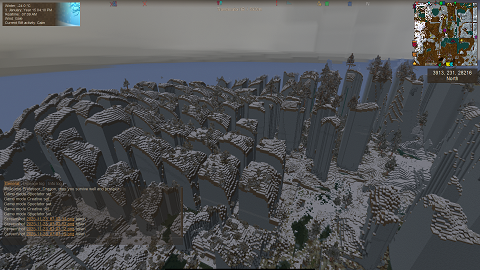
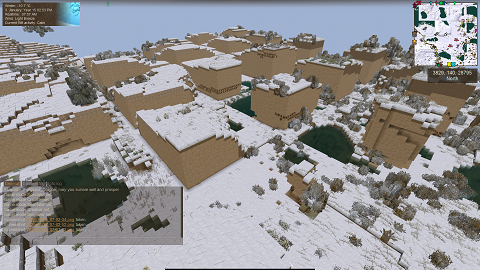
-
Bug with the skinnableParts of an EntityPlayerBot NPC
Professor Dragon replied to cyberlogia's topic in Questions
Hi @cyberlogia I don't know coding, but see that you don't have a reply here. You may want to put a post over to the Modding section of the forum here: https://www.vintagestory.at/forums/forum/27-mods-mod-development/ There is also a Discord area for modding. I'm guessing that whoever can help will want to see the full mod details, such as whether this information is being saved to a file. I see a save to file being done for SkinnableParts in this forum question as an example: You may wish to also stand on the shoulders of those who have come before by examining published mods that work in the same space and seeing how they handle things, such as: https://mods.vintagestory.at/playermodellib Lastly, here are the standard mod pages if you haven't found them already: https://wiki.vintagestory.at/Modding:Getting_Started https://wiki.vintagestory.at/Modding:Theme_Pack Professor Dragon. -
I was wondering when that would come up Some thoughts. First come, first served. Obviously not a solution, but easy to implement Area is instanced to each player. So each player would see their own build only. Would likely require significant code investment. Would not let players see what other players are doing, which is not ideal. "Minecraft Ender chest" style storage solution. The player house is locked down, but there is storage there, and each player sees only what is in their own storage. Similar issues to above, but easier (probably). OR just set up a massive barn/underground storage area with storage, and players get their own storage chests. Downside is that it doesn't provide the customisable player housing. Set up multiple house spots along the outsides of the walls, with a door through to inside the settlement and to outside. Probably easiest to implement. Would allow for a "large" number of new players, as the city walls are large. 10 - 20+ easily(?). (Most multiplayer worlds don't have this many people. Most worlds are single player, for that matter.) Each player gets an allotment, and they do as they wish to it. Is in thematic keeping with medieval towns, which often grew beyond their walls. Or add a larger curtain wall around the existing town and put the plots between the two walls. Give/sell/reward each player one unique "Nadiya Translocator" which has a limited range eg 200 blocks. Then each player can set up their own house in their own claim outside of the village, but the translocator would let them pop into a communal translocator in the village square. Stepping into the communal translocator would only take you back to your own translocator. This could scale massively, allows players to build small or massive builds, theme whole areas etc, without impacting the village at all. Out of all of those options, the last option with the Nadiya Translocator seems the best overall solution to me. While just providing storage to players is probably the easiest solution, but lacks the customisation and flair. Open to suggestions of course. Professor Dragon.
-
Same experience for me. I've also recently started with that mod (for one specific thing) and all the rest was just a bonus or I didn't actually need. We already know that crops won't grow under some circumstances, such as winter. This may just putting a weird number interpretation as to the mechanics as to WHY they are not growing - something normally shielded under the hood. From the mod author at https://mods.vintagestory.at/extrainfo: "This mod runs timers - meaning that it doesn't actually 'read' how much time a block has left before something happens. It simply finds out how long that block has been there. This can cause problems, such as when crops stop growing due to lack of sunlight, or when temperatures reach <10 Celsius, or when skeps are left out for too long, since they don't update accordingly." I think we need to break this into two separate issues: Why is the mod Extra Info showing negative numbers? I think that part is handled by the above comments. I wouldn't worry about this aspect. Are my Rye crops growing? This is the part I think we should focus on. For that, let's check the basics: Pull up your Character sheet (C) and look at the temperature - what is it? Rye grows between -12 to 27C in a standard world What season is it? Your growth speed is fine - indicating that this should grow. How many days have you waited? Rye takes 18 days in a standard world. Maybe just wait a bit. The Nutrient levels are fine, from the graph. Bonus points for having a greenhouse - although watch Rye in Summer as it overheats easily. Have you changed either directly (via Worldconfig or at game creation) or indirectly (via mods) the growth speed of crops? Professor Dragon. EDIT Aaaaaand . . . I've just seen your last comment. Hey ho, a lot of words for nothing.
-
Bony Soil ain't so bony... or anything... anymore?
Professor Dragon replied to Angie P's topic in Questions
Did you mean candles? You can get candles from Bony Soil drops, but never lanterns - so if so, that would have been a mod. You're right, the return does fall off the further you get in the game. You'll get far more "treasures" from completing the story rewards. And with good tools you will get way more of the common resources. However, I will still collect Bony Soil from Ruins and pan it during off moments, even in very late game. Sometimes you just need an activity when you can't think of anything else to do, and the rewards of the Lore books and Gems are still worth it to me. Professor Dragon. -
Great experimentation. I look forward to the results! See if you can scrape together enough glass to put a small greenhouse around that orange tree for the +5C bonus. If anyone is not up to tools or bloomery yet, then use regular quartz that you find on the ground to make glass in the early game. You only need enough for half the roof for the greenhouse bonus, and the rest of the structure can be can any solid block, such as rammed earth.
-
How to get an Elk and Book back? (Mild spoilers. Chapter 2)
Professor Dragon replied to Professor Dragon's topic in Questions
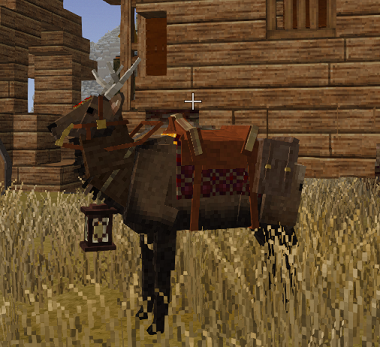
MY ISSUE HAS BEEN WORKED AROUND I was not able to retrieve my original Elk or my diary from my current world. I have worked around this by: - Taking a current backup, then restoring a prior backup - Opening my book in that old backup, and select and copy each page of text into a separate Notepad++ document. - Restoring to current backup. - Changing to Creative Mode and gifting myself a new Elk and equipment (saddle, harness etc) So my issue is addressed in practical terms. I even gave myself some free upgrades as compensation for the inconvenience. Here is my fresh new Elk, in markedly different colours so that I can distinguish the original if he ever shows up again. ADVICE TO OTHERS Do NOT store anything on an Elk that you can't afford to lose. Eg Food, wood, a bed - fine. One off story mission rewards - nope. If you DO have important stuff to transport long distances (I mean, that is kind of the whole point) or into a dangerous area like the Story 2 zone, then: Take a Save backup before loading your elk. In the course of my restoration attempts, I've viewed a lot of different forums and Issue Tracker posts in different locations, and this issue comes up often enough to take care. ON THE BENEFITS OF OWNING AN ELK These things are AWESOME. I can immediately see that this is a game changer for me. I highly recommend that everyone complete the Chapter 1 Story so that they may buy their Elk. I regret playing for three real world years before getting my first one! High speed travel It is like having a "ground Elytra" from Minecraft. Zoom, zoom, zoom! Bears, wolves See ya later, fellas! Holes I see you coming! Plus I can jump over most, and take less damage if I do fall into one. Extra Storage Speaks for itself. Will help out on complex or large builds. Storage on Demand Doing a build and need to access some resources? Call your Elk and supplies come to you! Thanks all. Professor Dragon
-
How to get an Elk and Book back? (Mild spoilers. Chapter 2)
Professor Dragon replied to Professor Dragon's topic in Questions
I'd like to use BOTH the or emojis against your post, but I can only do one. So you get them here. I've had a decent go flying around in Creative back over the route into the Devastation, but will give it another go. Didn't find him. Mind you, it was night. If he is somewhere else . . . well, it was a huge trip in and back. The Treasure Hunter I purchased him from is what . . . 80,000 blocks away. (Teleport and check there? Maybe) It will take a while even in Creative with fast fly to cover my trip just from Nadiya to the Devastation. But maybe I'll give it a shot, as you're right, they don't normally "vanish." I'm also not going to risk spawning in another just yet - it might wipe my creature from existence, if he's not already gone. (Hmmm. Backup Save and try it. . .) Anyway, thanks people. -
I like and agree with everything you said. Having another room that the player could earn or purchase would be great. I had that idea also, but failed to vocalise it. The role model would be "Breezehome" from Skyrim. In that game, you do an adventure or two, buy the house from the town, and then can buy upgrades to it. The Vintage Story equivalent could sell/rent you a Nadyian home, and while the exterior walls are fully locked out, you could build/decorate inside that space to your heart's content. OR The interior is also locked, but you can purchase "upgrades" like a trunk, a bed, a firepit, a small garden plot outside etc. That would keep the town aesthetic, while letting you live there. I prefer the first option though, as the building element and design choice is strong in VS. Lean into the strengths of the game. This would then be protected space and storage during upgrades. Also, renting a room in the inn just seems like . . . obvious. They even say that I can put a bed down on the floor of the inn . . . but you can't!
-
Bowtorn Arrows (Can I pick them up?)
Professor Dragon replied to EvilShrimpRamen's topic in Questions
No, you can't. However, you can harvest Bowtorn with a knife, as you would do for a Drifter or animal, and they have a drop chance of including a Bone arrow. Frankly though, they're not worth it. They take a precious inventory slot in the early game, and later they are outclassed by . . . well, anything really. A flint spear, for example. And if you are getting enough of them to use as ammo . . . well, then you're getting shot by Bowtorn way more than is healthy. Plus . . . kind of gross. You'd be better off using that slot for a pile of rocks. Not only can you knap tools with them, but you can throw one of them if you need to get the attention of something. Or go to a body of water and skip them. Professor Dragon.



