


Spear and Fang
-
Posts
493 -
Joined
-
Last visited
-
Days Won
8
Content Type
Profiles
Forums
Blogs
News
Store
Everything posted by Spear and Fang
-
 Necklaces are a bit different for sure, but here's my "clean pants" mod that I shared with someone recently. A complete mod that adds one pair of clean pants to the game, no more, no less. I made this mod with no prior knowledge of clothing mods - by taking the vanilla "lowerbody.json", bringing it into my own mod, then stripping it down to its bare essentials. And tweaking it a bit to meet my needs. Quite sure lowerbody.json only applies to pants though so you'll be looking for a different file in about the same location as this one. There isn't a shape in the mod (I use a vanilla shape and then retexture it via the mod) but I did have a shape folder all prepped and ready for my very own shape file. cleanpants_0.0.2.zip
 -
https://mods.vintagestory.at/wildfarmingrevival
-
Fresh water vs salt water
Spear and Fang replied to Micah Holmes's topic in [Legacy] Mods & Mod Development
Me again there is indeed a unique item for saltwater "item-waterportion": "Water", "item-boilingwaterportion": "Hot water", "item-saltwaterportion": "Sea water", as well as a unique block and bucket (containing seawater) boiling it may be tricky though because cooking mechanics (especially liquid related) are kinda borked. I suspect that both of the "thirst" mods have come up with a solution, but I imagine they both used c# code to make that happen. I highly recommend joining the official Vintage Story Discord where you can get help with such things from people that are more experienced in such areas. Not many modders come over to the forums anymore, myself included. -
just keep an eye on your logs/server-main.txt and logs/client-main.txt while modding 2.11.2024 15:51:16 [Warning] Entity with code piranha:piranha has defined InsideBlockCodes for its spawn conditions, but none of these blocks exists, entity is unlikely to spawn. This is just telling you to fix your spawn conditions at the bottom of your entity.json. Since water blocks are vanilla, you need the "game:" prefix in a couple of places. insideBlockCodes: ["game:water-*"],
-
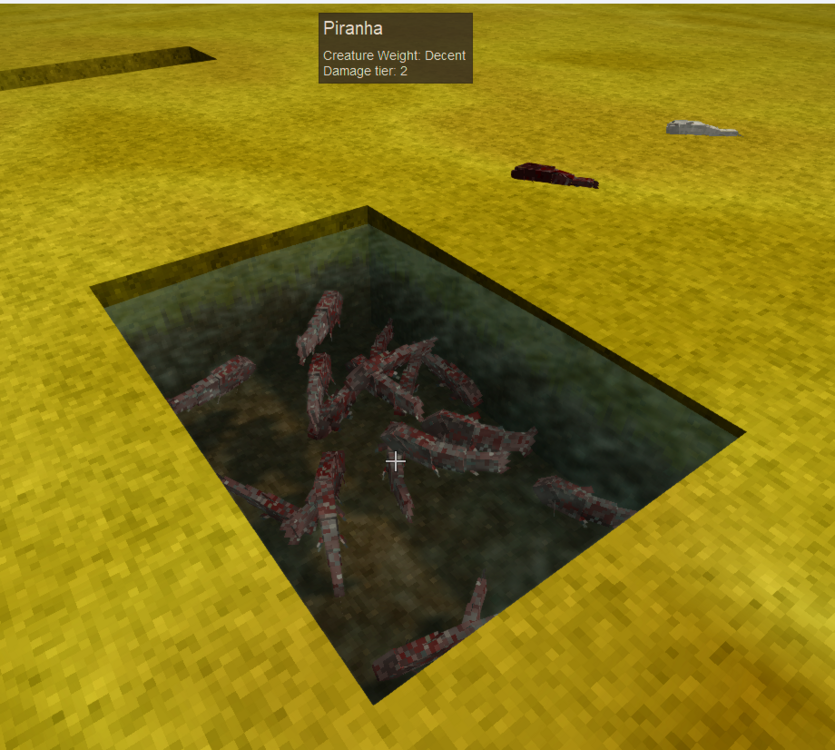
I couldn't tell which one was the latest version, so I downloaded the bottom one. Tested it in game and it seems to be working perfectly. congrats One issue I ran into was in my Creature.Json I have to have a "Skin: base" This is fine. The game is expecting something there. I think "all" is often used rather than "skin" in these cases, but it shouldn't matter Other issue is of course the fish acts like an item and not a entity when i add it in game via creative. You will never have an "entity" in an inventory. It's always an item in these cases. So if you throw it on the ground it's an item, if you right click place it it magically becomes an entity.
-
Next up is actually being able to place your piranha in world (which converts the item.json to the entity.json) I didn't tackle or test that but it can be a little tricky. I can help with that too if you can't figure it out.
-
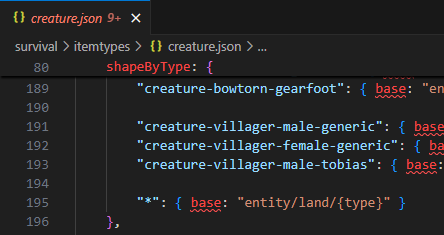
I will briefly explain what I did to fix your immediate issue. So first I want to make sure that the actual shape file and texture file are in your domain - so I may (or may not) have moved your shape.json and texture (png) into your pirahna folder structure (assets\piranha\shapes and assets\piranha\textures). ideally you want ALL of your mods assets to live in assets\piranha\...this is basically the piranha "domain". aside: You will notice I removed any folders you had called survival because that isn't a thing. You will also notice that I left a folder called game in your mod. If you really want to put some of your mod's assets in the game's "domain" (along with all of the vanilla assets) you *can* put them in the game folder. Not recommended! But sometimes it is the only way to solve a problem. Your entity "item" is created via your json patch "survival-itemtypes-creature.json", and its shape and texture are located via this section of that patch. Note the two instances of "piranha:" in the code below. This points to the shape file and texture file in your mods domain. Why? Because you used a patch, your piranha item is actually in the game domain! Please also note the two "move" patches I added. This is because of the "*": entry at the end of the shapeByType section of "game:itemtypes/creature.json". (see sceenshot) I essentially moved that entry to a temporary location and then immediately moved it back (which forced it to the end of the list. This will allow your piranha shape entry to actually get loaded. If I did not move the asterisk entry then that asterisk entry would block your new entry, because the list is processed top down. { "op": "add", "path": "/shapeByType/*-piranha", "value": { "base": "piranha:entity/water/piranha" }, "file": "game:itemtypes/creature.json", "side": "Server" }, { "op": "move", "frompath": "/shapeByType/*", "path": "/hax", "file": "game:itemtypes/creature.json", "side": "Server" }, { "op": "move", "frompath": "/hax", "path": "/shapeByType/*", "file": "game:itemtypes/creature.json", "side": "Server" }, { "op": "add", "path": "/texturesByType/*-piranha", "value": { "all": { "base": "piranha:entity/fish/piranha-red" } }, "file": "game:itemtypes/creature.json", "side": "Server" },
-
check this out piranha1.0.1.zip
-
the screenshot you posted is your fish "item", but the code you posted is your fish "entity" they are two different things - the item is what shows in inventory/handbook, the entity is what appears in the world.
-
no animals were harmed Primitive Survival
Spear and Fang replied to Spear and Fang's topic in Mod Releases
Oop, I haven't been over here in a while sorry! Thanks so much for the translation and other details in need of attention. I'll definitely look into getting most of this stuff fixed for the next release! -
no animals were harmed Primitive Survival
Spear and Fang replied to Spear and Fang's topic in Mod Releases
The irrigation vessel is a water block at it's core, so first and foremost that watering behavior applies. Then it's got a pattern like this applied, where it tries to push the nearby blocks (X) to 100% XXX XXXXX XXVXX XXXXX XXX BUT it waters prioritizing from the (V)essel outwards, so if it's really hot it might struggle to keep up. As in, the weather + farmland + crop are often working to push these numbers in the opposite direction, so much so sometimes that maximum water levels are simply unachieveable. -
no animals were harmed Primitive Survival
Spear and Fang replied to Spear and Fang's topic in Mod Releases
there is one such example about here https://youtu.be/9uSBfcw8Aa4?si=uHmmJHWmqwgk-VF0&t=105 -
Running patches to see the final output?
Spear and Fang replied to DrKlinger's topic in [Legacy] Mods & Mod Development
Yes - with this mod https://mods.vintagestory.at/show/mod/513 don't let the versioning fool you, it does indeed work with the latest game version -
no animals were harmed Primitive Survival
Spear and Fang replied to Spear and Fang's topic in Mod Releases
Did you post this here accidently or are you just looking for advice in general? Because it really has nothing to do with this mod. -
https://wiki.vintagestory.at/index.php/Modding:CompatibilityLib
-
no animals were harmed Primitive Survival
Spear and Fang replied to Spear and Fang's topic in Mod Releases
Hah! You are the third person this week to ask for this - if I was a betting man I'd guess that you are all on the same server. I can surely do something here but not any time soon. If you want to take a shot at patching some of this stuff out in the interim feel free. -
Oh oops yeah I forgot about this. Also, I have no plans on continuing to work on it. Here's the source code and seal of approval from Jake. If someone wants to take over, feel free. Original repo is up on Jake's Github if you would rather start from there. farmlife2.zip

-
no animals were harmed Primitive Survival
Spear and Fang replied to Spear and Fang's topic in Mod Releases
Added (optional) achievements via Nat's Achievements mod! Check it out here: https://mods.vintagestory.at/show/mod/9615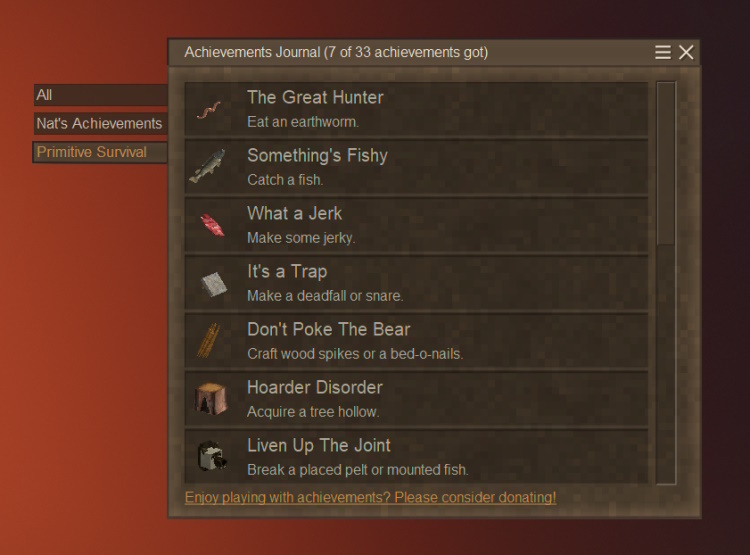
-
1. Locate this file: %appdata%\Vintagestory\assets\survival\blocktypes\plant\fruittreebranch.json 2. Edit the attributes/fruittreeProperties section directly. i.e. the dieBelowTemp values for each tree type 3. Run the game to test. When you are happy with your changes, run modmaker to generate your mod %appdata%\Vintagestory\ModMaker.exe 4. Reinstall the game directly over itself to restore your changes in #2 to their original values 5. Publish your mod on the modDB 6. Profit!
-
fwiw, I never direct anyone to the api docs because they are auto-generated and difficult to navigate. And while the Anegostudios github is convenient for pointing people towards and searching, it is missing half of the resources that one might want to look at (and also pretty clunky). Using a decompiler like dnSpy or ILSpy (or Visual Studio has a plug in apparently) is so much better than the other two resources. I use dnSpy myself. Run it, drag and drop all the relevant .dll files into it (i.e. VintagestoryAPI, VintagestoryLib, VintagestoryServer, plus everything in the Vintagestory\mods folder), and Bob's your uncle.
-
https://github.com/search?q=repo%3Aanegostudios%2Fvssurvivalmod+path%3A%2F^Block\%2F%2F+worldinteraction&type=code
-
Help Please, C# Code not working?
Spear and Fang replied to pencilgame's topic in [Legacy] Mods & Mod Development
Add this right before you call ExchangeBlock? Should work handling = EnumHandling.PreventDefault; -
umm. I'm not sure I understand what's being said here exactly, but... You CAN essentially disable a patch made by another mod by simply patching the same file that the other mod patched. Then use a "dependsOn" to ensure that your patch runs after the other mod's patch. Maybe. Probably.
-
no animals were harmed Primitive Survival
Spear and Fang replied to Spear and Fang's topic in Mod Releases
" failing to render something in a tree hollow and crashing" for the record (and to clarify), this mod only ever puts vanilla items, items from this mod, and items from the old version of Wildcraft trees (if it's installed) in a tree hollow. But that doesn't prevent another mod from modifying vanilla items in such a way that they would no longer render correctly in a hollow. Also, if your existing world used to include the old version of wildcraft trees and that same world now uses the new version of wildcraft trees, that could explain why it's crashing. -
no animals were harmed Primitive Survival
Spear and Fang replied to Spear and Fang's topic in Mod Releases
Hi Mineymonkey, The error message does indeed indicate that my mod is failing to render something in a tree hollow and crashing. The problem is that I simply can't recreate the issue. To expedite testing on my end I jacked up tree hollows a lot by editing my modconfig file "TreeHollowsMaxPerChunk": 12, "TreeHollowsSpawnProbability": 0.5, Then I created a new world with this loadout primitivesurvival@3.4.5, game@1.19.3, herbarium@1.0.4, creative@1.19.3, survival@1.19.3, wildcraftfruit@1.1.0 I mucked with a lot of hollows, and no crash. So I tried another new world with this loadout primitivesurvival@3.4.5, game@1.19.3, herbarium@1.0.4, creative@1.19.3, survival@1.19.3,wildcrafttree@1.0.0 and once again, I mucked with a lot of hollows, and no crash. My best guess is that the problem lies within your existing world, and it may be tricky to recover from this situation. To confirm or deny this claim, you *could* start a brand new world and see if it crashes... I read recent modDB comments for all the mods involved and did a quick dive into the json files for those other mods and can't find any other clues. Tree hollows should be pretty far removed from those other mods, as I've already taken many steps to ensure this.




