
Ryilo
-
Posts
56 -
Joined
-
Last visited
Content Type
Profiles
Forums
Blogs
News
Store
Everything posted by Ryilo
-
It's not always / , it changes depending on keyboard layout/language
-
I usually just plant a lot of trees and make lots of charcoal. Cut them down, plant, and repeat...
-
What kind of issues? I multi-material chiseled a section of a house and didn't notice anything, can you be more specific?
-
A separate building for smithing and mill, since both benefit from a windmill. In your 'main' house as you already mentioned you need just a kicthen, a cellar to keep food fresh, and a bed. You can make a separate building exclusively for storage, then a small building for leathermaking and dyes/paper (near the windmill, you'll need to grind some things). You also need space for the animals, better to put them inside a building. And a farming area. I prefer different buildings, so I can make them bigger if needed, if I build a "base" with different rooms they end up being too small or too big... Don't forget the space for the smelting of iron and for making steel, and for the furnaces to cook clay objects/bricks. I'm surely forgetting something...
-
Oh, right, that was added in 1.21... Use the command /worldconfig loreContent to see if it is set to true or false To use the command, with the chatbox closed press the T key, then write the command.
-
 A correction: it's unintuitive, but try this: load the game, set it as "Windowed". It appears in a window, it not what we want, but: leave it like this, close the game and reopen it, it's now windowed fullscreen borderless as I wanted.
 -
It sounds like the lore content got activated by accident. To check this before loading the world click on the edit button, then click the customize button, then go in Survival challenges and check if lore content is enabled or not. You can unckeck it, click apply and see if the change takes effect.
-
More fauna is always welcome. The 1.21 is more about fixing other things, I think I have read somewhere that 1.22 is going to be more about content, though they talked more about new "mechanical" content, I'm not sure.
-
15 mods are not a lot, but even 1 might be a lot if it's not stable. In case of a crash it's necessary to look at log files to understand what caused it, and there are additional logs that can be enabled in dev mode for this, but the game is not crash-prone per se. Alas, being every pc different from one another in hardware and software anything can happen. If you experience frequent crashes and can't solve them because of your pc, you can make a backup of your last save before playing by copying the Saves and Maps folders. I recommend this for important worlds in any case, because a save can be lost because of other causes (operating system or hardware fault, see last windows 11 update that corrupted some ssd...).
-
Nice work there, crunching all those numbers! I too usually start heating things up using peat, and I too found out that after reaching the smelting temps with coal using peat in-between can be risky, as at a certain point the temps lower below smelting temperature and it takes more coal to put it up again. Also, I hate to babysit it too much.
-
The problem with "Fullscreen + always on top" is that if something opens on the main screen where the game is running we can't interact with it. I get that it's a major problem only for those who are recording or streaming, nonetheless... Not being able to see the source code I don't know if the game is not using the SetWindowPos method or if it's using it with the wrong window size, or if it's using something else so I don't know how hard it is to patch it.
-
Yes, "maximised borderless" doesn't cover the windows taskbar, while it should cover it. "What if I need the taskbar?" you may ask, well it should show by, for example, pressing the windows key (or ctrl+esc) to show the start menu, then hidden again as soon as the game regains focus. There are also other problems when using multiple screens and having other apps open.
-
You just have to know what to look for, as said above. Red clay is quite easy to find, and as I always say to new players: use the colored map to spot different terrain. This game doesn't give you everything you need in a single world chunk, it has a more plausible distribution of resources. Don't get discouraged, make different worlds and learn the basic, I 'wasted' I don't know how many hours in different worlds before figuring out some things.
-
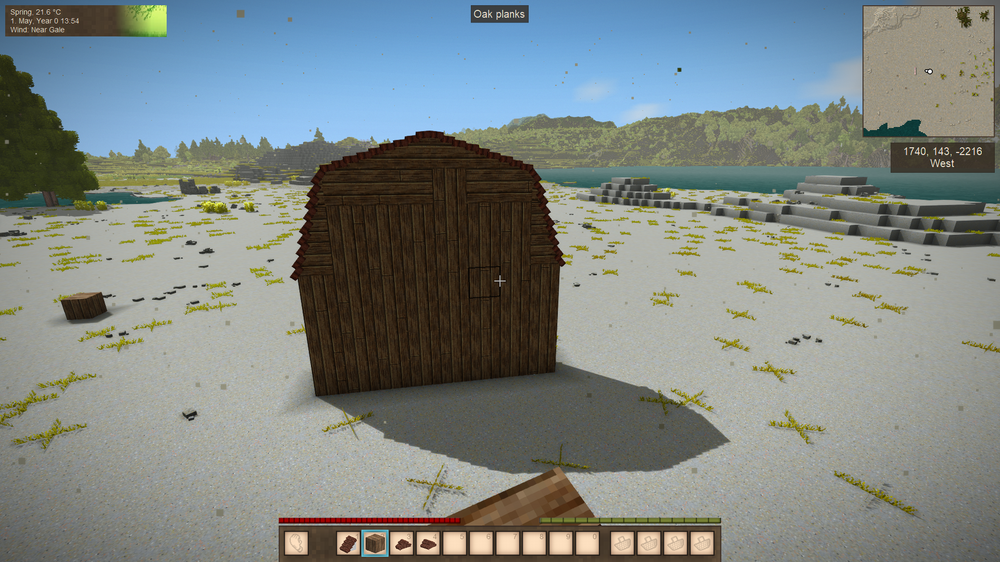
A quick and dirt example using the mentioned mod, is this what you mean?:
-
Other games have mods like the one op suggested, and they are no fun at all. There is already a lot to do in the game: animal husbandry, farming, smithing, combat, building, exploration, mining, leathermaking, cooking, etc... we have a bit of everything to take care of and there is always a lot to do if the game is played this way (what's the "other way"? just run around, find new ruins to get items from, trade with traders to get equipment, get the food you find around, sleep in a trader wagon, you get the idea....) I understand that there are people who might like the added complexity, but if the player had to deal even just with broken legs/arms everytime you are exploring and fall down because of sand/gravel hiding a cave, or by falling into a cave full of drifters or because an animal pushes you down a hill, it would become very frustrating very soon, even more so with the other mechanics on top of it. Then you'd have to balance it all for the start of the game and for the end game, and it gets even messier. Then the player could just set the game to respawn without losing the inventory, let the character die and respawn and avoid all the mess of healing/patching things up, and so all the new mechanics can be thrown out the window...
-
For sure it would have to be limited to worlds that have at least a certain size, to prevent the world tiling indefinitely or something like that. If the game engine permits it it would be cool, and it could be an option to enable in the game settings.
- 1 reply
-
- 1
-

-
- worldgen
- exploration
- (and 1 more)
-
There is a Mod called "One-Roof" that is very flexible, I suggest to start by incorporating its functions in the base game. It handles the creation of corner pieces automatically, it converts the standard roof piece in a corner piece when it detects what the player wants to do, and it permits manual editing of what has been placed if the player wants to do something different. It permits the creation of more steep roofs simply by placing another roof piece on top of an existing one, and it does the same thing for horizontal pieces, and it does even more things.
-
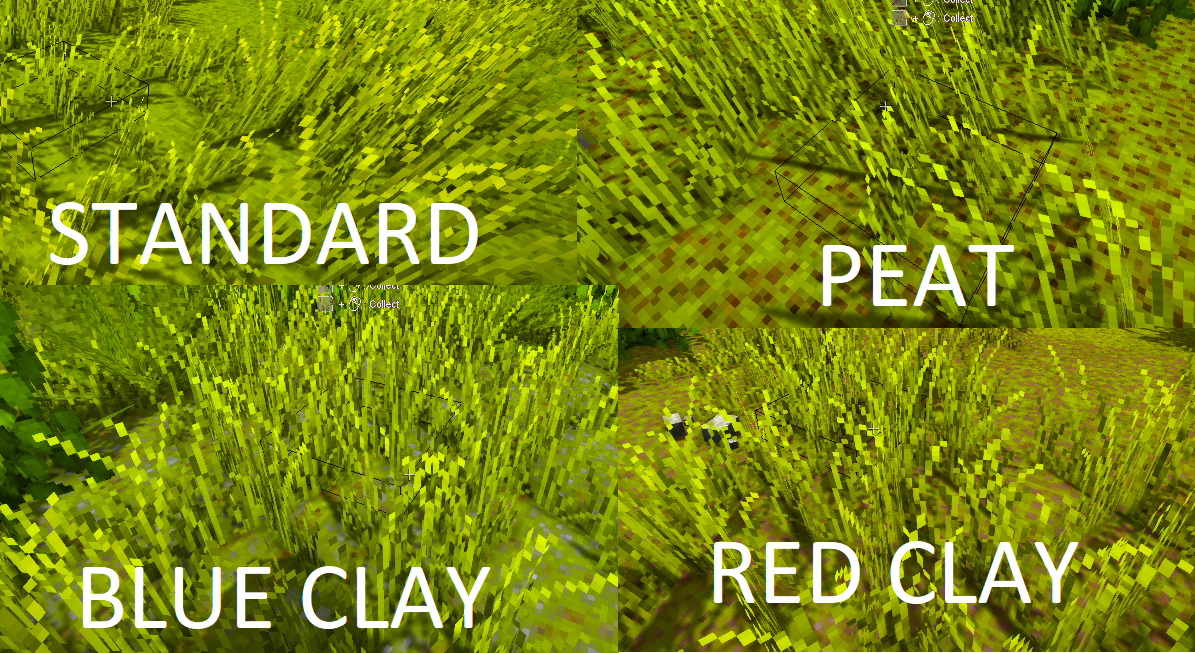
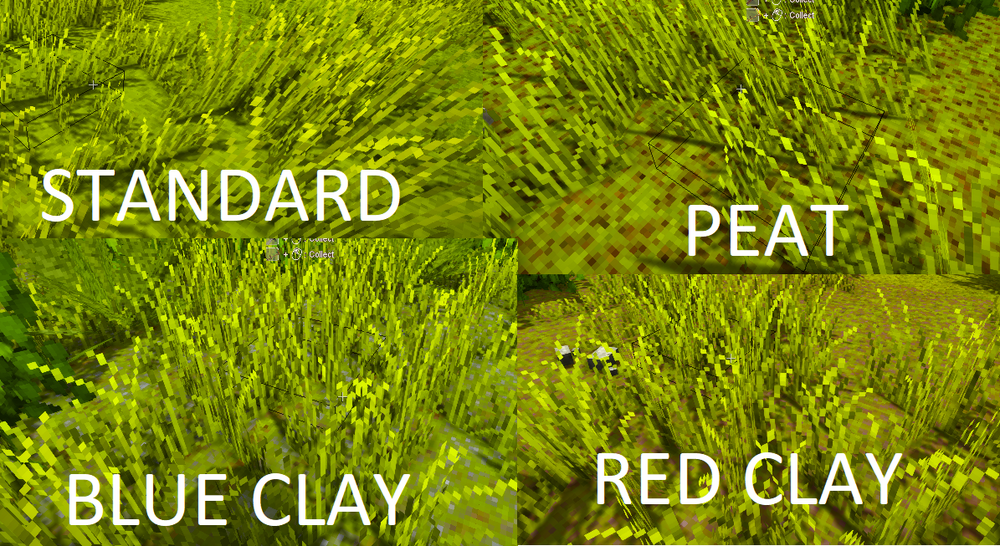
I seriously recommend using the color map, peat and clay can be seen as different colored ground pretty easily. Then once you know what to look for it will be easier to find it with the other map. For blue clay there is a mod called More Blue Clay that does what's written on the tin. Take a look at this image, if you look at the ground while walking you can spot special terrain pretty easily, it has spots all over. It's way more difficult finding high fertility soil, especially if it's under your feet and with grass/plants on top.
-
Take a look on how to create multiple installations on the same pc, there is a thread in guides: What you want to do is create a folder for each player, and inside each of them a DATA and a MODS folder (the login data will be stored in the DATA folder), then you create two different desktop shortcuts for each that link to those folders. Each player can then have its own set of mods, placed in its own MODS folder you created. Also, you can copy the current game saves by copying the contents of the "Saves" folder and "Maps" folder into the new folders you create. As long as you don't move or delete stuff, the current setup will continue to be available by launching the current shortcut you have.
-
Foreshadowing: It's probably cpu settings. Can't help much with Radeon graphics, but with NVIDIA try: Vertical Sync FAST in nvidia control panel, Vsync OFF in the game, then limit the FPS until you see the graph being smooth 99% of the time.. For example, for a 60hz display you should see it smooth by setting a maximum of 90 fps. Then try reducing SSAO, Shadows quality and dynamic lights number. If it still stutters, it may need CPU configuration in the game. Keep a Task Manager window open in the Performance tab (remember to set to "logical processors" or you'll see only 1 graph and that is useless) and see if there are any cores stuck at 100% all the time (usually the first core) (let the game run enough for it to load everything once you load the save to have an accurate reading). With it "fixed" you'll see the occasional 40fps spike in the game graph, but it won't be noticeable when playing. (I'm also playing with a view distance of over 900 blocks and height of 320, so I can't complain at all...) To the devs: can we please have the cpu settings in the settings GUI in game?
-
If you're happy without the fade out part, there is a mod: Silent Pause MOD that silences the game when paused.
-
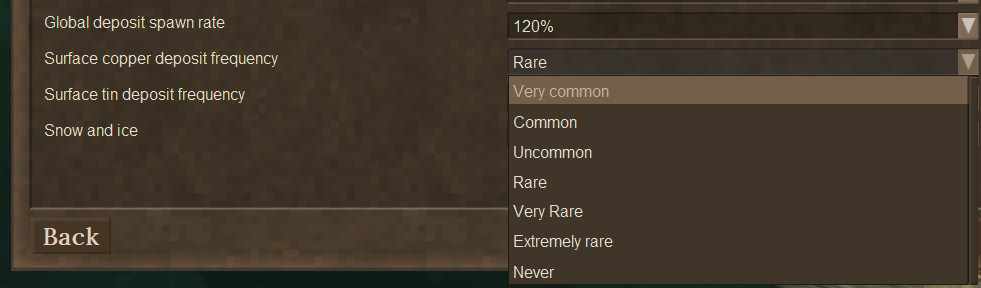
For the new players that find early game diffcult: remember that there is a "customize" button that can be accessed before and after a world has been created, and you can customize the amount of ores that are generated and how easy it is to find copper and tin on the surface. I've seen a lot of videos of new players that completely skip the world customization screen, probably because they think there isn't much to customize like in the other block game...