


The Insanity God
-
Posts
72 -
Joined
-
Last visited
Content Type
Profiles
Forums
Blogs
News
Store
Everything posted by The Insanity God
-

Mod Help - Shape issue
The Insanity God replied to Micah Holmes's topic in [Legacy] Mods & Mod Development
So remember how earlier I said "this is normally done either through a BlockEntity with custom logic for it or through variants" well the `GenericTypedContainer` would be one of the base game BlockEntities with rotation logic... meaning you now have 2 rotation systems trying to interfere with each other. I know the base game chest also has this but in their case it's to provide legacy support (you can only place down the `east` variant now and it fully uses the BlockEntity rotation) the reason why the textures don't work is because `GenericTypedContainer` is designed for creating variants through attributes instead of the standard variants system and to achieve this they altered the way textures are defined. { "code": "workbench", "class": "BlockGenericTypedContainer", "entityclass": "GenericTypedContainer", "behaviors": [ { "name": "Lockable" }, { "name": "Container" }, { "name": "BoatableGenericTypedContainer" } ], "creativeinventory": { "general": [ "workbench" ], "decorative": [ "workbench" ] }, "attributes": { "inventoryClassName": "chest", "defaultType": "normal-generic", "types": [ "normal-generic" ], "handbook": { "groupBy": [ "workbench" ] }, "rotatatableInterval": { "normal-generic": "22.5degnot45deg" }, "storageType": { "normal-generic": 189 }, "retrieveOnly": { "normal-generic": false }, "shape": { "normal-generic": "workbench" }, "typedOpenSound": { "normal-generic": "game:sounds/block/largechestopen" }, "typedCloseSound": { "normal-generic": "game:sounds/block/largechestclose" }, "variantByGroup": "side", "variantByGroupInventory": null }, "shapeInventory": { "base": "workbench", "rotateY": 270 }, //Texture identifiers are prefixed with the type "textures": { "normal-generic-top": { "base": "game:block/wood/workbench/top" }, "normal-generic-bottom": { "base": "game:block/wood/workbench/bottom" }, "normal-generic-fdoor": { "base": "game:block/wood/workbench/bottom" }, "normal-generic-back": { "base": "game:block/wood/workbench/back" }, "normal-generic-sideleft": { "base": "game:block/wood/workbench/left" }, "normal-generic-sideright": { "base": "game:block/wood/workbench/right" } }, "replaceable": 500, "resistance": 1.5, "lightAbsorption": 99, "sidesolid": { "all": false }, "sideopaque": { "all": false }, "heldTpIdleAnimation": "holdbothhandslarge", "heldRightReadyAnimation": "heldblockready", "heldTpUseAnimation": "twohandplaceblock", "tpHandTransform": { "translation": { "x": -1.23, "y": -0.91, "z": -0.8 }, "rotation": { "x": -2, "y": 25, "z": -78 }, "scale": 0.4 } }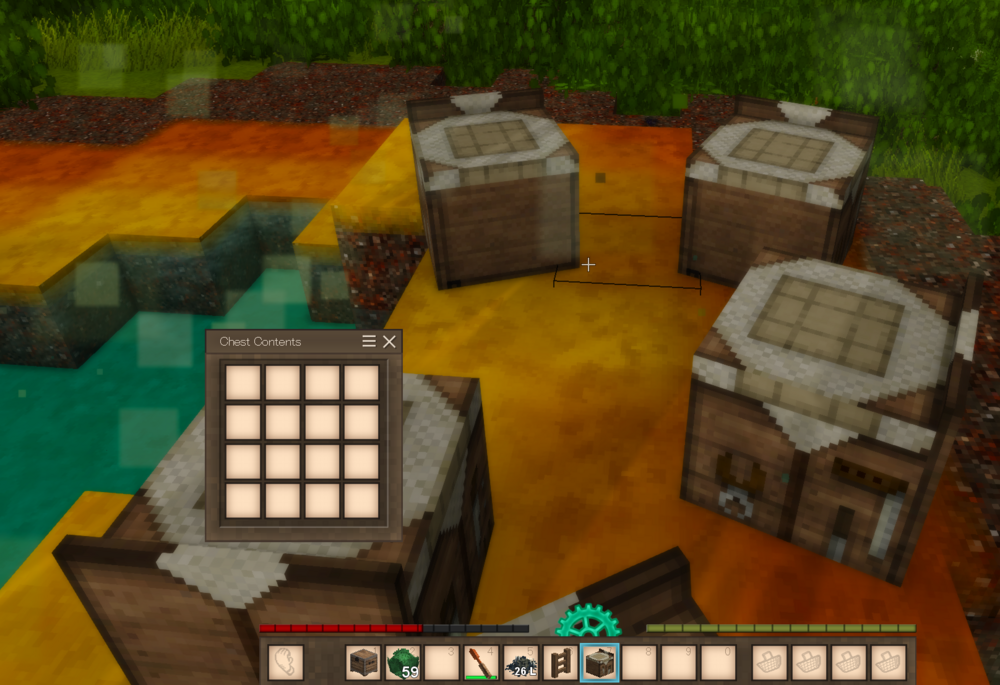
-
Add sound effect to grid crafting?
The Insanity God replied to Micah Holmes's topic in [Legacy] Mods & Mod Development
You'd need code for this. but should be fairly straight forward as the game triggers an event whenever this happens. (from `ItemSlotCraftingOutput` class)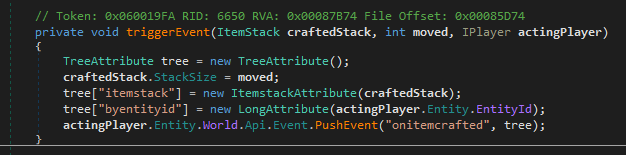
-
Mod Help - Shape issue
The Insanity God replied to Micah Holmes's topic in [Legacy] Mods & Mod Development
If you want it to be rotatable with a wrench then you need to add the "WrenchOrientable" behavior: { code: "workbench", behaviors: [ {name: "HorizontalOrientable"}, { name: "WrenchOrientable", properties: { basecode: "yourmoddomain:workbench" } } ], variantgroups: [ { code:"side", loadFromProperties: "game:abstract/horizontalorientation" } ], creativeinventory: { "general": ["workbench-north"], "decorative": ["workbench-north"] }, shapeByType: { "*-north": { base: "workbench", rotateY:0 }, "*-east": { base: "workbench", rotateY:270 }, "*-south": { base: "workbench", rotateY:180 }, "*-west": { base: "workbench", rotateY:90 } }, replaceable: 500, resistance: 1.5, lightAbsorption: 99, sidesolid: { all: false }, sideopaque: { all: false }, textures: { "top": { base: "game:block/wood/workbench/top" }, "bottom": { base: "game:block/wood/workbench/bottom" }, "fdoor": { base: "game:block/wood/workbench/bottom" }, "back": { base: "game:block/wood/workbench/back" }, "sideleft": { base: "game:block/wood/workbench/left" }, "sideright": { base: "game:block/wood/workbench/right" } }, heldTpIdleAnimation: "holdbothhandslarge", heldRightReadyAnimation: "heldblockready", heldTpUseAnimation: "twohandplaceblock", tpHandTransform: { translation: { x: -1.23, y: -0.91, z: -0.8 }, rotation: { x: -2, y: 25, z: -78 }, scale: 0.4 } } note: the content of "basecode" doesn't actually matter it just needs to be unique. (the game uses it as a key/identifier to group the blocks by) -
Patches not working in multiplayer
The Insanity God replied to Slye_Fox's topic in [Legacy] Mods & Mod Development
Huh, maybe this kinda patch just somehow doesn't work when run client side and because you added the "side" line it now enforces the patch happen during client side logic (instead of happening earlier) it stopped working It's case insensitive, in the code It's actually capitalized so if it wasn't then lowercase would likely fail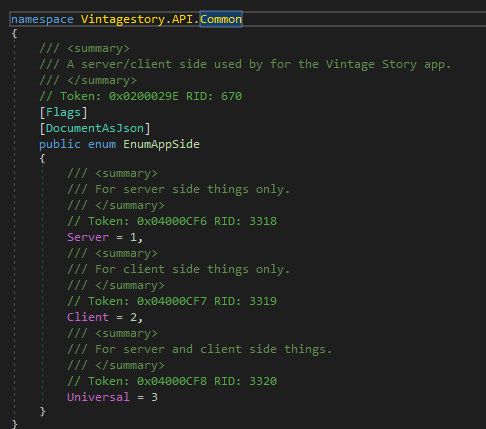
-
TreeAttribute and int[]
The Insanity God replied to Uriel Cain's topic in [Legacy] Mods & Mod Development
The game uses `IntArrayAttribute` for this, would look like this: ITreeAttribute treeAttribute = new TreeAttribute(); int[] myIntArray = [1, 2, 3, 4]; treeAttribute["myIntArray"] = new IntArrayAttribute(myIntArray); -
Mod Help - Shape issue
The Insanity God replied to Micah Holmes's topic in [Legacy] Mods & Mod Development
It's bleeding through the sides because you didn't define `sidesolid` and `sideopaque` and you can't rotate it because you didn't add any logic for rotation... this is normally done either through a BlockEntity with custom logic for it or through variants (the latter means it creates a separate block for each orientation) So you'd end up with something like this: { "code": "workbench", "class": "Block", "maxstacksize": 64, "variantgroups": [ { "code": "type", "states": [ "fired" ] }, //Add the extra orientations { "code": "side", "loadFromProperties": "game:abstract/horizontalorientation" } ], //Add behavior to handle logic for selecting the correct orientation to place "behaviors": [ { "name": "HorizontalOrientable" } ], "attributes": { "mapColorCode": "settlement" }, "shape": { "base": "workbench", //Set orientation on shape for each orientation variant "rotateYByType": { "*-north": 180, "*-east": 90, "*-south": 0, "*-west": 270 } }, //drawtype: "Cube", "blockmaterial": "Soil", "creativeinventory": { "general": [ "*-fired-north" ], "decorative": [ "*-fired-north" ] }, "replaceable": 700, "resistance": 3, "lightAbsorption": 99, // Must declare textures so they get added to the block texture atlas "textures": { "back": { "base": "game:block/wood/workbench/back" }, "sideleft": { "base": "game:block/wood/workbench/left" }, "sideright": { "base": "game:block/wood/workbench/right" }, "bottom": { "base": "game:block/wood/workbench/bottom" }, "top": { "base": "game:block/wood/workbench/top" }, "fdoor": { "base": "game:block/wood/workbench/bottom" } }, "drops": [ { "type": "block", "code": "workbench-fired-north", "quantity": { "avg": 0.85, "var": 0 } } ], "sounds": { "place": "game:block/dirt", "break": "game:block/dirt", "hit": "game:block/dirt" }, //These should be defined to prevent it from assuming the sides are solid and thereby not render the sides of blocks next to it. (aka the bleeding through) "sidesolid": { "all": false }, "sideopaque": { "all": false }, "fertility": 3, "heldTpIdleAnimation": "holdbothhandslarge", "heldRightReadyAnimation": "heldblockready", "heldTpUseAnimation": "twohandplaceblock", "tpHandTransform": { "translation": { "x": -1.23, "y": -0.91, "z": -0.8 }, "rotation": { "x": -2, "y": 25, "z": -78 }, "scale": 0.4 } } -
Patches not working in multiplayer
The Insanity God replied to Slye_Fox's topic in [Legacy] Mods & Mod Development
Essentially the same way as you'd do in the ModInfo, though if the mod is already marked as client side then this will only enforce that the patch happens during the client side code and not during the server side code when possible. [ { "file": "game:blocktypes/stone/cobble/cobbleslab.json", "op": "replace", "path": "/textures", "value": { "horizontals": { "base": "block/stone/cobblestoneslab/{rock}" }, "up": { "base": "block/stone/cobblestoneslabtop/{rock}*" }, "down": { "base": "block/stone/cobblestone/{rock}*" } }, "side": "Client" } ] -
Patches not working in multiplayer
The Insanity God replied to Slye_Fox's topic in [Legacy] Mods & Mod Development
The `Side` should be set to `Client` inside the modinfo.json (and possibly also in the patch itself) and well if the server is using fairplay guardian (mod for restricting client mods on a server) you might need to get it whitelisted -
I think you might have understood, but I'm not entirely sure so I'll give my take anyway: The error is actually unrelated to the grid recipe it's crashing because of the combustible props: In the case of your "storagevessel-ashforest-raw" this will resolve into "storagevessel-ashforest-fired", but your file for fired vessels does not have a "ashforest" variant: As a result, when you open up the handbook page and it tries to display that it can smelt into "storagevessel-ashforest-fired" it crashes because it doesn't exist.
-
Mod request (Knockback Removal)
The Insanity God replied to tripleortrippy's topic in [Legacy] Mods & Mod Development
You might want to try Rubberbandaid (https://mods.vintagestory.at/show/mod/28325) and see if that helps. Vanilla has an issue where if too many player attributes are updated at the same time it can seems like you are lagging/glitching/rubberbanding but it's actually just due to some hard coded limit which when surpassed triggers a full resync of attributes including position. If you are using mods you can hit this limit especially easily as merely taking damage alone already gets you halfway to that hard coded limit. -
You sure about that? base game doesn't list the entries separately either.... creativeinventoryStacks: [ { tabs: [ "general", "decorative" ], stacks: [ { type: "block", code: "storagevessel-{color}-fired", attributes: { type: "normal" } }, ] } ] (from base game `assets\survival\blocktypes\clay\fired\storagevessel.json` file) EDIT: Maybe you are confused with the attribute based variant system the chests use? Where they do indeed need to be listed separately because it's not an actual variant but an "attribute based variant" creativeinventoryStacksByType: { "*-east": [ { tabs: [ "general", "decorative" ], stacks: [ { type: "block", code: "chest-east", attributes: { type: "normal-generic" } }, { type: "block", code: "chest-east", attributes: { type: "golden" } }, { type: "block", code: "chest-east", attributes: { type: "owl" } }, ] }, { tabs: [ "general", "clutter" ], stacks: [ { type: "block", code: "chest-east", attributes: { type: "normal-aged" } }, { type: "block", code: "chest-east", attributes: { type: "golden-aged" } }, { type: "block", code: "chest-east", attributes: { type: "owl-aged" } }, { type: "block", code: "chest-east", attributes: { type: "collapsed1" } }, { type: "block", code: "chest-east", attributes: { type: "collapsed2" } }, { type: "block", code: "chest-east", attributes: { type: "collapsed3" } }, ] } ] }, (from base game `assets\survival\blocktypes\wood\chest.json` file)
-
`BlockGenericTypedContainer.OnPickBlock` (used by the game to find the name of your placed block) appears to be unable to find your block. public override ItemStack OnPickBlock(IWorldAccessor world, BlockPos pos) { ItemStack stack = new ItemStack(world.GetBlock(base.CodeWithVariant("side", "east")), 1); BlockEntityGenericTypedContainer be = world.BlockAccessor.GetBlockEntity(pos) as BlockEntityGenericTypedContainer; if (be != null) { stack.Attributes.SetString("type", be.type); } else { stack.Attributes.SetString("type", this.defaultType); } return stack; } To be specific it's failing on the `world.GetBlock(base.CodeWithVariant("side", "east"))` part, I can think of 2 reasons why this might fail: 1. The "side" variant might be wrong: You don't actually need "side" variant but if you do have it, ensure that "east" is a valid state for it. (`CodeWithVariant` reconstructs the code but where the "side" is normally present will be replaced with "east") 2. The Code might be wrong: This could happen if you put a `-` in the code, quite a few people who do this... but this what the game uses as the separator for variants and using it in the code (or variant states) tends to mess up variant mutation. For instance if your code looks like this: code: "storagevessel-custom" The `CodeWithVariant` will actually only use `storagevessel` (because it searched for the first `-` to remove all variants) which would result in an incorrect code being generated. Don't think I can figure out anything more without seeing the actual block file.
-
is the modding api language agnostic?
The Insanity God replied to hstone32's topic in [Legacy] Mods & Mod Development
Short answer: No it's not agnostic. Long answer: First of all there are 2 types of mods: 1. Content mods: these only contain stuff like JSON and PNG files. You can do a surprising amount of things with these (like custom entities, blocks, items, etc) but if you need real custom logic/behavior then this likely won't be enough. 2. Code mods: these actually contain a DLL file (don't ask why but the game also accepts uncompiled cs files, which it compiles itself) containing custom logic/behavior. The DLL is loaded through `Assembly.UnsafeLoadFrom` so it has to be a managed .NET assembly (meaning native C++ won't work) but you should be able to write it in C#, F#, VB.NET or even C++/CLI, though I doubt many (if any) have tried using stuff other then C#. (Technically speaking you could also create a bridge from .NET to lots of other stuff but it's not standard) -
Looking at the provided stacktrace, it's failing while appending the crushing props info to the tooltip: Tested the patch with "game:stick" instead of "kaoliniteyay:copperpowder" (because I don't have the mod this item is from) and it worked just fine, meaning it most likely failed to find your item. So would recommend double checking the code and that it is indeed an Item and not a Block.

-
Wait you had the main project inside of the mods folder? well that does explain why it was showing up twice, since pressing play normally launches the game with your bin folder as an additional mod path. Meaning it will attempt to load both your actual compiled mod and the non compiled project because it's in the mods folder (which fails because folder structure doesn't match) But yeah in the case of farmland the IL code looks a bit different: So would end up looking more like this: [HarmonyTranspiler] [HarmonyPatch(typeof(BlockEntityFarmland), "Update")] internal static IEnumerable<CodeInstruction> Transpiler(IEnumerable<CodeInstruction> instructions) { var matcher = new CodeMatcher(instructions); var temperatureField = AccessTools.Field(typeof(ClimateCondition), nameof(ClimateCondition.Temperature)); matcher.MatchStartForward( CodeMatch.LoadsLocal(), //match the loading of a local variable (ClimateCondition) new CodeMatch(OpCodes.Dup), //duplicate climate condition (cause it needs to both retrieve and store field CodeMatch.LoadsField(temperatureField), //match the retrieval of the field CodeMatch.LoadsConstant(5f), //match the static 5 new CodeMatch(OpCodes.Add), //match the addition CodeMatch.StoresField(temperatureField) // match the storing of the field ); if (matcher.IsInvalid) { throw new Exception("Farmland transpiler could not find a match, either base game code has changed or another mod has changed this logic"); } matcher.Advance(1); //Still need to load the ClimateCondition matcher.RemoveInstruction(); //But don't duplicate (we only need it once) matcher.RemoveInstruction(); //Also don't try to load the field matcher.Instruction.operand = 20f; matcher.Advance(1); matcher.RemoveInstruction(); //No addition is needed anymore return matcher.InstructionEnumeration(); }

-
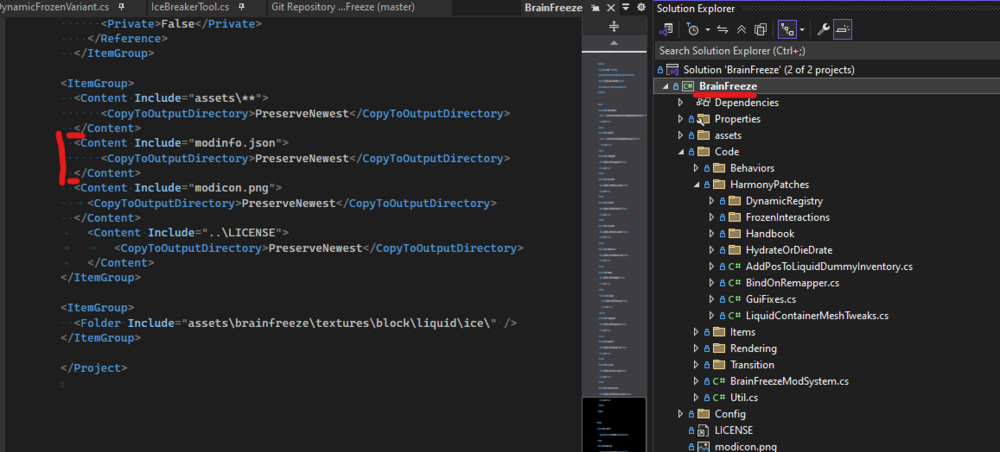
ModInfo file looks just fine, if it's not found you might want to check the `csproj` file to ensure it's actually including your ModInfo file Might want to also manually delete the content of the `bin` folder (folder is normally hidden inside visual studio) to do a fresh rebuild.
-
The `[HarmonyPatch]` attribute does not need to be on the `SteadyGreenHouses` class (it doesn't contain any patches) The class containing patches (for instance `BerryBush`) does not need to inherit `ModSystem` and might as well be a static classes (since it only contains static methods) I'd recommend using the `CodeMatcher`, makes patches a lot more readable You replaced the `Add` operation with a `Nop` this will result in invalid code as you never removed the variable that was loaded so it's still on the stack (should be putting a big error about this in your log file). Berry patch would end up looking like this using CodeMatcher and after fixing number 4: [HarmonyTranspiler] [HarmonyPatch(typeof(BlockEntityBerryBush), "CheckGrow")] internal static IEnumerable<CodeInstruction> Transpiler(IEnumerable<CodeInstruction> instructions) { var matcher = new CodeMatcher(instructions); matcher.MatchStartForward( CodeMatch.LoadsLocal(), //match the loading of a local variable CodeMatch.LoadsConstant(5f), //match the static 5 new CodeMatch(OpCodes.Add), //match the addition CodeMatch.StoresLocal() // match the storing of a local variable ); if (matcher.IsInvalid) { throw new Exception("BerryBush transpiler could not find a match, either base game code has changed or another mod has changed this logic"); } matcher.RemoveInstruction(); //We don't need the original temperature (so don't push the value onto the stack) matcher.Instruction.operand = 20f; matcher.Advance(1); matcher.RemoveInstruction(); //No addition is needed anymore return matcher.InstructionEnumeration(); }
-
I can't say much about the actual code without seeing it but when you say "compile" do you mean: Build and manually create mod zip Use CakeBuild and grab the mod zip from the "Release" folder Just pressing the play button in visual studio (All of those are viable though I wouldn't recommend the first) In regards to the mod showing up twice, this is something that commonly happens if you install the mod (by putting it in mod folder) and then run from visual studio or if you just have multiple versions of the same mod installed. Usually not an issue as it will just load the one with the latest version number. The folder structure of the code is irrelevant btw, it's compiled into a single .DLL file. Game searches for `ModSystem` classes and uses those as entry point (assuming "type": "code" in modinfo, but that should be standard with the template) in your case the mod system would look somewhat like this: public class MyModSystem : ModSystem { public override void Start(ICoreAPI api) { base.Start(api); //Prevent duplicate patching in single player (because it creates 2 instances of the ModSystem, 1 for server side and 1 for client side) if (!Harmony.HasAnyPatches(Mod.Info.ModID)) { var harmony = new Harmony(Mod.Info.ModID); harmony.PatchAllUncategorized(); //and possibly some category patches based on config } } public override void Dispose() { new Harmony(Mod.Info.ModID).UnpatchAll(Mod.Info.ModID); } }
-
@Vexxvididu You probably missed the documentation due to the way it's named https://wiki.vintagestory.at/Modding:Monkey_patching If you need examples there are some other mods out there that change greenhouse buff like: https://github.com/Kaktur/VS-Mod-GreenhouseBuff/tree/master/GreenhouseBuff/GreenhouseBuff/ModPatches (makes the buff +20 C instead of +5 C)
-
Mod request(s)
The Insanity God replied to Avintagekindapainting's topic in [Legacy] Mods & Mod Development
@Avintagekindapaintingthere actually is a mod that adds more firestarters (no ornamental lighters though) which I created a "reforge" of for newer game version: Extreme Firestarters Reforged -
The new "outdated" tag on mods.
The Insanity God replied to Wondiws98's topic in [Legacy] Mods & Mod Development
Personally I have mixed feelings about this change as well: I like how it's far more noticeable that the author has not confirmed that this mod is supposed to work on a given version... I don't like the phrasing "for outdated Vintage Story ..." as I feel this will be easily misunderstood as "this mod is only for outdated game versions" while in reality mods often survive game versions (especially when we talk about minor versions) I'd opt for something along the lines of: "Warning: Author has not confirmed this mod is supposed to work for game versions beyond ...." -
Anybody using AI to create mods?
The Insanity God replied to Zero_'s topic in [Legacy] Mods & Mod Development
I use it to for the following purposes: Generating mod image (cause I'm no artist and I don't enjoy creating these myself) When other people send me a translation of my mod I use it to backwards translate (just to make sure it's somewhat okay) When I really can't understand an exception I sometimes ask it to take a look and see if I just made some dumb mistake





