


Brady_The
-
Posts
750 -
Joined
-
Last visited
-
Days Won
7
Content Type
Profiles
Forums
Blogs
News
Store
Everything posted by Brady_The
-
Mod Help - Help with texturing
Brady_The replied to Micah Holmes's topic in [Legacy] Mods & Mod Development
You are using byType incorrectly. Have a look at this wiki tutorial to see the correct syntax. -
Their code changed. It's "raccoon-common-adult-male" now.
-
Those are called variant substitutions and can carry information from an ingredient into the output in a recipe, if used correctly. Example: { "ingredientPattern": "S,D", "width": 1, "height": 2, "ingredients": { "S": { "type": "item", "code": "game:saw-*", "isTool": true }, "D": { "type": "block", "code": "game:door-solid-*", "name": "wood" } }, "output": { "type": "block", "code": "game:door-sleek-windowed-{wood}" } } The recipe above will accept any solid door variation as ingredient "D", save the content of "*" in the variable called "wood", which in turn can be used to output the exact same value, making the creation of recipes much easier and resource-friendly because in this example you don't have to create 12 recipes for the Vanilla woods, but only one.
-
Nice! A little tip so that the super root will show up in the Creative Inventory and the handbook. Replace "creativeinventory": { "category": [ "food" ] } with "creativeinventory": { "food": [ "*" ] }
-
Hello, hello. Both soil types are blocks, not items.
-
Hey there. When working on mods it is always a good idea to keep an eye on the logs for any potential errors or warnings popping up. It's mostly "client-main" and "server-main" you want to keep an eye on. You can find them in "%AppData%\VintagestoryData\Logs". Your mod got two warnings. [Warning] Did not find required shape rootstew:shapes/item/food/rootstew.json anywhere. (defined in Shape for item rootstew:rootstew) [Warning] Texture asset 'rootstew:textures/item/food/rootstew.png' not found (defined in Item rootstew:rootstew). The first warning is fairly self-explanatory. Your mod doesn't come with a shape. That means that even if your texture would be working, the game would have no way of displaying it. The second warning tells you what is wrong with the texture. The game is expecting a .png file, while you are supplying a .jpg.
-
[Mod Request] Weapon Display Plaques
Brady_The replied to Dr B's topic in [Legacy] Mods & Mod Development
It'd help to know what those forays actually are. I know of https://mods.vintagestory.at/purposefulstorage but it might be a mod which is already on your list. -
Most likely this one:
-
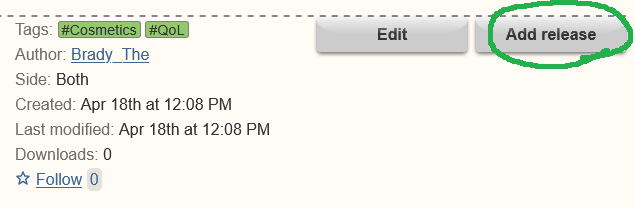
Ah, now I understand your problem. It has been a while for me. Yep, you have to save the page first. That page will be in Draft mode, so people won't have access to it. You've got all the time in the world to fill out all the details.
-
-
If I had to wager a guess I'd say that it's most likely "drtagx" causing the issues. I don't see any other mod that'd touch the moon except the shader.
-
That's part of the domestication process. The wiki has more information about it: https://wiki.vintagestory.at/Animal_husbandry#Domestication Generation 10 animals shouldn't have any fear towards you.
-
If you bought this one I am afraid that you cannot install mods.
-
I feel inclined to let you know that I appreciate the effort of hosting such contests, in case the resonance isn't as big as desired. I am just not capable enough nor do I have the imagination to come up with something that could fit the bill.
-
I may have messed up my Archive run, have I?
Brady_The replied to Broccoli Clock's topic in Questions
The Resonance Archive has a Surface entrance. -
Anyone seen these lights floating over water?
Brady_The replied to BolsheViking's topic in Questions
Those look like Primitive Survival's whisps. They are basically like Vanilla butterflies in terms of functionality (minus the fact that you can't catch them, iirc). -
People tend to generate their worlds in Single Player and upload those to their servers. https://wiki.vintagestory.at/index.php/Guide:Dedicated_Server#Customize_world
-
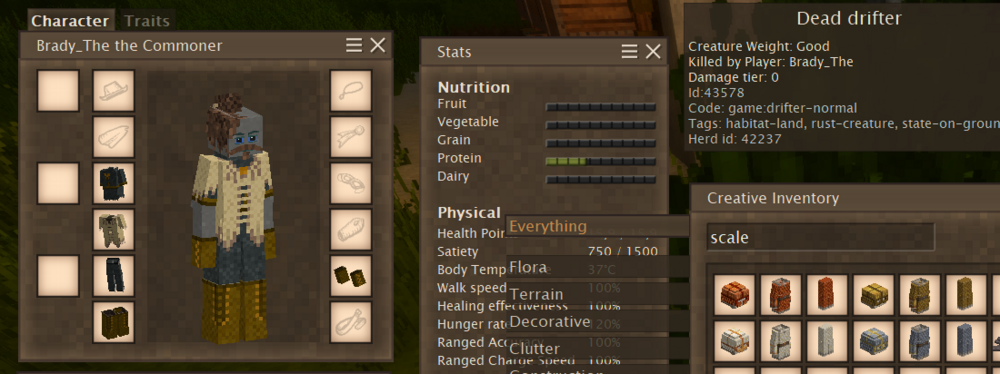
armor-head-scale-steel, armor-body-scale-steel, armor-legs-scale-steel But honestly you probably just want to go into Creative mode with "/gm 2", open the Creative Inventory and your character sheet and simply drag and drop your armour pieces onto your character. After that you can switch into Survival with "/gm 1".
-
It has been a while, so I don't remember exactly what the bots were spamming, but I think it was mostly comments and threads advertising pills, ointments and the like, and linking to scam/blog sites. I doubt the VS forum was target specifically, the bots were just sent after forums using this particular forum software.
-
Hello ijj42199, welcome to the forum. Unfortunately you cannot add mods to the official servers at this time.

-
bug Modded dedicated server help - Reconnecting bug.
Brady_The replied to Rose Williamson's topic in Questions
I found an open issue on Github discussing this problem.This comment includes a potential solution: https://github.com/anegostudios/VintageStory-Issues/issues/5385#issuecomment-2830655466 -
That's definitely something that should be adjusted. I'd recommend to create an issue on Github, though. I'd call this more of a bug or oversight than a feature that hasn't been implemented yet. https://github.com/anegostudios/VintageStory-Issues/issues
-
Check out https://mods.vintagestory.at/beamium! This might suit your fancy.
- 1 reply
-
- 2
-

-

-
Check this out: https://mods.vintagestory.at/show/mod/30734
-
Must be, because the screenshot above is from 1.21.1. I suppose that highlights how crucial it is, to include as many information about your setup as you can in your reports, because I stupidly assumed that OP was on the newest version.


