


Brady_The
-
Posts
745 -
Joined
-
Last visited
-
Days Won
7
Content Type
Profiles
Forums
Blogs
News
Store
Everything posted by Brady_The
-
Not sure what this means- mods worked fine before.
Brady_The replied to BaronOfCinders's topic in Questions
Double-check versions. With following combinations I have gotten no patch error messages. Vintage Story: 1.21.0 Ancient Tools: 1.6.0-pre.6 Floral Zones Cape Region: 1.0.23 Regarding the "Artillery Culinary" error: It's mentioned on the mod page as a known problem. I guess you have to wait for an official update for this particular fix. -
Not sure what this means- mods worked fine before.
Brady_The replied to BaronOfCinders's topic in Questions
What version of Floral Zones Cape region are you running? This mod is causing the patch error messages. I am afraid, I can't help regarding the "Artillery Culinary" error message. This could be caused by the unofficial version you are using. Edit: "LiquidInfo" is mentioned on that mod page, so it appears to be a known problem. -
Not sure what this means- mods worked fine before.
Brady_The replied to BaronOfCinders's topic in Questions
It would help to know what game version, but even more so the mod versions you are using. I am currently looking at Cape regions 1.0.23 and see nothing wrong with the patches. Patch 2 is printing a particularly interesting error, because it tells us that it's missing a part of the original "Ancient Tools" file, which does exist in version 1.6.0-pre6. These errors are generally not something you should fix, but rather report it to the mod developer. After you made sure that all mods involved are compatible.
-
It's there for me. On an upgraded and an unpacked version.
-
Can I still get raw "huge hide" from bears in the 1.21.0 update
Brady_The replied to labtop 215's topic in Questions
It doesn't look it.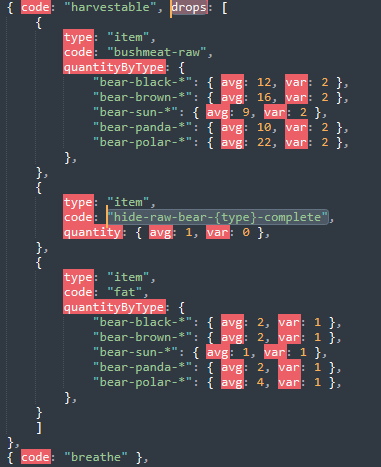
-
This might be BlockGenericTypedContainer's doing, generating definitions based on the block attributes. Replace "blackbronze2" with "normal-blackbronze2" and see if that helps.
-
I have to admit that I haven't done any animations in the VSMC yet, so I haven't stumbled across this problem yet. Your JSON looks fine. I doubt that this is caused by errors, so I don't think that anything will show up in the logs. Still it'd be my first stop. How does the full animation look in the VSMC?
- 7 replies
-
- 1
-

-
- playermodel
- animation
- (and 1 more)
-
They added a button to paste now? Interesting. It's a bit hidden and requires access to the world you want to copy from. Click on the button in the "Your Worlds" screen and then click on the Copy button in the "Playstyle" row.
-
Discord sucks, though. Especially as a forum replacement. So I try to be as active as possible here, even with my limited knowledge.
-
What do the logs tell you? If your block stopped working after the change, you might have mistyped something in the file that breaks your asset. Share it here if you like. Btw, in 1.21 clay objects changed a bit. -raw and -fired variations were for some reason moved into separate files. -burned was replaced with -fired. This is just fyi. This change to the vanilla items should not break your block.
-
The game account is separate from the forum account.
-
Unfortunately that crash report is rather vague. One can find a few of those on the Github bug tracker. What game version are you running? Are you playing with or without mods? Are you playing Single Player or Multi Player? Does "client-crash.log" has any more details?
-
There's also https://mods.vintagestory.at/improvedhandbookrecipes for the recipe side.
-
Unable to join Vintage Story's Discord Server
Brady_The replied to Axl Krape's topic in General Offtopic
I bet whoever got into your account was a naughty boy and posted crypto scam links. With the inevitable outcome. I suppose you could open a ticket: https://www.vintagestory.at/support/ -
That's it then. Those paths are absolute and don't change. I am just as surprised as you are. It's either a caching thing or the default is somewhere referenced in the game code.
-
Another idea. Check "modPaths" in "clientsettings.json" (found in VintagestoryData). This has to point towards the correct folder(s) or mods won't show up in the game.
-
Check out https://wiki.vintagestory.at/VintagestoryData_folder#MacOs. Does that information help?
-
What appears to be the problem? What are you trying to obtain via command? If it is causing too much trouble, you might find it easier going into creative mode (/gm 2) and getting the item of your choice via the creative menu before switching back into survival mode (/gm 1).
-
There are a couple. I can't tell you how good they are, though. https://mods.vintagestory.at/claimkit https://mods.vintagestory.at/starterkit https://mods.vintagestory.at/xiggystarterkit https://mods.vintagestory.at/theessentials (this one is a bit like taking a sledgehammer to crack a nut if you only want starter kits, but I'd be negligent to not mention this tool)
-
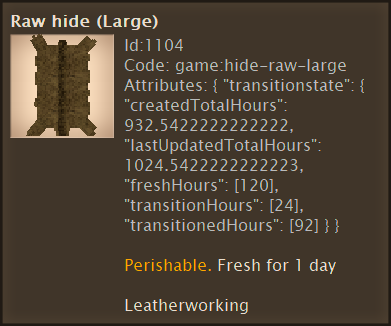
I don't think so. In the above screenshot I advanced the time by 23 hours 4 times. On the other hand I have no idea what these times are actually used for in the code.
-
Try "transitionedHours" instead. "freshHours" is the amount of time the hide will stay fresh (5 * 24 = 120). "label" is the wrong key to use. It's a variable custom to the crate. Or maybe not. I'd probably start with This is all just theoretical. I wish I could help more, but my extremely-soon-to-be-replaced-computer makes surfing an obnoxiously annoying past-time. I can pretty much forget about doing any modding. Or forget anything I wrote instead. If it works, it works.
-
I can't say for sure that this will work for hides (its function might be limited via code), but you could try "copyAttributesFrom". (In Vanilla it is mainly used for armour repair recipes.)
-
Help a Beginner? (Adding Player Model Features)
Brady_The replied to Charleston's topic in [Legacy] Mods & Mod Development
I am sorry, I can't really help you there. That error is very generic, it could be anything. Maybe the crash is caused by the missing language strings. I personally would have a look at some other mod doing something similar and see if those work. If so, compare yours to theirs and see what is different. For example, check out https://mods.vintagestory.at/show/mod/17519#tab-files version 2.2.0. -
Help a Beginner? (Adding Player Model Features)
Brady_The replied to Charleston's topic in [Legacy] Mods & Mod Development
This happens because you are trying to add your moustache to an array (square brackets) with the wrong value contents (curly braces). I've not dabbled in hair, but I did help somebody a bit a while ago. I adapted their solution to your parameters. See if [ { "file": "game:entities/humanoid/player.json", "path": "/attributes/skinnableParts/8/variants", "op": "addmerge", "value": [ { "type": "shape", "code": "mst-typical01-skinny", "shape": { "base": "expandedhairs:shapes/entity/humanoid/seraphskinparts/hair-face" } } ], "side": "server" } ] does the trick. -
Follow this guide: (The topic is about multiple installations, but the same applies in your case).


