


Professor Dragon
-
Posts
709 -
Joined
-
Last visited
-
Days Won
3
Content Type
Profiles
Forums
Blogs
News
Store
Everything posted by Professor Dragon
-
Does anyone know if rain or snow will halt the progress on a Beehive Kiln? I put in a fairly full load with 9 x 24 peat bricks, and came back to find all the peat consumed, but still raw items. I'm curious if I should have just gone for a 9 x 32 peat brick stack, or if I need to cover the hole in the Beehive Kiln "chimney". My base is in a Rainfall "Almost all the time" area. My prior runs have completed, so the kiln setup is fine in general. Same question for the Cementation Furnace (steel making), although my guess is that is immune. I can test this out, but I'm hoping that someone knows already. Thanks, Professor Dragon.
-

Treasure hunter map not generating for Resonance Archives
Professor Dragon replied to MrSkyraw's topic in Questions
Excellent stuff - thanks for the feedback and extra details. It will help someone in the future, without doubt. Professor Dragon. -
Treasure hunter map not generating for Resonance Archives
Professor Dragon replied to MrSkyraw's topic in Questions
Are you sure that the Trader accepted the pickaxe? You could try spawning in a new Trader (???). If you are able to enter commands, then this will simply give you the map: /giveitem locatormap-resonancearchive 1 Professor Dragon -
I hope you're experimenting first on a test world, and have Backup Saves. What exactly is the command you're running, and what are the results? It looks from the db prune page that you're expected to regenerate chunks with world gen commands in tandem. https://wiki.vintagestory.at/1.21.5 /db prune Command Command /db prune should now work properly Notes: Use with care, it's a powerful command, can take a few seconds or minutes to run. Essentially it can remove parts of the map already generated in earlier game versions so that they can be regenerated with fresh 1.21.5 worldgen and bugfixes, while preserving any parts of the map which have player builds, farms, roads or mines. A backup of the world first is advisable
-
Automation issue - any way to prevent lazy hoppers?
Professor Dragon replied to Jacsmac's topic in Questions
Hi @Jacsmac May I double-check the basics? 1) Confirm version is v1.21.5. 2) Go to Settings, Graphics and confirm what "View Distance" is set to. 3) How many blocks are you from the Hopper during testing? For testing, be far enough that you are not picking up the output as it is created, but only a few blocks further. Say 7 blocks. 4) Creative test world. Backup Save your main world Disable any mods Create a small size (not a million blocks, but say, 50,000) Creative test world. Recreate your setup. (OPTIONAL) Replace the windmill rotor with the blue/green component "auto rotor (Creative)'. Click this so that the Power is 100% and it will give consistent speed output without relying on wind. Replace your reed baskets with single chests Fill the chest with Quartz Chunks - note the amount exactly Change to Survival mode /gamemode survival Start the Clutch Note output amount If not close to 95 - 100% then advise us here the number and screenshot the setup. If it works here in Creative (near 100%), then retest in your Survival world under similar conditions (ie no mods, stand close) 4) If we can't solve it here, then you are in a position I feel to screenshot this, gather the logs and put through a request to the Issue Tracker. Perhaps as a comment or linked to that same post. Thanks, Professor Dragon. -
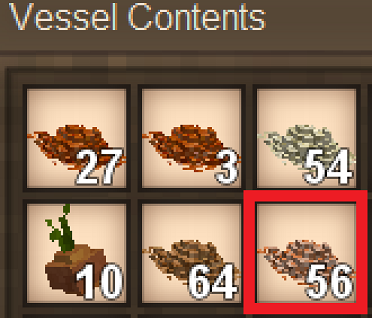
Make "Crushed/Powdered Ore" image different to "grains." A simple change could be to mirror flip the ores, so that they look a bit different to the grains at a glance. Similar to how the Crimson Maple Seed is a flipped and recoloured Maple Seed. The highlighted Flax Grain below is in fact Powdered Bauxite. And yes, I know that the colours are different. I'd like to be able to better quickly tell "This is food, this is ore" at a glance when sorting. Thanks.
-
Automation issue - any way to prevent lazy hoppers?
Professor Dragon replied to Jacsmac's topic in Questions
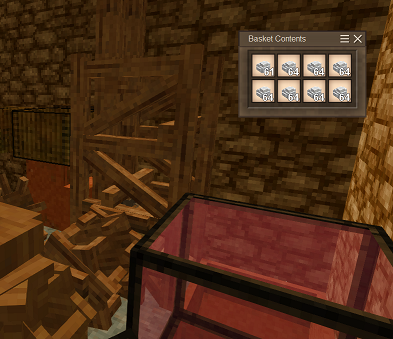
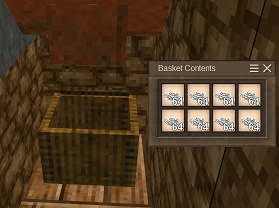
I rebuilt your setup, and got 100% throughput. I even used the same orientation. Loading up the reed chest. The first stack shows 61, because three drop straight into the system straight away. 100% efficiency. I got nothing. Did I miss a block? Mods? Current version 1.21.5? Professor Dragon. EDIT Your post on the other hand, did help me. When I was testing, I found a flaw with my own main world which I had to fix. Do NOT put a Clutch next to the hopper. (Where the pink block in this screenshot. Correct is on the other side where it is.) Doing so causes output to periodically be forced upwards. So, thanks for that - I might not have noticed. I ran through a final test, which was a trunk full of bauxite in my main world - I was on a small test world before. This time the wind conditions were a lot more variable, ranging from a Strong Breeze to a Hurricane. I was wondering if very light winds were throwing the results. Anyway, 100% throughput again. So I'm not sure where the differences might be. Professor Dragon.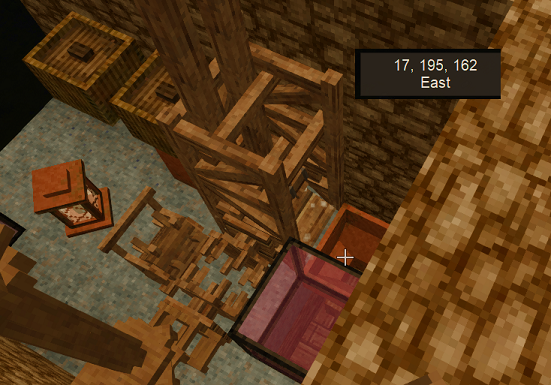
-
Automation issue - any way to prevent lazy hoppers?
Professor Dragon replied to Jacsmac's topic in Questions
5 - 10 per stack seems high (?). I'll run through a few tests tonight on my world and see what numbers I get. I've found the post you referenced on the Issue Tracker: https://github.com/anegostudios/VintageStory-Issues/issues/789 According to that, a stack of 64 should lose less than 7 items per stack on each run through, so your results are in the right area of expectations. Radfast is on the Development Team, so if they say that's how they're meant to work, then that's how they work - although we can put through something on the Suggestions board. I see there is a mod called "Better Hopper" which may help, as it lets it pull from further vertically away. I can't speak to how it would work in this scenario - haven't tried it. I'm going to assume that when you say that you're "not standing next to the output" that you mean "not standing on the block next to the output." If you mean that you've gone far enough that you are not in chunk loading distance, then that's a different story, with the answer being "Don't go that far away from automation." But it sounds like you mean the former. Professor Dragon. -
Automation issue - any way to prevent lazy hoppers?
Professor Dragon replied to Jacsmac's topic in Questions
Thank you! I meant to mention using slabs, but chiselling is even better. That was what the "inside face" was alluding to, but not as clear as you put it. -
Automation issue - any way to prevent lazy hoppers?
Professor Dragon replied to Jacsmac's topic in Questions
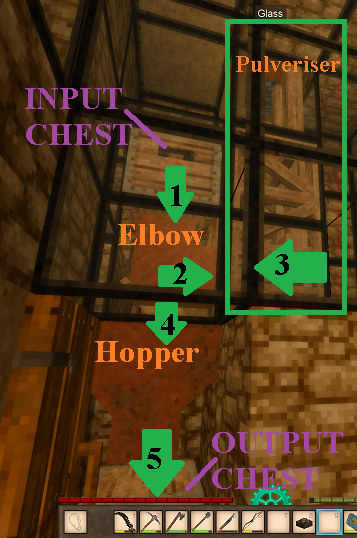
Hello @Jacsmac, Welcome to the forums - and nicely written post. I could immediately understand what the issue is. As it happens, I've just been through the same process. If you surround the top of the hopper with blocks (or at least the inside face of a block), then stuff doesn't slide off the slides, or slide and bounce up something. In your case, one block here: I used glass, so that I can see what happens. This should fix the issue for you. BONUS TIP - Did you know? You can have the output chest for the pulveriser on the same side as the input chest? You just need to face the pulveriser the other way around. This is useful for some layouts where space is tight - I was able to get a nice flow and staircase layout just now, where there wasn't room in the "standard" orientation. Transmission and clutch are on the other side. Professor Dragon.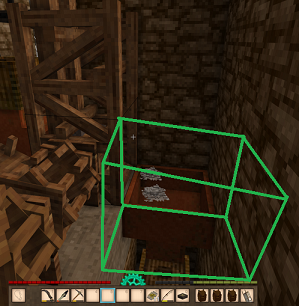
-
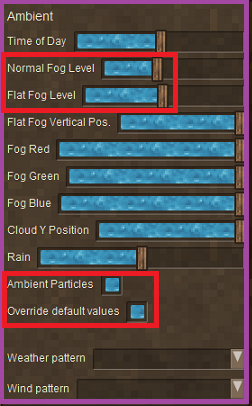
Fog is one of those "Whack-a-mole" issues in Vintage Story. Every time you think it's beaten, back it comes. The simplest, shortest solution is "Move your house." Some areas are simply more fog prone than others. Now, for the long answer. Fog has a number of factors that makes it more likely, or heavier. If you are in a particular area, or elevation, and the weather is just right, then you get fog (or cloud or haze). See: https://wiki.vintagestory.at/Weather#Clouds_&_Fog Fog is also influenced by some mods. If you have mods which impact light levels or weather, try disabling those. (It is assumed that you are on the latest stable version.) In particular any mod that has BOTH "Ambient Particles" and "Override default values" checked in the World Edit. To see these values, you would need to switch the game mode to Creative (/gamemode creative), enter "~" (tilda) to bring up World Edit and then look at the values on the right. CAUTION: I'd recommend that you take a world backup before you consider touching those values. (I got more Creative World into a bit of a weather tangle while testing fog.) If you wanted to just kill the fog, then switching the fog levels left should do that. I've been adding to a post at the Issue Tracker which you may wish to check out here: https://github.com/anegostudios/VintageStory-Issues/issues/6228#issuecomment-3396800796 This is on-going. My understanding is that fog is an "area" affect which does not take account of whether something is a "room." I could be wrong on this, but that is my guess as to how it is working. Would I like it to take account if you are in a room? Yes, yes I would. Does it currently? There are issues. Long story short, if you haven't shot yourself in the foot by doing something with a mod or a command or World Edit, then I would recommend moving to a better climate/position. The world is large. There are plenty of nice places without fog. NOTE: Fog is usually a TEMPORARY event. So maybe just wait a few days. Maybe the rest of the year is just fine? Professor Dragon.
-
"Messenger Shoes" Footwear that gives no warmth, armour or wetness protection, however, it does give you a small movement speed buff when running. Would give player agency on whether to take a warmth bonus or a movement buff. So I see people swapping these out as the seasons change. Would require higher tier ingredients such as leather . . . perhaps tie to the Iron Age(?)
-
And to make a distinction, there are rafts as well as the sailboats. Rafts are a great "early game" transport method, especially if there are big bodies of water. They take a basket as well. The big advantage is low food cost compared to running or swimming. One day, I'll have an elk. One day. Also the unspoken, but at any point you can switch to Creative mode (/gamemode creative, /gamemode survival) and fly. Otherwise, what others have said. I saw one video where a guy had a mod which basically gave him a slow flying steampunk car, which looked pretty cool. Personally, I just run. Everywhere. A lot of running. It really does just work for me. Stone paths make running even more efficient, with a big speed boost. Around my home territory, I build a raft on each body of water with a three plank boat dock and a three pillar column to mark it (and rest the oar against). I'll get around to prettying these up, eventually. It lets you chain run/raft sections together. Also, ladders - if you live in an area with sheer cliffs, then some permanent installations help a lot. Anyway, sorry, there are no horses or minecarts, bikes or cars, steam wagons, palanquins or rickshaws. I hope you brought a good pair of shoes. (Hmmm. What a good idea for a Suggestion - footwear that has no warmth, wetness or armour bonus, but gives a small running speed bonus.) Professor Dragon.
-
Main story structures location/advice (no spoilers)
Professor Dragon replied to SweetTrip's topic in Questions
I like the suggestion for an option of a mobile base respawn point, for the ship or the elk, as you suggested. This post won't be found here, so perhaps we should put this idea to the Suggestions thread? I also am playing with infinite respawns and set my spawn point. The novelty of finding yourself 5,000 blocks from your death point, when 30,000 blocks away from it, wore off very fast. It wouldn't be so bad, but even with experience, death can come suddenly and unexpectedly. FYI for other players, there is a respawn radius command which changes the default huge respawn radius to something more normal: https://wiki.vintagestory.at/World_Configuration#Player_spawn_and_death /worldconfig spawnRadius [number] Sets how far players spawn in a radius from world spawn. Eg /worldconfig spawnRadius 100 will respawn you within 100 blocks of your death Also worth checking on that page the other variables: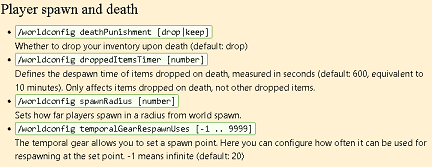
-
It has been mooted to replace some gameplay functionality. Think of Smithing, which is already crafting grid free, but instead requires you to manipulate the environment. Or there are mods which currently let you form things in your hands or on a work surface. There have been different proposals, such as different size grids, or gridless. I can't really speak to the pros or cons, or what is happening - just thought you should have a response.
-
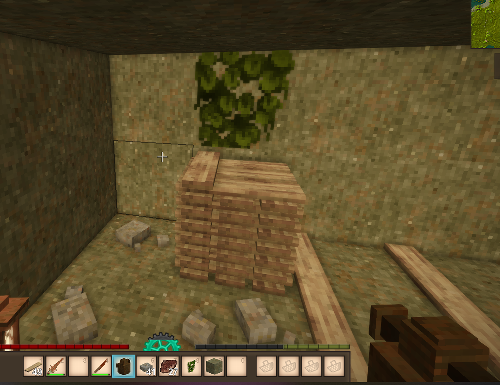
While I'm at it . . . Instead of vines being destroyed when placing items such as peat or firewood stacks below them and encroaching into their space, have them pop off (or stop the stack). It's an easy decorating mistake to make, and then you need to go out and find another vine to fix up your room - or not have vines in certain spots.
-
Main story structures location/advice (no spoilers)
Professor Dragon replied to SweetTrip's topic in Questions
I found this out the hard way. I had a cold biome start, so I travelled a looooong way south - thinking I was being very clever to get to a better climate - only to find that I need to go all the way back again for the quest. I think this behaviour could do with a Suggestion that places the Resonance Archive within a range of where you first ask the Treasure Hunter for the map and hand over the pick-axe, for example. On a multi-player world it could tie off either the first player to do so, OR fall back to generating a distance from world spawn. I think this would encourage travel - because in my view that should be encouraged, rather than anchoring players to hang around near spawn for fear of missing out and needing to come back. -
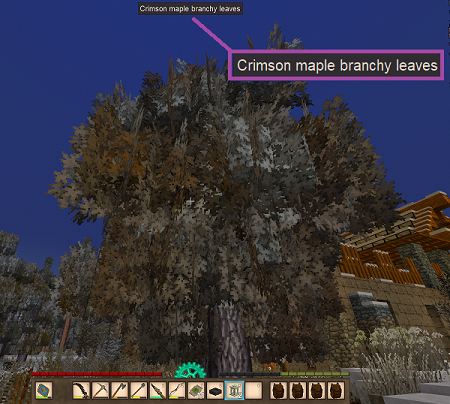
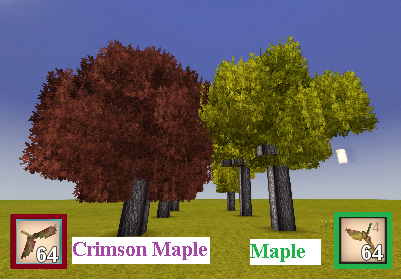
Yes, yes, yes. They certainly do! Here's a picture of one that I grew from a seed from a parent tree several thousand blocks away from my base. Yes, it's winter, so the leaves aren't red now. But it is a crimson maple, and the leaves do change to that wonderful red. I went into Creative for you and grew some seeds from scratch with accelerated time. Note that the Crimson Maple seeds face the opposite direction to the regular Maple seeds! (Nice touch, VS). Professor Dragon
-
Ah, the problems of being a long term player. Now that you mention it, I remember when they didn't. I had a shock coming back when you needed tongs for hot items. Anyway, it changed at some point and yes, now they do drop seeds at a low rate. You're welcome. I also happened to stumble by chance on this mod. Haven't tried it, but it is in the same vein and feels fair to me: Gimme One Seed Plz Professor Dragon.
-
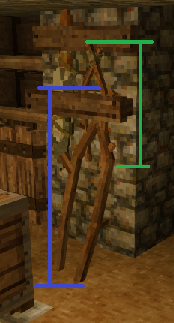
REQUEST Make the wooden tongs the same size when leaned against the wall, as on the Tool Rack. They change dimensions depending on where they are.
-
Maybe five in-game years, but definitely five real life months and I'm ready to try this trick! BTW, you only need fireclay bricks fro the beehive kiln, not refractory bricks. Save those for your steel furnaces. Although I did scrape together enough refractory bricks for both the kiln door and for the gratings, as they are more of a pain to replace if you run out.
-
Stay away from bears The surface is a fine place to be - much safer than caves. If you have decent armour, such as Gambeson, and a shield You don't wander into places without clear sight lines (of bears or wolves), such as a forest I'm too scared to go into caves, so translocators and underground riches are restricted to me currently. Professor Dragon.
-
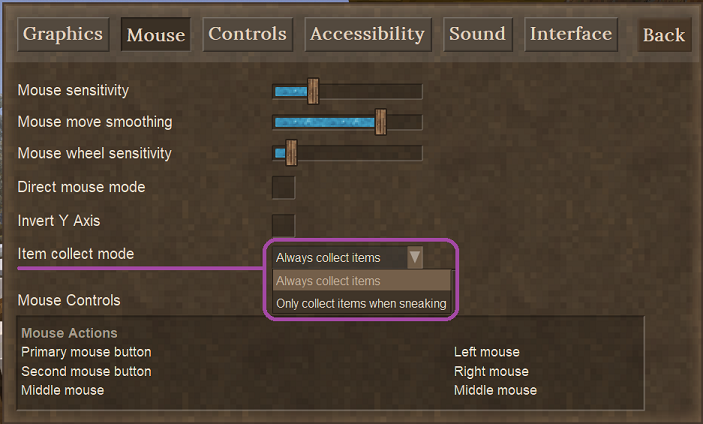
You've got it right, @Never Jhonsen. It is under Settings, Mouse Controls and is called "Item collect mode". There are also a few mods that play in this space, to allow pick up with a right click. At least these two - maybe more: Salty´s Click To Pick PrecisePickedUp Professor Dragon.
-
Yes. If you wander far enough (and it may be a few thousand or ten thousand blocks if you're unlucky), you should come across big surface Peridotite areas - in the same way that you come across big shale or bauxite areas. These areas are often sparsely covered, so you may even have a good chance of finding some Olivine fragments on the surface, which you should dig down from. I would never recommend digging down to deep ores unless you have to.
-
Oh, don't give them ideas! We'll have rats in our Storage Vessels eating our grain before Tyron can say "The players can suffer more." Then we'll have to go on an Epic Quest to get a housecat, and it all snowballs from there.



