


Professor Dragon
-
Posts
709 -
Joined
-
Last visited
-
Days Won
3
Content Type
Profiles
Forums
Blogs
News
Store
Everything posted by Professor Dragon
-
 No, no - its fine. As I've seen you bring pizza.
 -
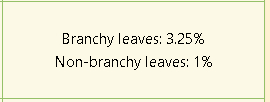
@PixelatedBeat is correct that you need to break leaf blocks on that Crimson Maple and hope it drops seeds. Adding in extra information, for those who wish it. You are obviously a player of distinction. The Crimson Maple looks fantastic - but has one of the lower seed drop rates. I have a few around my base, and it is on the list to get more. If you are out and about, my advice is to take down several to increase your chances back home later on. There is an interesting post here if you want to get into the details of what the numbers mean in practice. Please note though that the regular Maple that you see everywhere also turns a lovely red shade in autumn. It is the cut price variant, if you like. Perfect for an avenue. If you are a Malefactor Class, then your chance of getting seed/sapling drops goes up by 20%. While a Blackguard suffers a 20% penalty. This really hurts with rare seed drops. You can use shears to increase the efficiency of harvesting leaves, but it does not increase the drop rate. If you don't mind the Creative route, then switching to Creative mode, giving yourself some seeds and switching back again is an option. /gamemode creative /gamemode survival Then there is the mod path. It is a shock to many players that the seed drop rate in Vintage Story is so low, compared to say, Minecraft. There are attempts to rebalance it with mods like: Useful Shears - increases drop rate while using shears Whole Lotta Tree Seeds - Increases drop rates substantially. Mainly intended for multi-player worlds. Or you can go directly to the .json files and modify the drop rates. Anyway, that should be enough to get most people started Professor Dragon. EDIT. Meant to include this information when typing the post (Thanks @LadyWYT for the reminder). Agriculture Traders carry some seeds for sale. Some of the commons but also some of the exotics. Finally, Pine trees are your "go to" if you just want timber and seeds. They have the highest seed drop rate in the game. I gather up as many as I can, and then place them periodically along long trade routes or paths, so that I have something to follow later on, which is visible from a huge distance. Also, I like the timber for a lot of things.
-
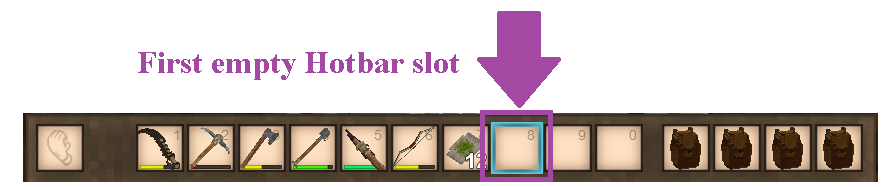
With the armour in the active hotbar slot, simply right-click on the ground - or any non-interactable space or block. How to Quickly Equip and Unequip Armour Having the first empty Hotbar slot active is key. EQUIP ARMOUR FROM ARMOUR STAND Have the first empty hotbar slot active. Right click a piece of armour from the armour stand eg Helmet This will move the armour to this active slot. Move the mouse to a non-interactable block/space and right click. This lets you equip up quickly with just six mouse right clicks and minor mouse movement. EQUIP ARMOUR FROM INVENTORY Have only the Inventory (E) open with your armour in any slots. Do NOT have a chest, trunk or other storage location open. Shift left click a piece of armour. This will move the armour to the active slot. Move the mouse to a non-interactable block/space and right click. TIP: You should be able to point straight at the armour stand, and click right click six times quickly. No mouse movement needed. EQUIP ARMOUR FROM STORAGE Have only the storage open with your armour in any slots. Do NOT have your Inventory or any other storage location open. Shift left click a piece of armour. This will move the armour to the active slot. Move the mouse to a non-interactable block/space and right click. UNEQUIP ARMOUR AND PLACE ON ARMOUR STAND Have the first empty hotbar slot active. Shift left click a piece of armour on your Character (C) screen. This will move the armour to the active slot. Move the mouse to point at the Armour Stand and Shift + right click. UNEQUIP ARMOUR PLACE IN INVENTORY This one does not have a great sequence. Quickly FILL your Hotbar eg Drag some blocks/torches to fill the empty slots. Have only the Inventory (E) open with your armour in any slots. Do NOT have a chest, trunk or other storage location open. Shift left click a piece of armour. This will move the armour to the Inventory. OR if the Hotbar has Empty slots that you don't wish to fill, click and drag from Character to Inventory. UNEQUIP ARMOUR AND PLACE IN STORAGE Have only the one target storage container open. Open your Character (C) sheet. Shift left click a piece of armour. This will move the armour to the Inventory. It does not matter if the Hotbar has empty slots or not. Professor Dragon.
-
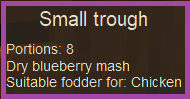
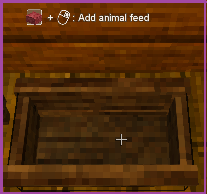
@LadyWYT and @Facethief are right, @ArmouredDingo. It looks like this is in base game v1.21.5 (and probably earlier). Use a Small Trough and put in some Fruit Mash (any type). I've just done this (no mods that I have that should be impacting this), and the chickens yummed it up. Use the Tooltips to see. There is an option where you hover over a block and it cycles through all the things you can do with it. Or just put some food in a trough and hover over it, and it will tell you what can eat it. Professor Dragon.
-
Thanks @StCatharines for checking! Had a brain snap and the obvious place to check is the Issue Tracker, and I'm guessing it is down to this entry: Rice grain is no longer ignored as food for various animals#7281 It looks like the problem was ONLY WITH RICE, but Flax got caught up in the cross-fire in the notes, simply because of how the underlying mechanic works. There has never been an issue with Flax under normal conditions, and Flax continues to be fine. It is just Rice which needed to be fixed. Description Despite multiple entity files defining "rice" under the "skipFoodTags" object array, rice can still be consumed by any animal that accepts grain. This applies to rice grain that is placed in basket traps, troughs, or dropped on the ground. . . . This is most likely occurring because the food tags are only being defined on line 19, which is a wildcard definition for the remainder of grain types after flax and rice. Since neither flax nor rice have individual food tags set, their values are probably null/undefined, which may be the reason why the rice exceptions are not working properly. Professor Dragon.
-
That wasn't me! But I understand the sentiment. Pros: Early game useful Source of your first copper when can't find any (Prospecting failures <grumble, grumble etc>) Get Lore Books without tangling with monsters Something to do at night/off periods/temporal storms Relaxing, always available, something to do when you can't decide what to do Kills an hour or so before bed/kilns cooking/whatever Cons: Repetitive Time consuming I'm in the Steel Age, and I still go back to it. Now, getting back to the original post, if the question had been "What is your favourite activity in the game?" Then I would without hesitation answer "Building."
-
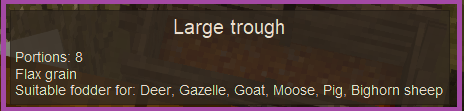
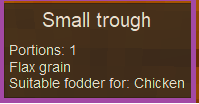
I've just tested Flax grain on 1.21.5 (never had animal mods but have some standard mods). Chickens, Pigs and Bighorn Sheep eat Flax grain just fine from both the ground and a trough. My Bighorn Sheep took their sweet time to have a nibble. I have Large Troughs just sitting there stuffed with grain. I didn't think they were THAT far from my base - it's just a short run. Eventually though, they took a nibble from both grain thrown on the ground, and I broke and replaced a trough and they ate from that. (Don't know if that was necessary. The Tooltips appear to be correct, if you hover over a Small or Large Trough, Professor Dragon.
-
Excellent point there @Maelstrom I can't believe that double negative flew by me. I only just came across this post - I'll come back to it at some point. I pretty much use every mechanic on that list. It's basically my checklist for "What haven't I done yet?" (Not fond of monsters or combat at all.) But yes, Aqua Vitae would have to be the poster child for "least used", so long as Honey Sulfur poultices exist in the game, which do the same thing and don't expire.
-
I would do, I would do . . . but Flynn the Artisan Trader has too many tempting coloured crockery options!
-
Yes, but no. I can't remember a single time when I've had (a) hungry chickens (b) spare fruit mash and (c) the enthusiasm to take the mash to the animals. Besides, it kinds of fits a theme of keeping some specific food types for specific animals. I've got a whole pen of pigs just outside, and they've never tasted fruit mash once, even though I've got an overworked fruit press in my cellar. Why? Because it's simply not convenient or needed to feed it to them. Not when there is an abundance of vegetables and grains from any decent sized farm. So in short, while this could be done. However, I don't see the problem that it is addressing. I hate to be the one to say it, but this looks like a prime candidate for a mod. This information is probably held in a single line in a .json about what a chicken can eat, and you can modify that directly. There are mods out there that do similar already - I haven't searched to see if there is specifically one for chickens and mash. eg: https://mods.vintagestory.at/diversediets (EDIT: You could try contacting this mod author and seeing if they will add your request. See details below.) Professor Dragon. EDIT The file you want to change what chickens eat is: \assets\survival\blocktypes\wood\trough-small.json Add your own section for mash, similar to the existing sections: { code: "rye", content: { type: "item", code: "grain-rye" }, quantityPerFillLevel: 1, maxFillLevels: 8, shapesPerFillLevel: ["block/wood/trough/small/grainfill1", "block/wood/trough/small/grainfill1", "block/wood/trough/small/grainfill2", "block/wood/trough/small/grainfill2", "block/wood/trough/small/grainfill3", "block/wood/trough/small/grainfill3", "block/wood/trough/small/grainfill4", "block/wood/trough/small/grainfill4"], foodFor: ["chicken-*"], textureCode: "contents-rye" }, You'll probably want to go to the files for large trough and copy over some of the details for "mash" so that you get the textures right, and then add chickens to the list: \trough-large.json { code: "fruitmash", content: { type: "item", code: "pressedmash-*" }, quantityPerFillLevel: 2, maxFillLevels: 8, shapesPerFillLevel: ["block/wood/trough/large/grainfill1", "block/wood/trough/large/grainfill1", "block/wood/trough/large/grainfill2", "block/wood/trough/large/grainfill2", "block/wood/trough/large/grainfill3", "block/wood/trough/large/grainfill3", "block/wood/trough/large/grainfill4", "block/wood/trough/large/grainfill4"], foodFor: ["pig-*", "sheep-*"], foodForDesc: "trough-acceptable-pigs-sheep", textureCode: "contents-fruitmash", } Professor Dragon. Edit to edit Okay, so not a "single line" - but as close to a small mod as an enthusiastic Vintage Story player could hope for. Going for top score would also include updates to the Handbook to include what chickens can eat, and a refresh to the warning message that they can't eat mash. Neither of which is required. You can do a search string for words like "chicken", "trough" and "mash" against the .json files to start with. Not sure what else is required. I haven't done mods yet - just pointing the people with enthusiasm in the right direction Good luck!
-
Same! I've been waiting on this one. On a different note, lanterns are now dim in my cellar. Looking into it - disabling mods, disabling ambient in CreateWorld. EDIT: Taking this to Issue Tracker. Not sure if an issue or if the lighting has just been better tuned.
-
Maybe they are using a mod that lets you easily create slabs from blocks? That seems easier than chiselling for standard variants of a block. eg: Slabs & Stairs Incidentally, unrelated but related, I've just found this mod and I think my life is changed - I do a lot of paths: Splittable stone paths Finally, if you're working with a lot of wattle and daub, you may also want to consider a mod which makes switching between the variants easier (I haven't used this one, but it looks good) eg: Craftable wattle and daub Professor Dragon.
-
I do exactly what you describe in your full post. Established trade routes to "close" traders (can visit three in a day for example on foot) on some partially completed stone paths. (Extending them is on "The List." Ahem) I keep the baskets stocked with their "common" buys (feathers, twine, clay, reeds, honey, leather etc). Then I do take notes when I do the loop of special orders and try to pair traders up. For example, the Clothing Trader works well with the Survival Goods, Agriculture and Treasure Hunter and Luxury Trader for special orders to each other. The ones that happened to be near me are 3 x Survival Goods and 2 x Commodity Traders, Luxury Trader. Plus Agriculture, Clothing x 2, Artisan and a Treasure Hunter a full day out. Oh, also Building Materials, but I can't afford those guys prices yet. The Artisan guy gets a lot of my gears for pots and tapestries. One thing that I would add is bread making. As I have large crops, I've put four ovens and a quern in a base near each Survival Goods Trader, and just bake on demand when I'm out there and have the time. Grain lasts a long time, and the cooking doesn't take that long - and what else are you going to do with your nights? I guess I'm about at the point of the metal crafting, having finally reached the point in the game where I might have metal to spare. It's been so hard to get in the past though, that I can't quite bring myself to do it yet. Especially when there are dark and undecorated parts of my base left. . . Anyway, long story short - Trading: I use it a lot. Professor Dragon.
-
I have turned off lightning damage long ago, as my whole nicely curated landscape was being pock-marked with craters from unstable ground near my base, and forest fires. And after a massive amount of play on this world, I have just turned off fire spread, because even though I think I understand the issues, at this point I don't want to risk my massive wooden house to something as silly as an accidental fire. Maybe when I go wandering on a long expedition, I'll turn both back on. See: https://wiki.vintagestory.at/List_of_server_commands/serverconfig /serverconfig allowfirespread [bool] Enable/Disable spread of fire https://wiki.vintagestory.at/World_Configuration /worldconfig lightningFires [true|false] If true, lightning can cause wildfires in dry conditions (default: false). This one I still have on. Still, it is a surprise when lightning hits you in your cellar because you don't have a lightning rod: /worldconfigcreate bool lightningDamage [true|false] Whether or not the lightning does damage on strikes. Professor Dragon.
-
You're right.
-
Change grass (eaten) to grass (cropped)
Professor Dragon replied to Facethief's topic in Suggestions
Forget rust monsters. You're bringing the real existential horror to this game. -
The game should automatically mark your last death location on the map. It is controlled by this setting, and you want to make sure it is set to "true": /worldconfigcreate bool allowDeathwaypointing [true|false] Whether or not the game will display a death waypoint on the map when you die. https://wiki.vintagestory.at/World_Configuration Various mods also use this. I use: https://mods.vintagestory.at/automapmarkers And: https://mods.vintagestory.at/moremapicons There are probably a few more that do death markers in more detail. Professor Dragon.
-
How to get tapestries for creative mode building ?
Professor Dragon replied to Kolyenka's topic in Questions
Nice! -
"Possibly to my own detriment, I can show you the roadmap . . . " Well, he totally called that one correctly.
-
Change grass (eaten) to grass (cropped)
Professor Dragon replied to Facethief's topic in Suggestions
Yes, I am totally on board with this request. It is one of those little grammar things which irks every time you see it. If necessary, keep the extra state "eaten" which only applies if eaten by an animal, while "clipped" or "mown" could be used if the player changes the state. Or, as Facethief says, "cropped" for both states.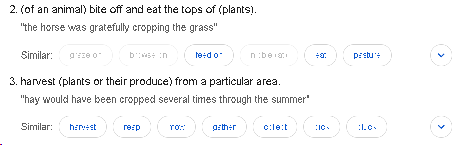
-
I like the part where the chickens go "Poiiiinnng!" through the corner! This mod is great for calming crazy chickens, until you get them to Gen 10. https://mods.vintagestory.at/chickensit It won't solve the corner problem, but it means it will trigger much less. Plus, calm chickens. I always double fence livestock: Aesthetically, looks nice and is a common thing on farms. Small pen. Bigger boundary fence (or ditch!) Stops predators swiping through fences Handles escapees Nice testing - so great to see this done. Both at all, and with a nice little video which clearly shows the problem. As you've got it reproducible, you may want to place it to the Issue Tracker, along with your log files (which should hold your mod list). https://github.com/anegostudios/VintageStory-Issues How did you get the fancy red border? Professor Dragon.
-
Eeep. Thanks @Echo Weaver Good point.
-
Hello @Jeramie Welcome. Do you mean that if you place a block of sand or gravel against against a wall more than a block from the ground, that it does not fall? Or that only soil does not fall? (I am going to assume that you are on the latest stable release. If not, stop here and install that.) First, confirm what value "blockGravity" has by entering this in game: /worldconfig blockGravity It should report back either "sandgravelsoil" or "sandgravel". If your problem is only that soil is not falling and it says the latter, then that is the issue. After changing this value, make sure that Vintage Story is restarted for it to take effect. Not on your client, but the server. Next, disable ALL mods. Some mods are known to have block interactions. Restart Vintage Story and test again. If it works now, then you need to isolate the mod. Next, is to put on a mod that specifically works with the falling block files and implement that, and see if that works. For example, Partial Landslides mod. This may be a better solution in any case. Next, does this happen on a newly created test world, with that setting applied and no mods? Final step is to go through this post and attack the falling block files directly. I'm providing this more for complete information, than because I think you'll need it. It is a kind of last resort: Actually, logging a report at the Issue Tracker along with your log files is the true last resort: https://github.com/anegostudios/VintageStory-Issues/issues Cover off the above groundwork before going through there though, because I had a scan through and there are no reported similar issues on falling blocks lately. Let us know the results or any questions on any point above. Professor Dragon.
-
Hello @Dom9789, Welcome! My initial thought is that you just didn't notice the Temporal Stability going down when you went into the area. You are seeing the main blue/green gear in the center bottom of the screen spinning left, correct? Next thoughts are: * Do you have mods? If so, disable them ALL and try exiting and re-entering the zone. * What version (exactly) are you on? There may be an issue - but I can't find a similar one in the Issue Tracker after a quick look. You seem to be aware that the way that Temporal Stability SHOULD work is: * Regions in general have a default Temporal Stability level. Once set, this never changes. * Temporal Storms are temporary events, and once gone the level should return to the default. * Rift spawning (calm to apocalyptic) is a different thing to the big gear spinning. This changes frequently. There are similar problems that you are not reporting, which were meant to be addressed in recent releases, such as a Temporal Storm persisting for months. I mention it because it is possible that there is an issue. You'd need to rule out mods first and then post your logs to the Issue Tracker (above) to get help if reporting a potential issue. In any case, besides troubleshooting as above, the most practical thing to do is to resettle in a different region. Professor Dragon.
-
Nicely done.





