


Professor Dragon
-
Posts
709 -
Joined
-
Last visited
-
Days Won
3
Content Type
Profiles
Forums
Blogs
News
Store
Everything posted by Professor Dragon
-
Play how you The progression is actually a strong point of this game. Moving up to Copper, Bronze and better tools gives you things to do at each point. Then you'll look at the Dairy meter and think about Dairy, or dying clothes, or building a better roof for your house, or getting windows . . . which means, glass, masses of straw, cloth etc etc. Each thing leads to new things. I'm ten years into this current world and still trying new things. Give yourself a goal such as "I want a red roof" and you'll unlock a lot of play just doing that. And yes, you will be doing a lot of the same things, such as making crocks or storage vessels, over again. But usually with a point eg "I want to travel a few thousand blocks over to a new type of forest and will need a small base over there." I agree that the world is a bit empty. Some people like it that way (Ask a Trader). But for other people, you know what? Fine - install a mod. That's okay. Play how you want to play. There's not a single person here who would argue against that. I believe that better villages/traders are on the roadmap as well, but that could be a while. I think that multi-player is a different beast. I haven't done much of it myself, but if I did I would want to be on a small server where there is a group of people bent on a similar purpose, such as "Build a village. I'll be resource provider, you be a base builder, you two go and check the tunnels." Progression is so hard in this game that you don't really want to have a "Preserve the trees!" person living next to a "Burn the world!" type. Professor Dragon.
-
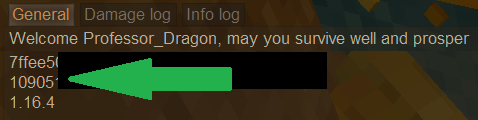
Yes, a Multiplayer world will show what you saw, while a Single-player world will have an Edit button which shows the Seed. You will also get a button on the same page which lets you make a new world with the same seed - you could also ask your server manager if they can create a world for you. If you can run commands, this should do it: https://wiki.vintagestory.at/List_of_server_commands/info/en /info seed Here is my information for ident, seed and createdversion. And @idiomcritter is correct that you're not going to get an identical world created, like Minecraft. Professor Dragon.
-
If you're playing with the default days in the month of nine days, then I agree, it does feel like the seasons whip by a little fast. So I'd recommend if you were thinking of extending it, to consider two things: Play through a few in-game years first Extend the number of days in a month, but not to 30. Try 12 or 15. This will give you a better idea of what is required to survive winter, grow crops, raise animals etc. You are still a new player, and you're currently luxuriating in the "good times" weather. But the converse of longer months is that the winters do seem to go on, and they do slow down a lot of things such as travel, building and exploration. And I'm with you on preferring the "build and prosper" side of the game, over "combat." Professor Dragon.
-
Ooooh - YES! Except, with a minor qualification. Not "all" off or on. But "All that I currently have on" off or on. I usually have a bunch of mods, such as visible glass, that I leave off most of the time, but sometimes turn on. So I only want to temporally disable all mods for testing, and then re-enable those same ones. Not turn on ones that are in my list, but weren't currently active. And I'm going to be greedy and ask for more. Tie your mod list to each world, rather than have one global mod list. I'd like one world to be vanilla, my creative world to have a different list, test world another etc Maybe even: Mod "groups". Create a mod group name and add mods to that group. Name a collection of mods "Professor Dragon's test world mods" and another "My favourite experimental mods" or "Mostly vanilla" etc. But yeah, I'll take whatever can be had in this area. Professor Dragon.
-
First up - I applaud the concept. Big picture thinking - love it. You've obviously put some thought into how it would work and integrating it into the lore. I have some concerns though. The first is that this is a very specialised, very late game tech. that most players will never see nor need. This I think is the main issue that kills it in the current form. It feels similar to the problem with Terra Preta, which is "By the time you have it, you don't need it." The second is that I don't believe that Jonas parts are as reliable to get as would be needed. In my current world, which is currently 11 years old, I have never seen one. Admittedly, I have an anathema to monsters and caving, but I have trouble imagining that people have enough spare Jonas parts for the usual Rift Wards and other nice to have items you would get first. Next is producing Temporal Instability seems counter-intuitive. That is a high price to pay for warmth and light. If anything, I would have such an expensive mechanism produce a region of Temporal Stability, like a Rift Ward. My view is that this idea would actually be better presented in a Lore Book that you find - as a cautionary tale of some mad scheme in the past as a failed last ditch attempt. It is a nice piece of world building. Either that, or as a mod, because it has such a specialised use case. Then at least Creative world players could implement it for otherwise unlivable spots. They might still be better served by breaking up the effects into smaller mods though, such as a mod for boosting Greenhouses, a mod for warmth, a mod for stability and so on. Professor Dragon.
- 5 replies
-
- 1
-

-
- jonas tech
- late game
- (and 1 more)
-
Weird. Nice troubleshooting with isolating it to multiple pit kilns, by the way. Do you have control over the mods, and can you disable them to confirm it is a mod issue? I'm assuming that you've logged out and back in again. But how about running away a distance and coming back? (Or trying a new pit kiln some distance away). Does running in a diagonal pattern change anything? (It shouldn't.) Does separating the pits by "a distance" help? Is it on the current version? Penny to a pound it is a mod issue, so that is the place to start. If you don't have control over the mods (and the mod co-ordinator for your server can't help), are you able to get logs and put them to the Vintage Story Issue Tracker? https://github.com/anegostudios/VintageStory-Issues/issues Professor Dragon.
-
 Hello @hudson1 Welcome. The question is a "bit vague" - starting with what is a "mid laptop" and what you mean by "look better." Have you hit any specific problems? Are you running with mods? Anyway, my advice would be just to try adjusting some the graphics settings. You shouldn't need any mods for performance - out of the box is fine, then go to Settings, Graphics. My laptop is "quite old" but runs it well, although not at the highest settings. Start here: https://wiki.vintagestory.at/Framerate_and_Performance Also try checking around the Forums for similar posts, as someone may have a similar setup. Eg, first thread I came across with a Search: Or here: Professor Dragon.
- 1 reply
-
- 1
-

-
https://wiki.vintagestory.at/Temporal_rift#Configuration Temporal rifts can be configured either during world generation, or afterwards using the World Configuration command /worldconfig temporalRifts [off|invisible|visible]. By default, they are set to visible. off: Disables temporal rifts. Drifters may still spawn in low-light conditions on the surface. invisible: Keeps temporal rifts, but disables their stability-drain effect on the player, and all visual and sound effects. This allows surface drifters to spawn but stops temporal rifts from showing up. visible: Shows temporal rifts and allows drifters to spawn near them. There are several mods to disable Drifters completely, but from their descriptions I don't think they've been updated to the current version, although there might be one out there. Example: https://mods.vintagestory.at/nodrifters Professor Dragon
-
I tell you what, some of the small changes in this update are causing me repeated moments of happiness. So much so that I thought I'd come back here and comment against this update, even though there are newer ones out there. Every time that I can use five buckets to work with dough or a barrel, or place three sticks on the ground in a pile is a delight. (Yes, simple pleasures.) Feature: Added dedicated piles for beeswax, cattails, papyrus, cloth, bones, sticks and flax fibers Tweak: Buckets now stack to 5 Feature: Ground storage tweaks Added several more piles, including: flax twine, leather, fat, windmill sails, pulp, thatch, and rods Thank you.
-
Huh. That sounds very similar to my situation where I trapped a boar, but predators ate all the sows. I kept a pit trap with a filled trough near the boar for years, and never had another pig spawn in that region. I'd given up on pigs near my base, when one day I found a whole new family which must have spawned in, trapped inadvertently in my clay mine. I fenced them off quick smart. Then wolves fell in the other side of the clay mine. Then on the next update, a family of deer fell in . . . All of the long distance travel and trapping attempts in an effort to get pigs near my base, and in the end doing nothing was the winning option. At this point, I'm just waiting for a family of goats to drop from the sky, to complete the set.
-
There are Vintage Story PvP servers? That's a thing?!? As if the base game wasn't tough enough.
-
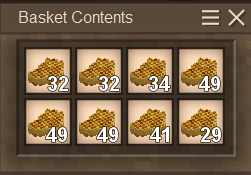
Okay, that is off-topic, but it's a great idea! And a reverse switch to unstack items. For balance, you might want to make it a game rule that you couldn't USE any item from a stack which exceeded size - you'd still need to unpack the stack, like you do with a layer of sticks and sticks currently. Counterpoint - mods that let you exceed stack size, such as carrying four filled crock pots, are pretty common. And the second balance check would be that you couldn't exceed current trunk or crate space sizes. You could make an argument that you should be able to "condense stack" many items like sticks in fact. It would be like putting Christmas decorations away. Sure, you get a lot more in a box, but you can't immediately use them. (Wait . . . did I just reinvent crates?) Come to think of it, the Fruit Press recently had a glitch for honey which is almost basically that idea. You could fill it up with multiple input stacks of honeycomb and exceed the default output stack of beeswax. (I wasn't committed enough to the ideals of purity of gameplay to unbreak my one little reed basket into two. I consider it fair compensation for being attacked by an invisible wolf.) ___ Back to Echo Weaver's original post. I'd be inclined in the first instance just to go with one of the above cheese mods. They already exist, don't change game play too much and address the basic concern somewhat. Then I'd recommend checking in on the "Frequently Suggested" thread and chipping in there. Concern about dairy recipes and return for effort is a theme that keeps coming up. Right at the top, there is a strikeout through "Cheese" - I'm not sure what that's about, but you can search the thread and report back. Professor Dragon.
-
I can't really speak to coding mods - I'm more "search web until I find something". However, there are mods out there that make cheese more worthwhile, such as boosting satiety from them. https://mods.vintagestory.at/cheesemoredelicious https://mods.vintagestory.at/moredairysatiety Although I haven't tried either of those, they look pretty light weight, just touching the "Is cheese worth it?" side of things by boosting the food content value. No need to reinvent the wheel for that effect.
-
@Vratislav describes the current state of play correctly. Please see the Dev. comment here for what should happen: https://github.com/anegostudios/VintageStory-Issues/issues/7057 "Lake ice is melting fine in a test I just ran in 1.21.1 vanilla. A player needs to stay in the area for a day or two, for it to melt fully (that's issue #2319) but that is the current game design - it's intentional that ice takes a lot longer to melt than snow and some ice can remain in April/May for example. In future there will be a new system but right now this is intended behavior in 1.21" Note that there are a lot of duplicate issues regarding ice melting. So first of all make sure that (a) you're on the current version and (b) that the ice is behaving as above. That is, staying in the area for a while ticks over the melting process. If it does NOT behave this way, I'd recommend putting it through to the Issue Tracker with your logs. In the meantime, you could always try a mod: https://mods.vintagestory.at/waterweathersimulationredux "Forces lakes to fully freeze/melt based on temperature, since the base game does not do a good job at it sometimes." Professor Dragon.
-
See my next entry about the .json.
-
Tyron is secretly a geology teacher who is tricking people into learning about minerals through building a complex video game, requiring a huge staff and development as a cover. There is no other point.
-
You're welcome. Link to Issue Tracker here: https://github.com/anegostudios/VintageStory-Issues/issues
-
I dunno. I'd still be putting some two high fences around that bear hole if I were the original poster. Then a safety fence to keep ME away a few blocks from that. https://wiki.vintagestory.at/Bear Brown bears, black bears and pandas can easily escape a pit 3 blocks deep. Polar bears and sun bears can only jump up 2 blocks. Polar bears are the only variant that cannot use ladders. All bears can easily hit players/creatures over a fence 1 block high, but they can't jump over fences on level ground. Note: if the player puts a block such as a lantern on top of a fence, that creates a weak point where a bear could climb over. Bears have a 0.01 chance to leap at their target. People used to keep bears in a five deep hole because of the jumping . . . is that still a thing?
-
I suggest adding your comments to the Issue Tracker against this one: https://github.com/anegostudios/VintageStory-Issues/issues/4641 And I agree, same thing happens to me. Fog on the surface kills lighting in even "small" rooms underground.
-
I had another thought. There might be some cheese making mods that tackle this already? I couldn't find one on a quick search, but that doesn't mean there isn't one. Anyway, there ARE lots of existing mods on cheese, so maybe have a look at some of those and see what files they touch? Also, I found this post and this might be the .json: @Thorfin "The file you are looking for is "curdledmilk.json," located at ".\assets\survival\recipes\barrel\cheesemaking". EDIT Probably this bit. { code: "curdledmilkportion", sealHours: 72, ingredients: [ { type: "item", code: "milkportion", litres: 25 }, { type: "item", code: "pickledvegetable-*", name: "pickledvegetable", quantity: 1, allowedVariants: ["carrot", "onion", "parsnip", "pumpkin", "turnip", "cabbage", "bellpepper" ] } ], output: { type: "item", code: "curdledmilkportion", litres: 25 } Professor Dragon.
-
Thank you for testing! Believe me, someone will have need of this information later. I guess that is where the "Piercing" stat comes in.
-
Nicely done! Just one FYI, as this one bit me, but there is only a 50 MB limit on ALL attachments on this forum. So at some point you may wish to compress those images to a smaller size. You can keep track of it here: https://www.vintagestory.at/attachments There is also a "Guides" section on this forum, and that last update would fit well in there. https://www.vintagestory.at/forums/forum/32-guides/ Professor Dragon.
-
If you go to the Github and and the vssurvivalmod, there is a "Search" bar at the top right. https://github.com/anegostudios/vssurvivalmod/ I entered "cheese" there and came up with this: https://github.com/anegostudios/vssurvivalmod/blob/099f168f61b1bcab1ea98170e621081f04767840/Block/BlockLinen.cs#L37 if (curLitres < 25) { (api as ICoreClientAPI)?.TriggerIngameError(this, "notenough", Lang.Get("Need at least 25 litres to create a roll of cheese")); handHandling = EnumHandHandling.PreventDefault; return; } I don't know what to DO with that information, but I hope it helps (?). Professor Dragon.
-
NICE! Thank you.
-
Just replying because I see no-one else has. At best guess, start by ruling out mods. Disable all of them. (Or make a new test world without mods - should probably have one of those anyway.) I can't think of why this would be happening without a mod. Something like this one - although not this one, as it says it is client side only: Item Pickup Notifier Simple UI overlay that displays items and their amount whenever a player picks them up. https://mods.vintagestory.at/show/mod/23330 Professor Dragon.
