


Professor Dragon
-
Posts
709 -
Joined
-
Last visited
-
Days Won
3
Content Type
Profiles
Forums
Blogs
News
Store
Everything posted by Professor Dragon
-
 Silly questions time: 1. Have all mods been removed? For an example of a type of mod issue, if you have Primative Survival there could be an interaction. https://github.com/anegostudios/VintageStory-Issues/issues/4792 2. Have you restarted the server? 3. Have you experimented with changing the standard Graphics Settings to basic levels? If yes to all of the above and the problem remains, I suggest you put it through to the above Issue Tracker along with a log set. Professor Dragon.
 -
That's expected. https://wiki.vintagestory.at/Room Faces of chiseled blocks only need to be "almost solid", meaning that no more than 32 voxels are missing from that face in total, to count as solid. The block will be considered solid if at least 50% of the total volume of the block filled in with voxels and the inward or outward face is considered solid. As of 1.20.11, using a wrench to rotate a chiseled block does not update its insulation, but using a chisel does.[1] To get around this, you either need to meet the chiselling conditions above, OR install a mod which changes partial blocks to meeting solid block room requirements, such as: This is just an example - there may be better mods for your purpose out there: https://mods.vintagestory.at/cbr There is another approach to consider, which is to ignore it altogether and say "Hang it." I made myself a fancy "greenhouse", but it was a greenhouse in the generic sense, rather than in the Vintage Story "Room" definition sense. I accepted the trade-off between having a massive decorated space, and meeting the room requirement. But this was an aesthetic choice - I already had functional greenhouses elsewhere for crops. Professor Dragon. EDIT If you want some inspiration of what is possible either late game or in creative, check out this thin walled greenhouse. You do need to be on top of using chiselling tools, and probably a chiselling mod also. "A lot of people ask me a question about the last video about a greenhouse, whether it is a functional greenhouse. The answer is yes. If you do everything right, the greenhouse should receive a bonus of +5 degrees Celsius. The chiseled roof and walls are within limits. Fruit trees do not take away the bonus. I posted the screenshots in a separate post." Or by the same person: End edit.
-
No problem. We've kind of reached the extent of my knowledge on this topic, honestly. There are probably people around here who are genuinely experienced with WorldEdit, but they haven't popped in yet. Anyway, if you or OP reach a bottleneck, post it back here with details (the commands/things done and the results) and we'll see what can be done.
-
I wonder if having an option to "display layer" would be good? Then you could toggle what you want to see. Games typically handle this with a little "eye" symbol checkbox next to each item on the loadout screen. I've got these very fancy shirts and whatnot, but I rarely see them because I'm often in a cold region. I'll take armour off when in base, but the fur coat tends to stay on.
-
I think we posted at the same time! Didn't see your response until I put in mine - sorry. Can you run through the exact input and output you get? I tried the same as you did (I think) and got a similar result . . . but the only thing unusual was that the start and end position it gave me in chat was nowhere close to the red and green start block displayed on screen in front of me. BTW, why not use the GUI?
-
How did you go with this? There's a post in this Reddit thread on doing (1). ". . . the gist is that all you need to do is to create a brush with an area that encompasses blocks you want to replace (ie: the size of the entire build), set it to "replace selected block" and then right click on the type of block that you want to replace while holding the block that you want."
-
This is a more complex question than would first appear, which is probably why there haven't been many responses. I think for most purposes, just treat the arrow damage as "damage." It is "piercing" damage type, but that doesn't appear to matter a lot. These are the values you can get from: https://wiki.vintagestory.at/Arrow#Arrow_Tier See here for how the armour calculation formula works, and why this isn't simple: https://wiki.vintagestory.at/Armor#Technical Interestingly, people have worked out pretty well what happens when different Drifter types hit you in different armours on that page, so maybe one of those results in the table will be close enough? If you really want an answer to your original question, then barring someone with more knowledge chiming in here, you may want to consider reviewing the code here: https://github.com/anegostudios/vssurvivalmod OR maybe more simply, see if you can get someone to log into your world and shoot you. I am NOT a code person, but here are some "points of interest" that may be in the right direction(???). Damage types - arrows use "PiercingAttack": https://github.com/anegostudios/vsapi/blob/8b7ff79eb95bc6dfab47191751df988a2c332cfb/Common/Combat/EnumDamageType.cs The arrow gets its PiercingAttack damage type here: https://github.com/anegostudios/vssurvivalmod/blob/099f168f61b1bcab1ea98170e621081f04767840/Item/ItemArrow.cs if (dmg >= 0) { dsc.AppendLine(Lang.Get("arrow-piercingdamage-add", "+" + dmg)); The main "Projectile" page: https://github.com/anegostudios/vsapi/blob/master/Common/Entity/IProjectile.cs#L27 It does mention a "Projectile damage tier" - but what or how this works, I don't know. /// <summary> /// Projectile damage tier when hitting an entity. /// </summary> int DamageTier { get; set; } If you figure it out, please post it here. Professor Dragon.
-
They take "some time" to appear. Has been this way for a while. I find that if I wander off "a little distance" then they pop into existence.
-
Did I mess up the timer on my skeps for the winter?
Professor Dragon replied to MeggyMegs's topic in Questions
No, just just hit a temporary reset when it dipped below zero. https://wiki.vintagestory.at/Beekeeping#Temperature Add LOTS of flowers around the skep, and then wait for the spawn time to hit again. https://wiki.vintagestory.at/Beekeeping#Propagating_Bee_Populations Depending on the climate where you are, the greenhouse buff may or may not be enough to carry you through winter. Lots to look forward to though when Spring comes! Professor Dragon. -
I'd agree with all of that. And Magnetite was the final straw for me.
- 143 replies
-
- 1
-

-
- prospecting
- prospecting pick
- (and 2 more)
-
Just putting it out there, the Hunters' clothing set gets the most class warmth bonuses by far. If the Hood gets buffed (which is fair), then maybe that point of warmth needs to be balanced out of the rest of the outfit. The other classes don't even GET a hat or hood. Rain Protection for the Hood is much more of a strong point though.
-
Huh. MAD RESPECT to be playing both without a map nor Node Search. I might consider a Prospecting mod which gives a hot/cold in three dimensions, if one exists. I think I'd recommend that for the majority of the playerbase to be honest. Or to build into the game some type of improvement along those lines, such as being able to sample a small square and have it give you a Node like correct answer, but for the full vertical column. Or a true hot/cold reading. Something along those lines. The majority of the potential playerbase simply does not have the time available to sink into this activity. As this is such a core activity, I think in this case there should be a better answer than "mods" (even though it is a good answer). As an example of where I'm at, I'm 'searching with a Node (6) ProPick search now for Chromite. My best Densitry reading in a bauxite/andesite surface area reading is "Decent" (1.71) in the highest hotspot. My choices are: * Sink a shaft, even though the reading isn't a High or Ultra High. This will burn through a game day (maybe) and the resources of ladders and torches (which I typically leave). * Write off four in-game days of preparation, travel and Density Prospecting, to this spot, to go prospecting again. I've been burned many times unfortunately by sinking the shaft and coming up empty handed.
- 143 replies
-
- 1
-
-
- prospecting
- prospecting pick
- (and 2 more)
-
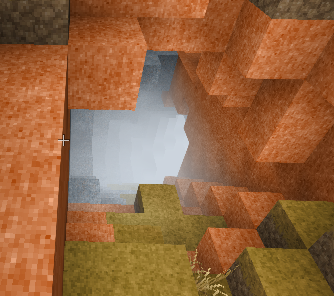
I've just come across a cave with bright fog in it also.
-
I like the clothing visual wear mechanic. I just don't want to be a "dirty beggar" though in a tattered shirt. I'd like a good copy of my Malefactor shirt, however that happens to come - I'd be prepared to buy a new shirt in a Malefactor cut (or whatever) from a trader. Or sure, we can do needle, thread and soap.
-
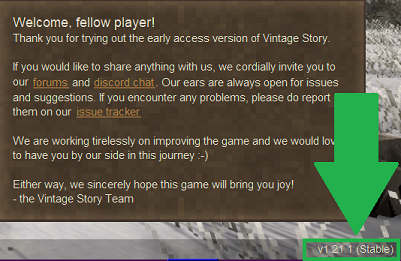
If you're NOT on the current stable version, then you'll get an "update" message at the top left of the front main screen. The version is displayed at the bottom right of the main screen. Bear in mind that there are probably still fog issues in game. I'd still try waiting a few days and see if it changes.
-
Steel Acquired (Iscariot's survival stuff)
Professor Dragon replied to Iscariot's topic in Discussion
I'm fickle and switch around. "Whichever wood you have a lot of" is the right answer. Pine - my default. Grows fast, throws off a lot of seeds (which I plant along trade routes as future humungous way markers), my current primary building wood, "kind of easy" to harvest with grass block scaffolding, relatively quick to get wood with the growing and harvesting. Birch - secondary Much easier to harvest being closer to ground level. Plant it closer and take large groups of leaves out at once. My secondary building material. Reasonable seeds. Pretty to look at. Oak and maple - tertiary. Just because I had them around. Oak was primarily for tannin, but I now have forests beyond my needs. Either is a good "avenue" tree for trade routes. Protect against snow and rain as you walk, nice colours. Good to build with. Oak throws off a lot of wood, but is slower. Exotics Never firewood - go to my storage chests for building as I don't have farms of them yet eg walnut, kapok. Get yourself a forest or avenue and wood becomes less of a limiting resource. Also, forests are not rare. I'm very much a "save the planet" type of player, but honestly, you could take down that spare forest over the hills back there, and no-one would notice Professor Dragon. -
Well if you - or anyone, - are willing, please write a technically correct guide on how to prospect. It would be very well received. Just a suggestion to the community. EDIT: This is the best currently available: https://wiki.vintagestory.at/Guide:Prospecting In addition, if prospecting could be better, then let's also look at discussing these root causes. Thanks. Professor Dragon.
- 143 replies
-
- 2
-
-
- prospecting
- prospecting pick
- (and 2 more)
-
Which version are you on? The last stable version has this fix: Tweak: Color grading fine tuning. Should fix cases of extremely bright fog But the fog should be a "some of the time thing" and not an "all of the time thing" as it is weather dependent. Give it a few days of sunshine and check back?
-
Steel Acquired (Iscariot's survival stuff)
Professor Dragon replied to Iscariot's topic in Discussion
Well done. Standard advice is "Two picks and a shovel" - which lets you get MORE steel, and also dig up ruins and do more effective base building. 16 steel is nice and all, but you are a looooooong way off steel armour. And yes, greenhouses are lovely. Get one in the early game and you are set up all game for food. -
My suggestion would be to give Armour Stands an "F" mode, which places the armour stand in the centre of the block, but differs between: Locked in place in X-Y co-ords. (But can still fall along the Z line if you take out the block below.) Can be bumped by player Most times you place an armour stand, you want it staying in one place and centred on the block, and not being bumped by every player interaction. But someone might want to nudge one into the perfect spot.
-
I'd say it happens way more often than it should, actually. Even though me as an individual player is not a representative sample size, everything that @Rexvladimir said rings true for me. In particular, the key point that the prospecting system could be improved. I know that I'm the type of person who can stick things through for lot longer periods than "average" people. My guess is that characteristic pretty much defines the character type of Vintage Story players. But even I feel that the "reward" cycle of prospecting is too long, too haphazard. Basically we've got survivorship bias going on with the current player base, where the only ones still playing the game are the ones who can handle the current game mechanics. There are probably a lot of people who either left the game or who looked at it and never engaged with it in the first place. That itself is wrong - this is a great game that deserves a bigger player base. It needs to take a good hard look at itself though and work through the key issues. This is all fine. That exactly is why this game is still in beta. Just look at the skill set for prospecting and how a typical experience goes: Gear up to metal tools Use a command to enable Node search on ProPick if it is not done Understand a grid search pattern - only explained really well in one obscure post by @Streetwind three years ago in a Reddit post with 143 likes (EDIT 158). (Link at end.) Understand Density Search Revise a few YouTube videos, because you ain't got a hope otherwise Understand vertical mining with use of the ProPick in Node search and hope beyond hope that your reading clips the edge of a field. (Spoiler alert - it "often" doesn't. You can go to the Mantle and miss the edge of an ore field by a single block) Gather a heap more resources for torches, ladders, new picks, food, baskets/bags than you ever thought possible. While doing the rest of seasonal base management, temporal stability at depth management, monster interactions, base building etc. Go back to revising Density search because you didn't really understand it. Begin to study geology, rock formation layers, ore distribution tables on the Wiki. (I have head cannon that Tyron is secretly a former geology teacher, who is trying to trick the world into studying geology mechanics by burying it cunningly inside a video game and never directly referencing this.) Engage in panning, farming and trading in order to be able to get enough bronze picks to mine, because you're not getting enough copper to make the leap. And all of this because you wanted enough metal for a chisel that doesn't break after a few minutes, to add a bit of base detail. My personal pet peeve is that you can have a target spread with a hot spot for an ore in the middle, fading out to the edges, and the ore field is NOT in the centre of the hotspot, but instead starts at a "Very Poor" reading on the side (Which side? No-one knows!) This is just not intuitive. I get the point of it. I understand the "chance to find, not a guarantee to find." But it just feels wrong. Professor Dragon
- 143 replies
-
- 6
-
-

-

-
- prospecting
- prospecting pick
- (and 2 more)
-
I understand the frustration. Every Vintage Story player is going to encounter SOMETHING like this. Some weird bottleneck or trick of spawn. It is not insurmountable though. Suggestions: Switch to the old colour world map, not the now default sepia map, and look at it for white squares next to water (not during winter due to ice!). This is a chalk beach. Find a Commodities or Survival Goods Trader and buy some lime to tide you over. Traders are a key part of the game. https://wiki.vintagestory.at/Trading#Commodities https://wiki.vintagestory.at/Trading#Survival_Goods (Possibly also a Building Materials Trader for "Chalk rock (Polished)" and break it up. Not recommended.) Travel more. You'll eventually stumble over a chalk beach or cliff, distinguishable by their bright white. As a side note - things are slower in this game. 3,000 blocks seems far, but isn't. A year seems a long time, but isn't. See this thread on hunting for it: Switch to Creative Mode, and fly around a bit for spotting. Then back to Survival. Install the Mod Block Overlay and look for it. You'll probably find it closer than you thought. https://mods.vintagestory.at/xray As others have mentioned, forget aiming to find Marble if you just want to get into leather working. It is one of the harder resources to find. Go look for chalk. Switch to Creative Mode and gift yourself enough chalk to get through the initial bottleneck, while you (a) continue your search next year or (b) play other parts of the game Professor Dragon.

-
It's been reported at the issue tracker: https://github.com/anegostudios/VintageStory-Issues/issues/6698
-
new mechanics More Canadians animals!
Professor Dragon replied to Ezequiel Mortaloni's topic in Suggestions
As a side note, there is no indication that we are in a world where "Canada" ever existed. But as there are wolves and bears and other current Earth-like animals, I don't see that as a barrier.- 10 replies
-
- 2
-

-

-
- animals
- more realistic
- (and 1 more)
-
Okay. I see that I got confused when you said "So since the hats got rain protection and warmth, I was bent about my hunter hood not getting it. " that you were specifically concerned about the "rain protection" missing from the Hunter's Hood, not the warmth. I agree with you - the "Hunter Hood: should get rain protection. I think it is okay otherwise that different headgear has different "rain protection" and "warmth" values. After all, a fancy indoor hat might offer no rain protection while being warm. Here is my list of which hat or hood has what on v1.21.1 stable from the Creative menu. As I said before, it really is a mixed bag. I didn't check which ones are available in a Survival game. And the Nadiyans sure liked their hats. Clothing Item Rain Protection Warmth (C) Hunter hood None 0.0 Squire hood None 1.0 Nadiyan alchemist hood None 0.3 Nadiyan barber hood None 0.3 Nadiyan beekeeper hood 70% 0.0 Nadiyan blacksmith hood 70% 0.0 Nadiyan musician hood None 1.0 Barber surgeon mask with hood None 1.0 Rotwalker hood None 1.0 Scribe hood None 1.0 Roll hat 50% 0.0 Minstrel hat 50% 1.0 Messenger hat 50% 0.0 Merchant hat 50% 1.0 Lackey hat 50% 1.0 Jailors hat 50% 1.0 Gem encrusted fur hat 50% 1.0 Nadiyan alchemist hat 70% 1.0 Nadiyan barber hat None 1.0 Nadiyan fisher hat 85% 1.0 Nadiyan hunter hat 85% 1.0 Nadiyan inkeeper hat None 1.0 Nadiyan miner hat 70% 1.0 Nadiyan musican hat None 1.0 Tan Nadiayan peasant hat 50% 1.0 Blue Nadiayan peasant hat 50% 1.0 Tan Nadiayan peasant hat 50% 1.0 Beige Nadiayan peasant hat 50% 1.0 Red Nadiayan peasant hat 50% 1.0 Brown Nadiayan peasant hat 50% 1.0 White Nadiayan peasant hat 50% 1.0 Nadiayan shepherd hat 70% 1.0 Nadiayan tailor hat None 1.0 Brown Nadiayan fur-lined hat 85% 1.5 Blue Nadiayan fur-lined hat 85% 1.5 Straw hat 85% 1.0 Top hat 70% 1.0 Bamboo cone hat 85% 1.0 Alchemist hat None 0.0 Bamboo cone hat (large) 90% 1.0 Most helmets None 0.0 Bear hide helmets None 1.0 As I said, it is pretty mixed, and you can definitely make some arguments about what should have what. The poor old Messengers for example, out in all weathers at the end of the world you imagine, had worse hats than Lackeys who probably served indoors. Same with the Merchants. Out in all weathers, and can't match a Straw Hat? The Straw hat wins hands down as the easiest to obtain hat with the best stats. The Bamboo cone hat (large) offers the best weather protection in the game. (Not much good in wind though I wouldn't think! Should there be a wind mechanic hat penalty to reduce the warmth from hats? Fine in calm wind, nothing in a hurricane?) Your best warmth AND rain protection options bar none are the Nadiyan fur-lined hats, but as the game help says that they are available from a "Tailor", I'm not sure if you can actually get them in-game (?). There is no recipe and there is no such Trader as a "Tailor" I don't think - there is a "Clothing" trader. There is some question in my head whether items such as the "Hooded cape" or any body party that is a cape or cloak with a hood should give rain protection. It makes sense to me. Currently, they don't. Bear hide helmets are your go-to choice for very cold regions due to being the only helmet with a warmth bonus. You'd think that some of the helmets would also offer a little rain protection - but I'm having trouble picturing in general how you combine helmets and hats, and yet it happens. Lots of Seraphs walking around double-head gearing it. I'm curious why there aren't apostrophes in same of the names - such as "Jailors' hat" instead of "Jailors hat." But then again, I'm curious as to why some of the hats are plural in the first place compared to others. See "Lackey hat" versus "Jailors hat." There is definitely more than one Lackey - the Handbook tells us so. Anyway, top of my head, that's hats wrapped up. Definitely scope for debate and tweaking. Professor Dragon.
