BigBadBeef
-
Posts
147 -
Joined
-
Last visited
-
Days Won
7
Content Type
Profiles
Forums
Blogs
News
Store
Everything posted by BigBadBeef
-
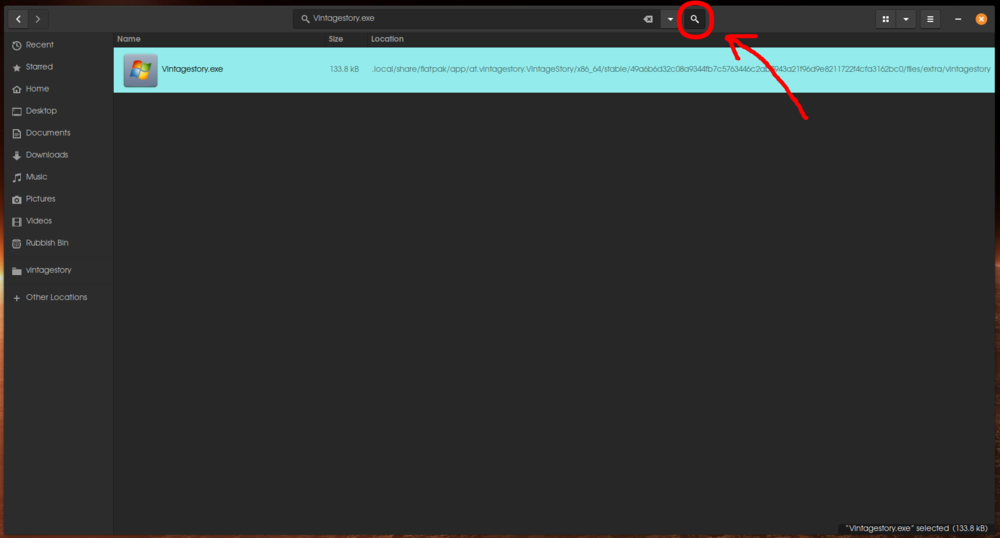
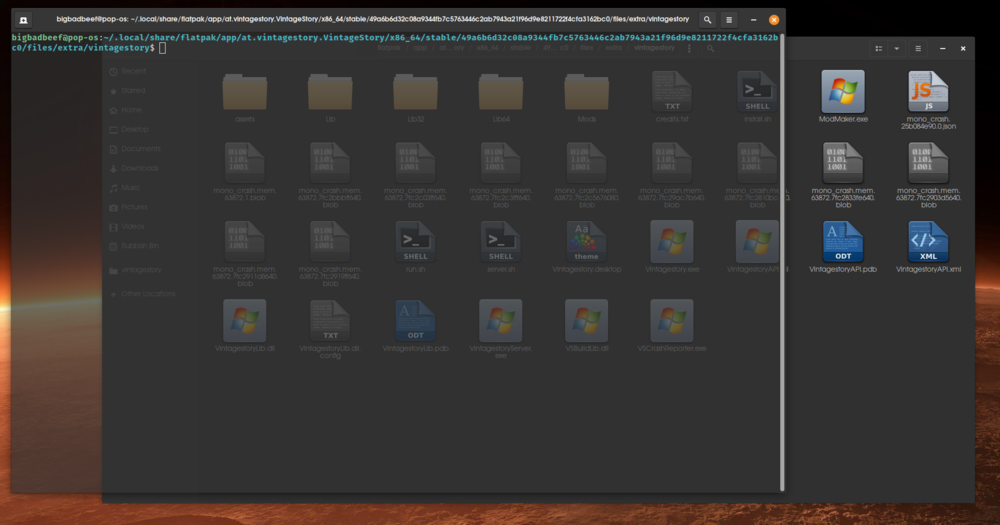
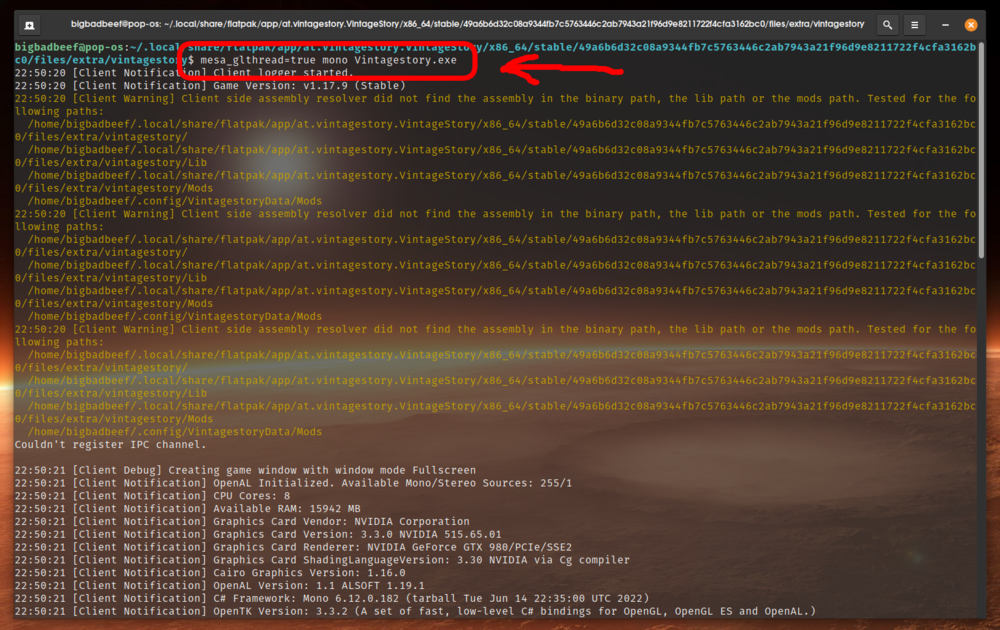
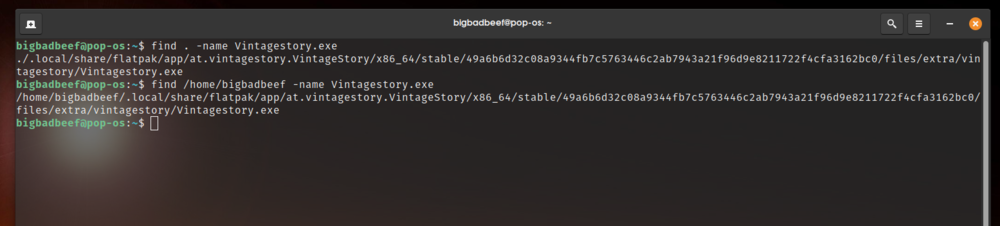
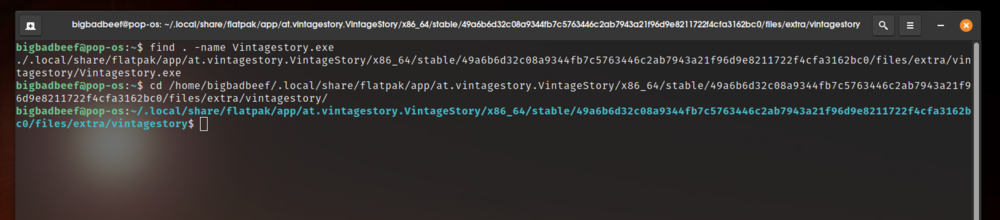
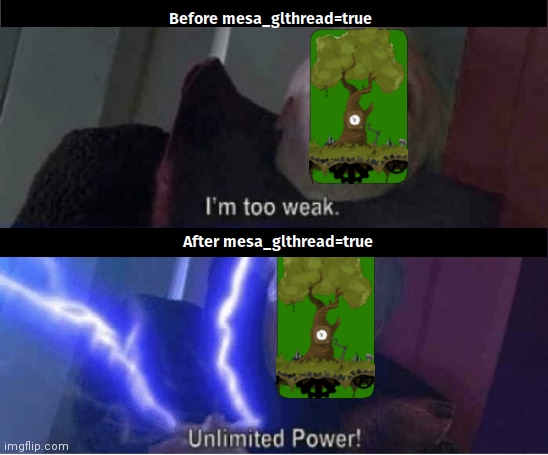
 Hello everyone, I know that there is a considerable population of Linux users among you. In collaboration with this forum's staff and and querying of many Linux enthusiasts across the spectrum on the world's largest Linux forum, I bring to you this detailed Linux guide for enabling mesa_glthread in Vintage Story. What is mesa_glthread? In layman's terms, mesa_glthread is a custom argument under which you can run Vintage Story that will fully enable your computer's multi threading capabilities to be exploited by the game. It will make the game run faster, more stable, and let your computer be more quiet. Should I enable it? Why? Absolutely! We are talking about 5-15% increase of performance in general, with up to 15% reduced frame drops in more demanding areas, 50% (FIFTY PERCENT) reduction in stutters and jerkiness (though in my own personal case its even more), reduced load on your computer and I have been led to believe it even reduces the impact that you, as Linux player makes on the server you are connected to, though I cannot confirm or deny that. Why am I doing this? If you direct your attention to the current (soon to be old) Linux guide (https://wiki.vintagestory.at/index.php/Framerate_and_Performance#For_Linux_users ) , you will notice that it is very weigh and it asks simply to put one command into the terminal. The problem is that it does not work for many people, I'm even being told that it isn't working for almost anyone at all, the terminal will return to you a message something in the lines of what you can see here: The error message The reason I'm doing this is because I like the game and want to support the developers through the knowledge I possess. They are doing a tremendous job with very limited resources so in accordance with the holiday spirit, I would make my knowledge available to all who have need of it. Is it hard? Not at all. It is simply contingent on the fact that you follow the instructions posted below. It is a set of instructions tailored to a beginner, helpful to a wide variety of Distros, and if you managed to acquire all the prerequisites and got the game to run, you should have no trouble getting this to run as well. I will post a guide to this in 2 parts. One is the visual method, and another is the terminal method. Both are a reliable way to get what you want. While the former will have some variation that will require you to "find your way" a bit, the latter in universal and should be able to work regardless of what version of Linux you have. Before we begin, a few disclaimers: Your experience may vary. The performance figures posted above are AVERAGES. If you meet the game's minimum requirements, your improvement may be minimal. Its not a miracle solution, but it has been known to help many people a lot. Meant for beginners, but not absolute beginners. This guide is contingent on the fact that you have sufficient knowledge to have installed all Vintage Story's prerequisites for Linux and have actually gotten it to play successfully. If you don't know how to that, you may need to take a step back. There are many guides available online on how to get Vintage Story's prerequisites installed, and those will really help you get a feel to just how Linux works. Visual method may require some critical thinking. Linux, at its core, is the same for all distributions, however from distro to distro (that is the version of Linux you're using) it will look different. When asked to do a specific thing, you may need to look for an equivalent that may or may not be on the same place or not quite look the same. It will be helpful to you if you were to exercise some resourcefulness in regards to being asked what to do. On certain rare occasion, there may be issues. Running Vintage Story under mesa_glthread may see your Linux Distro running it as a different user. What this is means is that you may be asked to log in to your account again (hope you haven't forgotten your password), your settings have been reset to default and you may no longer see your savegames. Do not panic. If this happens, you can simply run Vintage Story in the way you did previously, open your save folder, copy it, and then paste it when running Vintage Story under mesa_glthread. Other bugs may also appear, some different bugs that are unique to your computer may actually vanish! There are also some of for whom the game may not run at all. These reports are being investigated and we will if a solution can be implemented. THE VISUAL METHOD STEP 1: SEARCH FOR VINTAGE STORY ON YOUR HARD DRIVE You will need to find where exactly has your Linux put the folder to where Vintage Story is located. The issue lies here that there are multiple methods of installing Vintage Story on Linux, and each one puts it in a slightly different location. Simply open your file browser and search for "Vintagestory.exe". In my case it is a simple magnifying glass, and in most beginner Linux Distributions, it will be a similar experience. Some of you may have it identical, some of you might have the magnifying glass somewhere else. Some of you may have it similar to windows. Feel free to exercise some independence when looking for the file. Note that uppercase and lowercase letters should be matched precisely when searching. Once your search is completed, and it is done correctly, the search should a single file as seen on the image above, along with the path to where it is. If you are unable to locate the search function, then I recommend you go for the Terminal method, which is posted below. STEP 2: GO TO THE FOLDER WHERE THE FILE IS LOCATED Right-click on the file in question. Open the item location. In your case it may say something else, something similar. Once again what the actual option given may vary a bit from person to person, but if you have done it correctly, this is what you should see: Vintagestory.exe has to be among the files. In my case its the fourth from the right in the third row. If you do not have the option of going directly to the path of the file you've searched for, then open another file browser and manually go to the path listed listed in the search results and you will find your way there. At this step, it would be helpful for you to mark this folder. Add it to your favorites, pin it to the file explorer, make it however you can so you can easily find it the next time, because these steps have to be repeated each time you want to play the game. There is an advanced way you may be able to instantly perform all these steps, but as a beginner, its a temporary inconvenience. STEP 3: NOW WE RUN IT! Now comes the awesome part. Don't be afraid, just please be a bit careful and be precise: Right click on an EMPTY SPACE INSIDE THE FOLDER. You will have one of the three following as an option: "Open in Terminal", "Open Terminal Here" or "Open as Root". Whichever option you have, click on it! This is what you should see: A terminal windows will pop out, pointing the path to where Vintage Story is located, which is EXACTLY what we wanted. Now is the time to execute the command from the old guide: Press enter. After an intense burst of technical data in the terminal, Vintage story will run and mesa_glthread will be enabled! This is what you will see just before the game will launch. do not be alarmed, there will be no explosions in your pc. Well, if you have the latest nVidia graphics cards, there may be some explosions at your energy provider's power plant. You know what these cards are like, just now, we've unshackled it for this game as well. Enjoy! THE TERMINAL METHOD STEP 1: FIND THE FILE We will be doing the exact same as with the visual method, except we will be typing everything out instead. While the visual method may vary from Distro to Distro, the terminal method is universal. You will have no trouble finding the file, but you must be more precise in following the instructions. It all begins by you opening the terminal. Type in the following command in the terminal: Feel free to just copy - paste the code into your terminal. If this command doesn't work, try substituting it with: Where you substitute [USERNAME] with however you named your Linux account to be. I am displaying the results of both commands sequentially, so that you can see that in both cases it will show you the path to where Vintagestory.exe is located: As you can see, both commands show you the same result. Whichever you choose, you will see only one. STEP 2: MOVING THE TERMINAL POINTER TO THE FOLDER Before I tell you how to do that, let me share with you something cool - You can use the information obtained from the terminal and find the folder yourself using the visual method and continue from there! Perform STEP 2 from the VISUAL METHOD and continue there if you wish, but if you wish to remain in the terminal, then this is what you do: If able, select the path that has been output by the terminal, everything except Vintagestory.exe. Just pull the mouse over it until it is colored. Then Right Click and Copy the text. Type the following in the terminal, but DO NOT press enter: also add a spacebar, then right click and paste the code. Now you can press enter. This is what you should see so far: If done right, it will simply "go" there, there will be no error message, and no objections. We are now, as we were in step 2 of the visual method, once again located within the folder where Vintage Story is installed. If there is any problem whatsoever, please double check everything before asking for help regarding this. Have you typed a spacebar after the cd command? Have you selected the entire path before copying? Linux will do EXACTLY what you tell it, it is both a virtue and a fault. The terminal requires accuracy and attention to detail. STEP 3: LETS RUN IT! All that is left to do is to execute the command and just like in the visual method, there will once again be a burst of data just before the game will launch. As to how it looks, defer to STEP 3 of the visual method if you're curious. A FEW IMPORTANT NOTES AND HELPFUL TIPS As I said before, you will have to repeat these steps each time you want to play vintage story. I know, its tedious, but in the visual method, most Linux Distros will have the option for you to pin the folder for you to easily open it the next time. And for the terminal method, once you have copied the code, you can also paste it in a text file. In both cases you can begin any successive play session with step 2 outright. Once your knowledge of Linux advances, you will have the ability to create a script that will instantly perform these actions. In order to maximize performance, be sure to disable vsync and set your maximum framerate to be no more than 50% higher than your minimum framerate to ensure a smooth, steady gameplay. If you want to know what your framerate is, press Alt+F3 in the game itself and it will display the whole graph for you. I have nothing to say to you except congratulations! You have unleashed the full power of your pc at Vintage Story. If there are any questions or problems, please, don't hesitate to submit them below!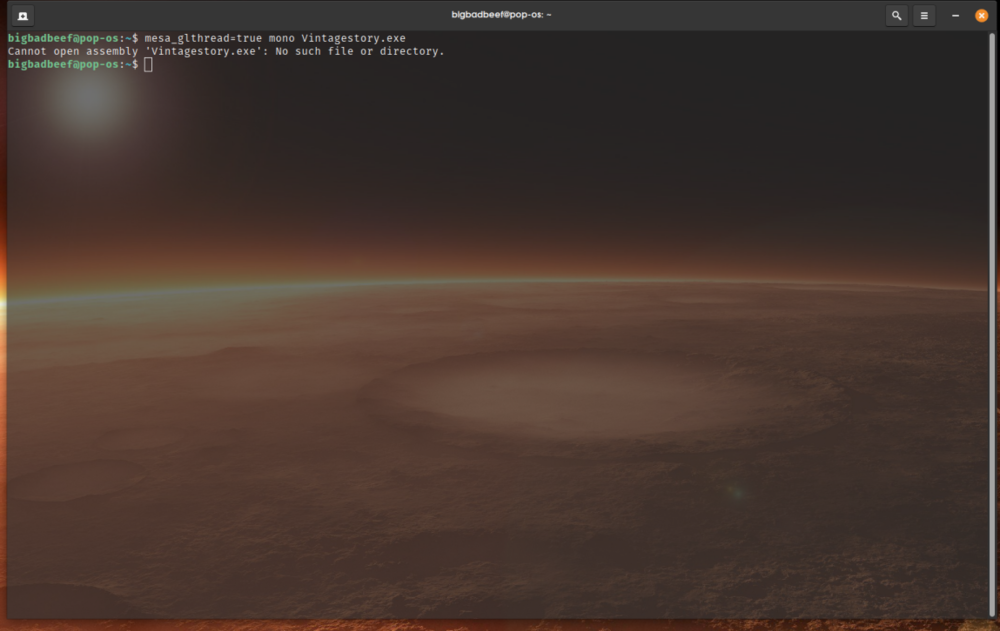

-
suggestion Suggestion Flax farming alternative? Moths!
BigBadBeef replied to MothPrinceLucy's topic in Suggestions
You will see them buzzing over lakes during nights. Yellow dots flying around in clusters. -
suggestion Suggestion Flax farming alternative? Moths!
BigBadBeef replied to MothPrinceLucy's topic in Suggestions
Not at all. BTW did you notice that there are fireflies in the game? -
suggestion Suggestion Flax farming alternative? Moths!
BigBadBeef replied to MothPrinceLucy's topic in Suggestions
The game is listed as unfinished. A lot is on the table at present. -
CHRONICLES OF JONAS, ENTRY 1 Over the last few nights, I stood watch upon the windmill. It is peaceful for most nights, yet of two nights ago. Jedediah, our towns brewmaster has been doing much sampling of his own wares of late. I have seen the fool wobble through the streets, jug in hand, and naked to the butt. To make the scene all the more comical, It was raining the other days, so mud and filth are abound. He took the appearance of a swine on its hind legs, wobbling furiously, singing and pretending to dance. He woke people in the middle of the night, they threw rotten food at him yet he did not seem to mind. The fool even wandered close to the cliff of our village. One of these days he is going to fall down and die painfully. But there is something that did catch my eye right at the end of my watch, as the sun began to rise. I could have sworn the distant horizon below the sun took a brownish hue, almost the color of rusty nails. Barely to be seen by the naked eye. Regardless, I went to the tavern to catch breakfast before I went to bed and told the patron about this strange occurrence. They claimed that tired eyes see many things that arenth' there. Nodding in agreement, I ate, drank my ale and ended my watch with a most welcome sight upon my bed, waking upon the day, pen in hand, ready to put my words into writing.
- 1 reply
-
- 1
-

-
Alrighty then, I'll continue this on the discord!
-
Ready to join a server, but there is a catch...
BigBadBeef replied to BigBadBeef's topic in Multiplayer
Alright, you sold me, maybe I could take it easy for a while, I am just worried that I might get spoiled and then suddenly take a crack into my singleplayer world and end up getting owned by a rabbit or something like that. I can led you my "expertise" if you will have it. I may be just a cut above intermediate in vintage story, but I am pretty nifty around block in games in general, I have considerable experience in minecraft and space engineers. Did you start your server yet? -
Don't cast ingots until you've had multiples of 20 nuggets in the crucible. To fill a mold, you need multiples of 100 units of ore per ingot or tool mold (The tooltip will tell you for the rest, both cruicible and molds). If you happened to have a surplus that you need to pour in and it doesn't fill the mold, let it cool and then use the chisel to tear it apart into nuggets for it to be recombined and melted again later. I recommend you go supervise your friend, this is a bit of a step up from knocking rocks together, it may be a bit too much for him. If he doesn't get it, you can still knock some sense into his stone age skull by smacking him in the face with a shovel... in-game of course!
-
*SIGH* I'd love to join, now is not a problem, but when my sick leave ends, I would be able to do it only the weekends. Food spoilage would be a massive issue for me.
-
Ready to join a server, but there is a catch...
BigBadBeef replied to BigBadBeef's topic in Multiplayer
That one seems a bit too cozy for me. And the reason behind classes is that encourages players interaction and trade. Do you want to take that away from people? -
Hey guys, I just got myself on sick leave from work due to a nasty injury, which I means I have plenty of time on my hands. I am not exactly a beginner, since I have around 130 hours of singleplayer on my hands, but now I figured, sure, I'd go for it. BUT THERE IS A CATCH! Eventually, my sick leave will end. That means I will probably have only the weekends available to play. I would like to join a server where the community would be okay with that should it come to pass. But that has rather some implications. One of these is food decay. I would not be able to grow my own food, therefore I would need to be able to aquire it through alternate means. Either through hunting, foraging (which is only seasonal) and through trading for it with my services. This be not be an issue however, if the community has taken settlement in a zone where one could leave their crops sitting mature indefinitely. However to make it worth your while, I would be disposed towards choosing a class that may be disliked but needed by the community as a whole (I suspect tailor is the case or maybe another class for some modded server). Any takers? Btw I play on Linux...
-
Lovely, interesting or just plain bizarre landscapes
BigBadBeef replied to Maelstrom's topic in Videos, Art or Screenshots
I'll take your corny mountains, match them and then set the scenery to spring. Then I'll raise your bet with a pretty amazing sunset with god rays and a plateau.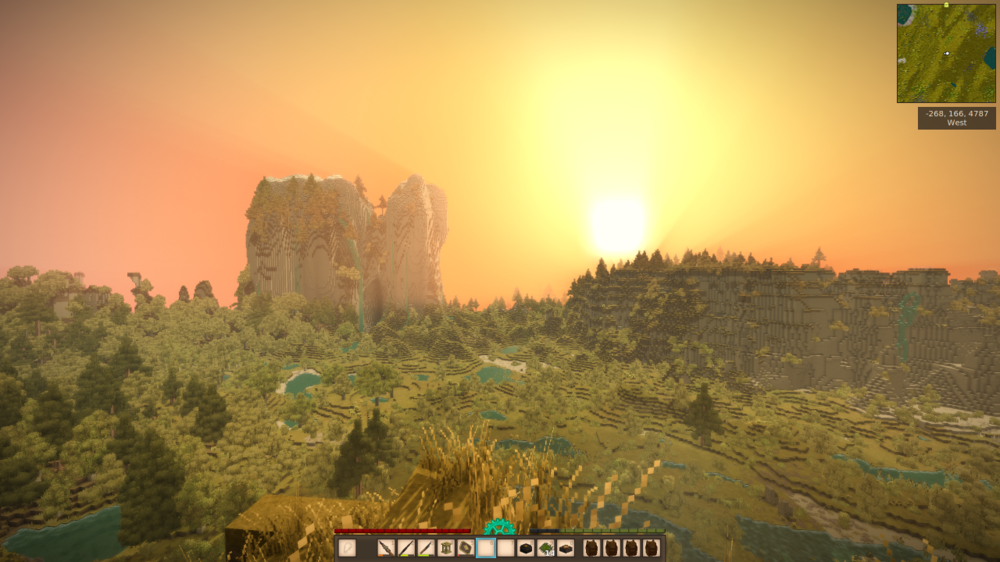
-
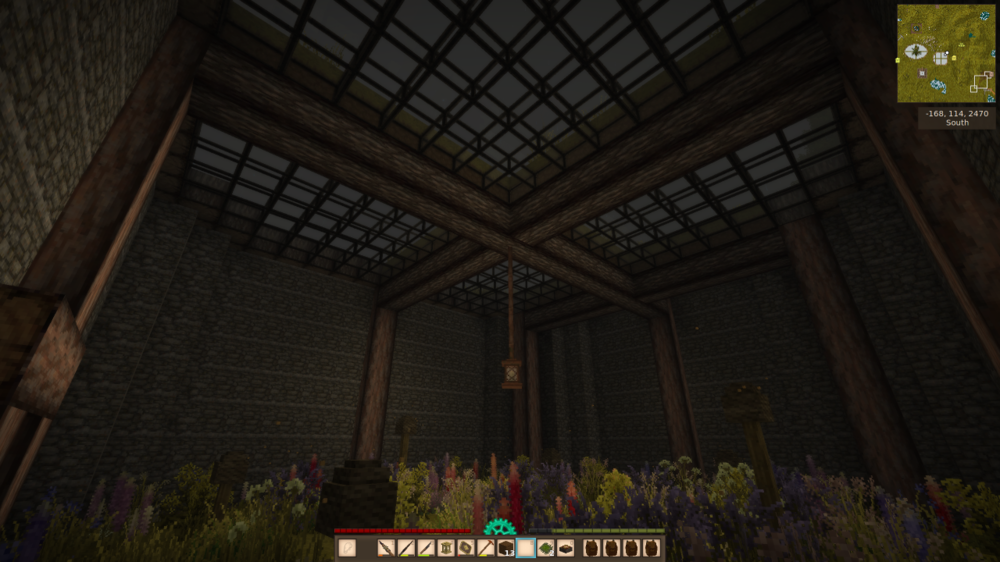
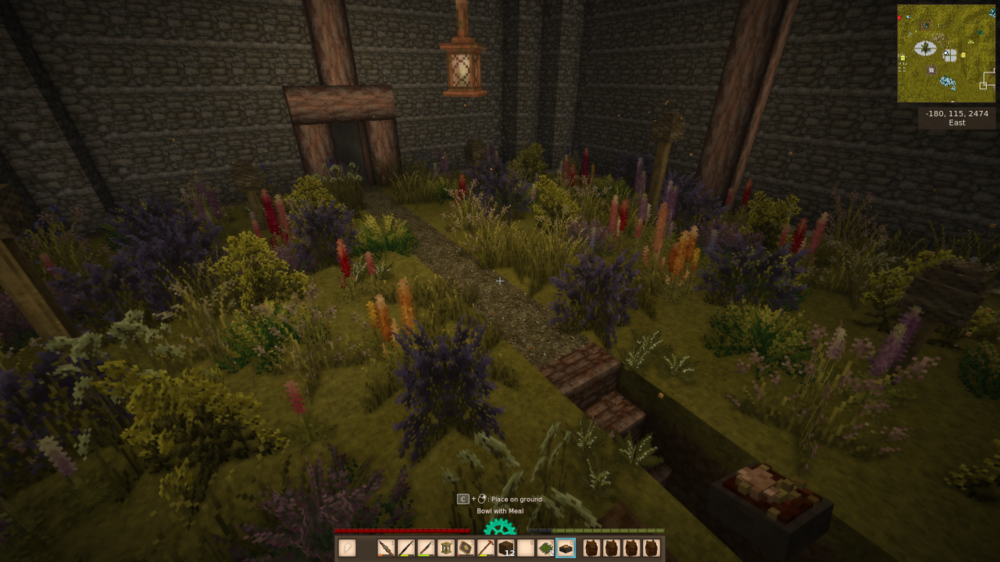
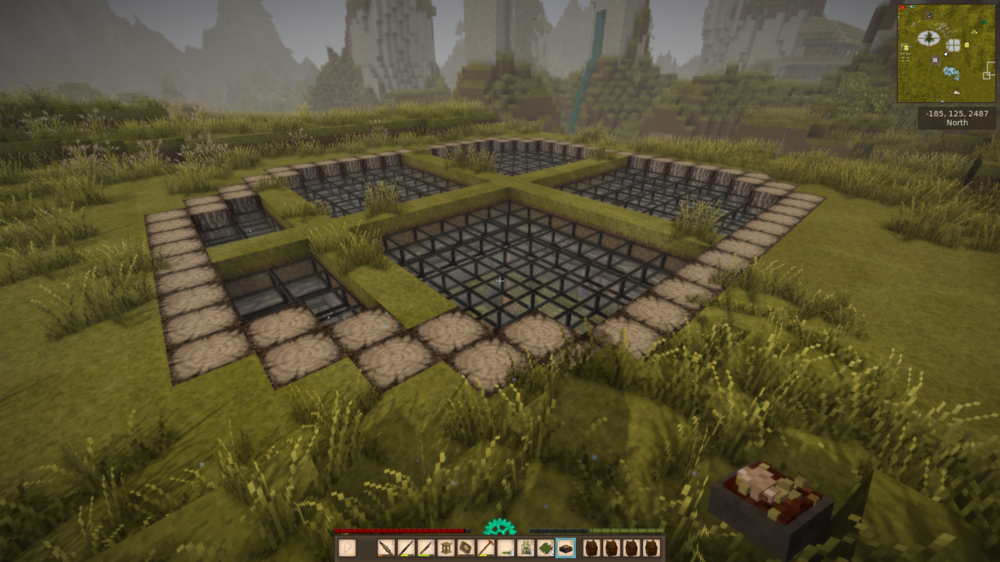
After 110 hours of playing, I found bees for the first time. To commemorate this occasion, I build a glorious underground apiary to house them. Underground, because its pi***ing down almost all the time, and all that rain is good for crops, but bad for everything else. Even built a "mini" underground tree house for rare trees if you look at my mini map.
-
Well, I'd start by using an actual mouse instead of a hamster. But other than that, mods are under the purview of the author. Any concerns and failures should be taken up with him personally, not this community. Considering the fact that you are familiar with the very concept of modding in any way, shape or form, I would expect you would know this by now. And if the game crashes, then it IS a critical error. No other choice than to ditch the mod, especially if the author is no longer active in keeping it up to date.
-
A glass of milk along with it for projectile diarrhea?
-
So for Linux, vintage story runs on Mono. And Mono also runs on an ARM cpu. So then technically speaking, you could run Vintage Story on something like a raspberry Pi? I don't happen to have one, but has anyone tried?
-
What an absolute madlad! We need this in vintage story! <iframe width="560" height="315" src="https://www.youtube.com/embed/RnvtXikwrIU" title="YouTube video player" frameborder="0" allow="accelerometer; autoplay; clipboard-write; encrypted-media; gyroscope; picture-in-picture" allowfullscreen></iframe> (Why isn't the code working?) Nevermind: Crossdraft Kiln by "Primitive Technology"
- 1 reply
-
- 2
-

-

-
You don't understand... its spinning but its acting like its not connected to anything, no milling, no resources being lifted by archimedes screw, nothing. As soon as I touch it it reverts to manual spinning unless I restart the game. If I do that, and the clutch is connected, then it works.
-
No, I just figured out that using the clutch on a quern is broken. Every time I use it I have to restart the game because it loses the connection to the axle. And here I was, thinking I could get away with just having one rotor on the mill. P.S.: Same with the archimedes screw.
-
Alright, I've been doing some tinkering, and restored the 1:1 gear ratio - same problem with the quern. The problem isn't power because it is not stalling when I run it. Also, the T-shape is working correctly, as the goods are indeed going into the screw below, they aren't just going up the screw. I will try your suggestion and see what happens. P.S.: What'ya know, the damn thing works now. It seemed to have been bugged in a way that it stalled in spite of showing the spinning animation. What is unusual is that before there wasn't any problem with the T-shape as the stuff went into the screw, it just wasn't pulled out properly, but now there is a problem. I will rework the system to compensate and get back to you.
-
Nah it regrows, just very slowly. By the way, if your scythe is set to "trim" and you cut already trimmed grass, it will completely remove it. That way you can get 2 cut grass per per tile. Grass also won't grow in the winter.
-
Finally somebody who understands.
-
Bears have gotten me into trouble on more than one occasion. I seem to have anger management issues in vintage story, and the trouble I get into has usually not directly to do with them. You see, I am appaled everytime I encounter a predator. The insolence of them appearing in my fov drives me into a reckless murderous rage where after killing that particular animal, I go on a mad dash to find more animals to kill with complete abandon, and usually end up getting killed by the environment more than anything else. Hunger, cold, bottomless pits, you name it, I've died to it, all because I happened to see a bear sh*** in the woods and have gone out to kill anything that moves for the outrage! You could say I'm unBEARable to be around when angry!
-
That doesn't do it, it just toggles between first and third person.
-
Ooooh, I must have overlooked this particular detail in the guide. Alright now, thanks for that, 1 down, 3 to go.