


Brady_The
-
Posts
750 -
Joined
-
Last visited
-
Days Won
7
Content Type
Profiles
Forums
Blogs
News
Store
Everything posted by Brady_The
-
 You are right, that's exactly what is happening. (Note: Technically this only happens because the line above is a catch-all wildcard ("*").) You can solve this issues by using the move operation.
 -
A couple of mods already go into that direction, some smaller, some larger. Off the top of my head, so the list is most likely not complete by any means: https://mods.vintagestory.at/steamandpower https://mods.vintagestory.at/electricalprogressivecore https://mods.vintagestory.at/vintageengineering https://mods.vintagestory.at/astriaporta https://mods.vintagestory.at/viescraftmachines https://mods.vintagestory.at/jonasboat https://mods.vintagestory.at/translocatorengineeringredux https://mods.vintagestory.at/show/mod/22557 https://mods.vintagestory.at/translocatorlocator https://mods.vintagestory.at/craftablecompanion https://mods.vintagestory.at/repairablelocust
-
How do the Map.db files work?
Brady_The replied to CoZzaBoZza's topic in [Legacy] Mods & Mod Development
This is way over my head so I can't be of any help, but you could look how https://mods.vintagestory.at/vsdbtopng solves this. -
That sounds very odd. Without any more information we cannot help you. It would be easiest if you'd simply attach your zipped mod to comment. It's also never a bad idea to look into the log files. Particularly client-main and server-main. They are found in %AppData%\VintagestoryData\Logs.
-
There's https://mods.vintagestory.at/heatretention (doesn't include sound functionality), but it's currently only available till version 1.19. 1.20 support hasn't been added yet.
-
It's a bit bizarre. In the past I had it happen fairly regularly, but now I couldn't have recreated it even if my life would have depended on it.
-
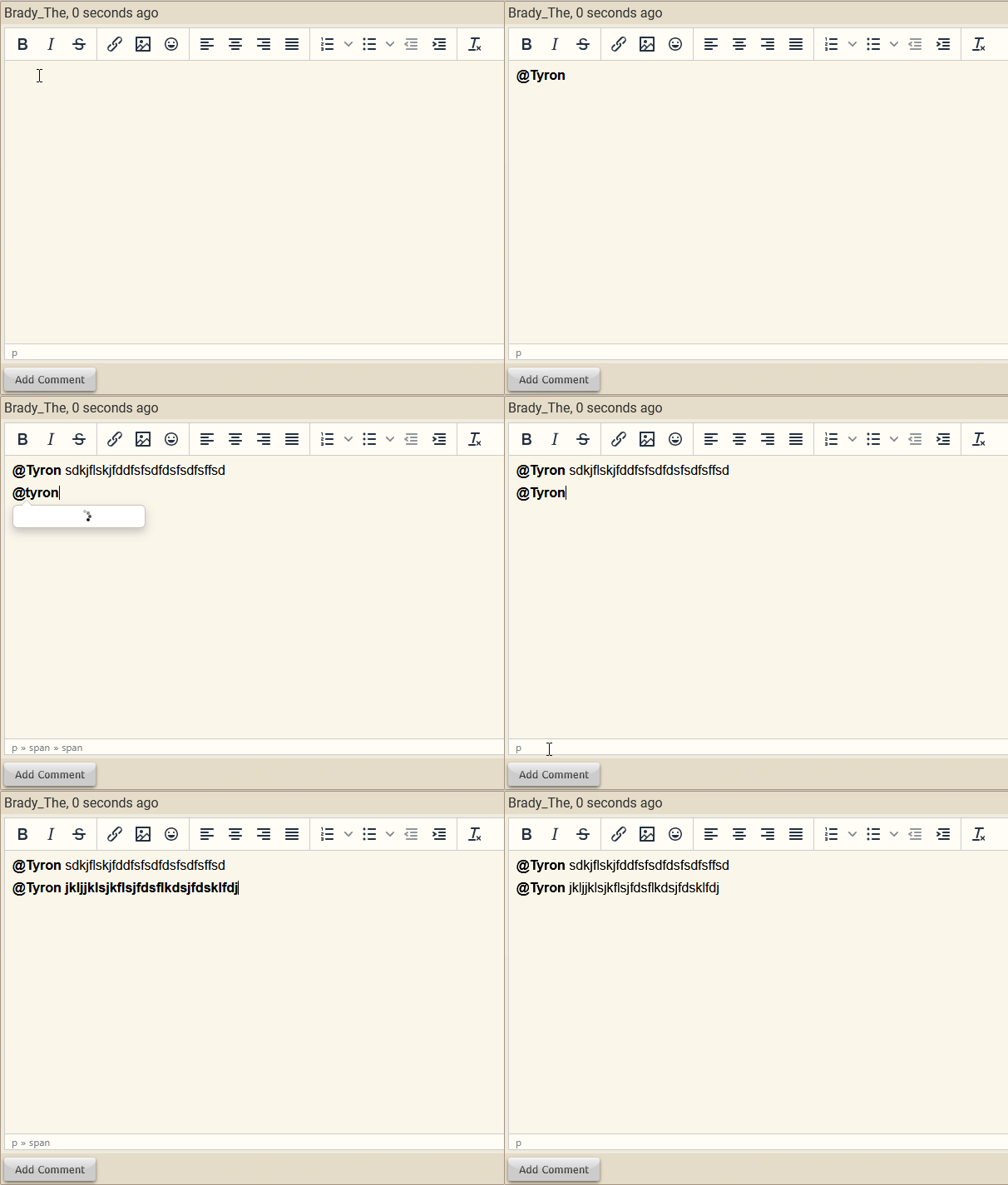
How tagging works is still a mystery to me. Generally it just works when I typed "@", parts of the user name, select the name with my mouse and press "space", followed by my message. If for some reason the tagging doesn't close, you can press the "Clear formatting" button in the tool bar which should close the tag.
-
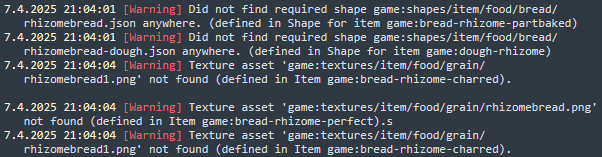
Don't worry about it. I felt my brain stop working when writing that explanation, so it wasn't as good as it could have been. Compare your with my fixed version. It's a very good idea to have the log files opened while working on and testing a mod. They are a good source for finding out if something is wrong. Particularly client-main and server-main are very informative. They can be found in "%AppData%\VintagestoryData\Logs". Note: Of course the textures I added are only placeholders. rhizometest.zip
-
Your folder structure is messed up. "game" is used for all Vanilla folders, you don't need to specify directories in subfolders. Texture do not show up because none are included in the version of the mod you attached to your post. Btw, it's better practice to add array entries to the end. This way you can ensure compatibility with mods which edit the same files as your mod. ModMaker is a bit flawed in this aspect. You do that by replacing the number 7 in your case with "-" (/variantgroups/0/states/-).
-
Custom Recipes Overriding Vanilla Recipes
Brady_The replied to jun1per's topic in [Legacy] Mods & Mod Development
It's a very handy feature for when you actually want to overwrite assets. This works with everything, not just recipes. Also, as long as you keep to the overall file structure (grid recipes go in recipes\grid, etc) you can add as many subfolder as you want. You could, for example, create the structure "sevenindexscrapmod\assets\game\recipes\grid\scrapping", put the chest.json recipe into that folder and be completely fine. If you wanted to differentiate between materials you could create scrapping subfolders called "wood", "metal", etc. too. -
Several item-based mods suddenly not working
Brady_The replied to Fimblebee's topic in [Legacy] Mods & Mod Development
Hah, there we go! Mod paths are indeed hardset in clientsettings.json and have to be manually adjusted when the path changes. -
Custom Recipes Overriding Vanilla Recipes
Brady_The replied to jun1per's topic in [Legacy] Mods & Mod Development
Overrides should only happen if you put the new recipe at the exact same path in your mod structure under the game domain as it can be found in Vanilla and give it the same name. In case of the chest that would be "sevenindexscrapmod\assets\game\recipes\grid\chest.json". It seems, though, that you are working from within your own mod domain. Because you are not prefacing your "scrapplank" item with your mod domain. "chest-east" are missing their game domains, though. -
Several item-based mods suddenly not working
Brady_The replied to Fimblebee's topic in [Legacy] Mods & Mod Development
client- and server-main.logs would be interesting. -
There's not. Out of curiosity, what's preventing you from dragging and dropping files, if you don't mind me asking? You might want to pop in the dedicated ModDB discord server channel and ping @rennorb, he is the one in charge of the db and fairly receptive of feedback.
-
Addendum: Apparently the antlers drop now. https://www.youtube.com/watch?v=TD9jXMhLh9s&t=71s Now I wonder if they always did and people always missed them or if that was a fix in one of the latter versions.
-
That's how it currently works.
-
They will drop indeed, but if nothing has changed in the last couple of updates sadly they'll just disappear. I don't know why. Maybe to keep the rarity of the large antlers higher. That's just speculation, though. It's probably a code thing, because generally you obtain antlers by killing the animal.
-
Are you on the VS discord server? Development on the ModDB has recently been picked up and this feedback might be appreciated. If you are not, would you mind me sharing this thread?
-
STRANGE multiplayer issue. Crashout on login, affects ONE person.
Brady_The replied to SaltyRat's topic in Discussion
Involved Harmony IDs: SomeUnknownMod is unfortunately definitely not much help. If that log section is correct, though, the mod causing the crash must be a code mod, otherwise Harmony shouldn't be involved. I am not the best stacktrace reader, but the first offender in line 1158 contains an if-statement regarding a "wearableTexturePrefixCode", but nothing out of that mod list stands out to me. You definitely would know more about those mods. There's also a reference to the size of the texture atlas, which technically shouldn't be a problem anymore in 1.20 but people still report issues. Using https://mods.vintagestory.at/textureatlasresized might help. -
Involved Harmony IDs: CombatOverhaul, CombatOverhaulAuto It appears that the server is running a somewhat outdated version of Combat Overhaul. Updating to v0.1.24 might already do the trick. If not, the server owner could try if updating to a more recent version will help. The later mod versions are tagged with higher game versions, but generally patch game version updates (vx.xx.3) don't change anything drastic. Still, backups are always a good idea before doing to some testing.
-
You can indeed: Also read the comments. Some contain solutions that might even be easier.
-
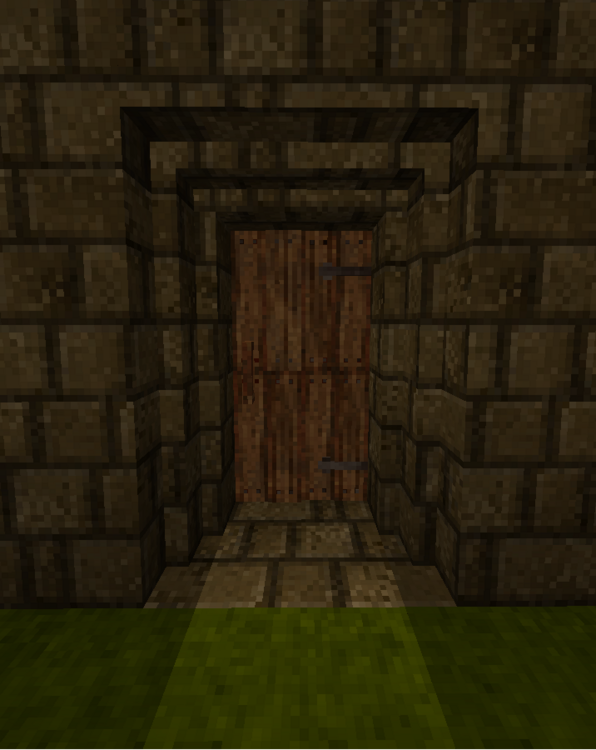
That's definitely not StepUp related. I accidentally created a block-free door by being a bit fancy. I was wondering why I suddenly wasn't stopped anymore. That said, I'd absolutely love this mechanic. It'd give the ridable elk another edge and it would be the perfect opportunity for functional gear (snow shoes).
-
-
If the game doesn't load at all, this error message is just the tip of a (probably very large) iceberg. Post server-main and client-main logs here. If I had to venture a guess, I'd say that you updated the game version to the newest one, but either forgot to update some mods or weren't able to.
-
Need help with simple cube block
Brady_The replied to Lariien's topic in [Legacy] Mods & Mod Development
Couple of things. I assume you added this mossblock under your own mod domain (morebuildingblocks?). If that is the case, the shape doesn't load because the game is looking for "cube.json" in the folders "block/basic" in your mod, which presumably doesn't exist. If you want to use Vanilla assets, you have to tell the game to look in the right place. You do that, by prefixing the domain "game:" (this works for any folder in the games asset folder (creative, game, survival)) in front of any path that links to a default file. I am not sure about `"all": { "base": "morebuildingblocks:block/mossblock" },`. If that is your mod id and if that mossblock texture exists in "textures/block" within your mod folder structure, it would be okay, but if it doesn't and you would rather use the games default texture, you have to replace this domain with "game" as well.


